
T10M Pro+
Vortex T10M Pro+ планшеттин колдонуучу нускамасы
Model: T10M Pro+
1. Киришүү
Thank you for choosing the Vortex T10M Pro+ Tablet. This manual will guide you through the features and functions of your new device, ensuring a smooth and enjoyable user experience. Please read this manual carefully before using your tablet.
Кутуда эмне бар
Upon unboxing your Vortex T10M Pro+ Tablet, please verify that all the following items are present:
- Vortex T10M Pro+ Tablet
- Заряддагыч
- Screen Protector
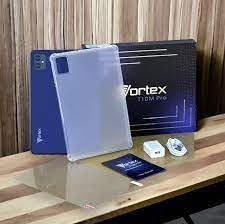
Image: Contents of the Vortex T10M Pro+ Tablet box. This includes the tablet, a clear protective case, the power adapter, and a screen protector, all neatly arranged on a wooden surface.
2. Продукт бүтүп калдыview
Familiarize yourself with the physical components and key features of your Vortex T10M Pro+ Tablet.
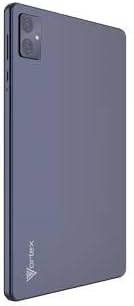
Сүрөт: Арткы view of the Vortex T10M Pro+ Tablet. The tablet has a sleek, dark finish with the 'Vortex' logo subtly placed at the bottom. The camera module is visible in the upper left corner.

Сүрөт: деталдуу view of the back of the Vortex T10M Pro+ Tablet, highlighting its specifications. Printed details include '10.1-inch Brilliant Display', '5MP Front Camera', '8MP Rear Camera', 'MTK6766 Processor', 'Quad-Core, 4GB+64GB', '5000mAh Mega Battery', and 'Android 12'.
3. Орнотуу
3.1. Аппаратты заряддоо
Before first use, fully charge your tablet. Connect the provided charger to the tablet's charging port and plug it into a power outlet. The battery indicator on the screen will show charging progress.
3.2. SIM/MicroSD картасын салуу
The Vortex T10M Pro+ supports 4G LTE connectivity and expandable storage. To insert a SIM card (for mobile data) or a microSD card (for additional storage):
- Планшеттин капталындагы SIM/microSD карта салгычын табыңыз.
- Салгычты ачуу үчүн берилген SIM чыгаруучу куралды колдонуңуз.
- Carefully place the SIM card(s) and/or microSD card into the designated slots, ensuring correct orientation.
- Табакты акырын кайра планшеттин ичине чыкылдатмайынча түртүңүз.
3.3. Баштапкы күйгүзүү
Press and hold the Power button located on the side of the tablet until the Vortex logo appears. Follow the on-screen prompts to complete the initial setup, including language selection, Wi-Fi connection, and Google account setup.
4. Иштөө нускамалары
4.1. Негизги навигация
Планшетиңиз Android 13.0 системасында иштейт. Навигация үчүн тийүү жаңсоолорун колдонуңуз:
- таптаңыз: Бир нерсени тандаңыз же колдонмону ачыңыз.
- Серпүү: Экрандарды же тизмелерди сыдырыңыз.
- Чымчып чоңойтуу: Сүрөттөрдү чоңойтуу же кичирейтүү жана web барактар.
- Узун басуу: Контексттик менюларга кириңиз же сүрөтчөлөрдү жылдырыңыз.
4.2. Wi-Fiга туташуу
Wi-Fi тармагына туташуу үчүн:
- барыңыз Орнотуулар > Тармак жана интернет > Интернет.
- Wi-Fi күйгүзүңүз.
- Тизмеден каалаган тармакты тандап, суралса сырсөздү киргизиңиз.
4.3. Using Mobile Data (4G LTE)
If you have inserted a valid SIM card with an active data plan:
- барыңыз Орнотуулар > Тармак жана интернет > SIM'тер.
- Ensure Mobile data is enabled for your SIM.
4.4. Камеранын иштеши
The tablet features an 8MP rear camera and a 5MP front camera.
- Камера колдонмосун ачыңыз.
- Сүрөткө тартуу үчүн жапкычты басыңыз.
- Камераны которуштуруу сүрөтчөсүн колдонуп, алдыңкы жана арткы камералардын ортосунда которуштуруу.
4.5. Сактоону башкаруу
Your tablet comes with 64GB of internal storage. You can expand this using a microSD card up to 128GB. To view сактагычты пайдалануу, өтүңүз Орнотуулар > Сактагыч.
5. Техникалык тейлөө
5.1. Тазалоо
Планшеттин экранын жана корпусун тазалоо үчүн жумшак, түксүз чүпүрөктү колдонуңуз. Катуу химиялык заттарды же абразивдүү материалдарды колдонуудан алыс болуңуз.
5.2. Программалык камсыздоону жаңыртуу
Планшетиңизде эң акыркы функциялар жана коопсуздук жаңыртуулары бар экенин текшерүү үчүн программалык камсыздоонун жаңыртууларын мезгил-мезгили менен текшерип туруңуз. Орнотуулар > Система > Системаны жаңыртуу.
5.3. Батареяга кам көрүү
Батареянын иштөө мөөнөтүн узартуу үчүн:
- Ашыкча температурадан сактаныңыз.
- Батареянын бат-баттан толук зарядсызданышына жол бербеңиз.
- Батарея толгондон кийин заряддагычты сууруп алыңыз.
6. Кыйынчылыктарды
Бул бөлүмдө планшетиңиз менен кездешиши мүмкүн болгон кеңири таралган көйгөйлөр каралат.
| Маселе | Мүмкүн чечим |
|---|---|
| Планшет күйбөйт | Батарея заряддалганын текшериңиз. Өчүрүп күйгүзүүгө мажбурлоо үчүн Кубат баскычын жок дегенде 10-15 секунд басып, кармап туруңуз. |
| Wi-Fi туташуу маселелери | Планшетти жана Wi-Fi роутериңизди өчүрүп-күйгүзүңүз. Жөндөөлөрдөн тармакты унутуп, кайра туташыңыз. |
| Колдонмолор жай же бузулуп жатат | Close background apps. Clear app cache (Settings > Apps > [App Name] > Storage > Clear cache). Restart the tablet. |
| Storage full message | Керексиз жок кылуу files or apps. Move media to a microSD card. |
7. Техникалык шарттар
Detailed technical specifications for the Vortex T10M Pro+ Tablet.
| Өзгөчөлүк | Спецификация |
|---|---|
| Модель аты | T10M Pro+ Tablet (Unlocked) Blue 10.1" 64GB 4GB GSM 4G LTE + Wifi 8MP |
| Дисплей өлчөмү | 10.1 дюйм |
| Max Screen Resolution | 1280 x 800 пиксел |
| Жаңыртуу ылдамдыгы | 120 Гц |
| Процессор | MediaTek, 2 ГГц |
| RAM | 4 ГБ |
| Ички сактагыч | 64 ГБ |
| Кеңейтүүчү сактагыч | MicroSD (128 ГБ чейин) |
| Операция системасы | Android 13.0 |
| Арткы камера | 8 депутат |
| Алдыңкы камера | 5 депутат |
| Байланыш | 4G LTE, Wi-Fi, Bluetooth, GPS |
| Батарея түрү | Литий-ион |
| Батареянын орточо иштөө мөөнөтү | 18 саат |
| Продукциянын өлчөмдөрү | 10.1 x 5 x 3 дюйм |
| Түс | Кара |
8. Кепилдик маалыматы
This product is covered by a manufacturer's warranty. Please refer to the warranty card included with your purchase or visit the manufacturer's official website for detailed terms and conditions regarding warranty coverage, duration, and claims process.
9. Колдоо
For further assistance, technical support, or service inquiries, please contact the manufacturer's customer support. Contact information can typically be found on the product packaging, the manufacturer's webсайтына же кепилдик документтерине.
Ask a question about this manual
Ask about setup, troubleshooting, compatibility, parts, safety, or missing instructions. Manuals+ will review the question and use this page’s manual context to help answer it.