
Retevis HD2
Retevis Ailunce HD2 DMR Radio User Manual
Модели: HD2
1. Киришүү
The Retevis Ailunce HD2 is a versatile dual-band handheld ham radio designed for reliable communication in various environments. It supports both digital (DMR Tier 1 & 2, MOTOTRBO compatible) and analog modes, offering a wide range of features including GPS, Bluetooth connectivity, IP67 waterproofing, and advanced security with AES256 encryption. This manual provides essential information for setting up, operating, and maintaining your HD2 radio.
2. Коопсуздук маалыматы
Always observe the following safety precautions to reduce the risk of fire, electric shock, or personal injury:
- Do not disassemble or modify the radio. Unauthorized modifications can void your warranty and may be dangerous.
- Keep the radio away from extreme temperatures, direct sunlight, and moisture.
- Use only Retevis-approved accessories and chargers.
- Do not operate the radio while driving or performing tasks that require full attention.
- Avoid prolonged exposure to the antenna when transmitting, as it may cause minor burns.
3. Пакеттин мазмуну
Пакетиңизде бардык буюмдар бар экенин текшериңиз:
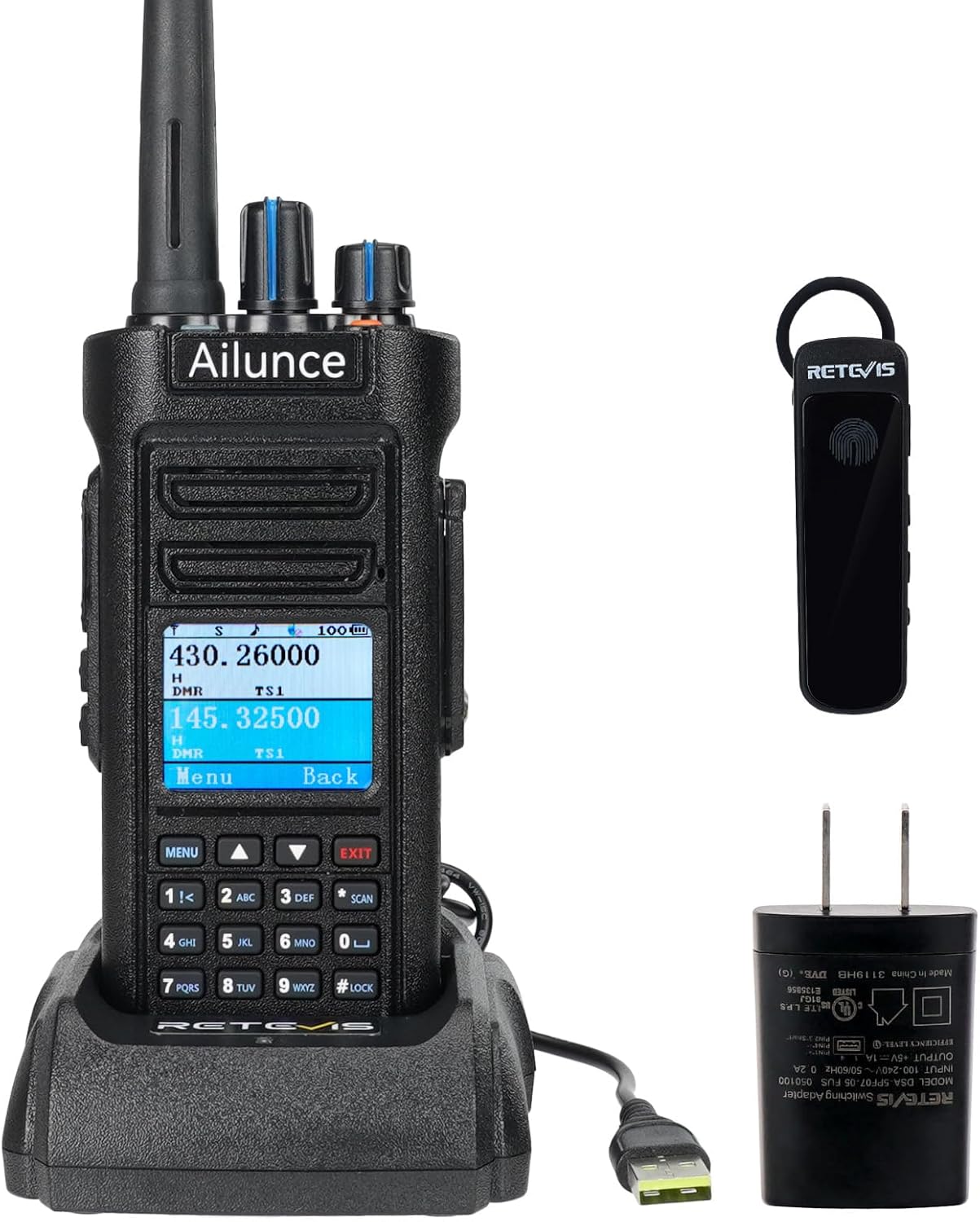
- Retevis Ailunce HD2 Radio Body
- USB Type-C кубаттоочу кабель
- Батарея
- Type-C Desktop Charger
- Антенна
- Колдонуучунун колдонмосу
- Belt Clip
- Sling
- Bluetooth наушник

4. Продукт бүтүп калдыview
Familiarize yourself with the main components of your Retevis Ailunce HD2 radio.

5. Орнотуу
5.1 Батареяны орнотуу жана заряддоо
The HD2 radio comes with a 3200mAh Li-ion battery. Ensure it is fully charged before first use.
- Батареяны радионун арткы жагындагы батарея бөлүмү менен тегиздеп, ал бекем чыкылдаган үн чыкканга чейин ордуна жылдырыңыз.
- Connect the USB Type-C charging cable to the radio or place the radio in the Type-C desktop charger.
- Connect the charger to a power source. The charging indicator will show the charging status. A full charge typically takes about 8 hours.

5.2 Антеннаны орнотуу
Антеннаны саат жебеси боюнча радионун үстүнкү жагындагы туташтыргычка манжаңыз менен бекем кысылганча бурап коюңуз. Ашыкча бекемдебеңиз.

5.3 Күйгүзүү/өчүрүү
To power on the radio, rotate the power/volume knob clockwise until you hear a click. To power off, rotate it counter-clockwise until it clicks.
5.4 Initial Configuration (VFO Mode and CPS)
The Ailunce HD2 supports VFO (Variable Frequency Oscillator) mode for direct frequency input and CPS (Customer Programming Software) for advanced configuration via computer.
This video demonstrates how to adjust frequencies on the Retevis Ailunce HD2 radio.
This video highlights the VFO mode and SUB-PTT function of the Retevis Ailunce HD2 radio, showing its solid build and ease of use.
6. Иштөө нускамалары
6.1 Негизги операция
The HD2 features a Push-to-Talk (PTT) button on the side for transmitting. Adjust volume using the top rotary knob. Channels can be selected using the keypad or the selector knob.
This video demonstrates the wireless function of the Retevis Ailunce HD2 two-way radio.
6.2 DMR and Analog Modes
The radio supports both digital and analog communication. You can switch between modes as needed for compatibility with different radio systems.
This video provides an introduction to the various functions of the Retevis Ailunce HD2 DMR Radio.
6.3 GPS функциясы
The integrated GPS function allows you to locate your real-time position and share it with others, crucial for outdoor activities or emergency situations.

6.4 Bluetooth байланышы
Connect a wireless headset for hands-free communication, ideal for amateur radio events or when mobility is required.

This video demonstrates how to connect an EZTalk 3A to the HD2 via Bluetooth.
6.5 NOAA аба ырайы жөнүндө эскертүү
Stay informed about severe weather conditions by tuning into NOAA weather channels. The radio can provide early warnings for hurricanes, typhoons, heavy rains, and other disasters.
This video showcases the alarm function and 11 NOAA channels available on the Retevis Ailunce HD2 radio.
6.6 Шашылыш сигнал
Press the orange alarm button on the top of the radio to activate an SOS signal light and alarm, quickly notifying rescue teams in emergencies.
6.7 Unmatched Security with AES256
The HD2 offers military-grade AES256 encryption to safeguard your communications, ensuring privacy and protection from eavesdropping, essential for professional and sensitive environments.
6.8 Каналды башкаруу
The upgraded HD2 supports 3000 channels and 500,000 contacts, facilitating extensive community communication. Features like ID edit, call records, and text messages are also supported.
6.9 FM радиосу
The HD2 includes an FM radio function for listening to broadcast stations.
This video demonstrates the FM radio functionality of the Retevis Ailunce HD2.
7. Техникалык тейлөө
7.1 Тазалоо
Wipe the radio body with a soft, damp cloth. Do not use harsh chemicals or abrasive cleaners. Ensure all port covers are securely closed to maintain waterproofing.
7.2 Батареяга кам көрүү
To maximize battery life, avoid fully discharging the battery frequently. Store the radio and battery in a cool, dry place when not in use for extended periods.
7.3 Waterproof Care (IP67)
The HD2 is IP67 rated, meaning it is protected from dust and can withstand immersion in 1 meter of water for up to 30 minutes. Always ensure the battery cover and all port seals are properly closed before exposing the radio to water or dusty environments. After exposure to water, dry the radio thoroughly before charging or opening any compartments.

8. Кыйынчылыктарды
| Көйгөй | Мүмкүн себеп | Чечим |
|---|---|---|
| Радио күйбөйт. | Батарея аз же туура орнотулган эмес. | Charge the battery fully. Ensure the battery is securely installed. |
| Динамиктен аудио жок. | Volume too low; squelch level too high; speaker damaged. | Increase volume. Adjust squelch level. If problem persists, contact support. |
| Өткөрүп же кабыл албайт. | Incorrect frequency/channel; antenna not connected; radio in wrong mode (digital/analog). | Verify frequency and channel settings. Ensure antenna is securely attached. Check and switch modes as needed. |
| Programming cable not working. | Driver issues; defective cable. | Ensure correct drivers are installed for your operating system. Try a different USB port or computer. Contact Retevis support for a replacement cable if necessary. |
| Bluetooth earpiece not connecting. | Earpiece not in pairing mode; radio Bluetooth off. | Put earpiece in pairing mode. Enable Bluetooth on the radio and attempt to re-pair. |
9. Техникалык шарттар
| Өзгөчөлүк | Спецификация |
|---|---|
| Модель номери | HD2 |
| Элемент Салмагы | 12.9 унция |
| Продукциянын өлчөмдөрү | 2.56 x 5.91 x 1.38 дюйм |
| Батареялар | 1 C батарейкалар талап кылынат (кошулган) |
| Каналдардын саны | 3000 |
| Жыштык диапазону | VHF 136-174Mhz, UHF 400-520Mhz |
| Сүйлөшүү диапазону максималдуу | 4 миля |
| Сууга туруктуулук деңгээли | IP67 суу өткөрбөйт |
| Тtage | 7.4 вольт |
| Өзгөчөлүктөр | VFO Mode, Analog & Digital Mode, GPS, 3200mAh Battery & Type-C Charging |
10. Кепилдик жана колдоо
Retevis provides a 2-year warranty for the radio body and a 1-year warranty for accessories. You are eligible for a 30-day no-reason return period. Beyond the warranty period, maintenance services are still offered, with buyers responsible for associated costs.
For any inquiries or support, please contact Retevis customer service on Amazon. They aim to reply within 12 hours.
For more information and resources, visit the official Retevis Store: Retevis Store on Amazon
Ask a question about this manual
Ask about setup, troubleshooting, compatibility, parts, safety, or missing instructions. Manuals+ will review the question and use this page’s manual context to help answer it.