
1. Киришүү
Thank you for choosing the Sharp 50FQ5EG 50-inch QLED 4K Google TV. This manual provides essential information for setting up, operating, maintaining, and troubleshooting your new television. Please read it thoroughly before use and keep it for future reference.
Негизги өзгөчөлүктөрү:
- 50-inch QLED 4K Ultra HD Display with 144 Hz Refresh Rate
- Google TV Operating System with Google Assistant and Chromecast built-in
- Harman/Kardon Hybrid Speaker System with Dolby Atmos
- Dolby Vision IQ, HDR10, HLG Support
- Multiple Connectivity Options: 4 x HDMI 2.1, 2 x USB, Bluetooth 5.3, Wi-Fi, Ethernet
- Frameless Aluminum Design
Камтылган компоненттер:
- Sharp 50FQ5EG Television
- Стенд
- Алыстан башкаруу пульту (2 AAA батарейка талап кылынат, комплектте бар)
- Instruction Manual
- Электр кабели
2. Коопсуздук маалыматы
Коопсуз эксплуатацияны камсыз кылуу жана зыян келтирбөө үчүн төмөнкү коопсуздук чараларын сактаңыз:
- Электр камсыздоо: Connect the TV only to an AC 220V, 50Hz power outlet. Do not overload power outlets.
- Вентиляция: Телевизордун айланасында жетиштүү желдетүүнү камсыз кылыңыз. Вентиляция тешиктерин жаап албаңыз.
- Суюктук жана нымдуулук: Do not expose the TV to rain, moisture, or dripping/splashing liquids. Do not place objects filled with liquids on the TV.
- Жылуулук булактары: Телевизорду радиаторлор, жылуулук регистрлери, мештер же башка жылуулук чыгаруучу приборлор сыяктуу жылуулук булактарынан алыс кармаңыз.
- Тазалоо: Тазалоодон мурун телевизорду розеткадан сууруп алыңыз. Жумшак, кургак чүпүрөктү колдонуңуз. Суюк тазалагычтарды же аэрозоль тазалагычтарды колдонбоңуз.
- Тейлөө: Бул продуктту өзүңүз тейлөөгө аракет кылбаңыз. Бардык тейлөөнү квалификациялуу тейлөө кызматкерлерине тапшырыңыз.
- Балдар: Supervise children to ensure they do not play with the TV or remote control.
3. Орнотуу
3.1 Пакеттен чыгаруу
Carefully remove the TV and all accessories from the packaging. Retain the packaging materials for future transport or servicing.
3.2 Attaching the Pedestal Stand
If you are not wall-mounting the TV, attach the included pedestal stand:
- Экранга зыян келтирбөө үчүн телевизорду жумшак, тегиз бетке ылдый каратып коюңуз.
- Стенддин тетиктерин телевизордун астындагы монтаждоо тешиктери менен тууралаңыз.
- Берилген бурамалар менен стендди бекитиңиз. Телевизорду тик коюудан мурун стенд бекем орнотулганын текшериңиз.

Сүрөт: Жакын план view of the TV's pedestal stand and integrated Harman/Kardon speakers.
3.3 Дубалга орнотуу (кошумча)
The Sharp 50FQ5EG supports VESA wall mounts with a standard of 200 x 200 мм. Use M6 screws (not included) with a length appropriate for your wall mount bracket. Consult a professional for wall mounting to ensure safety and proper installation.
3.4 Перифериялык түзүлүштөрдү туташтыруу
Connect your external devices to the TV's ports. The TV features 4 HDMI 2.1 ports, 2 USB ports, Ethernet, and an optical audio output.
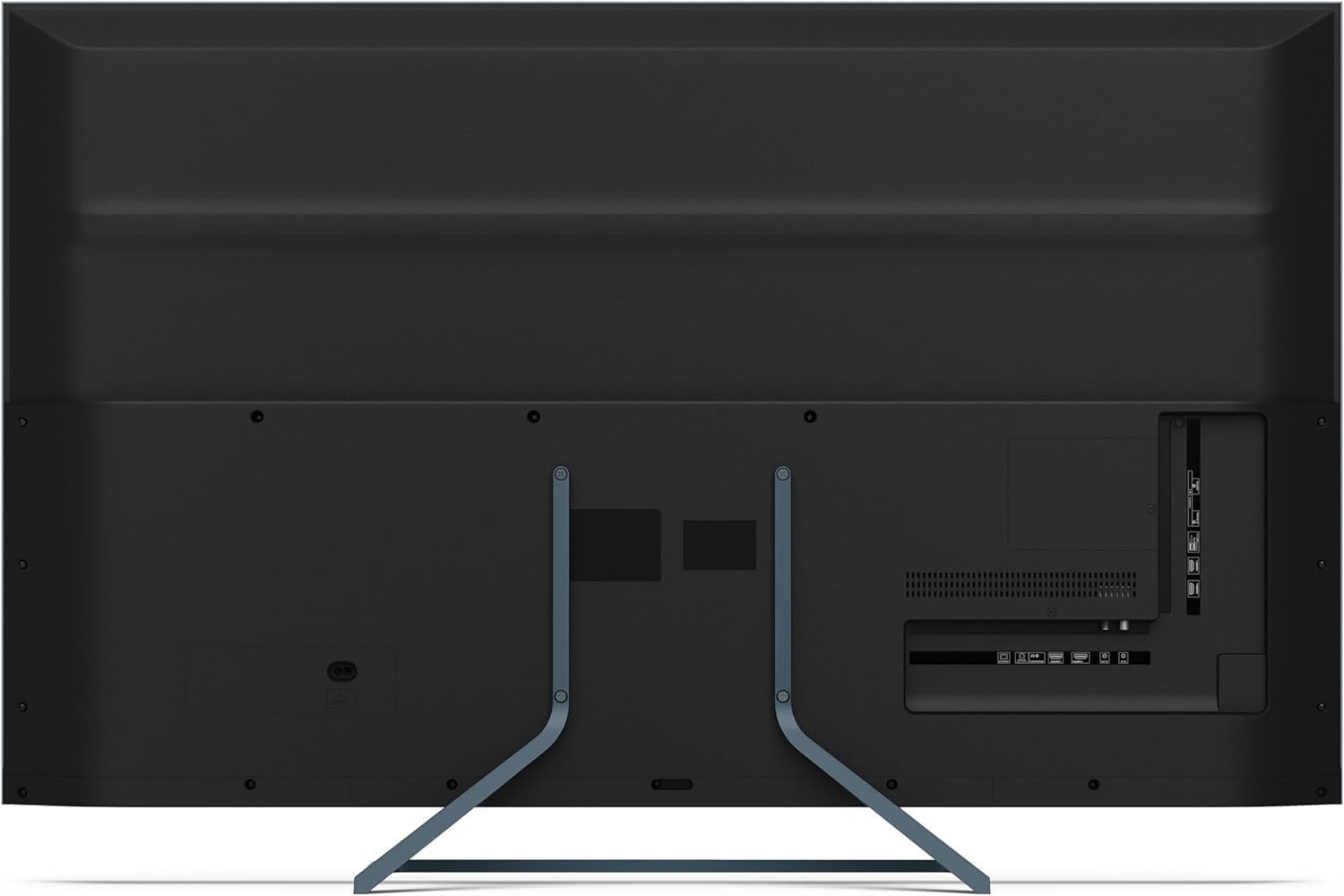
Сүрөт: Арткы view of the television displaying the arrangement of HDMI, USB, and other connectivity ports.
- HDMI: Connect Blu-ray players, game consoles, or set-top boxes. HDMI 2.1 supports eARC and ALLM for enhanced audio and gaming.
- USB: Медиа ойнотуу үчүн USB сактагыч түзмөктөрдү туташтырыңыз.
- Ethernet: Зымдуу интернет байланышы үчүн.
- Күч: Электр кабелин сыналгыга, андан кийин розеткага туташтырыңыз.
3.5 Баштапкы күйгүзүү жана Google TV орнотуу
- Телевизорду розеткага сайыңыз.
- Пульттун же сыналгыдагы кубат баскычын басыңыз.
- The TV will guide you through the initial setup process, including language selection, network connection (Wi-Fi or Ethernet), and Google account sign-in.
- Алыстан башкарууну жупташтыруу: During initial setup, you may need to pair the Bluetooth remote control. Follow the on-screen instructions, typically involving pressing specific buttons on the remote simultaneously.
4. Телевизорду иштетүү
4.1 Алыстан башкаруу
The included remote control uses Bluetooth for enhanced functionality. It allows navigation, voice control via Google Assistant, and quick access to various features.
4.2 Google TV интерфейси
The Google TV interface organizes your content from various streaming services and apps. Use the remote's directional pad to navigate through menus, select apps, and browse content.

Image: The television screen showing the Google TV home interface with recommended content and installed applications.
4.3 Сүрөт орнотуулары
Your Sharp 50FQ5EG TV features advanced picture technologies:
- QLED Q-Colour: Provides vibrant and accurate color reproduction.
- 4K Ultra HD: Так жана деталдуу сүрөттөрдү берет.
- 144 Гц жаңыртуу ылдамдыгы: Ensures smooth motion, especially beneficial for gaming and fast-paced content.
- Dolby Vision IQ, HDR10, HLG: Supports various High Dynamic Range formats for enhanced contrast and brightness.
- AQUOS Motion: Improves motion clarity by reducing blur.
- Eco Sensor: Айланадагы жарык шарттарына жараша жарыкты автоматтык түрдө тууралайт.
Access picture settings through the TV's menu to customize brightness, contrast, color, and other display options.
4.4 Үн орнотуулары
The TV is equipped with a Harman/Kardon Hybrid Speaker System and supports Dolby Atmos for immersive audio.
- Harman/Kardon Speakers: Delivers clear sound with powerful bass.
- Dolby Atmos: Provides a three-dimensional audio experience.
Adjust sound modes, equalizer settings, and volume levels via the TV's audio menu.
4.5 Байланыш
- Wi-Fi/Ethernet: Интернетке кирүү жана агым аркылуу агылтуу үчүн үй тармагыңызга туташыңыз.
- Bluetooth 5.3: Зымсыз гарнитураларды, саундбарларды же Bluetooth иштетилген башка түзмөктөрдү туташтырыңыз.
- Google Cast: Cast content from your mobile devices or computer directly to the TV.
4.6 Тиркемелерди колдонуу
The Google TV platform provides access to a wide range of applications from the Google Play Store, including:
- Netflix, Amazon Prime Video, HBO, Disney+, Movistar+, DAZN, Atresmedia
- KODI, IPTV, Steamlink, Twitch, VLC, YouTube
- Puffin TV Browser, Spotify, Deezer, TuneIn Radio
Navigate to the 'Apps' section on the Google TV home screen to browse, download, and manage your applications.
5. Техникалык тейлөө
5.1 Телевизорду тазалоо
- Экран: Экранды жумшак, түксүз чүпүрөк менен акырын сүртүңүз. өжөр белгилери үчүн, бир аз гampчүпүрөккө суу же атайын экран тазалагыч (түз эле экранга эмес, кездемеге сүйкөңүз).
- Дене: Телевизордун алкагын сүртүңүз жана жумшак, кургак чүпүрөк менен туруңуз.
- Колдонбо: Abrasive cleaners, alcohol, benzene, or thinners, as these can damage the TV's surface.
5.2 Программалык камсыздоо жаңыртуулары
Сыналгыңыз иштөөнү жакшыртуу жана жаңы функцияларды кошуу үчүн программалык камсыздоонун жаңыртууларын алышы мүмкүн. Бул жаңыртууларды автоматтык түрдө алуу үчүн сыналгыңыз интернетке туташкандыгын текшериңиз же аларды жөндөөлөр менюсунан кол менен текшериңиз.
6. Кыйынчылыктарды
Телевизоруңузда көйгөйлөргө туш болсоңуз, төмөнкү жалпы көйгөйлөрдү жана аларды чечүү жолдорун караңыз:
| Көйгөй | Мүмкүн чечим |
|---|---|
| Күч жок | Электр кабели сыналгыга жана розеткага бекем туташтырылганын текшериңиз. Розеткада кубат бар экенин текшериңиз. Башка розеткадан аракет кылып көрүңүз. |
| Сүрөт жок, бирок Үн бар | Киргизүү булагын текшериңиз. Тышкы түзмөктөрдүн туура сайылып, туташтырылганын текшериңиз. Башка HDMI кабелин колдонуп көрүңүз. |
| Үн жок, бирок Сүрөт бар | Check the volume level. Ensure mute is not activated. Check audio output settings (e.g., internal speakers, external soundbar). |
| Алыстан башкаруу жооп бербейт | Replace the batteries. Ensure there are no obstructions between the remote and the TV. Re-pair the Bluetooth remote if necessary (refer to initial setup). |
| Wi-Fi'га туташпай жатат | Роутериңизди жана модемиңизди текшериңиз. Wi-Fi сырсөзүнүн туура экенин текшериңиз. Сыналгы менен роутериңизди өчүрүп күйгүзүп көрүңүз. |
| Apps Not Working/Freezing | Ensure the TV has a stable internet connection. Try clearing the app's cache or reinstalling the app. Restart the TV. |
Бул чечимдерди колдонуп көргөндөн кийин көйгөй чечилбесе, кардарларды колдоо менен байланышыңыз.
7. Техникалык шарттар

Image: Technical drawing illustrating the width, height, and depth of the television with and without its stand.
| Өзгөчөлүк | Спецификация |
|---|---|
| Модель номери | 50FQ5EG |
| Screen Size | 50 дюйм |
| Дисплей технологиясы | QLED, LED |
| Резолюция | 4K Ultra HD (3840 x 2160) |
| Жаңыртуу ылдамдыгы | 144 Гц |
| HDR колдоо | Dolby Vision IQ, HDR10, HLG |
| Операция системасы | Google TV |
| Аудио чыгаруу | 2.1 Channel Harman/Kardon Speakers, 15W Max Power, Dolby Atmos |
| Байланыш | 4 x HDMI 2.1, 2 x USB 2.0, Bluetooth 5.3, Wi-Fi, Ethernet |
| VESA орнотуу стандарты | 200 x 200 мм |
| Станды менен өлчөмдөрү (W x Y x D) | 113.22 x 73.89 x 23.2 см |
| Өлчөмдөрү стендсиз (W x Y x D) | 113.22 x 66.87 x 6.0 см |
| Салмагы (турбастан) | 11.5 кг |
| Энергияны керектөө (иштөө) | 84 Ватт |
| Жылдык энергия керектөө | 64 кВт/саат |
| Башкаруу ыкмасы | Voice (Google Assistant), Remote Control |
| Түс | Anthracite Grey Aluminum |
8. Кепилдик жана колдоо
8.1 Кепилдик маалыматы
This Sharp 50FQ5EG television comes with a Чектелген Кепилдик. Please refer to the warranty card included with your product or visit the official Sharp webкамтуу мөөнөтү, кызмат көрсөтүү жол-жоболору жана шарттары боюнча толук маалымат алуу үчүн сайтты караңыз.
8.2 Кардарларды колдоо
For technical assistance, troubleshooting beyond this manual, or warranty claims, please contact Sharp customer support. Contact details can typically be found on the Sharp official webсайтында же сыналгы менен берилген документтерде.