
1. Киришүү
Сатып алганыңыз үчүн рахматasing the Rinnai RCK-30MA Gas High-Speed Oven. This large-capacity oven is designed for efficient and even cooking of various dishes using advanced hot air circulation technology. Please read this manual thoroughly before use to ensure safe and optimal operation.
Негизги өзгөчөлүктөрү:
- High-Speed Cooking: A sirocco fan circulates gas hot air throughout the oven cavity, enabling quick cooking of large quantities of food while minimizing uneven baking.
- Бир убакта тамак бышыруу: Dishes requiring lower cooking temperatures can be prepared simultaneously.
- Эстутум функциясы: Microcomputer control allows you to store up to 9 temperature and time settings for frequently used recipes.
- Soft Finish Function: This feature helps prevent food from drying out, ensuring moist and delicious results.
2. Коопсуздук маалыматы
Your safety and the safety of others are very important. Always follow basic safety precautions when using this appliance to reduce the risk of fire, electric shock, or injury.
Маанилүү коопсуздук эскертүүлөрү:
- Бул шайман арналган city gas use. Ensure your gas supply matches the appliance specifications.
- Орнотуу жергиликтүү эрежелерге жана орнотулган орнотуу көрсөтмөлөрүнө ылайык квалификациялуу адис тарабынан аткарылышы керек.
- Орнотуу аянтында шайкеш желдетүүнү камсыз кылыңыз.
- Мештин жанында күйүүчү материалдарды сактабаңыз же колдонбоңуз.
- The front door of the oven is not removable. Do not attempt to remove it.
- Be aware that when cooking items like cakes, the shape of the food may make it more susceptible to hot air, potentially causing uneven baking or deformation. Adjust cooking times and temperatures as needed.
- Temperature-sensitive dishes such as chawanmushi (savory egg custard) or pudding may develop 'su' (air bubbles) due to the hot air circulation.
- Always use oven mitts when handling hot trays or food.
- Иштеп жаткан учурда балдарды жана үй жаныбарларын шаймандан алыс кармаңыз.
3. Орнотуу
Proper setup is crucial for the safe and efficient operation of your Rinnai RCK-30MA oven.
3.1 Орнотуу
This gas oven requires professional installation. Refer to the separate installation manual provided with the appliance for detailed instructions. Ensure the oven is installed on a stable, level surface and connected to the correct gas supply and electrical outlet.
3.2 Алгачкы текшерүүлөр
- After installation, verify that all gas connections are secure and leak-free.
- Ensure the power cord is properly plugged into a grounded outlet.
- Remove all packaging materials and accessories from inside the oven cavity before first use.
- For the first use, it is recommended to run the oven empty at a high temperature (e.g., 200°C for 30 minutes) to burn off any manufacturing residues. Ensure the area is well-ventilated during this process.
4. Иштөө нускамалары
This section provides instructions for the basic operation of your Rinnai RCK-30MA oven.
4.1 Негизги операция
- Күйгүзүү: Press the Power button to turn on the oven. The display will illuminate.
- Температураны коюу: Use the Temperature adjustment buttons (e.g., Up/Down arrows) to select your desired cooking temperature. The temperature range is typically between 100°C and 300°C.
- Убакытты коюу: Use the Time adjustment buttons to set the cooking duration.
- Даярдоону баштоо: Press the Start button to begin the preheating and cooking process. The oven will preheat to the set temperature, then begin the cooking timer.
- Бышыруу аяктайт: Once the set time expires, the oven will beep and automatically turn off the heating elements. Open the door carefully to remove food.
4.2 Эстутум функциясы
The oven can store up to 9 customized temperature and time settings for quick recall.
- To Store a Setting:
- Set the desired temperature and cooking time using the respective adjustment buttons.
- Press and hold the 'Memory' button (or a designated 'Store' button) until a memory slot number flashes on the display.
- Use the adjustment buttons to select a memory slot (1-9).
- Press the 'Memory' button again to confirm and save the setting.
- To Recall a Setting:
- Press the 'Memory' button. A memory slot number will flash.
- Use the adjustment buttons to select the desired stored memory slot.
- Press the 'Start' button to begin cooking with the recalled settings.
4.3 Soft Finish Function
Activate the Soft Finish function to prevent food from drying out, especially useful for delicate items or when reheating.
- To activate, press the 'Soft Finish' button (or designated button) before or during the cooking cycle. An indicator light will confirm activation.
- This function subtly adjusts the heating process to retain moisture.
- To deactivate, press the 'Soft Finish' button again.
5. Техникалык тейлөө
Үзгүлтүксүз тазалоо жана тейлөө мешиңиздин узак иштөөсүн жана оптималдуу иштешин камсыздайт.
5.1 Мештин ичин тазалоо
- Always ensure the oven is cool and unplugged before cleaning.
- Жарнама менен ички беттерин сүртүңүзamp cloth and mild detergent. Avoid abrasive cleaners or scouring pads that can damage the finish.
- For stubborn stains, use a specialized oven cleaner, following the product's instructions carefully. Ensure thorough rinsing to remove all chemical residues.
- Clean the oven trays, grilling racks, and oil drip pan after each use. These can typically be washed with warm soapy water.
5.2 Сырты тазалоо
- Сырткы беттерин жумшак менен сүртүңүз, гamp cloth. For stainless steel finishes, use a stainless steel cleaner to maintain its luster.
- Do not spray water directly onto the control panel or electrical components.
6. Кыйынчылыктарды
If you encounter any issues with your oven, refer to the following common problems and solutions. If the problem persists, contact customer support.
| Көйгөй | Мүмкүн себеп | Чечим |
|---|---|---|
| Меш күйбөйт. | Электр энергиясы жок. | Кубат шнуру бекем сайылганын жана автоматтык өчүргүч иштебей калганын текшериңиз. |
| Духовка ысыбайт. | Gas supply off or igniter issue. | Ensure the gas supply valve is open. If the issue persists, contact a qualified technician. |
| Uneven cooking/browning. | Improper food placement or oven overloaded. | Ensure food is placed centrally and not overcrowding the oven. Rotate trays if necessary. For cakes, be aware of potential unevenness due to hot air circulation. |
| Тамак-аш кургап жатат. | Soft Finish function not activated. | Activate the Soft Finish function. Consider using a water bath for delicate items. |
| Дисплей ката кодун көрсөтөт. | Ички бузулуу. | Note the error code and refer to the full service manual or contact customer support. |
7. Техникалык шарттар
Detailed technical specifications for the Rinnai RCK-30MA Gas High-Speed Oven.
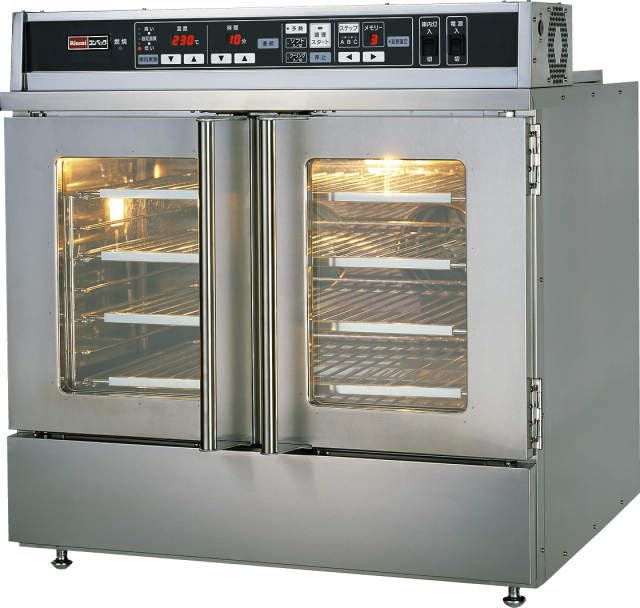
Сүрөт 1: Алдыңкы view of the Rinnai RCK-30MA Gas High-Speed Oven.
| Спецификация | Деталь |
|---|---|
| Бренд | Риннай |
| Модель номери | RCK-30MA |
| Продукт түрү | Gas High-Speed Oven, Large Type |
| Түс | Silver |
| Продукциянын өлчөмдөрү (D x W x Y) | 36 см х 54.5 см х 51.8 см |
| ASIN | B0CW35J9LC |
| Камтылган аксессуарлар |
|
| Oven Tray Dimensions (Outer) | 458 мм x 292 мм x 26 мм |
| Oven Tray Dimensions (Inner) | 410 мм x 262 мм x 14 мм |
8. Кепилдик жана колдоо
Rinnai products are manufactured to high-quality standards and come with a manufacturer's warranty. Please refer to the warranty card included with your purchase for specific terms and conditions, including warranty period and coverage.
For technical assistance, service, or to inquire about replacement parts, please contact Rinnai customer support. Have your model number (RCK-30MA) and purchase date ready when contacting support.
You can find contact information for Rinnai customer service on the official Rinnai webсайтында же шайманыңыз менен берилген документтерде.