
Introduction
This manual provides detailed instructions for the installation, operation, and maintenance of your Aigo Darkflash DK353 ARGB Mid-Tower Gaming PC Case. Please read this manual carefully before proceeding with installation to ensure proper setup and optimal performance.

1-сүрөт: Каптал view of the Aigo Darkflash DK353 PC case, showcasing the tempered glass side panel and internal components.
Негизги өзгөчөлүктөрү
- Motherboard колдоо: ATX / M-ATX / ITX
- Каптал панели: Температуралуу айнек
- I/O порттору: 1 x USB 3.0, 2 x USB 2.0, HD аудио
- Drive Bays: 2 x HDD / 4 x SSD
- Кеңейтүү уячалары: 7
- Күйөрмандардын колдоосу: Front: 3 x 120mm; Top: 2 x 120mm or 2 x 140mm; PSU Cover: 2 x 120mm; Rear: 1 x 120mm
- Суюк муздатуу колдоо: Front: 360mm / 240mm / 120mm radiators
- Max VGA Length: 340мм
- CPU муздаткычтын максималдуу бийиктиги: 165мм
- Кубат менен камсыздоону колдоо: Bottom mount, up to 200mm length
- Кошулган күйөрмандар: 4 x CL6 ARGB Fans (120x120x25mm, 1100 RPM, 26.0dB max noise)
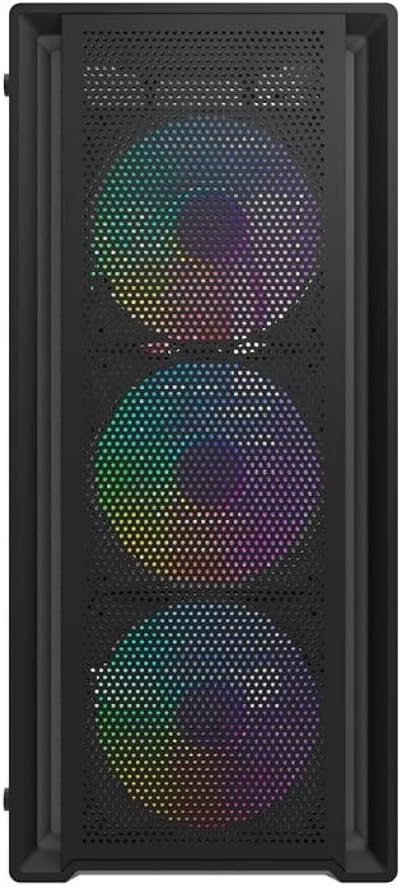
Сүрөт 2: Алдыңкы view of the Aigo Darkflash DK353 PC case, highlighting the mesh front panel and the three pre-installed ARGB fans.
Пакеттин мазмуну
Пакетте бардык буюмдар бар экенин текшериңиз:
- Aigo Darkflash DK353 PC Case
- Колдонуучунун Колдонмосу (бул документ)
- Accessory Screws Kit
- 4 x CL6 ARGB желдеткичтери
Орнотуу нускамалары
Follow these steps to set up your Aigo Darkflash DK353 PC case:
- Пакеттен чыгаруу: Carefully remove the PC case from its packaging. Inspect for any damage during transit.
- Каптал панелди алып салуу: Locate and remove the screws securing the tempered glass side panel. Gently slide or pivot the panel to remove it. Repeat for the solid side panel if necessary.
- Motherboard орнотуу: Install the appropriate standoffs for your motherboard form factor (ATX, M-ATX, ITX). Carefully place your motherboard into the case and secure it with screws.
- Электр менен жабдууну орнотуу: Install your power supply unit (PSU) into the dedicated compartment at the bottom of the case. Secure it with screws from the rear.
- Drive орнотуу: Install your HDDs and SSDs into the designated drive bays. Refer to the case's internal layout for specific bay locations.
- Компонентти орнотуу: Install your CPU cooler, graphics card (VGA), and any other expansion cards into their respective slots. Ensure maximum length and height clearances are respected.
- желдеткич жана радиатор орнотуу: The case comes with 4 pre-installed ARGB fans. If installing additional fans or liquid cooling radiators, refer to the fan support section for compatible sizes and locations.
- Кабелдик башкаруу: Route all power and data cables neatly behind the motherboard tray to ensure optimal airflow and a clean build.
- Алдыңкы панелдин байланыштары: Connect the front panel I/O cables (USB 3.0, USB 2.0, HD Audio, Power, Reset, LED) to the corresponding headers on your motherboard.
- Жыйынтыктоочу жыйын: Reattach the side panels, ensuring they are securely fastened.

3-сүрөт: жарылган view of the Aigo Darkflash DK353 PC case, illustrating the removable tempered glass side panel, solid side panel, and internal layout for component installation.
Компьютериңиздин корпусун иштетүү
Once all components are installed and connected, you can power on your system. The Aigo Darkflash DK353 case is designed to provide optimal airflow and aesthetics for your gaming PC.
- Кубат баскычы: Компьютериңизди күйгүзүү үчүн алдыңкы I/O панелиндеги кубат баскычын басыңыз.
- ARGB жарыктандыруу: The included CL6 ARGB fans feature customizable lighting. Connect the ARGB cables to a compatible motherboard header or a dedicated ARGB controller (if included or purchased separately) to manage lighting effects.
- USB порттору: Use the front panel USB 3.0 and USB 2.0 ports for connecting peripherals and external devices.
- Аудио уячалары: The HD Audio jacks allow for easy connection of headphones and microphones.

Figure 4: Angled top-front view of the Aigo Darkflash DK353 PC case, highlighting the accessible front I/O panel with USB ports and audio jacks, and the top ventilation mesh.
Техникалык тейлөө
Үзгүлтүксүз техникалык тейлөө сиздин PC корпусуңуздун жана компоненттеринин узак мөөнөттүү иштешин жана иштешин камсыз кылууга жардам берет.
- Чаңды тазалоо: Periodically clean dust filters (if present) and internal components using compressed air or a soft brush. Ensure the system is powered off and unplugged before cleaning.
- Тышкы тазалоо: Сырткы беттерин жумшак менен сүртүңүз, гamp кездеме. Абразивдүү тазалагычтардан же эриткичтерден алыс болуңуз, бул финишке же катууланган айнекке зыян келтирет.
- Кабель башкаруу текшерүү: Кабелдердин аба агымына же желдеткичтин иштешине тоскоол болбогонун текшерүү үчүн, кээде кабелдердин өткөрмөлөрүн текшерип туруңуз.
Проблемаларды чечүү
If you encounter issues with your PC case, consider the following common solutions:
- Кубат жок:
- Ensure the power supply is properly connected and switched on.
- Алдыңкы панелдеги кубат баскычынын кабели энелик платага туура туташкандыгын текшериңиз.
- Fans Not Spinning/No ARGB Lighting:
- Check if fan power cables are securely connected to the motherboard or fan controller.
- Ensure ARGB cables are properly connected to a compatible ARGB header or controller.
- Consult your motherboard manual for ARGB software control.
- Front USB/Audio Ports Not Working:
- Verify that the front panel USB and HD Audio cables are correctly connected to the corresponding headers on your motherboard.
- Check your motherboard's BIOS/UEFI settings to ensure USB/Audio ports are enabled.
Техникалык шарттар
| Өзгөчөлүк | Деталь |
|---|---|
| Модел | DK353-BK |
| Материал | 0.5mm SPCC Steel, Tempered Glass |
| Motherboard Support | ATX / M-ATX / ITX |
| Каптал панели | Температуралуу айнек |
| I/O порттору | 1 x USB 3.0, 2 x USB 2.0, HD аудио |
| Drive Bays | 2 x HDD / 4 x SSD |
| Кеңейтүү уячалары | 7 |
| Күйөрмандарды колдоо (алдыңкы) | 3 x 120 мм |
| Күйөрмандарды колдоо (жогорку) | 2 x 120 мм же 2 х 140 мм |
| Fan Support (PSU Cover) | 2 x 120 мм |
| Желдетүүчү колдоо (арткы) | 1 x 120 мм |
| Liquid Cooling Support (Front) | 360 мм / 240 мм / 120 мм |
| Max VGA Length | 340 мм |
| CPU муздаткычтын максималдуу бийиктиги | 165 мм |
| PSU колдоо | Bottom, up to 200 mm |
| Өлчөмдөрү (L x W x Y) | 385 x 195 x 449 мм |
| Камтылган күйөрмандар | 4 x CL6 ARGB желдеткичтери |
| Fan өлчөмдөрү | 120 x 120 x 25 мм |
| Fan Speed | 1100 ± 10% RPM |
| Желдетүүчү ызы-чуу деңгээли | 26.0dB (MAX) |
| Fan Airflow | 32.18 CFM |
| Желдеткичтин статикалык басымы | 0.62 mm H²O |
| Желдетүүчү подшипник түрү | Мылтык |
Кепилдик жана колдоо
Кепилдик жөнүндө маалымат жана техникалык колдоо алуу үчүн, өндүрүүчүнүн расмий өкүлүнө кайрылыңыз webсайтка же кардарларды тейлөөгө кайрылыңыз. Кепилдик дооматтар үчүн сатып алганыңыздын далилин сактаңыз.
Өндүрүүчү: Айго