
Introduction
Thank you for choosing the Thunderobot K87 Wired Mechanical Keyboard. This manual provides essential information for the proper setup, operation, maintenance, and troubleshooting of your new keyboard. Please read this manual thoroughly before using the product to ensure optimal performance and longevity.

1-сүрөт: Бурчтуу view of the Thunderobot K87 Mechanical Keyboard.
Жайгашуу
Пакеттин мазмуну
Улантуудан мурун, пакетиңизде төмөнкү нерселер бар экенин текшериңиз:
- Thunderobot K87 зымдуу механикалык клавиатурасы
- USB кабели
- Колдонуучунун Колдонмосу (бул документ)
Баскычтопту туташтыруу
- Unpack the Thunderobot K87 keyboard and the included USB cable.
- Connect the USB-C end of the cable to the port located on the keyboard.
- Кабелдин USB-A учунун компьютериңиздеги жеткиликтүү USB портуна туташтырыңыз.
- Баскычтоп сиздин операциялык тутумуңуз тарабынан автоматтык түрдө таанылат. Негизги функциялар үчүн, адатта, кошумча драйверлер талап кылынбайт.

2-сүрөт: Төмөнкү view of the keyboard, illustrating adjustable feet and cable management options.
Иштөө нускамалары
Негизги функциялар
The Thunderobot K87 is a standard 87-key (TKL) layout mechanical keyboard. Simply plug it into your computer, and it is ready for typing. The keyboard features Red mechanical switches, known for their linear feel and quiet operation, making them suitable for both typing and gaming.
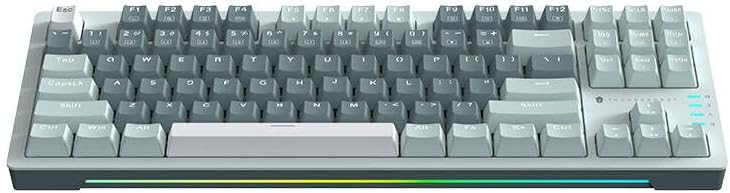
3-сүрөт: жогорудан ылдыйга view of the Thunderobot K87 keyboard layout.
Мультимедиа жана Функция баскычтары
The keyboard includes a Function (Fn) key, typically located near the right Alt key. This key, when pressed in combination with the F1-F12 keys, activates various multimedia and system functions. Refer to the keycap legends for specific functions.
- Fn + F1-F12: Typically control media playback, volume, and other system shortcuts.
- Fn + Windows ачкычы: Оюн учурунда кокусунан басылып калбашы үчүн Windows баскычын кулпулайт/ачат.
Арткы жарыкты башкаруу
The Thunderobot K87 keyboard features customizable RGB backlighting. Specific key combinations allow you to change lighting modes, brightness, and speed. Consult the keyboard's keycap legends or the manufacturer's website for detailed instructions on lighting customization.

Сүрөт 4: Алдыңкы view showing the RGB lighting strip.

5-сүрөт: Side profile view demonstrating keycap height and keyboard angle.
Техникалык тейлөө
Баскычтопту тазалоо
Үзгүлтүксүз тазалоо клавиатуранын көрүнүшүн жана функционалдуулугун сактоого жардам берет.
- Ажыратуу: Тазалоодон мурун ар дайым клавиатураны компьютериңизден ажыратыңыз.
- Чаңды тазалоо: Баскыч капкактарынын ортосундагы чаңды жана калдыктарды үйлөө үчүн кысылган аба банкасын колдонуңуз.
- Бетти тазалоо: Баскычтоптун капкактарын жана клавиатуранын бетин жумшак, түксүз чүпүрөк менен акырын сүртүңүзampсуу же жумшак, абразивдүү эмес тазалоо эритмеси менен. Ашыкча нымдуулуктан сактаныңыз.
- Качуу: Do not use harsh chemicals, solvents, or abrasive materials, as these can damage the keyboard's finish or keycap legends.
Сактагыч
When not in use for extended periods, store the keyboard in a dry, cool place away from direct sunlight and extreme temperatures. Consider covering it to prevent dust accumulation.
Проблемаларды чечүү
If you encounter issues with your Thunderobot K87 keyboard, please refer to the following common solutions:
| Көйгөй | Мүмкүн себеп | Чечим |
|---|---|---|
| Баскычтоп жооп бербей жатат | Бош USB туташуу, туура эмес USB порт, драйвер маселеси. | Ensure USB cable is securely connected. Try a different USB port on your computer. Restart your computer. |
| Атайын баскычтар иштебейт | Debris under keycap, switch malfunction. | Use compressed air to clear debris. If the issue persists, contact customer support. |
| Арткы жарык иштебейт же туура эмес | Lighting mode disabled, software conflict. | Check keyboard's lighting control key combinations (Fn + specific keys). Ensure no conflicting software is running. |
| Баскычтоптун киргизүү кечигүүсү | USB port issues, system performance. | Try a different USB port. Close unnecessary background applications. |
If the problem persists after trying these solutions, please contact Thunderobot customer support for further assistance.
Техникалык шарттар
| Өзгөчөлүк | Деталь |
|---|---|
| Модель номери | JM03NQ002 |
| Бренд | Тандеробот |
| Байланыш | Зымдуу (USB) |
| Которуу түрү | Кызыл механикалык өчүргүчтөр |
| Макет | 87 ачкычтуу (Тен ачкычсыз) |
| Арткы жарыктандыруу | RGB |
| Өндүрүүчү | Тандеробот |
| ASIN | B0CWS77B83 |
| Кепилдик | 2 years manufacturer |
Кепилдик маалымат
The Thunderobot K87 Wired Mechanical Keyboard (Model JM03NQ002) comes with a 2 жылдык өндүрүүчүнүн кепилдиги from the date of purchase. This warranty covers defects in materials and workmanship under normal use. It does not cover damage caused by accident, misuse, abuse, neglect, unauthorized modification, or improper installation.
To claim warranty service, please retain your proof of purchase. For detailed warranty terms and conditions, or to initiate a warranty claim, please contact Thunderobot customer support.
Колдоо
For technical assistance, product inquiries, or warranty claims, please visit the official Thunderobot website or contact their customer support team. Please have your product model number (JM03NQ002) and proof of purchase ready when seeking support.
Official Thunderobot Webсайт: www.thunderobot.com (Эскертүү: Бул толтургуч URL конкреттүү колдоо жок URL was provided in the product data. Refer to your product packaging or official Thunderobot documentation for the correct support contact information.)