
Продукт бүттүview
The Conambo K10 Wireless Bluetooth Headset V5.2 is designed for clear communication and extended use, featuring advanced noise-canceling technology and a portable charging case. This manual provides detailed instructions for setup, operation, and maintenance to ensure optimal performance.
Кутуда эмне бар
- Conambo K10C Headset (1 unit)
- 750mAh Charging Case (1 unit)
- USB-C кубаттоочу кабели (1 даана)
- Наушниктер (бир нече өлчөмдөгү)
- Колдонуучунун Колдонмосу (бул документ)
Продукт өзгөчөлүктөрү
- Кеңейтилген сүйлөшүү убактысы: Up to 16 hours on a single charge, with an additional 48 hours provided by the 750mAh charging case, totaling 60 hours.
- Advanced Noise Canceling: Features CVC8.0 Dual Mic and ENC noise-canceling technology, reducing 96% of ambient noise for clear calls.
- Bluetooth 5.2 & Qualcomm aptX HD: Ensures stable connectivity and high-definition voice quality.
- Көп чекиттүү технология: Connects to two phones simultaneously, allowing calls from either device.
- Ыңгайлуу дизайн: Rigorously tested for stability and comfort, includes 9 different sizes of ear tips for a personalized fit.
- Интуитивдик башкаруулар: Easy access to media, volume, and call controls, including a mute button and activation for Siri/Google Assistant.
- Суу каршылык: IPX4 rated for splash resistance.

Image: Conambo K10 Headset with charging case, highlighting 16 hours of talk time on a single charge and 60 hours total with the charging case.

Image: Conambo K10 Headset with visual representation of CVC8.0 & ENC Dual Mic Noise Cancelling for clear calls in various environments.
Жайгашуу
- Гарнитураны заряддоо: Before first use, fully charge the headset and its charging case. Connect the provided USB-C cable to the charging case and a power source. The headset can be charged by placing it inside the case or by connecting the cable directly to the headset.
- Күйгүзүү: Slide the Power On/Off switch on the headset to the 'ON' position. The indicator light will flash, indicating it's ready for pairing.
- Жупташтыруу:
- Мобилдик түзмөгүңүздө Bluetooth'ду жандырыңыз.
- Издөө 'Conambo K10C' in the list of available Bluetooth devices.
- Select 'Conambo K10C' to connect. Once connected, the indicator light will stop flashing and remain solid.
- For multipoint connection, repeat the pairing process with a second device.
- Тууралоону тууралоо: Select the most comfortable ear tip size from the provided options. Gently adjust the headset on your ear for a secure and comfortable fit.
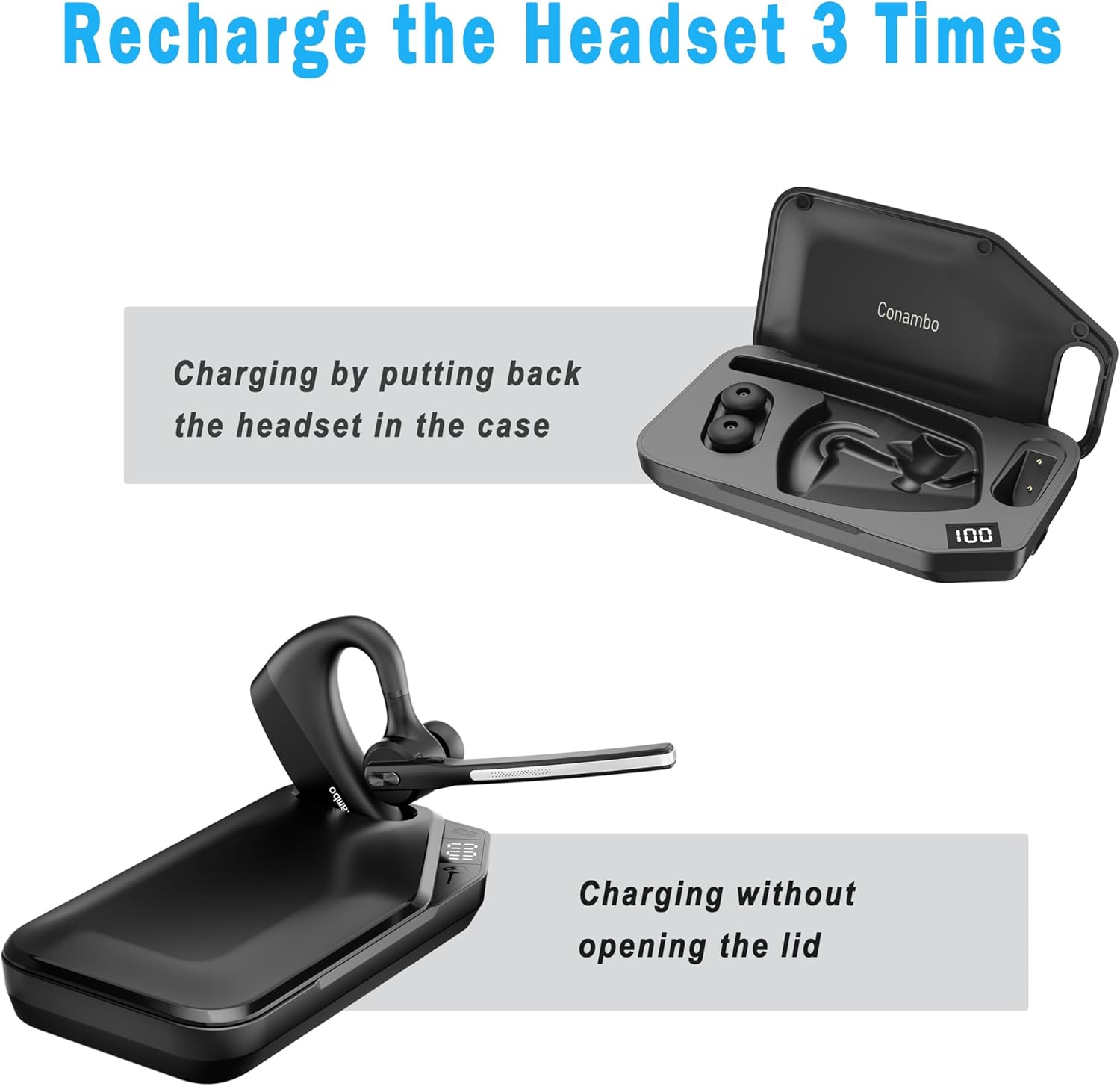
Image: The Conambo K10 Headset being charged by placing it inside its dedicated charging case.
Иштөө нускамалары
Чалууларды башкаруу
- Чалууга жооп берүү/аяктоо: Көп функциялуу баскычты бир жолу басыңыз.
- Чакырууну четке кагуу: Көп функциялуу баскычты 2 секунд басып туруңуз.
- Үнсүз/Ачуу: Press the mute button on the boom arm.
- Үн жардамчысы: Press and hold the mute button for 3 seconds to activate Siri or Google Assistant.
Үндү көзөмөлдөө
- Көлөмүн жогорулатуу: '+' баскычын басыңыз.
- Көлөмдү азайтуу: '-' баскычын басыңыз.
Медиа ойнотуу
- Ойнотуу/тындыруу: Көп функциялуу баскычты бир жолу басыңыз.
- Кийинки трек: Көп функциялуу баскычты эки жолу басыңыз.
- Мурунку трек: Көп функциялуу баскычты үч жолу басыңыз.

Сүрөт: деталдуу view of the Conambo K10 Headset, illustrating the location of the Power On/Off switch, Volume +/- buttons, and Mute button.
Техникалык тейлөө
- Тазалоо: Regularly wipe the headset and charging case with a soft, dry cloth. For ear tips, remove them and clean with mild soap and water, then dry thoroughly before reattaching.
- Сактагыч: Гарнитураны чаңдан жана бузулуудан коргоо үчүн колдонулбаган учурда заряддоо кутучасында сактаңыз. Кургак, салкын жерде сактаңыз.
- Батареяга кам көрүү: Батареянын иштөө мөөнөтүн узартуу үчүн, бат-баттан батарейканы толук зарядсыздандырбаңыз. Үзгүлтүксүз колдонууда болбосо да, гарнитураны дайыма заряддаңыз.
Проблемаларды чечүү
| Көйгөй | Чечим |
|---|---|
| Гарнитура күйбөй жатат | Ensure the battery is charged. Connect to the charging cable or place in the charging case. |
| Түзмөк менен жупташтыруу мүмкүн эмес | Ensure Bluetooth is enabled on your device and the headset is in pairing mode (flashing indicator light). Try restarting both devices. |
| Аудио сапаты начар | Check the headset's position on your ear. Ensure no obstructions are blocking the microphone. Move closer to your paired device to avoid interference. |
| Charging case not charging headset | Ensure the charging case itself is charged. Verify the headset is correctly seated in the case. |
Техникалык шарттар
- Модель аты: K10C
- Байланыш технологиясы: Зымсыз (Bluetooth 5.2)
- Bluetooth диапазону: 10 метр
- Battery Life (Headset): 16 Hours talk time
- Батареянын иштөө мөөнөтү (заряддоо кутусу менен): Up to 60 Hours talk time
- Noise Control Features: CVC8.0 Dual Mic Noise Cancellation, ENC
- Башкаруу түрү: Media Control, Volume, Call Control (Touch)
- Материал: Пластик, силикон
- Суу каршылык: IPX4
- Шайкеш түзмөктөр: Bluetooth-enabled devices (iPhone, Android, etc.)
Кепилдик маалымат
The Conambo K10 Wireless Bluetooth Headset V5.2 comes with a standard manufacturer's warranty. Please refer to the warranty card included in your product packaging for specific terms and conditions, including warranty duration and coverage details. Keep your proof of purchase for any warranty claims.
Колдоо
For further assistance, technical support, or to inquire about replacement parts, please visit the official Conambo website or contact their customer service. Contact details can typically be found in the warranty information or on the product packaging.