
Introduction
This manual provides detailed instructions for the setup, operation, and maintenance of your MageGee SKY 87 75% Mechanical Gaming Keyboard. Designed for both gaming and office use, this compact 87-key keyboard features tactile brown switches, ice blue LED backlighting, and broad compatibility.
1. Орнотуу
1.1 Пакеттин мазмуну
- MageGee SKY 87 Mechanical Gaming Keyboard
- USB-A Cable (Wired Connection)
- Keycap Puller (for maintenance)
1.2 Баскычтопту туташтыруу
The MageGee SKY 87 keyboard uses a wired USB-A connection. To connect:
- Plug the USB-A cable into the USB port on the keyboard.
- Connect the other end of the USB-A cable to an available USB port on your computer (PC, Mac, or laptop).
- Баскычтоп плагин жана ойнотуу болуп саналат жана операциялык тутумуңуз тарабынан автоматтык түрдө таанылышы керек.
2. Иштөө нускамалары
2.1 Жарыкты башкаруу
The keyboard features ice blue LED backlighting with multiple modes and adjustable settings.
- Change Backlighting Mode: Басыңыз Fn + PrtSc to cycle through 20 preset ice blue backlighting modes.
- Жарыктыкты жөндөө: Басыңыз Fn + ↑ (Өйдө жебе) жарыктыгын жогорулатуу үчүн жана Fn + ↓ (Төмөн жебе) жарыктыгын азайтуу үчүн.
- Adjust Flowing Speed: Басыңыз Fn + - to decrease flowing speed, and Fn + = to increase flowing speed (for dynamic modes).

Image: The MageGee SKY 87 keyboard showcasing its vibrant ice blue LED backlighting and customizable light effects.
2.2 Tactile Brown Switches
The keyboard is equipped with tactile brown switches, offering a balanced typing experience with a noticeable bump without a loud click, suitable for both typing and gaming.

Сүрөт: жакын план view of the keyboard demonstrating the tactile brown switches and a keycap puller for easy removal.
2.3 Ergonomic Design and Side Lighting
The keyboard features stepped keycaps and a two-stage adjustable stand for ergonomic comfort. Additionally, an ice blue LED light strip on the bottom provides enhanced visual effects.

Image: The keyboard highlighting its distinctive ice blue side lighting, which enhances the aesthetic in low-light conditions.

Image: An illustration detailing the two-step adjustable keyboard feet, allowing users to set the keyboard at high or low angles for personalized comfort.
2.4 Compact TKL Layout (87 Keys)
The 75% Tenkeyless (TKL) design provides a compact footprint with 87 keys, including independent arrow keys, saving desk space while retaining essential functionality.
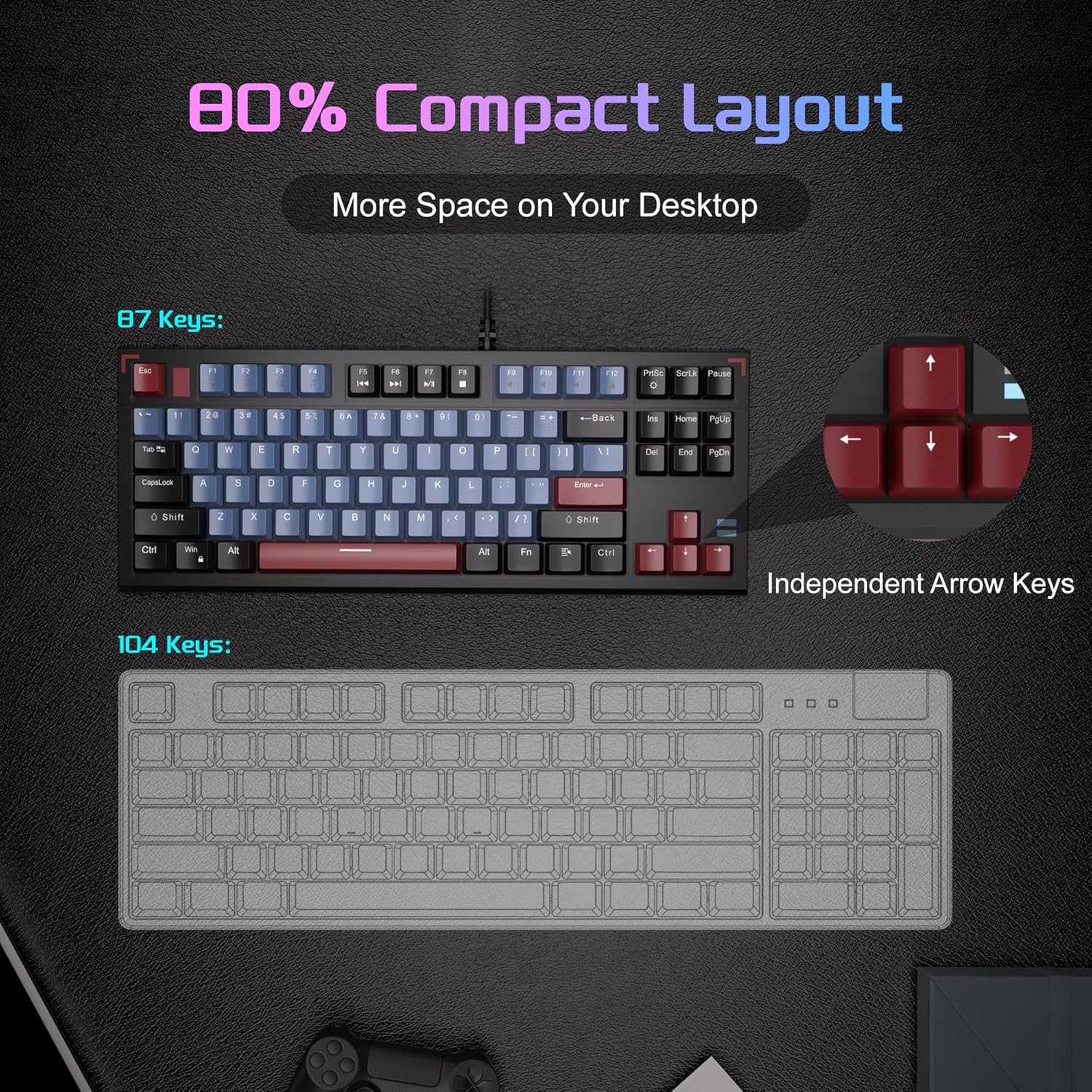
Image: A visual comparison illustrating the compact 87-key layout of the MageGee SKY 87 keyboard next to a standard 104-key keyboard, emphasizing space-saving benefits.
2.5 N-Key Rollover (Anti-Ghosting)
The keyboard supports 100% N-key rollover, meaning all keys can be pressed simultaneously without conflict, ensuring every keystroke is registered accurately during intense gaming or fast typing.

Image: A diagram showing how multiple key presses are registered simultaneously without ghosting, highlighting the N-key rollover feature.
2.6 Мультимедиа жарлыктары
Access various multimedia functions using the Fn key in combination with the F-keys.
| Функция баскычтарынын айкалышы | Description |
|---|---|
| Fn + F1 | Менин компьютерим |
| Fn + F2 | издөө |
| Fn + F3 | Калькулятор |
| Fn + F4 | Медиа ойноткуч |
| Fn + F5 | Мурунку трек |
| Fn + F6 | Кийинки трек |
| Fn + F7 | Ойнотуу/Тыныгуу |
| Fn + F8 | Токто |
| Fn + F9 | Үнсүз |
| Fn + F10 | Үндү төмөндөтүү |
| Fn + F11 | Үндү көтөрүү |
| Fn + F12 | Кулпуланган экран |

Image: The keyboard layout highlighting the F-keys and their corresponding multimedia functions when used with the Fn key.
3. Техникалык тейлөө
3.1 Баскычтопту тазалоо
To ensure optimal performance and longevity, regular cleaning is recommended.
- Тазалоодон мурун клавиатураны компьютерден ажыратыңыз.
- Баскыч капкактарынын ортосундагы чаңды жана калдыктарды тазалоо үчүн жумшак щетка же кысылган абаны колдонуңуз.
- Кежир кир үчүн, баскычтардын капкактарын жана клавиатуранын бетин бир аз d менен акырын сүртүңүзamp, түксүз кездеме. Ашыкча нымдуулуктан сактаныңыз.
- Катуу химиялык заттарды же абразивдүү тазалоочу каражаттарды колдонбоңуз.
3.2 Баскычтын капкагын алып салуу жана алмаштыруу
Комплекттеги баскычтоптун капкагын тартуучу каражатты тазалоо же ыңгайлаштыруу максатында баскычтоптун капкактарын алып салуу жана алмаштыруу үчүн колдонсо болот.
- Баскыч капкагын тарткычты алып салгыңыз келген баскычка акырын бекитиңиз.
- Баскычтын капкагы өчүргүчтөн ажыраганга чейин бирдей басым менен түз өйдө тартыңыз.
- Алмаштыруу үчүн, баскычтоптун капкагын которгучтун сабы менен тегиздеп, ордуна чыкылдаган үн чыкканча бекем басыңыз.

Image: The keyboard with some keycaps removed, illustrating the possibility of customization or deep cleaning.
4. Кыйынчылыктарды
If you encounter issues with your MageGee SKY 87 keyboard, refer to the following common solutions:
- Баскычтоп жооп бербейт:
- USB кабели клавиатурага жана компьютерге бекем туташып турганын текшериңиз.
- Баскычтопту компьютериңиздин башка USB портуна сайып көрүңүз.
- Компьютериңизди өчүрүп күйгүзүңүз.
- Арткы жарык иштебейт же туура эмес:
- Check if the brightness is set too low (Fn + ↑/↓).
- Cycle through lighting modes using Fn + PrtSc.
- Атайын ачкычтар иштебейт:
- Remove the keycap and check for any obstructions or debris around the switch.
- Эгер көйгөй чечилбесе, кардарларды колдоо менен байланышыңыз.
5. Техникалык шарттар
| Өзгөчөлүк | Деталь |
|---|---|
| Бренд | MageGee |
| Модель номери | SKY 87 |
| Байланыш технологиясы | USB-A (Зымдуу) |
| Keyboard Description | Механикалык |
| Которуу түрү | Tactile Brown Switches |
| Ачкычтардын саны | 87 |
| Баскычтоптун жайгашуусу | QWERTY |
| Арткы жарыктандыруу | Ice Blue LED (Single Color) |
| Өзгөчөлүктөр | Backlit, Ergonomic, Multimedia Keys, Portable |
| Шайкеш түзмөктөр | Ноутбук, компьютер (Windows, Mac) |
| Продукциянын өлчөмдөрү (L x W x Y) | 14.37" x 5.51" x 1.69" |
| Материал | Акрилонитрил бутадиен стирол (ABS) |
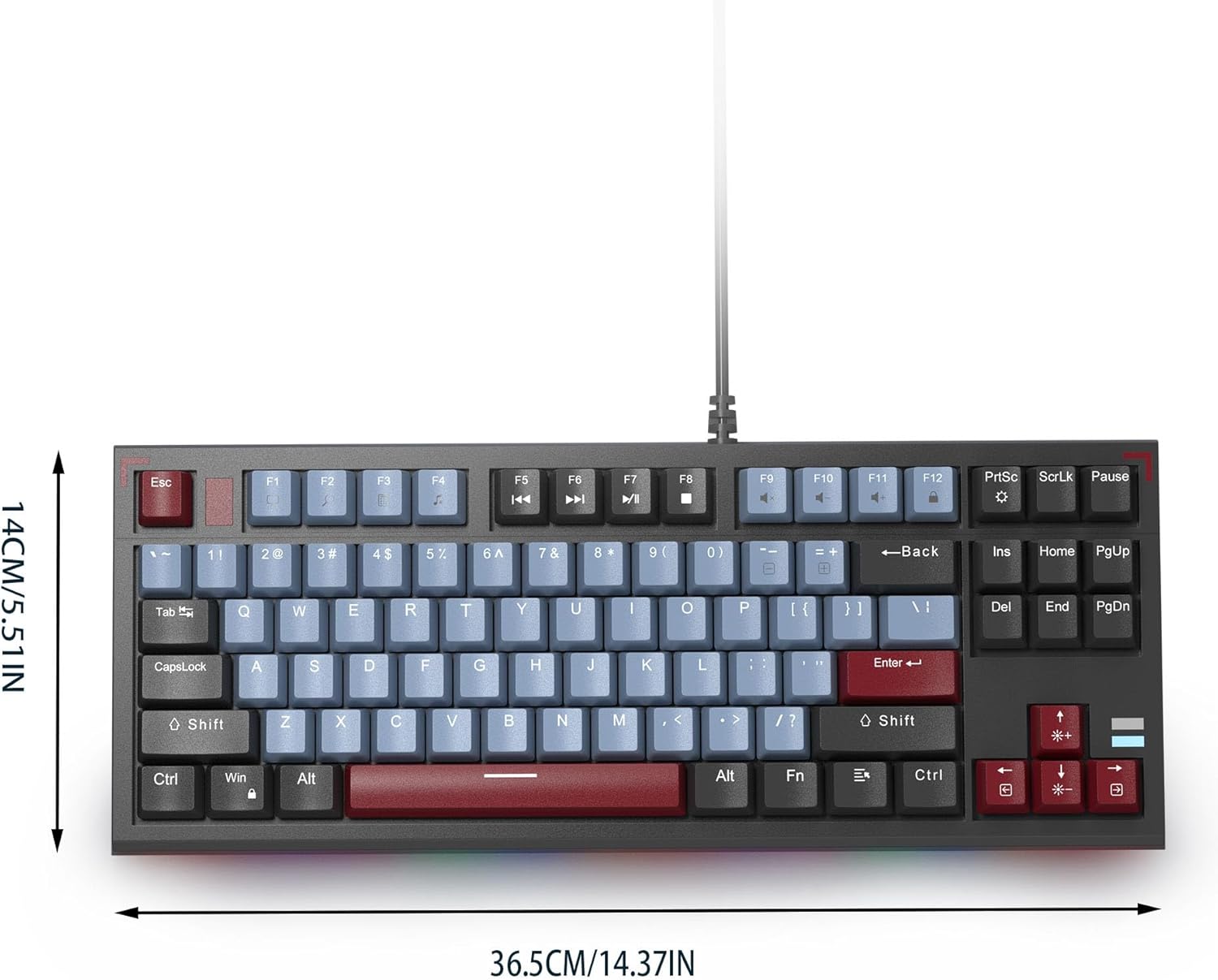
Image: The MageGee SKY 87 keyboard with its physical dimensions clearly indicated.
6. Кепилдик жана колдоо
For warranty information and technical support, please refer to the official MageGee webсайтка же түздөн-түз кардарларды тейлөөгө кайрылыңыз. Кепилдик дооматтар үчүн сатып алуу дүмүрчөгүңүздү сактаңыз.