
1. Киришүү
This manual provides essential information for the safe and effective use of your OWON SDS1022 Digital Oscilloscope. Please read it thoroughly before operating the device and keep it for future reference. The SDS1022 is a 2-channel, 20MHz bandwidth digital oscilloscope with a 100MS/s real-time sample rate, designed for a wide range of applications from electronic circuit debugging to educational purposes.
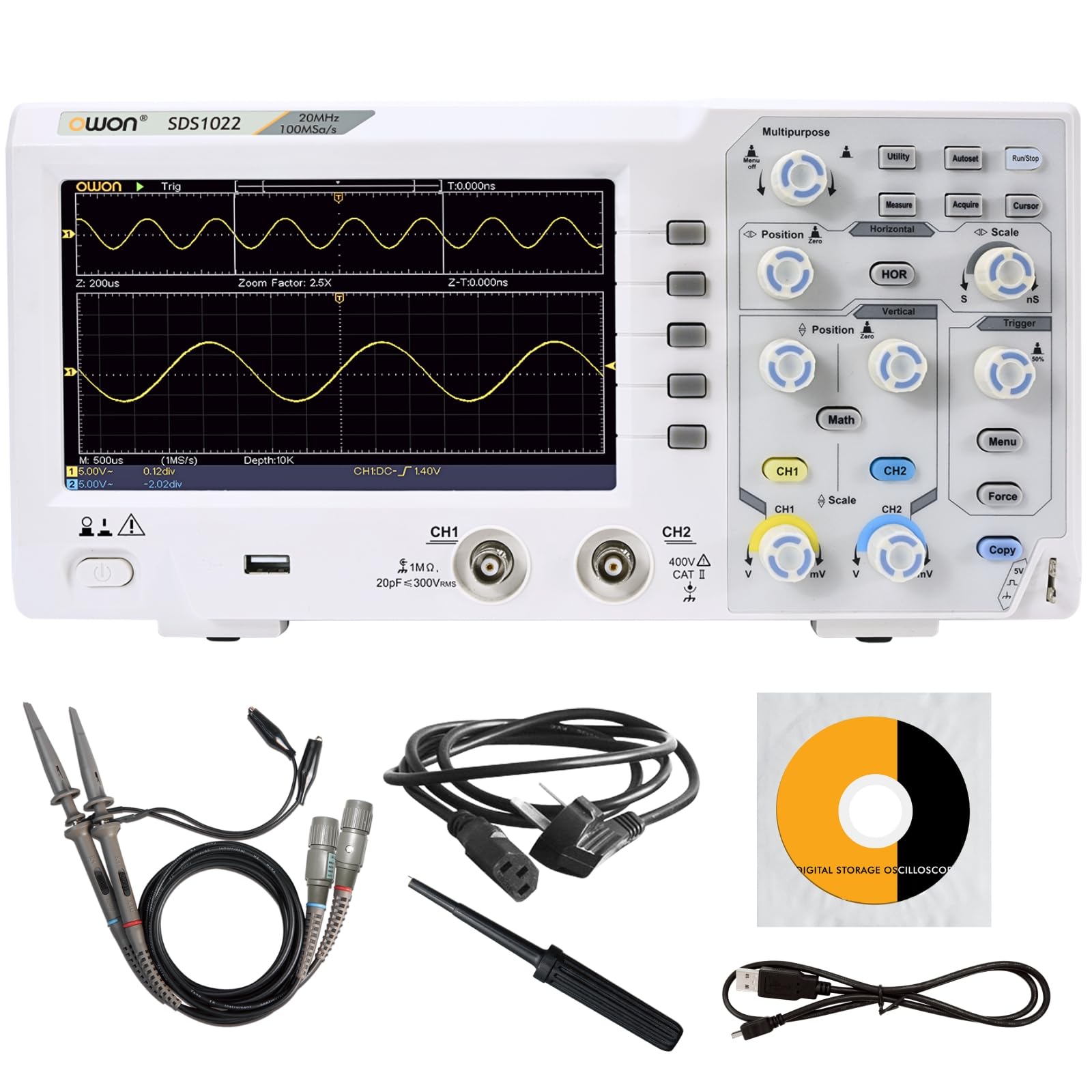
Figure 1: OWON SDS1022 Digital Oscilloscope with probes.
2. Продукциянын өзгөчөлүктөрү
- Wide Bandwidth and High-Speed Sampлинг: The SDS1022 offers a 20MHz bandwidth and a 100MS/s real-time sampling rate, enabling accurate capture of instantaneous waveform changes for precise signal analysis.
- Clear Display and Intuitive Operation: Features a 7-inch high-resolution color LCD for vivid waveform display. The user-friendly menu system ensures intuitive operation for both novice and experienced users. A zoom display function allows quick identification of anomalies.
- Diverse Measurement and Analysis Functions: Includes 30 types of automatic measurement functions, FFT for frequency analysis, and waveform operations (addition, subtraction, multiplication, division, inversion). Pass/fail testing and screenshot capabilities enhance efficiency in testing and reporting.
- Compact Design and Connectivity: With a thin and lightweight design (approx. 1.1kg), the device is easy to place in various environments. Equipped with USB host and device interfaces for data storage and PC connectivity. SCPI command support allows for automated testing and remote control.

Figure 2: Compact design and dimensions.

Figure 3: ашыкview of included functions.
3. Орнотуу
- Пакеттен чыгаруу: Carefully remove the oscilloscope and all accessories from the packaging. Verify that all included components are present (Power cord, CD-ROM, Quick Guide, USB cable, Probes, Probe adjustment tool).
- Кубат туташуу: Connect the provided AC power cord to the oscilloscope's power input and then to a suitable AC power outlet.
- Баштапкы күйгүзүү: Press the power button to turn on the oscilloscope. The device will perform a self-test.
- Зонд туташуу: Connect the oscilloscope probes to the CH1 and CH2 input channels. Ensure a secure connection.
- Зонддун компенсациясы: Before taking measurements, perform probe compensation to ensure accurate readings. Connect the probe to the probe compensation output (usually a square wave signal) and adjust the probe until a flat-top square wave is displayed on the screen. Refer to the Quick Guide for detailed steps.

Сүрөт 4: Камтылган аксессуарлар.
4. Операция
The SDS1022 features a user-friendly interface with dedicated controls for horizontal, vertical, and trigger settings. The 7-inch LCD provides a clear view of waveforms and measurement data.
4.1 Негизги толкун формасын көрсөтүү
- Вертикалдык башкаруу элементтери: Use the CH1/CH2 vertical position and scale knobs to adjust the vertical position and voltage per division for each channel.
- Горизонталдык башкаруу элементтери: Use the horizontal position and scale knobs to adjust the horizontal position and time per division.
- Trigger орнотуулары: Adjust the trigger level and mode (Edge, Video, etc.) to stabilize the waveform display. The 'Auto' button can often provide a stable display quickly.
4.2 Өлчөө функциялары
The oscilloscope supports 30 types of automatic measurements. Press the өлчөө button to access these functions. You can select parameters such as Period, Frequency, Peak-to-Peak Voltage, RMS, and more.

Figure 5: Automatic measurement display.
4.3 Өркүндөтүлгөн функциялар
- FFT Analysis: басыңыз Математика button and select FFT to perform frequency domain analysis of your signals.
- Waveform Operations: The Математика menu also allows for waveform addition, subtraction, multiplication, division, and inversion.
- Маалыматтарды сактоо: Use the USB host port to save waveforms, screenshots, or setup configurations to a USB flash drive.
Video 1: Demonstration of OWON SDS1104 (similar model) oscilloscope controls and waveform display. This video illustrates general operation principles applicable to the SDS1022.
5. Техникалык тейлөө
- Тазалоо: Use a soft, dry cloth to clean the exterior of the oscilloscope. Do not use abrasive cleaners or solvents.
- Сактагыч: Store the device in a dry, dust-free environment away from direct sunlight and extreme temperatures.
- Пробка кам көрүү: Handle probes carefully. Avoid bending or stressing the cables. Store them properly to prevent damage.
- Программалык камсыздоо жаңыртуулары: Periodically check the OWON official webоптималдуу иштешин жана жаңы функцияларга жетүүнү камсыз кылуу үчүн микропрограммаларды жаңыртуу үчүн сайт.
6. Кыйынчылыктарды
- Кубат жок: Ensure the power cord is securely connected to both the oscilloscope and the power outlet. Check the power outlet for functionality.
- Толкун формасынын дисплейи жок: Verify that probes are correctly connected to the input channels and the signal source. Adjust vertical scale, horizontal scale, and trigger settings. Use the 'Auto' button to attempt automatic waveform display.
- Туруксуз толкун формасы: Adjust the trigger level and trigger mode. Ensure the trigger source is correctly selected.
- Туура эмес өлчөөлөр: Perform probe compensation. Ensure the correct probe attenuation setting (1X, 10X) is selected on both the probe and the oscilloscope.
- USB түзмөгү таанылган жок: Ensure the USB device is formatted correctly and functioning. Try a different USB port or device.
For issues not resolved by these steps, please contact OWON customer support.
7. Техникалык шарттар
| Параметр | Specification (SDS1022) |
|---|---|
| өткөрүү жөндөмдүүлүгү | 20 МГц |
| Каналдар | 2 |
| Sample Rate | 100 MS/s |
| Горизонталдык масштаб (s/div) | 5ns/div - 1000s/div, step 1-2-5 |
| Rise Time (at input, typical) | ≤3.5 ns |
| Киргизүү импедансы | 1 MΩ ±2%, in parallel with 15pF±5pF |
| DC пайда тактыгы | ±3.0% |
| DC Accuracy (average) | Average 16: V±(3% reading + 0.05 div) |
| Max Record Length | 20K |
| Зонддун басаңдатуу фактору | 1X, 10X, 100X, 1000X |
| Vertical Resolution (A/D) | 8 бит |
| Vertical Sensitivity | 5mV/div - 5V/div (input) |
| LF Response (AC, -3dB) | 10Hz (at input, AC coupling, -3dB) |
| Sample Rate / Relay Time Accuracy | ±100 промилле |
| Триггер түрү | Edge, Video |
| Waveform Operations | Invert, FFT, +, -, ×, ÷ |
| Толкун формасын сактоо | 16 waveforms |
| Trigger Mode | Авто, Кадимки, Жалгыз |
| Фузер | 2A, T class, 250V |
| Input Coupling | DC, AC, GND |
| Өлчөмдөрү (W x Y x D) | 301 x 152 x 70 мм |
| Салмагы | Болжол менен 1.10 кг |
| Дисплей | 7" Color LCD, 800 x 480 Pixels |
For a comparison with other models in the SDS1000 series, refer to the table below:
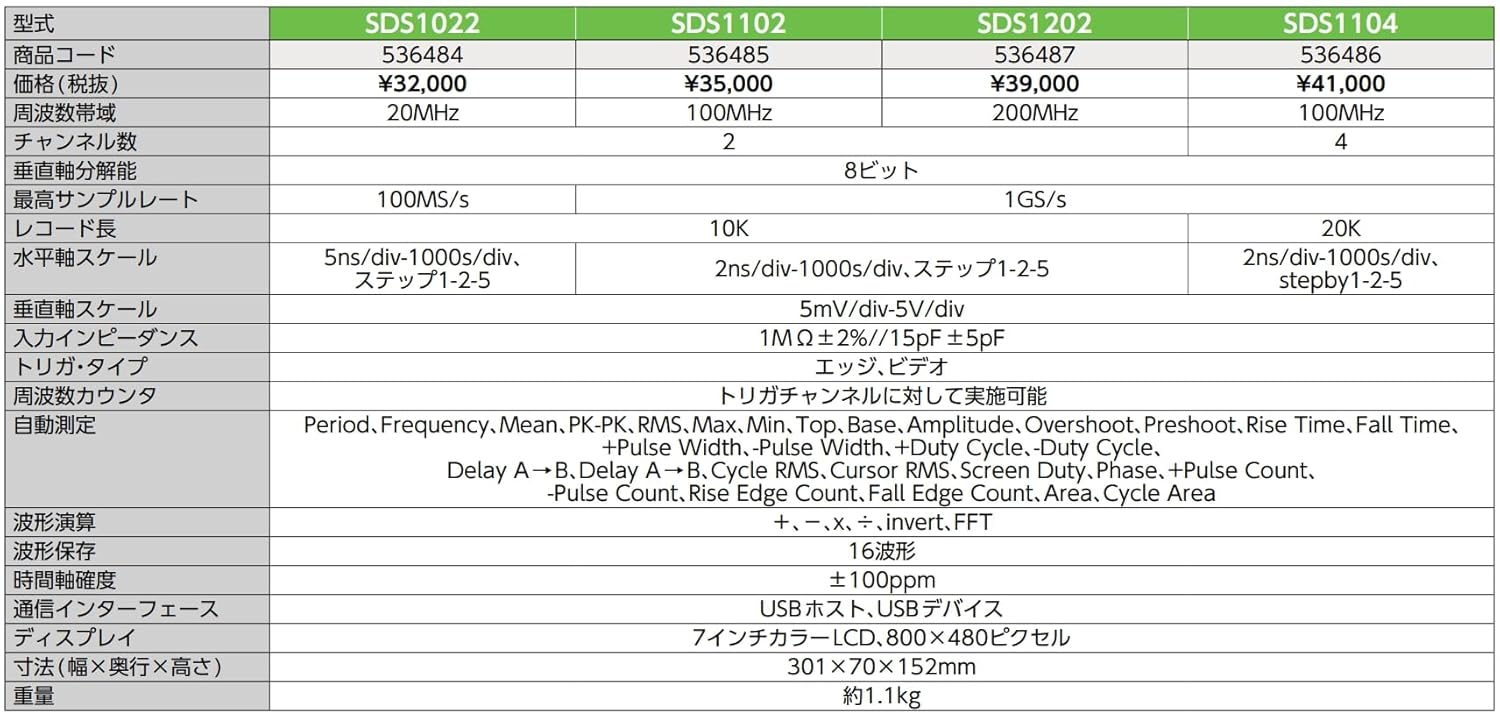
Figure 6: SDS1000 Series Model Comparison.
