
RWRAPS MS600 Series
RWRAPS MS600 Series Switching Power Supply User Manual
Model: MS-600-36 (0-48V 0-12.5A)
1. Киришүү
This manual provides essential information for the safe and efficient operation of your RWRAPS MS600 Series Switching Power Supply. The MS600 series offers various voltage and current configurations, including 0-12V, 0-24V, 0-36V, 0-48V, 0-60V, 0-72V, 0-80V, 0-110V, and 0-220V, all rated at 600W. This power supply features adjustable output current and voltage, and is cooled by free air convection.
2. Коопсуздук маалыматы
Сураныч, аппаратты иштетүүдөн мурун бардык коопсуздук нускамаларын окуп, түшүнүңүз. Бул нускамаларды аткарбоо электр шокуна, өрткө же олуттуу жаракатка алып келиши мүмкүн.
- Automatic Overload Cut-off: The power supply is equipped with an automatic overload cut-off mechanism to prevent damage from excessive current draw.
- Voltage Кесүү: Ашыкча томtage cut-off feature protects connected devices from damage due to voltage шиптер.
- Automatic Thermal Cut-off: The unit includes an automatic thermal cut-off to prevent overheating.
- Кыска туташуулардан коргоо: Built-in short circuit protection safeguards the power supply and connected equipment.
- Ensure proper grounding of the power supply before connecting any loads.
- Электр менен камсыздоону нымдуу же ысык абалда иштетпеңизamp шарттар.
- в ачпагылаasing энергия менен камсыз кылуу. Ичинде колдонуучу тейлей турган бөлүктөр жок.
- Туташтырууларды жасоодон же алмаштыруудан мурун ар дайым электр кубатынан ажыратыңыз.
3. Продукт бүтүп калдыview
The RWRAPS MS600 Switching Power Supply is designed for stable and reliable power delivery. It features a compact design with high stability, low ripple noise, and low power consumption.

3.1-сүрөт: Жалпысынан view of the RWRAPS MS600 Switching Power Supply. This image shows the compact form factor of the unit.

3.2-сүрөт: Арткы view of the power supply, highlighting the built-in cooling fan and a notice regarding its temperature-controlled operation. The fan automatically adjusts based on working temperature.
3.3-сүрөт: Деталдаштырылган view of the terminal block, showing input (N, L, Ground) and output (+V, -V) connections, along with adjustment potentiometers for voltage and current. This is where all electrical connections are made.
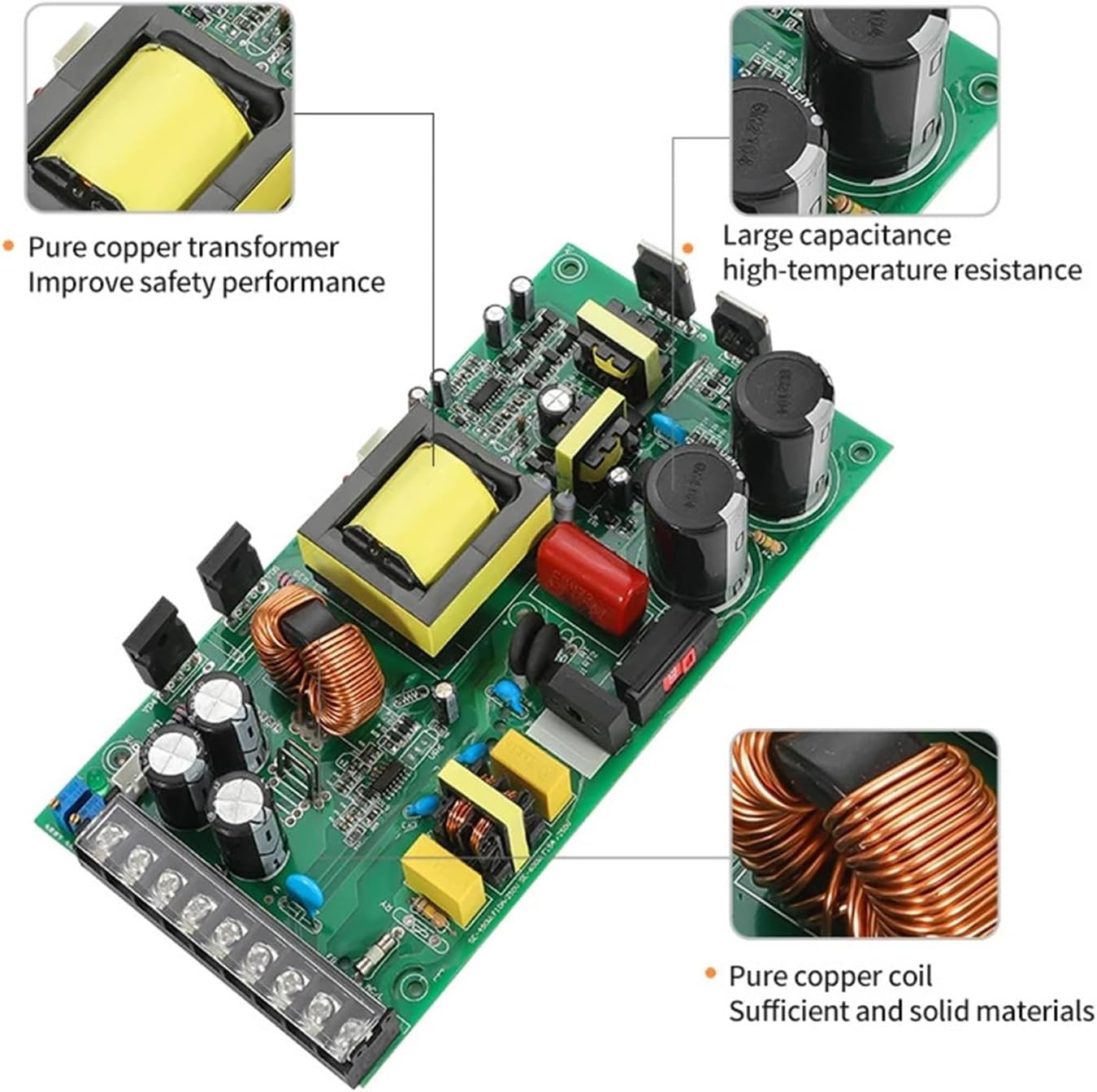
3.4-сүрөт: Ички view of the power supply's circuit board, showcasing the pure copper transformer, large capacitance high-temperature resistance components, and pure copper coils, all contributing to safety and performance.

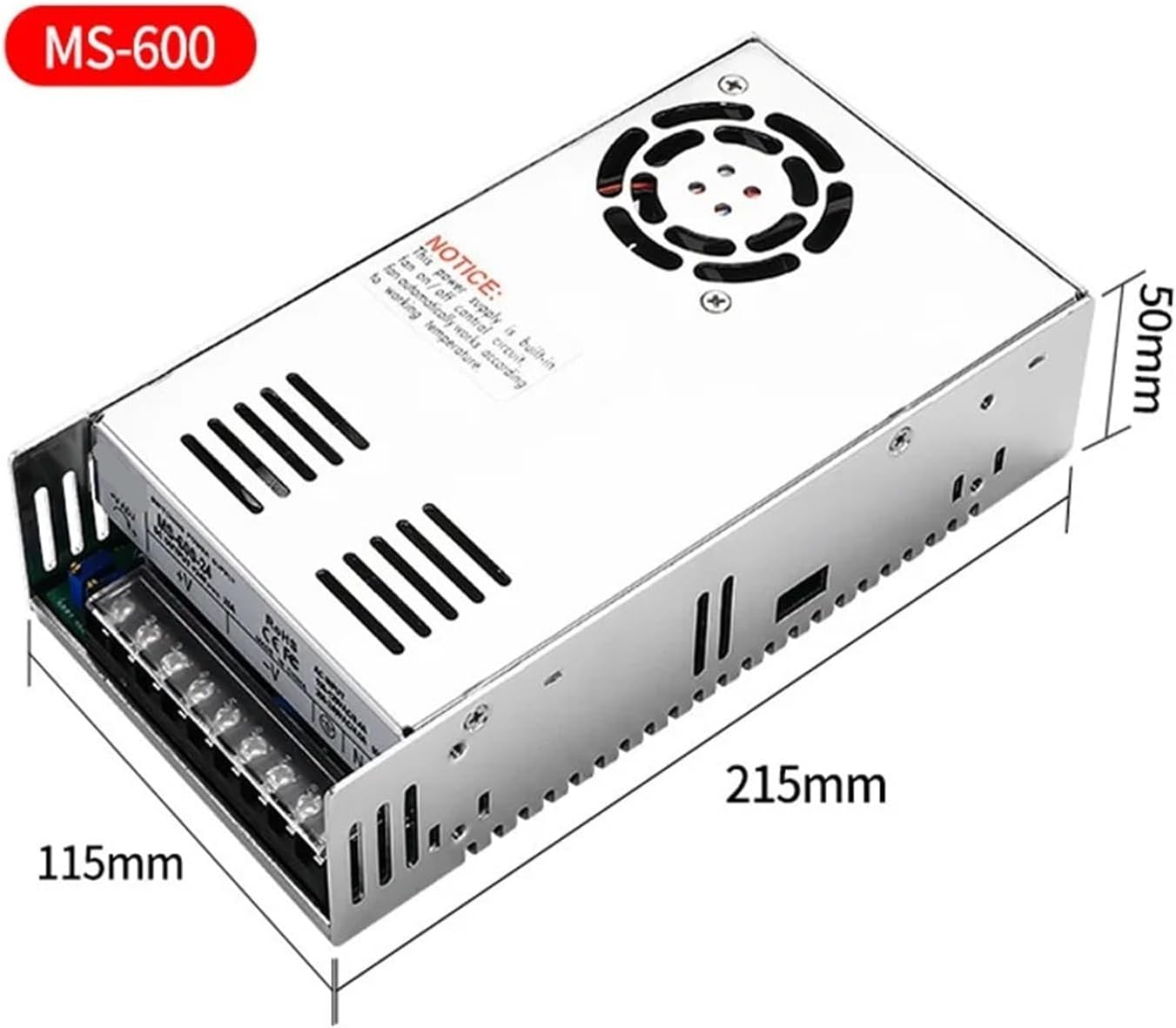
3.5-сүрөт: Dimensions of the MS600 power supply, indicating approximate measurements of 215mm length, 115mm width, and 50mm height for installation planning.
4. Орнотуу жана орнотуу
- Монтаждоо: Ensure the power supply is mounted in a well-ventilated area to allow for proper heat dissipation. Maintain adequate clearance around the unit.
- Input Power Connection (AC):
- Connect the Live (L) wire to the 'L' terminal.
- Нейтралдуу (N) зымын 'N' терминалына туташтырыңыз.
- Connect the Ground wire to the '⊗' (Ground) terminal.
- Киргизүүнү камсыз кылуу томtage matches the power supply's rating (100-120VAC/8.4A or 200-240VAC/4.0A, 50/60Hz).
- Output Power Connection (DC):
- Connect the positive (+) terminal of your load to the '+V' terminal.
- Connect the negative (-) terminal of your load to the '-V' terminal.
- Ensure correct polarity to prevent damage to the connected device.
- Алгачкы текшерүү: Before applying power, double-check all connections for tightness and correct polarity.
5. Иштөө нускамалары
The MS600 series allows for adjustment of both output voltage жана ток.
- Күйгүзүү: Once all connections are secure, apply AC input power to the unit.
- Тtage Тууралоо:
- Locate the '+V ADJ' potentiometer on the terminal block (refer to Figure 3.3).
- Using a small screwdriver, carefully turn the potentiometer clockwise to increase voltagд же саат жебесине каршыtage.
- Чыгуу көлөмүн көзөмөлдөөtage with a multimeter to set it to the desired level.
- Учурдагы тууралоо:
- Locate the 'current Adjust the' potentiometer (labeled as 'current Adjust the' in Figure 3.3, typically 'A ADJ' or similar).
- Turn this potentiometer to set the maximum output current limit. This acts as a current limiting feature to protect your load.
- Тtage Ылгайлуулугу: The power supply is designed to maintain stable voltage output with no significant fluctuations during power on, transmit, receive, or power off cycles.
6. Техникалык тейлөө
The RWRAPS MS600 power supply requires minimal maintenance. Adhering to the following guidelines will ensure optimal performance and longevity:
- Тазалоо: Мезгил-мезгили менен аппараттын сыртын жумшак, кургак чүпүрөк менен тазалап туруңуз. Суюк тазалагычтарды же эриткичтерди колдонбоңуз.
- Вентиляция: Ensure that the cooling fan and ventilation slots are free from dust and obstructions. Blocked vents can lead to overheating.
- Муздатуу желдеткич: The built-in cooling fan operates automatically based on the internal temperature. Ensure it is not obstructed.
- Текшерүү: Regularly inspect power cables and connections for any signs of damage or wear.
- Сактагыч: Эгерде электр кубатын көпкө чейин колдонбосоңуз, анда аны салкын, кургак жерде, күндүн нуру түз тийбеген жана өтө жогорку температурадан алыс сактаңыз.
7. Кыйынчылыктарды
This section addresses common issues you might encounter with your power supply.
| Көйгөй | Мүмкүн себеп | Чечим |
|---|---|---|
| Чыгаруунун көлөмү жокtage/power |
|
|
| Чыгуу томtage өзгөрүп турат |
|
|
| Unit is hot to touch / Fan not running |
|
|
For issues not listed above, or if troubleshooting steps do not resolve the problem, please contact RWRAPS customer support.
8. Техникалык шарттар
| Өзгөчөлүк | Деталь |
|---|---|
| Бренд | RWRAPS |
| Моделдер сериясы | MS-600 сериясы |
| Номиналдуу кубаттуулук | 600 Вт |
| Киргизүү көлөмүtage | 100-120VAC / 200-240VAC (50/60Hz) |
| Output Voltage Range (Adjustable) | 0-12V, 0-24V, 0-36V, 0-48V, 0-60V, 0-72V, 0-80V, 0-110V, 0-220V (model dependent) |
| Output Current Range (Adjustable) | 0-50A, 0-25A, 0-16.6A, 0-12.5A, 0-10A, 0-8.3A, 0-7.5A, 0-5.4A, 0-2.7A (model dependent) |
| Муздатуу | Built-in fan, free air convection |
| Коопсуздук өзгөчөлүктөрү | Overload cut-off, Over Voltage cut-off, Thermal cut-off, Short circuit protection |
| Өлчөмдөрү (болжол менен) | 215мм x 115мм x 50мм (8.46 x 4.53 x 1.97 дюйм) |
| Элемент Салмагы | 1.76 фунт (800 грамм) |
| Келип чыккан өлкө | Кытай |
9. Кепилдик жана колдоо
For warranty information, please refer to the terms and conditions provided at the time of purchase or contact your retailer. RWRAPS offers protection plans for extended coverage, which can be purchased separately.
For technical support, product inquiries, or assistance with troubleshooting, please contact RWRAPS customer service through the official channels provided with your product or on the manufacturer's webсайт.
Байланыш маалыматы: Please refer to your product packaging or the official RWRAPS webакыркы байланыш маалыматы үчүн сайт.
Ask a question about this manual
Ask about setup, troubleshooting, compatibility, parts, safety, or missing instructions. Manuals+ will review the question and use this page’s manual context to help answer it.