
1. Киришүү
The OWON HDS25 is a compact, multi-functional handheld device integrating a 2-channel oscilloscope and a 20,000-count multimeter. Designed for portability and versatility, it features a 3.5-inch LCD display, USB Type-C connectivity for charging and data transfer, and supports SCPI commands for remote control. This manual provides essential information for the safe and effective operation, maintenance, and troubleshooting of your HDS25 device.
2. Продукт бүтүп калдыview
2.1 Негизги өзгөчөлүктөрү
- 3-ин-1 Функциясы: Combines a 2-channel oscilloscope and a 20,000-count True RMS multimeter.
- Осциллограф: 25 МГц өткөрүү жөндөмдүүлүгү, 250 МСа/с реалдуу убакыт режиминдеги сample rate, 8K record length.
- Мультиметр: Чаралар AC/DC тtage, AC/DC current, resistance, capacitance, diode, and continuity.
- Дисплей: 3.5 дюймдук жогорку чечилиштеги LCD.
- Байланыш: USB Type-C for charging and PC communication, supports SCPI commands.
- Көчүрүү мүмкүнчүлүгү: Compact design with approximately 4 hours of continuous battery operation.
2.2 Аппараттын компоненттери
The following image illustrates the main components of the OWON HDS25 device:
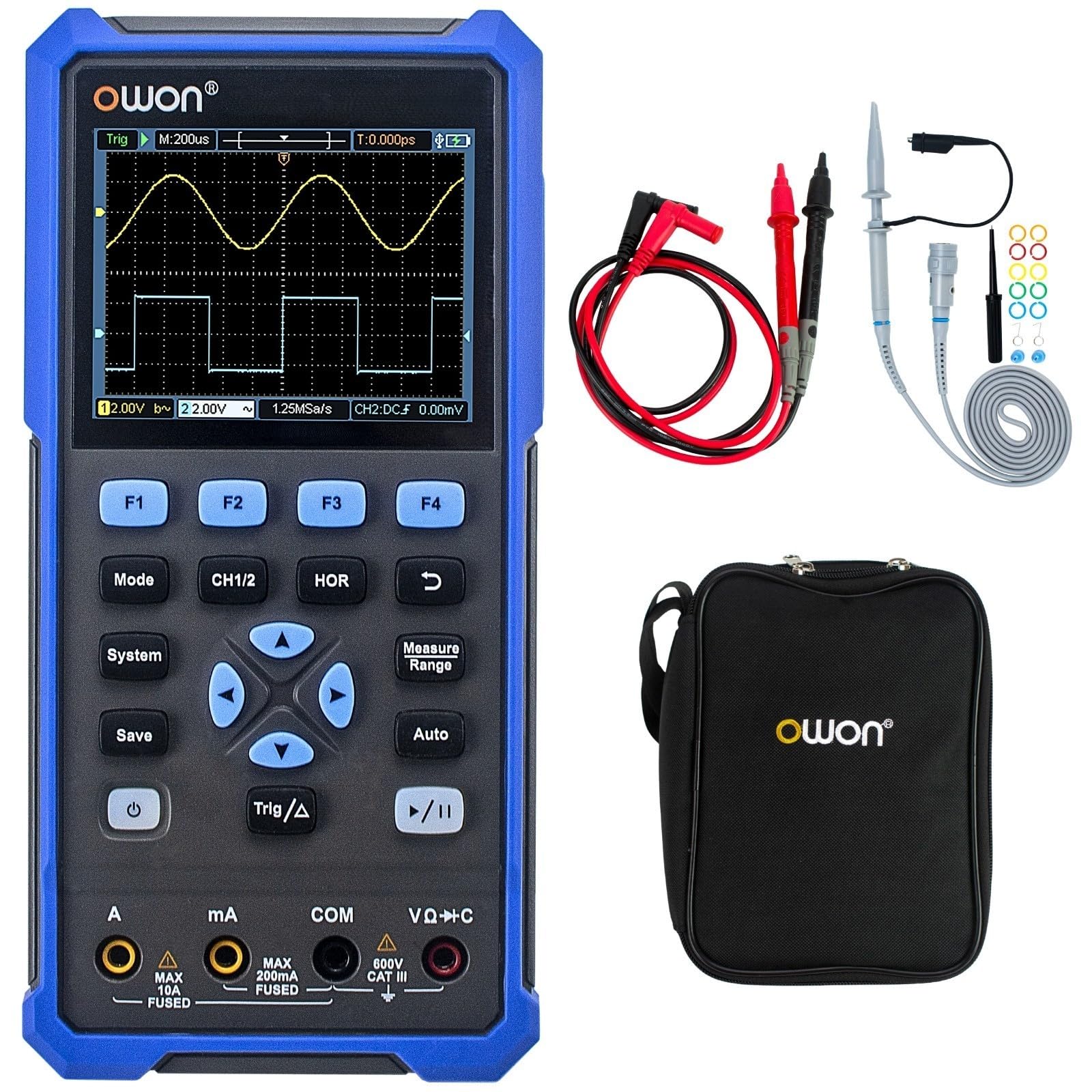
The device features a central 3.5-inch LCD screen for waveform display and measurement readings. Below the screen are function buttons (F1-F4), mode selection buttons (Mode, CH1/2, HOR, System, Save, Auto, Trig/Δ, Power, Play/Pause), and a directional pad for navigation. At the bottom, there are input jacks for current (A, mA), common ground (COM), and voltage/resistance/capacitance (VΩ+C) measurements.

2.3 Кошумча жабдуулар
- USB Type-C кабели
- Oscilloscope Probes (2)
- Зондду жөндөө куралы
- Мультиметрдик тесттер
- Коргоочу баштык

3. Орнотуу
3.1 Аппаратты заряддоо
Before initial use, fully charge the device using the provided USB Type-C cable and a compatible power adapter (not included). The charging indicator on the device will show the charging status.
3.2 Зонддорду жана зымдарды туташтыруу
- Осциллограф зонддору: Connect the BNC connector of the oscilloscope probes to the CH1 and CH2 input ports on the top of the device. Ensure a secure connection.
- Multimeter Test Leads: For multimeter functions, insert the red test lead into the VΩ+C jack and the black test lead into the COM jack. For current measurements, use the A or mA jacks as appropriate.
3.3 Күйгүзүү/өчүрүү
басып, кармап туруңуз Күч button (usually marked with a circle and vertical line symbol) to turn the device on or off.
4. Иштөө нускамалары
4.1 Жалпы навигация
- колдонуу Mode button to switch between Oscilloscope and Multimeter modes.
- The directional pad (up, down, left, right) is used to navigate menus and adjust parameters.
- Buttons F1 чейин F4 correspond to on-screen menu options.
- The Система button accesses system settings.
- The Сактоо button allows saving waveforms or measurement data.
4.2 Осциллограф режими
In Oscilloscope mode, the device displays real-time waveforms. Use the following controls:
- CH1/2: Selects the active channel or displays both.
- HOR (Horizontal): Adjusts the time base (horizontal scale) of the waveform.
- Vertical Scale: Use the directional pad (up/down) to adjust the voltage scale for the selected channel.
- Trig/Δ (Trigger): Configures trigger settings (edge, level, mode) to stabilize the waveform display.
- Авто: Automatically adjusts vertical, horizontal, and trigger settings for a stable waveform display.
- Ойнотуу/тындыруу: Freezes or resumes the waveform acquisition.
4.3 Мультиметрдик режим
In Multimeter mode, the device functions as a digital multimeter. Use the directional pad to select the desired measurement function (Voltage, Current, Resistance, etc.). Ensure the test leads are connected to the correct input jacks for the selected measurement type.
- Тtage Өлчөө (V): Connect leads in parallel with the circuit.
- Current Measurement (A/mA): Connect leads in series with the circuit. Ensure correct jack selection (A or mA) based on expected current.
- Каршылык өлчөө (Ω): Connect leads across the component when power is off.
- Үзгүлтүксүздүк/диод: For checking circuit continuity or diode function.
- Сыйымдуулукту өлчөө (F): Connect leads across the capacitor when power is off.
5. Техникалык тейлөө
5.1 Тазалоо
Түзмөктүн сыртын жумшак, d чүпүрөк менен сүртүңүзamp cloth. Do not use abrasive cleaners or solvents. Ensure the device is powered off and disconnected from all power sources and measurement circuits before cleaning.
5.2 Батареяга кам көрүү
Батареянын иштөө мөөнөтүн узартуу үчүн, батареянын тез-тез толук зарядын жоготуп алуудан алыс болуңуз. Түзмөктү үзгүлтүксүз кубаттап туруңуз, айрыкча, ал узак убакытка сактала турган болсо. Түзмөктү салкын, кургак жерде сактаңыз.
5.3 Сактоо
When not in use, store the HDS25 in its protective bag in a clean, dry environment away from direct sunlight, extreme temperatures, and high humidity.
6. Кыйынчылыктарды
If you encounter issues with your OWON HDS25, refer to the following common problems and solutions:
| Көйгөй | Мүмкүн себеп | Чечим |
|---|---|---|
| Түзмөк күйбөйт. | Батареянын заряды аз же кубат баскычы бузук. | Түзмөктү кеминде 30 мүнөт кубаттаңыз. Эгер дагы эле жооп бербесе, колдоо кызматына кайрылыңыз. |
| Осциллограф режиминде эч кандай толкун формасы көрсөтүлгөн эмес. | Incorrect probe connection, wrong vertical/horizontal scale, or trigger settings. | Зонддордун бекем туташтырылганын текшериңиз. Баскычын басыңыз Авто button. Adjust vertical (voltage) and horizontal (time) scales. Check trigger level. |
| Мультиметрдин көрсөткүчтөрү туура эмес же нөлгө барабар. | Incorrect lead connection, wrong measurement function selected, or open circuit. | Verify test leads are in the correct jacks for the selected function. Ensure proper connection to the circuit. Check for open circuits. |
| Түзмөк катып калат же жооп бербей калат. | Программанын катасы. | Perform a soft reset by holding the power button until the device turns off, then restart. If the issue persists, contact support. |
7. Техникалык шарттар
| Өзгөчөлүк | Спецификация |
|---|---|
| Модел | HDS25 |
| өткөрүү жөндөмдүүлүгү | 25 МГц |
| Каналдар | 2 |
| Sample Rate | 250 МСа/с |
| Record Length | 8K |
| Мультиметрдин эсептөөлөрү | 20,000 |
| Дисплей | 3.5 дюймдук LCD |
| Байланыш | USB Type-C (charging & data) |
| Батареянын иштөө мөөнөтү | Болжол менен 4 саат |
| Сертификаттар | CE, RoHS, UL |
| Камтылган заттар | USB cable, probes, probe adjustment tool, multimeter leads, bag |
8. Кепилдик жана колдоо
8.1 Кепилдик маалыматы
The OWON HDS25 comes with a 3 жылдык өндүрүүчүнүн кепилдиги негизги блок үчүн жана 1 жылдык кепилдик for included accessories. Please retain your proof of purchase for warranty claims.
8.2 Кардарларды колдоо
For technical assistance, troubleshooting, or warranty inquiries, please contact OWON customer support. You can also find the latest user manual and support resources on the official OWON webсайт (owon.co.jp) or on the product page where you purchased the device.