
1. Киришүү
This manual provides detailed instructions for the safe and effective operation of your Andoer Mini WiFi Action Camera L11. This compact digital video camera is designed for capturing high-quality 1080P video at 30 frames per second, featuring a 0.96-inch LCD screen, built-in rechargeable battery, motion detection, and versatile mounting options. Please read this manual thoroughly before using the device.
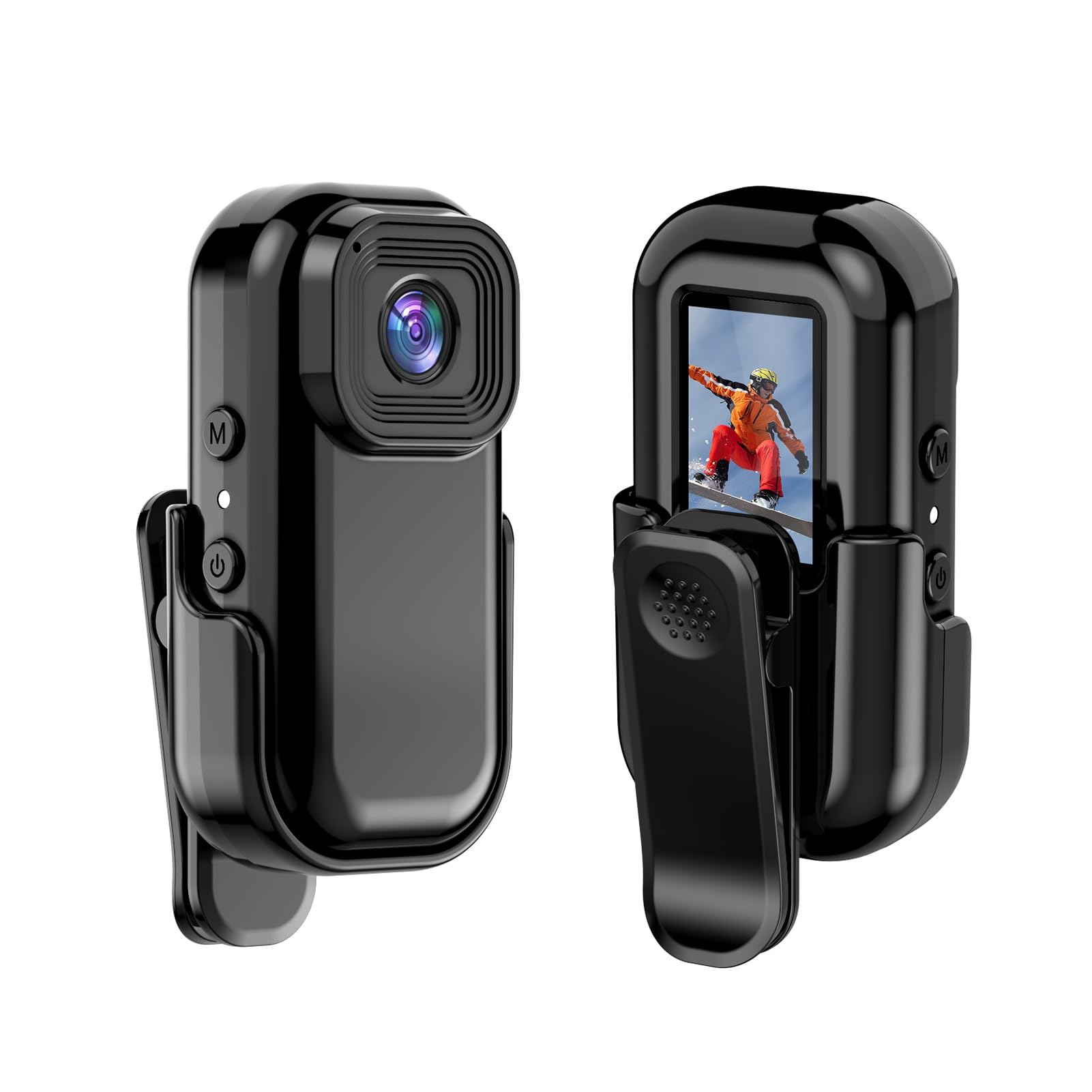
Сүрөт: алдыңкы жана арткы view of the Andoer Mini WiFi Action Camera L11, showing the lens and the 0.96-inch LCD screen.
2. Пакеттин мазмуну
Төмөндө тизмеленген нерселердин баары пакетиңизге камтылганын текшериңиз. Эгерде кандайдыр бир нерселер жок болсо же бузулса, кардарларды колдоо менен байланышыңыз.
- 1 x Andoer Mini WiFi Action Camera L11
- 1 x коргоочу капкак
- 1 x 1/4in Adapter Mount
- 1 x Back Clip Mount
- 1 х Картаны окугуч
- 1 x Type-C кабели
- 1 х Колдонуучунун колдонмосу (бул документ)
3. Продукциянын өзгөчөлүктөрү
- Жогорку сапаттагы видео: Records in 1080P at 30 frames per second, suitable for various applications including live broadcasting and video conferencing.
- Компакт жана көчмө: Super mini size allows for easy portability and discreet placement.
- Magnetic Body: Features a magnetic base for secure attachment to smooth metal surfaces.
- Seamless WiFi Connectivity: Connects wirelessly to a dedicated app for live view жана контролдоо.
- Ар тараптуу монтаждоо: Includes a 1/4-inch adapter mount and a back clip mount for diverse installation options.

Сүрөт: Мисamples of application scenarios for the camera, including parachute jumping, cycling, parent-child activities, and skiing.

Image: The camera being used as a portable video recorder in various outdoor activities like camping, cycling, climbing, and sports.
4. Орнотуу
4.1 Батареяны заряддоо
Before first use, fully charge the camera's built-in 400mAh battery. Connect the provided Type-C cable to the camera's USB port and the other end to a standard USB power adapter (5V, ≥1A). The charging indicator light will typically show the charging status and turn off or change color when fully charged.
4.2 Эстутум картасын салуу
The camera supports TF (Micro SD) cards up to 128GB. Ensure the card is formatted to FAT32 for optimal performance. Gently insert the TF card into the designated slot until it clicks into place. To remove, press the card in slightly until it springs out.
Note: A memory card is required for recording video and taking photos.
4.3 Күйгүзүү/өчүрүү
- Күйгүзүү үчүн: Press and hold the Power button (usually marked with a power symbol) for a few seconds until the screen illuminates.
- Өчүрүү үчүн: Press and hold the Power button again for a few seconds until the screen turns off.
5. Иштөө нускамалары
5.1 Негизги операция
The 0.96-inch color display provides visual feedback for modes and settings. Use the navigation buttons (if present, typically 'M' for Mode and another for selection/shutter) to cycle through options and confirm selections.
5.2 Видеону жаздыруу
In video mode, press the Shutter/Record button to start recording. Press it again to stop. Videos are saved in AVI format at 1920x1080P resolution. The camera supports loop recording with 3-minute segments.

Image: The camera's screen displaying a family scene, indicating video recording at 1920x1080P resolution.
5.3 Сүрөт тартуу
Switch to photo mode using the Mode button. Press the Shutter button to capture a still image. Photos are saved in JPG format.

Image: Icons representing photo, video, and audio recording modes, illustrating the camera's ability to capture various moments.
5.4 Кыймылды аныктоо
The camera features motion detection capabilities. Refer to the on-screen menu or the dedicated app for instructions on how to activate and configure this feature. When enabled, the camera will automatically begin recording when motion is detected within its field of view.
6. WiFi туташуу
The Andoer L11 camera supports wireless WiFi connectivity for remote control and live viewing via a smartphone application. Follow these general steps:
- Download the official Andoer camera app from your device's app store (iOS or Android).
- Power on the camera and activate its WiFi mode (refer to the camera's on-screen menu).
- On your smartphone, go to WiFi settings and connect to the camera's WiFi network (SSID and password will be displayed on the camera screen or in the app).
- Open the Andoer app. You should now see a live view from the camera and be able to control recording and settings remotely.

Image: A smartphone displaying a live view from the camera, demonstrating the WiFi connectivity feature.
7. Монтаждоо параметрлери
The Andoer L11 offers flexible mounting solutions:
- Магниттик орнотуу: The camera body has a magnetic feature, allowing it to be securely attached to smooth metal surfaces like refrigerator doors or metal poles.
- 1/4-inch Adapter Mount: Use the included 1/4-inch adapter mount to attach the camera to standard tripods, monopods, or other accessories with a 1/4-inch screw.
- Back Clip Mount: The back clip mount allows you to attach the camera to clothing, backpacks, or other thin objects for hands-free recording.
8. Техникалык тейлөө
- Тазалоо: Камеранын корпусун тазалоо үчүн жумшак, кургак чүпүрөктү колдонуңуз. Линза үчүн атайын линзаны тазалоочу чүпүрөктү жана эритмени колдонуңуз. Катуу химиялык заттардан алыс болуңуз.
- Сактагыч: Камераны салкын, кургак жерде күндүн тике тийген нурунан жана экстремалдык температурадан алыс сактаңыз.
- Батареяга кам көрүү: Узак мөөнөттүү сактоо үчүн, анын ден соолугун сактоо үчүн бир нече ай сайын аны болжол менен 50% га чейин кубаттаңыз.
- Программалык камсыздоонун жаңыртуулары: Check the official Andoer webоптималдуу иштешин жана жаңы мүмкүнчүлүктөрдү камсыз кылуу үчүн бардык жеткиликтүү микропрограммаларды жаңыртуу үчүн сайтка мезгил-мезгили менен.
9. Кыйынчылыктарды
| Көйгөй | Мүмкүн чечим |
|---|---|
| Камера күйбөйт. | Ensure the battery is fully charged. Connect to a power source and try again. |
| Видео жаздыруу/сүрөткө тартуу мүмкүн эмес. | Check if a TF card is inserted and properly formatted. Ensure there is sufficient storage space. |
| WiFi туташуу маселелери. | Ensure WiFi is enabled on the camera and your smartphone. Restart both devices. Verify the correct app is installed. |
| Poor video/image quality. | Ensure the lens is clean. Check lighting conditions. Verify camera settings are correct (e.g., resolution). |
| Камера катып калат же жооп бербей калат. | Perform a soft reset by holding the power button until it turns off, then restart. If persistent, remove and reinsert the memory card. |
10. Техникалык шарттар
| Өзгөчөлүк | Деталь |
|---|---|
| Машина түрү | L11 |
| Lens Angle | 140 градус |
| TFT дисплей | 0.96 дюймдук түстүү дисплей |
| Video Resolution | 1920 * 1080P |
| Батарея | 400mAh |
| Video File Формат | AVI |
| Фото формат | JPG |
| Loop Video | 3 мүнөт |
| Жаздыруу File Формат | WAV (Audio) |
| Иштөө нымдуулугу | 30% |
| Иштөө температурасы | -25тан + 75 ° Cге чейин (-13 дан + 167 ° F) |
| Электр камсыздоо | USB томtage 5V, ток ≥1A |
| Эстутум картасы | TF картасы, 128G чейин колдойт |
| Байланыш технологиясы | Wi-Fi |
| Форма фактору | Компакт |
| Элемент Салмагы | 4.2 унция (болжол менен 119 г) |
| Пакеттин өлчөмдөрү | 3.94 x 2.36 x 1.97 дюйм |
11. Коопсуздук маалыматы
- Do not expose the camera to extreme temperatures outside the specified operating range (-25°C to +75°C).
- Avoid operating the camera in humidity levels exceeding 30%.
- Keep the device away from water and other liquids unless explicitly stated as waterproof.
- Камераны бөлүктөргө бөлүүгө же өзгөртүүгө аракет кылбаңыз, анткени бул кепилдикти жокко чыгарып, зыян келтириши мүмкүн.
- Use only the specified power supply (USB 5V, ≥1A) for charging.
- Балдар жетпеген жерде сактаңыз.