
Introduction
This manual provides detailed instructions for the installation, operation, and maintenance of your MekedeTech Android Car Stereo. This unit is designed for Toyota RAV4 models from 2005 to 2013, offering an upgraded in-car entertainment and navigation experience.
Негизги өзгөчөлүктөр төмөнкүлөрдү камтыйт:
- Android 13 OS with 8-Core A53 1.8GHz CPU, 2GB RAM, and 32GB ROM.
- 9-inch IPS touch screen with 1280x720 resolution.
- Built-in Wireless CarPlay and Wired Android Auto for seamless smartphone integration.
- Integrated 4G LTE and WiFi module for internet connectivity.
- Built-in GPS navigation and maps.
- Support for original steering wheel controls.
- DSP sound system for enhanced audio quality.
- Bluetooth 5.0 for calls and music streaming.
Орнотуу жана орнотуу
The MekedeTech Android Car Stereo is designed for a plug-and-play installation in compatible Toyota RAV4 vehicles (2005-2013). It includes all necessary accessories such as a dash kit, power cable, RCA cable, reversing camera cable, and USB cables.
1. Орнотууга чейинки текшерүү
- Орнотууну баштоодон мурун унаанын от алдыруу өчүрүлгөнүн жана батареянын ажыратылганын текшериңиз.
- Verify all included components match the packing list.
- Унаанын учурдагы башкаруу панелинин жайгашуусу жана зымдары менен таанышып алыңыз.
2. Removing the Original Head Unit
Carefully remove the trim panels and screws securing the original head unit in your Toyota RAV4. Disconnect all wiring harnesses and antenna cables from the back of the original unit.

Image: Comparison showing the original car stereo (bottom left) and the MekedeTech Android Car Stereo installed (top and bottom right).
3. Жаңы баш блокту туташтыруу
- Connect the provided wiring harness from the MekedeTech stereo to the vehicle's factory wiring harness.
- Connect the GPS antenna, WiFi antenna, and 4G LTE antenna (if using a SIM card).
- If installing a reversing camera, connect its video and power cables to the designated inputs on the stereo.
- Тышкы түзмөктөр үчүн каалаган USB кабелдерин туташтырыңыз.
4. Cooling Fan Setup (If Applicable)
Some models include a cooling fan to manage internal temperatures. Follow these steps to ensure proper operation:
- Connect the cooling fan cable to the designated port on the main unit.
- Access the device settings: Go to Орнотуулар > Түзмөк > Үн.
- багыттоо Фабрика settings (password may be required, consult support if unknown).
- Табыңыз жана иштетиңиз AMP ON or Муздатуу желдеткич параметр.

Image: Visual guide for connecting the cooling fan and enabling it through the system settings.
5. Акыркы чогултуу жана сыноо
- Before fully reassembling the dashboard, reconnect the vehicle battery.
- Turn on the ignition and power on the stereo. Test all functions: audio, radio, GPS, Bluetooth, steering wheel controls, and camera inputs.
- If all functions operate correctly, proceed to reassemble the dashboard panels.
Иштөө нускамалары
1. Негизги навигация
- Сенсордук экран: Navigate through menus and applications by tapping, swiping, and pinching on the 9-inch IPS touch screen.
- Үй баскычы: Негизги Android үй экранына кайтып келет.
- Үндү көзөмөлдөө: Adjust volume using the physical buttons (if present) or on-screen controls.
- Рулдун башкаруу элементтери: The unit supports your vehicle's original steering wheel controls for functions like volume, track skip, and mode selection.
2. Зымсыз CarPlay жана Android Auto
Connect your smartphone wirelessly for access to navigation, music, messages, and more.
- Bluetooth иштетүү: On your phone and the car stereo, ensure Bluetooth is enabled.
- Түзмөктөрдү жупташтыруу: Издөө the car stereo's Bluetooth name on your phone and pair them.
- Launch Car Link: On the car stereo, open the "Car Link" application.
- Туташуу: Follow the on-screen prompts to establish a Wireless CarPlay (for iOS) or Wireless Android Auto (for Android) connection. Wired connection is also supported via USB.

Image: Step-by-step guide for connecting iOS devices via Wireless CarPlay and Android devices via Wireless Android Auto.
3. Internet Connectivity (4G LTE & WiFi)
The unit supports both 4G LTE via a SIM card and WiFi for internet access.
- 4G LTE: Insert a compatible 4G SIM card into one of the provided SIM card slots (one on the main unit, one on the RCA cable). The unit will automatically connect to the cellular network.
- WiFi: барыңыз Орнотуулар > Тармак жана Интернет > Wi-FiКаалаган тармагыңызды тандап, сырсөздү киргизиңиз.
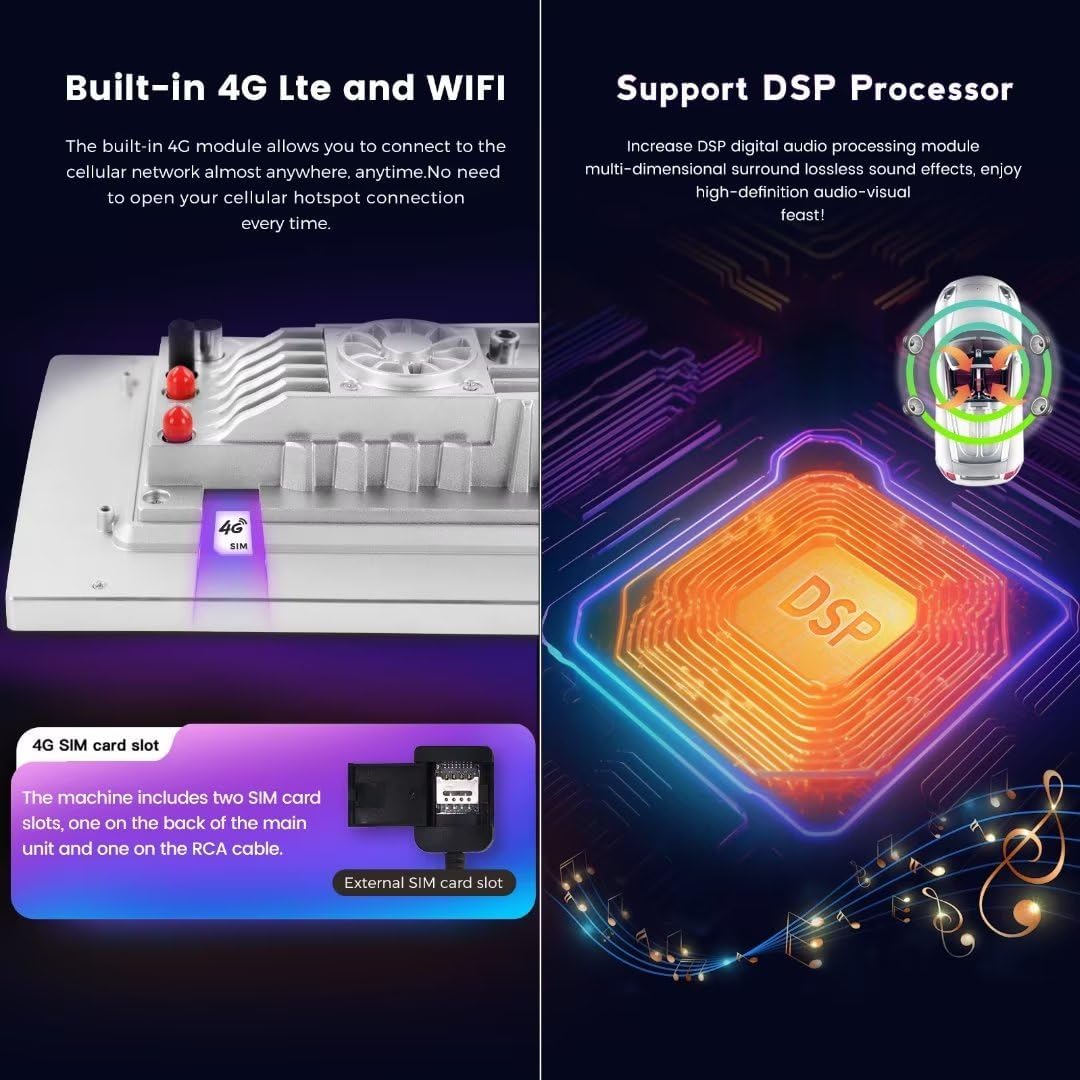
Image: Illustration of the 4G SIM card slot and the integrated DSP processor for audio enhancement.
4. GPS навигациясы
The stereo comes with built-in GPS navigation. Open the pre-installed navigation application (e.g., Google Maps, Waze) or download your preferred navigation app from the Google Play Store. Ensure the GPS antenna is properly installed for optimal signal reception.
5. Bluetooth функциялары
- Hands Free Чалуу: Стерео системадан түз чалууларды жасоо жана кабыл алуу үчүн телефонуңузду Bluetooth аркылуу жупташтырыңыз.
- Аудио агым: Play music from your phone through the car stereo's speakers.
Техникалык тейлөө
- Экранды тазалоо: Сенсордук экранды акырын сүртүү үчүн жумшак, түксүз чүпүрөктү колдонуңуз. өжөр тактар үчүн, бир аз гampчүпүрөккө суу же экранды тазалоочу каражат. Катуу химиялык заттардан алыс болуңуз.
- Программалык камсыздоо жаңыртуулары: Periodically check for system software updates via the settings menu (Орнотуулар > Түзмөк жөнүндө > Системанын жаңыртуулары). Keeping the software updated ensures optimal performance and access to new features.
- Жалпы кам көрүү: Аппаратты экстремалдык температурага, түз күн нуруна узак убакытка же ашыкча нымдуулукка дуушар кылуудан алыс болуңуз.
Проблемаларды чечүү
Күч жок
- Check the vehicle's fuse box for any blown fuses related to the stereo or accessory power.
- Ensure all power cables are securely connected to the stereo and the vehicle's wiring harness.
- Verify the vehicle battery is properly connected and charged.
Үн жок
- Стерео системанын үн деңгээлин текшерип, анын үнсүз эместигин текшериңиз.
- Динамиктердин туташууларынын коопсуз экенин текшериңиз.
- Ensure the correct audio source is selected (e.g., Radio, Bluetooth, CarPlay/Android Auto).
GPS сигналынын көйгөйлөрү
- Ensure the GPS antenna is properly installed and has a clear line of sight to the sky (e.g., mounted on the dashboard).
- Check the GPS settings within the stereo to ensure it is enabled and configured correctly.
CarPlay/Android Auto туташпай жатат
- Телефонуңузда да, стерео системаңызда да Bluetooth жана Wi-Fi иштетилгенин текшериңиз.
- Түзмөктү эки учун тең унутуп, кайра жупташтырып көрүңүз.
- Зымдуу туташуулар үчүн башка USB кабелин колдонуп көрүңүз.
- Update your phone's operating system and the stereo's software to the latest versions.
Бирдиктин ысып кетиши
- Ensure the cooling fan (if present) is properly connected and enabled in settings (refer to "Cooling Fan Setup" in the Setup section).
- Check for any obstructions around the unit that might impede airflow.
Техникалык шарттар
| Бренд | MekedeTech |
| Модел | 8-Core 2+32G |
| Операция системасы | Android 13 OS |
| CPU | 8 ядролуу A53 1.8 ГГц |
| Эс | 2 ГБ ОЗУ, 32 ГБ ROM |
| Screen Size | 9 дюйм |
| Резолюция | 1280 x 720 (IPS Touch Screen) |
| Power Output | 4*50 Вт |
| Байланыш | 4G LTE, WiFi, Bluetooth 5.0 |
| Өзгөчөлүктөр | Wireless CarPlay, Wired Android Auto, GPS Navigation, DSP Sound System, Steering Wheel Control Support |
| Шайкеш унаа | Toyota RAV4 (2005-2013) |
Кепилдик маалымат
This MekedeTech Android Car Stereo comes with a 1 жылдык кепилдик сатып алынган күндөн тартып. Бул кепилдик өндүрүштүк кемчиликтерди жана нормалдуу колдонуудагы бузулууларды камтыйт. Бул туура эмес орнотуу, туура эмес колдонуу, кырсыктар же уруксатсыз өзгөртүүлөрдөн келип чыккан зыянды камтыбайт.
Кепилдик дооматтары үчүн сатып алганыңыздын далилин сактап коюңуз.
Кардарларды колдоо
For technical assistance, troubleshooting not covered in this manual, or warranty inquiries, please contact MekedeTech customer support.
- Сатуучу: Mekedetech
- Онлайн колдоо: зыярат кылыңыз MekedeTech Store on Amazon for contact options and additional resources.
When contacting support, please have your product model number (8-Core 2+32G) and proof of purchase readily available.