
1. Киришүү
Thank you for choosing the MAIRDI M890DCBTENC Bluetooth Headset. This manual provides essential information for setting up, operating, and maintaining your headset to ensure optimal performance and longevity. Please read this manual carefully before using the product.

Image 1: MAIRDI M890DCBTENC Bluetooth Headset.
Негизги өзгөчөлүктөрү:
- Үзгүлтүксүз туташуу: Bluetooth V5.2 for stable and fast wireless connections.
- HD аудио: APTX and low latency technology for high-fidelity sound.
- AI Noise-Canceling Microphone: Dual-mic technology filters out 98% of background noise for crystal-clear calls.
- Узартылган батареянын иштөө мөөнөтү: Up to 40 hours of talk and music time on a single charge.
- Көп чекиттүү жупташуу: Connects to two devices simultaneously (e.g., PC/laptop and mobile phone).
- Comfort & Adjustability: 330-degree rotatable microphone boom, adjustable headband, and super soft leather ear cushions.
- Ар тараптуу заряддоо: Includes a charging stand with an in-built Bluetooth receiver for plug-and-play PC connectivity, or charge via USB cable.
2. Кутуда эмне бар
Upon opening your MAIRDI M890DCBTENC Bluetooth Headset package, you should find the following items:
- MAIRDI M890DCBTENC Bluetooth Headset
- Charging Base (with integrated Bluetooth receiver)
- USB заряддоо кабели
- Колдонуучунун колдонмосу
- Ташуу баштыкчасы
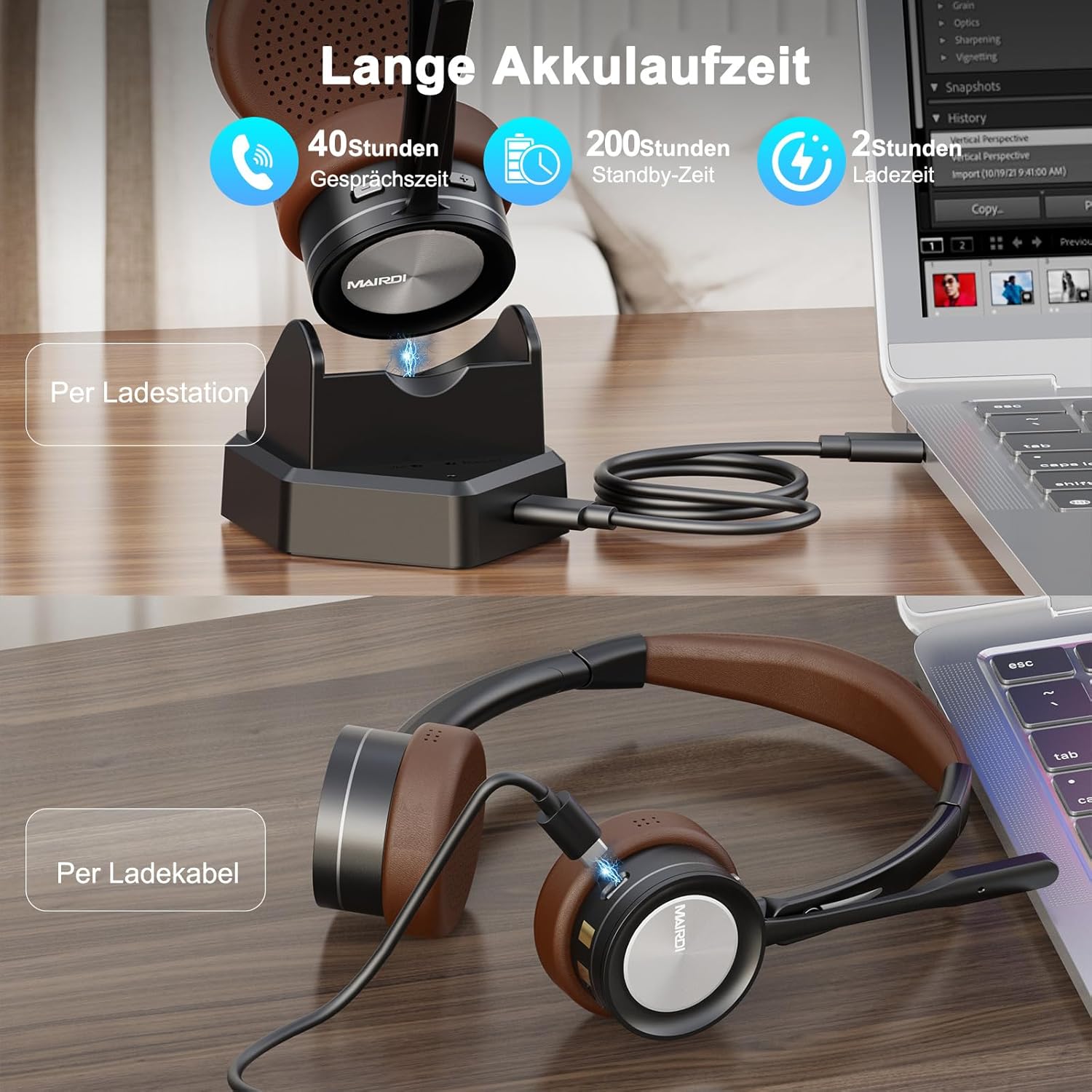
Image 2: The MAIRDI M890DCBTENC Headset with its charging base and USB cable.
3. Орнотуу
3.1 Алгачкы заряддоо
Before first use, fully charge your headset. Connect the USB charging cable to the charging base and a power source (e.g., computer USB port or wall adapter). Place the headset on the charging base. The indicator light will show charging status.

Image 3: The headset can be charged via the charging station or directly with the USB cable.
3.2 Түзмөккө туташуу
Your headset offers two primary connection methods: via the charging base (with integrated Bluetooth receiver) for PCs without Bluetooth, or directly via Bluetooth to any compatible device.
3.2.1 Connecting via Charging Base (for PC)
- Connect the charging base to your PC's USB port using the provided USB cable. The base acts as a plug-and-play Bluetooth receiver.
- Turn on the headset. It will automatically attempt to pair with the connected charging base.
- Once connected, your PC should recognize the headset as an audio device. Select it as your input/output device in your system's sound settings.
3.2.2 Connecting via Bluetooth (Direct)
- Ensure the headset is powered on and in pairing mode (usually indicated by a flashing LED).
- On your device (PC, laptop, Mac, smartphone), go to Bluetooth settings.
- Издөө available devices and select "MAIRDI M890DCBTENC" from the list.
- Once paired, the headset's LED indicator will show a steady light.

Image 4: The headset supports multipoint pairing, allowing simultaneous connection to a laptop and a smartphone.
3.3 Көп чекиттүү жупташтыруу
The headset supports connecting to two Bluetooth devices simultaneously. After pairing with the first device, put the headset back into pairing mode and connect to the second device. The headset will manage audio switching between the two connected devices.
4. Иштөө нускамалары
4.1 Күйгүзүү/өчүрүү
- Күйгүзүү үчүн, кубат которгучун "ON" абалына жылдырыңыз.
- Өчүрүү үчүн, кубат которгучун "OFF" абалына жылдырыңыз.
4.2 Чалууларды башкаруу
- Чалууга жооп берүү/аяктоо: Press the multi-functional button once.
- Чакырууну четке кагуу: Көп функциялуу баскычты 2 секунд басып, кармап туруңуз.
- Микрофондун үнүн өчүрүү: Press the mute button on the microphone boom. An audible prompt will indicate 'Mute On' or 'Mute Off'.

Image 5: The headset features a microphone with noise cancellation and a dedicated mute button.
4.3 Volume Control & Music Playback
- Үнүн жогорулатуу/төмөндөтүү: Кулакчындагы атайын үн баскычтарын колдонуңуз.
- Ойнотуу/тындыруу: Press the multi-functional button once.
- Кийинки трек: "Үндү катуулатуу" баскычын басып, кармап туруңуз.
- Мурунку трек: "Үндү азайтуу" баскычын басып, кармап туруңуз.
4.4 Микрофонду тууралоо
The microphone boom can be rotated 330 degrees to position it optimally for your voice or to move it out of the way when not in use. Ensure the microphone is positioned close to your mouth for best voice pickup and noise cancellation.

Image 6: The headset features a soft earpad, 330° rotatable microphone arm, and an adjustable headband for comfort.
4.5 Busy Light Indicator
The headset features a busy light indicator to signal to others when you are on a call or in a meeting, helping to minimize interruptions.
5. Техникалык тейлөө
To ensure the longevity and optimal performance of your MAIRDI M890DCBTENC headset, follow these maintenance guidelines:
- Тазалоо: Use a soft, dry cloth to clean the headset and charging base. Avoid using harsh chemicals or abrasive materials.
- Сактагыч: When not in use, store the headset in the provided carry pouch or on the charging base to protect it from dust and damage.
- Батареяга кам көрүү: Avoid fully discharging the battery frequently. Charge the headset regularly, even if not in daily use, to maintain battery health.
- Экологиялык шарттар: Do not expose the headset to extreme temperatures, humidity, or direct sunlight. Keep it away from water and other liquids.
6. Кыйынчылыктарды
Эгерде сиз гарнитураңыз менен көйгөйлөргө туш болсоңуз, төмөнкү кеңири таралган көйгөйлөрдү жана чечимдерди караңыз:
| Көйгөй | Мүмкүн чечим |
|---|---|
| Гарнитура күйбөйт. | Ensure the headset is fully charged. Connect it to the charging base or directly via USB cable. |
| Түзмөк менен жупташтыруу мүмкүн эмес. | Ensure the headset is in pairing mode (flashing LED). Turn off and on Bluetooth on your device. Move the headset closer to the device. Clear previous Bluetooth connections on your device. |
| Аудио жок же аудио сапаты начар. | Check volume levels on both the headset and your connected device. Ensure the headset is selected as the default audio input/output device. Re-pair the headset. |
| Микрофон иштебей жатат. | Ensure the microphone is not muted. Check that the headset is selected as the default microphone in your device's sound settings. Position the microphone boom correctly. |
| Батареянын иштөө мөөнөтү кыска. | Ensure the headset is fully charged before use. Battery life can vary based on usage patterns and volume levels. |
7. Техникалык шарттар
| Өзгөчөлүк | Деталь |
|---|---|
| Бренд | MAIRDI |
| Модель номери | M890DCBTENC |
| Түс | Күрөң |
| Байланыш технологиясы | Зымсыз (Bluetooth) |
| Bluetooth версиясы | 5.2 |
| Кулак жайгаштыруу | On Ear |
| Noise Control | Үн изоляциясы |
| Микрофон | AI Noise-Canceling, 330° Rotatable |
| Батареянын иштөө мөөнөтү (орточо) | 40 саат |
| Жыштык диапазону | 20 Гц - 20 000 Гц |
| Аудио драйвер түрү | Динамикалык драйвер |
| Башкаруу түрү | Үндү башкаруу, Пульт |
| Шайкеш түзмөктөр | PC, Laptop, Desktop, Mac, Smartphone, Cell Phone |
| Элемент Салмагы | 0.53 килограмм |
| Материал | Булгаары (кулак жаздыкчалары) |
8. Кепилдик жана колдоо
For warranty information and customer support, please refer to the official MAIRDI webсайтына кириңиз же сатуучуңузга кайрылыңыз. Кепилдик талаптары үчүн сатып алуунун далили катары сатып алуу дүмүрчөгүңүздү сактап коюңуз.
9. Продукт видеолору
Bluetooth Headset with Microphone for PC
Видео 1: Бүттүview of the MAIRDI Bluetooth Headset with Microphone for PC, highlighting its features and design.