
Introduction
Thank you for choosing the WalkerFit M6 Ultra Smartwatch. This device combines robust military-grade durability with advanced smart features, making it an ideal companion for both daily life and extreme outdoor activities. This manual will guide you through the setup, operation, and maintenance of your new smartwatch, ensuring you get the most out of its extensive capabilities.

The WalkerFit M6 Ultra Smartwatch, featuring a vibrant display and robust design, capable of tracking activities and managing calls.
Негизги өзгөчөлүктөрү
- Өтө туруктуулук: Built with a resistant metal casing, the M6 Ultra withstands extreme conditions, including salt fog, operational touches, wide temperature ranges (-40℉ to 158℉), 1-meter water resistance, and drops from up to 2 meters.
- Ультра узак батареянын иштөө мөөнөтү: Equipped with a 410 mAh pure cobalt battery, offering up to 2 weeks of normal use and an impressive 60 days in power-saving mode.
- 110+ машыгуу режимдери: Supports a wide range of professional fitness modes, accurately monitoring data such as heart rate, steps, and calories burned.
- Vibrant AMOLED Display: Features a 1.43-inch HD AMOLED always-on color screen with 1000 NIT brightness and 466x466 resolution for clear and vivid visuals, even under direct sunlight.
- All-Day Health Monitoring: Integrated high-precision sensors provide 24-hour heart rate tracking, blood oxygen (SpO2) measurement, and advanced sleep tracking.

The M6 Ultra boasts an extended battery life, providing up to 60 days in power-saving mode.

Explore over 110 sports modes, including outdoor cycling, running, walking, and hiking.

Comprehensive health monitoring includes continuous heart rate, SpO2, and advanced sleep tracking.

The 1.43-inch AMOLED display offers superior clarity and an always-on feature.
Орнотуу колдонмосу
1. Акылдуу саатыңызды кубаттоо
Before first use, fully charge your WalkerFit M6 Ultra. Connect the included magnetic charging cable to the charging contacts on the back of the watch and plug the USB end into a standard USB power adapter (not included). A full charge typically takes approximately 2 hours.
2. Колдонмону орнотуу
To unlock the full potential of your smartwatch, download the companion application to your smartphone. Издөө "WalkerFit" in your device's app store (Google Play Store for Android or Apple App Store for iOS).
3. Акылдуу саатыңызды жупташтыруу
- Смартфонуңузда Bluetooth иштетилгенин текшериңиз.
- Open the WalkerFit app and follow the on-screen instructions to create an account or log in.
- The app will guide you through the pairing process. Select "M6 Ultra" from the list of available devices.
- Смартфонуңузда да, акылдуу саатыңызда да жупташтыруу өтүнүчүн ырастаңыз.
Иштөө нускамалары
Негизги навигация
- Сенсордук экран: Swipe left/right to navigate between main functions, swipe up/down to access quick settings or notifications. Tap to select.
- Каптал баскычтары: The top button typically acts as a power/back button. The bottom button can be customized for quick access to a specific function (e.g., workout modes).
Телефондун иштеши
- Чалууларды жасоо: Once paired, you can dial numbers directly from the watch or select contacts from your synced phonebook.
- Чалууларды кабыл алуу: Answer or reject incoming calls directly from your wrist. The watch features a built-in speaker and microphone.
- AI Voice Commands: Utilize voice commands for hands-free control of calls, music playback, and other functions.
Фитнеске көз салуу
Access the 'Workout' menu to select from over 110 professional sports modes. The watch will track duration, calories burned, heart rate, and other relevant metrics for your chosen activity.
Ден соолук мониторинги
The M6 Ultra continuously monitors your heart rate. You can manually check your blood oxygen (SpO2) levels and view detailed sleep analysis reports through the companion app.
Ыңгайлаштыруу
Personalize your smartwatch by changing watch faces. Many options are available directly on the watch or can be downloaded via the WalkerFit app.
Техникалык тейлөө
Тазалоо
Саатты жана боону жумшак, кургак чүпүрөк менен үзгүлтүксүз сүртүңүз. Зарыл болсо, бир аз нымдуу чүпүрөк колдонуңуз.amp чүпүрөк, анан кылдат кургатуу. Катуу химиялык заттарды же абразивдүү материалдарды колдонуудан алыс болуңуз.
Сууга туруктуулук (IP68)
The M6 Ultra is IP68 water-resistant, meaning it can withstand immersion in water up to 1 meter for 30 minutes. It is suitable for daily use, hand washing, and light rain. However, it is not recommended for hot showers, saunas, or diving, as steam and hot water can compromise the seals.
Батареяга кам көрүү
To prolong battery life, avoid exposing the watch to extreme temperatures. Charge the device regularly and avoid letting the battery completely drain for extended periods.
Проблемаларды чечүү
| Көйгөй | Мүмкүн чечим |
|---|---|
| Саат күйбөй жатат. | Саат толук заряддалганын текшериңиз. Аны заряддагычка кеминде 30 мүнөт туташтырыңыз. |
| Смартфон менен жупташтыруу мүмкүн эмес. | Ensure Bluetooth is enabled on your phone. Restart both the watch and your phone. Clear the app's cache or reinstall the app. Ensure the watch is not already paired with another device. |
| Ден соолук көрсөткүчтөрүнүн туура эместиги. | Ensure the watch is worn snugly on your wrist, not too tight or too loose. Clean the sensor on the back of the watch. Avoid excessive movement during readings. |
| Батареянын иштөө мөөнөтү кыска. | Reduce screen brightness. Disable continuous heart rate monitoring if not needed. Limit notifications. Use power-saving mode. |
| Эскертмелер алынган жок. | Check app notification settings. Ensure the app is running in the background. Verify phone's notification permissions for the app. |
Техникалык шарттар
| Өзгөчөлүк | Деталь |
|---|---|
| Модель аты | M6 Ultra |
| Бренд | WalkerFit |
| Дисплей түрү | AMOLED |
| Screen Size | 1.43 дюйм |
| Резолюция | 466 x 466 пиксель |
| Батарея сыйымдуулугу | 410 mAh (Pure Cobalt) |
| Батареянын иштөө мөөнөтү (Кадимки колдонуу) | Up to 2 weeks (10-15 days) |
| Battery Life (Power Saving Mode) | 60 күнгө чейин |
| Сууга туруктуулук деңгээли | IP68 |
| Шайкеш түзмөктөр | Android devices, iOS devices |
| Өзгөчөлүктөр | Phone function, Fitness Tracker, Social Media Messages, Find My Phone, AI Voice Commands |
| Камтылган компоненттер | 1 Smartwatch, 1 User Manual, 1 Charging Cable, 1 Watch Box |
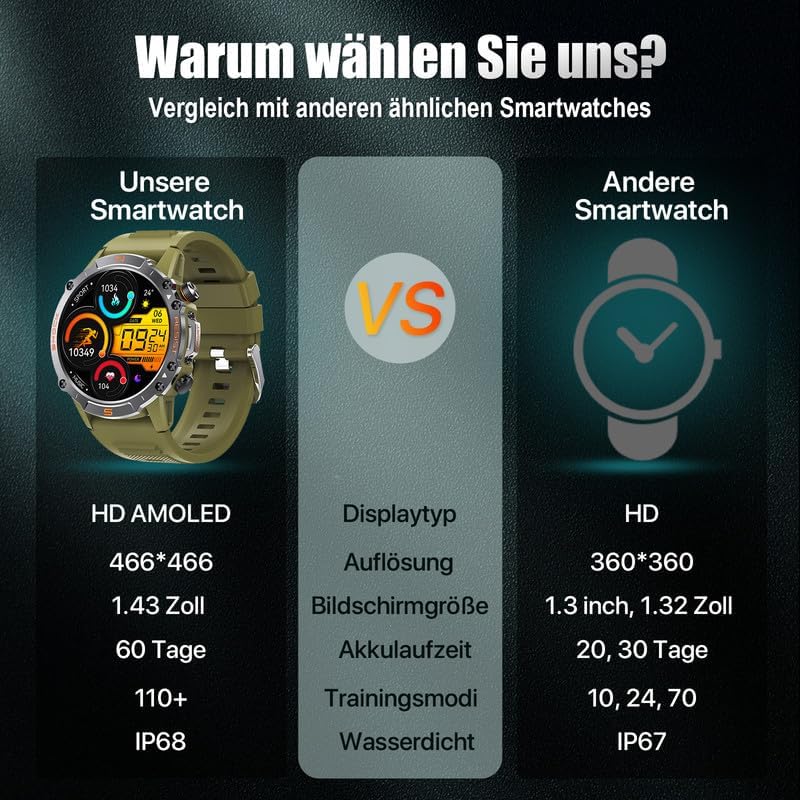
A comparison highlighting the superior specifications of the WalkerFit M6 Ultra.
Кепилдик жана колдоо
The WalkerFit M6 Ultra Smartwatch comes with a standard manufacturer's warranty. Please refer to the warranty card included in your product packaging for specific terms and conditions, including warranty duration and coverage details.
For technical support, troubleshooting assistance, or any inquiries regarding your WalkerFit M6 Ultra Smartwatch, please contact WalkerFit customer service through the contact information provided on the official WalkerFit webсайтында же коштомо тиркеменин ичинде.