
Introduction
This manual provides detailed instructions for the installation, operation, and maintenance of your DELLA 6000 BTU Window Air Conditioner. Please read this manual thoroughly before using the appliance and retain it for future reference.
Коопсуздук маалыматы
Өрт, электр тогуна урунуу жана адамдардын жаракат алуу коркунучун азайтуу үчүн электр шаймандарын колдонууда ар дайым негизги коопсуздук чараларын сактаңыз.
- Агрегаттын туура жерге туташтырылганын текшериңиз.
- Аппаратты бузулган шнур же сайгыч менен иштетпеңиз.
- Манжаларды же бөтөн нерселерди аба кирүүчү/чыгаруучу тешиктерине киргизбеңиз.
- Тазалоодон же техникалык тейлөөдөн мурун блокту электр розеткасынан сууруп алыңыз.
- Тез күйүүчү материалдарды аппараттан алыс кармаңыз.
Продукт бүттүview
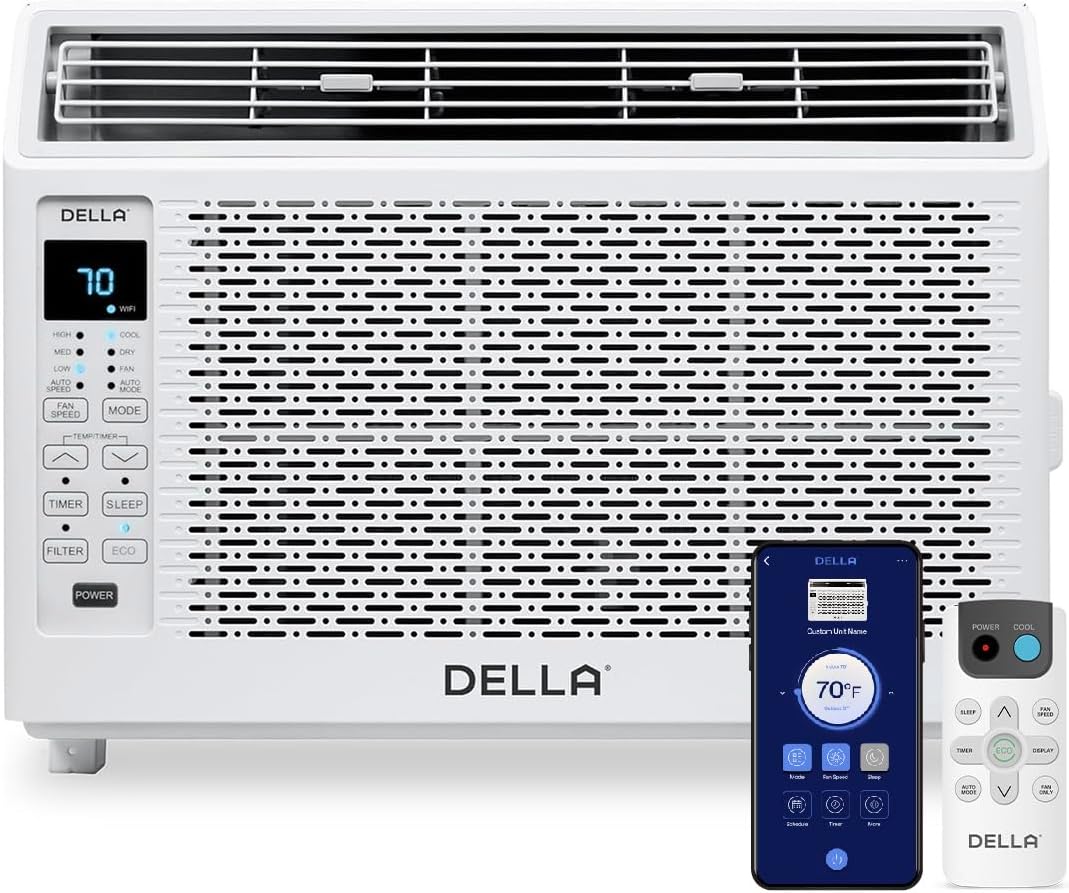
Figure 1: DELLA 6000 BTU Window Air Conditioner Unit, Remote Control, and Smartphone App Interface.
Башкаруу панели
The unit features an intuitive control panel with various buttons and indicator lights for easy operation.
- Кубат баскычы: Агрегатты күйгүзөт же өчүрөт.
- Режим баскычы: Cycles through Cool, Dry (Dehumidifier), Fan, Auto Mode, and ECO Mode.
- Желдетүүчү ылдамдык баскычы: Adjusts fan speed (High, Med, Low, Auto Speed).
- Temp/Timer Buttons: Adjusts temperature settings or sets timer.
- Уйку баскычы: Түнкүсүн тынч жана энергияны үнөмдүү пайдалануу үчүн уйку режимин иштетет.
- Чыпка баскычы: Фильтрди качан тазалоо керек экенин көрсөтөт.
- WiFi көрсөткүчү: Wi-Fi байланыш абалын көрсөтөт.
Алыстан башкаруу

Figure 2: Remote Control for the DELLA Air Conditioner.
The remote control allows for convenient operation of all unit functions from a distance. Ensure batteries are correctly installed.
Орнотуу
The DELLA 6000 BTU Window Air Conditioner features a T-design for simplified installation.
Орнотуу кадамдары

Figure 3: T-design installation allows for flexible window opening.

Figure 4: Simplified 3-step installation process.
- Step 1: Secure into window frame. Place the unit into the window opening, ensuring it is securely seated.
- Step 2: Mount with four screws. Fasten the unit to the window frame using the provided screws for stability.
- Step 3: Extend side panels into wall. Extend the accordion side panels to fill the gap between the unit and the window frame, providing insulation and reducing air leaks.
Орнотуу комплектинин компоненттери

5-сүрөт: Орнотуу комплектинин компоненттери кошулган.
The installation kit includes filler panels, insulation strips, lock frame & sash lock, screws, window sash seal, and a top mounting rail to ensure a secure and efficient installation.
Продукциянын өлчөмдөрү

Figure 6: Unit dimensions and recommended window opening.
The unit dimensions are approximately 15.94"D x 16.02"W x 12.05"H. It is designed for window widths between 23"-34" and requires at least 14.5" vertical clearance.
Иштөө нускамалары
Modes and Fan Speeds

Figure 7: Available operating modes and fan speeds.
The unit offers 5 operating modes (Cool, Auto, Dehumidify, Fan Only, ECO Mode) and 4 fan speeds (Auto, Low, Mid, High) to suit various comfort needs. Use the 'Mode' and 'Fan Speed' buttons on the control panel or remote to select your desired settings.
Температураны көзөмөлдөө
Use the up and down arrow buttons on the control panel or remote to set your desired temperature. The digital display will show the current setting.
Smart Features (Wi-Fi Control)

Figure 8: Control your unit wirelessly with the Della+ APP.

Figure 9: Della+ app supports Google Assistant and Alexa for voice control.
Download the free Della+ app to control your unit from anywhere. The app allows for remote control, scheduling, and integration with smart home systems like Google Assistant and Alexa.
Geo Location Function

Figure 10: Smart Geo Location feature for automatic operation.
The Geo Location feature allows the unit to automatically turn on or off based on your proximity to your home. This feature can be configured via the Della+ app.
Video 1: Demonstration of the Geo Location Function setup and customization within the Della+ app.
Уйку режими

Figure 11: Intelligent sleep mode adjusts temperature for optimal comfort.
Intelligent sleep mode automatically adjusts the temperature overnight to maintain comfort and save energy. Activate it using the 'Sleep' button.
Таймер функциясы
The 24-hour auto on/off timer allows you to program the unit to turn on or off at specific times, enhancing convenience and energy efficiency.
Техникалык тейлөө
Көп жолу колдонулуучу чыпкаларды тазалоо

Figure 12: The unit features a washable and reusable filter.
The unit is equipped with a washable and reusable filter. A clean filter helps maintain optimal cooling performance and air quality. When the 'Filter' indicator light illuminates, it's time to clean the filter.
- Кондиционерди өчүрүп, розеткадан ажыратыңыз.
- Алдыңкы панелди алып салыңыз жана аба чыпкасын жылдырыңыз.
- Чыпканы жылуу, самындуу суу менен жууңуз. жакшылап чайкоо.
- Фильтрди кайра салуудан мурун аны толугу менен кургатып алыңыз.
- Алдыңкы панелди алмаштырыңыз.
Жалпы кам көрүү
- Агрегаттын сыртын жумшак, гamp кездеме.
- Катуу химиялык заттарды же абразивдүү тазалоочу каражаттарды колдонбоңуз.
- Дренаждын аймагы тоскоолдуктардан таза болушун камсыз кылыңыз.
Проблемаларды чечүү
If you experience issues with your air conditioner, refer to the following common problems and solutions:
| Көйгөй | Мүмкүн себеп | Чечим |
|---|---|---|
| Түзмөк күйбөйт | Электр жок; автоматтык өчүргүч иштебей калган; блок розеткадан суурулган. | Электр менен камсыздоону текшериңиз; автоматтык өчүргүчтү кайра орнотуңуз; сайгычтын толук сайылганын текшериңиз. |
| Агрегат эффективдүү муздабай жатат | Dirty air filter; blocked air intake/outlet; room too large; windows/doors open. | Clean air filter; clear obstructions; ensure unit is sized correctly for room; close windows/doors. |
| Ызы-чуу операция | Loose parts; unit not level; fan obstruction. | Check for loose components; ensure unit is level; remove any fan obstructions. |
| Сыртта суу тамчылап жатат | Normal operation (condensation). | This is normal during cooling. Ensure proper drainage. |
Техникалык шарттар
| Өзгөчөлүк | Деталь |
|---|---|
| Бренд аты | Делла |
| Модел маалыматы | 048-TL-W6KWD |
| Продукциянын өлчөмдөрү | 15.94 x 16.02 x 12.05 дюйм |
| Элементтин моделинин номери | 048-TL-W6KWD |
| Натыйжалуулук | Энергияны үнөмдүү |
| Кубаттуулугу | 0.5 тонна |
| Ызы-чуу | 51 дБ |
| Орнотуу түрү | Терезе |
| Бөлүмдүн номери | 048-TL-W6KW_2 |
| Форма фактору | Терезе кондиционери |
| Өзгөчөлүктөр | Алыстан башкаруу |
| Тtage | 115 вольт (AC) |
| Ватtage | 517.5 ватт |
| Батареялар камтылганбы? | Жок |
| Кабат аянты | 250 чарчы фут |
| Муздатуу күчү | 6000 Британиянын жылуулук бирдиктери |
| BEE Star Rating | Ооба |
| Сезондук энергияны натыйжалуулук коэффициенти (SEER) | 11 |
| Power Source | Электр зымдары |
Кепилдик жана колдоо
Your DELLA 6000 BTU Window Air Conditioner comes with a 1 жылдык кепилдик. For any inquiries or technical assistance, Della provides 24/7 Кардарларды колдоо.
Сураныч, кириңиз Amazonдагы Della дүкөнү көбүрөөк маалымат алуу үчүн же колдоо бөлүмүнө кайрылыңыз.