
Introduction
This manual provides detailed instructions for the safe and effective use of your Andoer Portable Digital Camera. Please read this manual thoroughly before operating the device and retain it for future reference.
Пакеттин мазмуну
Төмөндө тизмеленген нерселердин баары пакетиңизге камтылганын текшериңиз:
- 1 x Andoer Digital Camera
- 1 32GB Memory Card х
- 1 x USB кабели (Type-C)
- 1 x Тазалоочу чүпүрөк
- 1 x Lanyard
- 1 x сактоо баштык
- 1 x User Manual
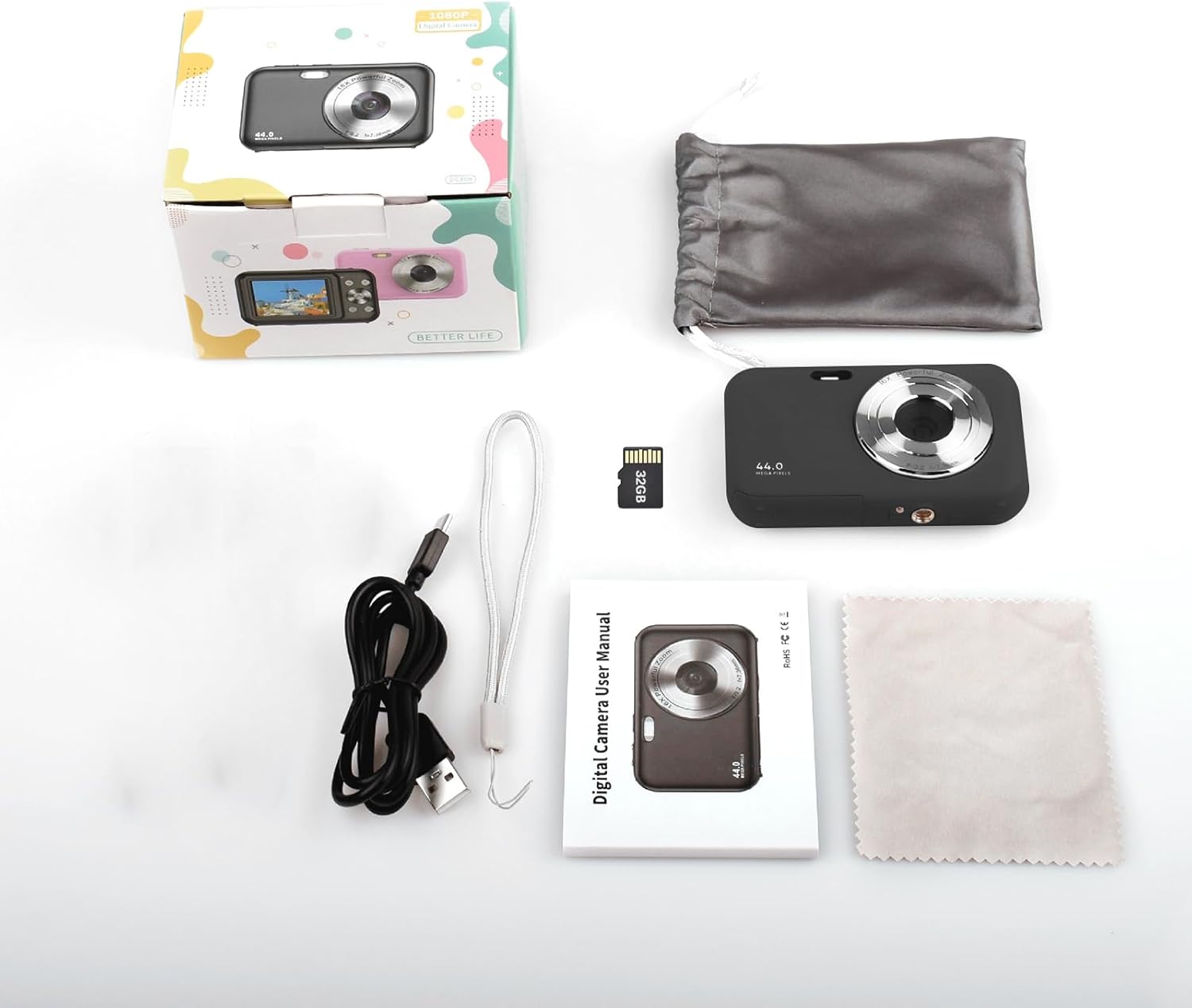
Image: Contents of the Andoer Digital Camera package.
Камера бүттүview
Камераңыздын ар кандай бөлүктөрүн жакшылап билип алыңыз.

Image: Multi-angle view of the Andoer Digital Camera, highlighting its compact design and button layout.
- Алдыңкы: Lens, Flash, Microphone.
- Жогорку: Power Button, Shutter Button.
- Артка: 2.4-inch IPS Screen, Navigation Buttons (Up, Down, Left, Right, OK), Menu Button, Mode Button, Zoom (W/T).
- тарап: USB Type-C Port.
- Төмөнкү: Battery/Memory Card Compartment.
Жайгашуу
1. Батареяны заряддоо
The camera is equipped with a built-in 700mAh rechargeable lithium battery. Before first use, fully charge the battery.
- Connect the included USB Type-C cable to the camera's USB port.
- USB кабелинин экинчи учун USB кубат адаптерине (кошумча эмес) же компьютердин USB портуна туташтырыңыз.
- Заряддоо индикаторунун жарыгы күйөт. Заряддоо аяктагандан кийин ал өчөт же түсүн өзгөртөт.
Эскертүү: The camera can be used while charging. A full charge provides approximately 150 minutes of continuous shooting or 90 minutes of video recording.

Image: Battery life information for the 700mAh battery.
2. Эстутум картасын салуу
The camera supports a 32GB memory card (included). Ensure the camera is powered off before inserting or removing the memory card.
- Камеранын ылдый жагындагы батарея/эстутум картасы бөлүгүнүн капкагын табыңыз.
- Капкакты ачыңыз.
- Insert the 32GB memory card into the designated slot with the metal contacts facing the correct direction (refer to the diagram inside the compartment if available) until it clicks into place.
- Бөлүмдүн капкагын бекем жабыңыз.
Маанилүү: Format the memory card in the camera's settings menu before first use to ensure optimal performance.
Иштөө нускамалары
1. Күйгүзүү / Өчүрүү
- Күйгүзүү үчүн, басып, кармап туруңуз Кубат баскычы on the top of the camera.
- Өчүрүү үчүн, басып туруңуз Кубат баскычы again. The camera also features an auto power-off function (configurable in settings).
2. Сүрөт тартуу
The camera captures photos up to 44MP resolution.
- Камераны күйгүзүңүз.
- Ensure the camera is in photo mode (indicated on the 2.4-inch IPS screen). If not, press the Режим баскычы которуу.
- Frame your shot using the IPS screen.
- басыңыз Жабык баскычы halfway down to focus, then press it fully to take the picture.

Сүрөт: Мисample of a high-resolution photo taken with the 44MP camera.
3. Видеолорду жаздыруу
The camera records videos in 1080P resolution.
- Камераны күйгүзүңүз.
- басыңыз Режим баскычы to switch to video recording mode.
- басыңыз Жабык баскычы to start recording. A red indicator will typically appear on the screen.
- басыңыз Жабык баскычы жазууну токтотуу үчүн дагы.

Сүрөт: Экран view during 1080P video recording.
4. Digital Zoom колдонуу
Камерада 16X санариптик масштаб бар.
- Сүрөт же видео режиминде басыңыз T (Telephoto) button кичирейтүү.
- басыңыз W (Wide-angle) button кичирейтүү үчүн.

Image: Comparison of 1x and 16x digital zoom effects.
5. Башка функциялар
- Авто таймер: Set a delay (e.g., 2s, 5s, 10s) before a photo is taken. Access this option in the camera's menu.
- Үзгүлтүксүз атуу: Take multiple photos in quick succession. This setting is also found in the menu.
- Чайкоочулукка каршы: Digital image stabilization helps reduce blur from camera movement. This feature is typically enabled by default or can be toggled in settings.
- Ойнотуу: басыңыз Ойнотуу баскычы (often indicated by a triangle icon) to view photos and videos. Use the navigation buttons to browse.
- Меню орнотуулары: басыңыз Меню баскычы to access various camera settings, including resolution, white balance, exposure, date/time, and formatting the memory card.
Өткөрүлүүдө Files to a Computer or Phone
You can transfer photos and videos from the camera to a computer or a mobile phone.
1. Via USB Cable (to Computer)
- Connect the camera to your computer using the provided USB Type-C cable.
- Камераны күйгүзүңүз.
- The camera should appear as a removable disk or media device on your computer.
- Open the camera's folder and copy the desired fileс компьютериңизге.
2. Via Memory Card Reader (to Computer/Phone)
For direct transfer from the memory card, you can use a card reader.
- Remove the memory card from the camera.
- Insert the memory card into a compatible card reader.
- Connect the card reader to your computer or mobile phone (via an OTG adapter if necessary).
- кирүү files on the memory card and transfer them.

Image: OTG usage diagram for transferring files from memory card to phone.
Техникалык тейлөө
- Камеранын корпусун тазалоо: Камеранын корпусун сүртүү үчүн жумшак, кургак чүпүрөктү колдонуңуз. өжөр кир үчүн, бир аз гampчүпүрөктү суу менен. Катуу химиялык заттардан алыс болуңуз.
- Линзаны тазалоо: Use the included cleaning cloth or a specialized lens cleaning cloth. Gently wipe the lens in a circular motion. Do not use abrasive materials.
- Экранга кам көрүү: The 2.4-inch IPS screen can be cleaned with a soft, lint-free cloth. Avoid pressing too hard.
- Сактагыч: When not in use for extended periods, store the camera in the provided storage bag in a cool, dry place, away from direct sunlight and extreme temperatures.
- Батареяга кам көрүү: Recharge the battery regularly, even if the camera is not used frequently, to maintain battery health. Avoid fully discharging the battery for long periods.
Проблемаларды чечүү
| Көйгөй | Мүмкүн себеп | Чечим |
|---|---|---|
| Камера күйбөйт. | Батарея түгөнүп калган же туура эмес салынган. | Батареяны толук кубаттаңыз. Батарея туура салынганын текшериңиз. |
| Сүрөткө тартуу/видео жаздыруу мүмкүн эмес. | Эстутум картасы толгон, салынбаган же бузулган. | Эстутум картасынын салынышын текшериңиз. Керексизин жок кылыңыз files or replace the card. Format the card (this will erase all data). |
| Сүрөттөр бүдөмүк. | Линза кир, жарык жетишсиз же камеранын титирөөсү. | Clean the lens. Ensure adequate lighting. Hold the camera steady or enable anti-shaking. |
| Камера катып калат же жооп бербей калат. | Программанын катасы же батареянын аздыгы. | Remove and reinsert the battery (if possible) or press and hold the power button for 10 seconds to force a shutdown. Recharge the battery. |
| Которуу мүмкүн эмес fileс компьютерге. | Туура эмес USB туташуусу же драйвер көйгөйү. | Ensure the USB cable is securely connected. Try a different USB port or computer. Check if the camera is recognized as a device. |
Техникалык шарттар
| Өзгөчөлүк | Деталь |
|---|---|
| Дисплей | 2.4 дюймдук IPS экраны |
| Video Resolution | 1080P/720P/480P |
| Сүрөттүн чечилиши | 44MP/42MP/36MP/24MP (Effective Still Resolution: 44 MP) |
| File Формат | JPG (Image), AVI (Video) |
| Электрондук масштаб | 16X |
| USB порту | Type-C |
| Батарея | 3.7V/ 700mAh Rechargeable Lithium Battery |
| Фокустун узундугу | f=7.36мм |
| Диафрагма | F/3.2 |
| Кубатты үнөмдөө | Auto power off in 1Min/2Mins/3Mins/4Mins/5Mins/10Mins |
| Колдоого алынган система | Windows XP, Vista, 7, 8, 10, Mac 10.2 and above |
| Эстутум сактоо сыйымдуулугу | 32 ГБ (кошулган) |
| Автофокус технологиясы | Контрастты аныктоо |
| Image Stabilization | Санарип |
| Жаш диапазонунун сүрөттөлүшү | Бала |
Кепилдик жана колдоо
For warranty information and technical support, please refer to the contact details provided with your purchase documentation or visit the official Andoer webсайт. Кепилдик дооматтар үчүн сатып алганыңыздын далилин сактаңыз.