
1. Продукт бүтүп калдыview
The Wantek 682NUSB/3.5mm Headset is designed for clear communication and comfortable use across various devices. It features a noise-cancelling microphone and multiple connectivity options for versatility.
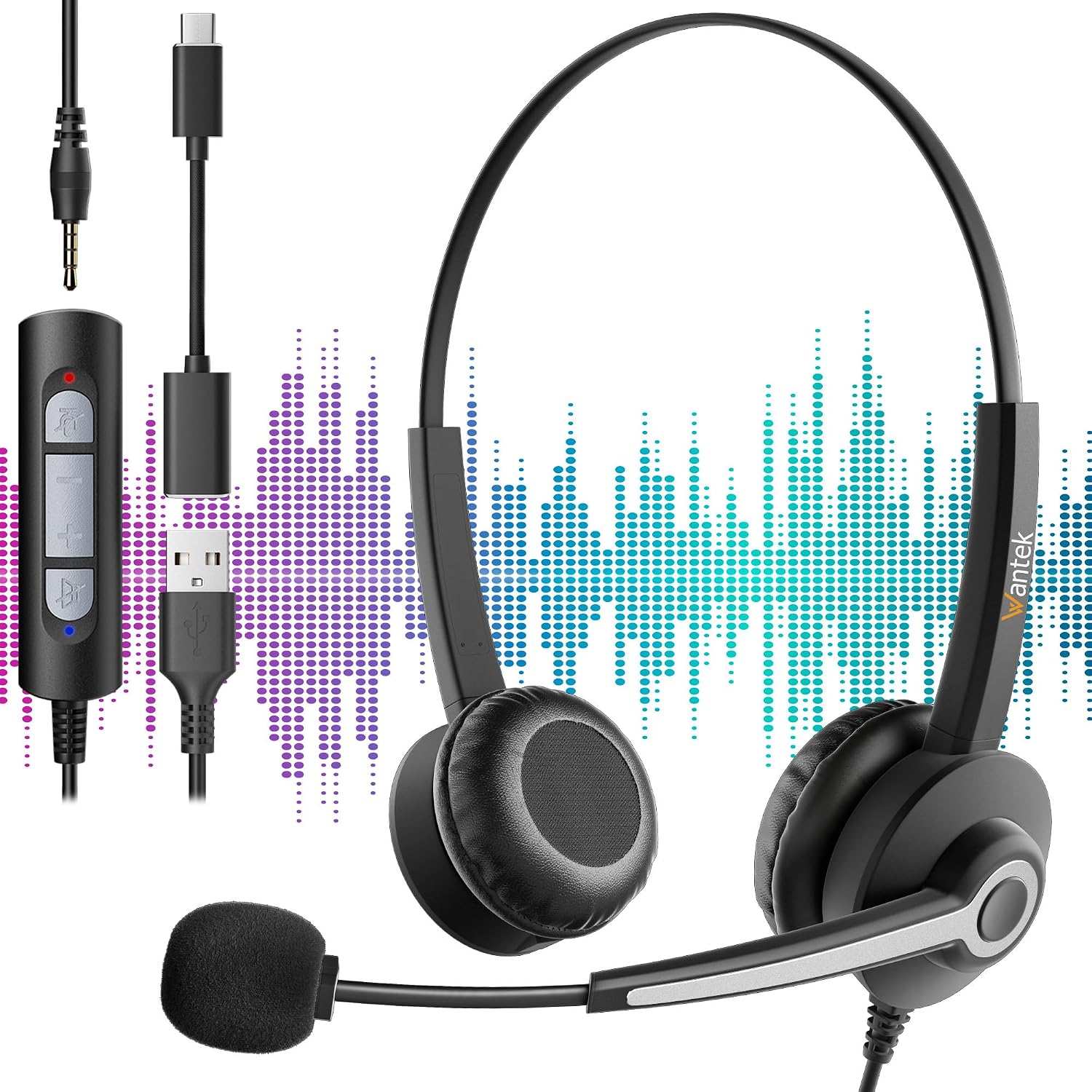
Figure 1: Wantek 682NUSB/3.5mm Headset with its 3.5mm, USB-A, and USB-C connectors, illustrating its multi-device compatibility.
2. Орнотуу жана туташуу
The headset offers flexible connectivity options to suit different devices.
2.1 3.5 мм уяча аркылуу туташтыруу
- Locate the 3.5mm audio jack on your device (e.g., smartphone, tablet, laptop).
- Insert the 3.5mm connector of the headset into the device's audio jack.
- Ensure the connection is secure. Your device should automatically detect the headset.
2.2 Connecting via USB-A or USB-C
- The headset includes adapters for USB-A and USB-C connectivity.
- Connect the 3.5mm jack of the headset to the appropriate USB adapter (USB-A or USB-C).
- Insert the USB-A or USB-C adapter into a compatible port on your computer or laptop.
- The device should recognize the headset as an audio input/output device. You may need to select it as the default communication device in your operating system's sound settings.
3. Иштөө нускамалары
3.1 Гарнитураны тагынуу
- Баш боону башыңызга ыңгайлуу тууралаңыз. Баш боону ар кандай өлчөмдөгү баштарга ылайыкташтырууга болот.
- Position the ear cushions over your ears. The cushions are made from soft, breathable synthetic leather for extended comfort.

Figure 2: Key features of the headset, including the adjustable headband, soft ear cushions, flexible microphone boom, and 270-degree microphone rotation.
3.2 Микрофонду тууралоо
- The microphone boom is flexible. Position it approximately 1-2 inches from your mouth for optimal voice pickup.
- The microphone arm can rotate 270 degrees, allowing you to position it on either your left or right side, or rotate it upwards and out of the way when not in use.
- The integrated noise-cancelling chip helps to reduce background noise, ensuring clear voice transmission.

Figure 3: Visual representation of the noise-cancelling technology, showing how it filters out background noise for clearer communication.
3.3 Сап ичиндеги башкаруу элементтери
The headset features an in-line control unit for easy management of calls and audio.
- Үнүн жогорулатуу/төмөндөтүү: Үндү тууралоо үчүн '+' жана '-' баскычтарын колдонуңуз.
- Чалууга жооп берүү/аяктоо: Press the call button to answer an incoming call or end an active call.
- Микрофондун үнүн өчүрүү: Press the microphone button to mute or unmute the microphone.
A small clip is attached to the cable to secure the control unit to your clothing, preventing it from dangling.
4. Техникалык тейлөө жана кам көрүү
- Тазалоо: Use a soft, dry cloth to wipe the headset. For ear cushions, a slightly damp кездемени колдонсо болот, бирок колдонуудан мурун алардын толугу менен кургак экенин текшериңиз. Катуу химиялык заттардан же абразивдүү тазалоочу каражаттардан алыс болуңуз.
- Сактагыч: Гарнитураны таза, кургак жерде, өтө жогорку температурадан жана түз күн нурунан алыс сактаңыз.
- Кабельге кам көрүү: Зыян келтирбөө үчүн кабелдерди кескин ийүүдөн же ашыкча тартуудан алыс болуңуз.
- Микрофон: Handle the microphone boom gently when adjusting its position.
5. Кыйынчылыктарды
5.1 Гарнитурадан үн чыкпайт
- Байланыштарды текшерүү: 3.5 мм уяча же USB адаптери түзмөккө толугу менен сайылганын текшериңиз.
- Үн деңгээли: Verify that the volume on the in-line control and on your device is not muted or set too low.
- Түзмөктүн жөндөөлөрү: For USB connections, check your computer's sound settings to ensure the headset is selected as the default playback device.
- Башка түзмөктө сыноо: Көйгөй гарнитурадабы же түпнуска түзмөктөбү, аныктоо үчүн гарнитураны башка түзмөккө туташтырып көрүңүз.
5.2 Микрофон иштебейт
- Үнсүз баскычын текшерүү: Ensure the microphone mute button on the in-line control is not activated.
- Микрофондун абалы: Verify the microphone boom is positioned correctly and not rotated out of the way.
- Түзмөктүн жөндөөлөрү: For USB connections, check your computer's sound settings to ensure the headset microphone is selected as the default recording device and that its input volume is adequate.
- Колдонмо орнотуулары: Some communication applications (e.g., Zoom, Skype) have their own microphone settings. Check these settings within the application.
6. Техникалык шарттар
| Өзгөчөлүк | Description |
|---|---|
| Модель номери | 682NUSB/3.5mm |
| Бренд | Wantek |
| Байланыш технологиясы | Зымдуу |
| Туташуу параметрлери | 3.5mm, USB-A (via adapter), USB-C (via adapter) |
| Шайкеш түзмөктөр | Gaming Console, Laptop, Tablet, Phone, Music Production Equipment |
| Микрофон | Noise-cancelling, 270-degree rotation, Flexible boom |
| Кулак жайгаштыруу | Supra-aural (On-Ear) |
| Импеданс | 1 Ом |
| Үн изоляциясы | Пассивдүү ызы-чууну азайтуу |
| Материалдар | Aluminum, Metal, Plastic, Polycarbonate (PC), Synthetic Leather |
| Камтылган компоненттер | Headset, USB-A Adapter, USB-C Adapter, User Manual |
| Сунушталган Колдонуулар | Professional use, Video Gaming, Call Center, Online Chat |
7. Кепилдик жана колдоо
Wantek products are designed for reliability and performance. For warranty information, please refer to the documentation included with your purchase or visit the official Wantek webсайт.
If you encounter any issues or require technical assistance, please contact Wantek customer support through their official channels. Have your product model number (682NUSB/3.5mm) and purchase details ready when contacting support.