
1. Киришүү
This manual provides detailed instructions for the safe and effective use of your Glazata R80-N Wireless Audio Receiver. Please read this manual thoroughly before using the product and retain it for future reference.
2. Продукт бүтүп калдыview

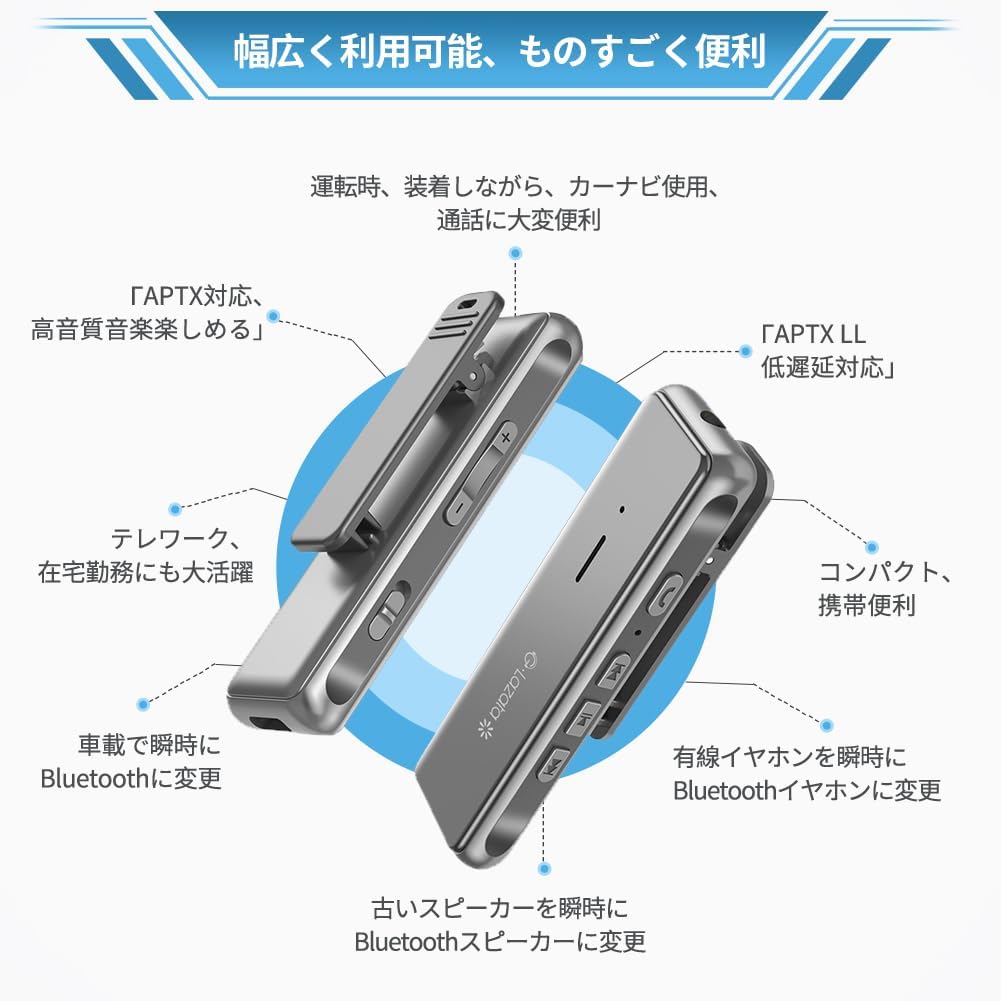
Сүрөт 2.1: Алдыңкы жана каптал view of the Glazata R80-N Wireless Audio Receiver, showing its compact design and control buttons.

Сүрөт 2.2: Detailed diagram of the Glazata R80-N receiver, labeling its buttons and ports such as volume controls, power switch, charging connector, 3.5mm jack, and multi-button.
2.1. Компоненттер
- Glazata R80-N Wireless Audio Receiver
- USB Type-C кубаттоочу кабель
- User Manual
2.2. Негизги өзгөчөлүктөрү
- Qualcomm Smart Chip: Equipped with a high-performance Qualcomm earphone amplifier chip for optimized audio performance.
- aptX & aptX-LL Support: Compatible with AAC and aptX codecs, including aptX Low Latency for reduced audio delay.
- MEMS High-Sensitivity Microphone: Integrated omnidirectional microphone for clear hands-free calls and reduced ambient noise.
- Зымсыз конверсия: Transforms non-Bluetooth audio devices (e.g., car audio, home stereos, wired headphones) into Bluetooth-enabled systems.
- Компакт жана көчмө: Lightweight design with a clip for easy attachment.
- Батареянын узак иштөө мөөнөтү: Extended standby, talk, and music playback times.
3. Орнотуу
3.1. Аппаратты заряддоо
Before first use, fully charge the receiver. Connect the supplied USB Type-C cable to the charging port on the receiver and the other end to a USB power source (e.g., computer, wall adapter). The LED indicator will show charging status.

Сүрөт 3.1: Illustration of the Glazata R80-N receiver's battery life and Type-C charging port.
3.2. Bluetooth түзмөгү менен жупташуу
- Ensure the receiver is charged and powered off.
- Жупташуу режимин көрсөтүүчү LED индикатору өчүп калганга чейин кубат баскычын басып, кармап туруңуз.
- On your smartphone, tablet, or other Bluetooth-enabled device, go to Bluetooth settings and search for new devices.
- Select "Glazata R80-N" from the list of available devices.
- Туташтырылгандан кийин LED индикатору туруктуу жарыкка өзгөрөт же жай күйөт.
3.3. Connecting to Wired Audio Devices
Plug your wired headphones, car AUX input, or home stereo's AUX input into the 3.5mm audio jack on the Glazata R80-N receiver.

Сүрөт 3.2: The Glazata R80-N receiver connected to a smartphone and wired earphones.
4. Иштөө нускамалары
4.1. Күйгүзүү/өчүрүү
- Күйгүзүү: LED индикатору күйгүчө кубат баскычын басып, кармап туруңуз.
- Өчүрүү: LED индикатору өчкөнчө кубат баскычын басып, кармап туруңуз.
4.2. Музыканы ойнотуу
- Ойнотуу/тындыруу: Көп функциялуу баскычты бир жолу басыңыз.
- Кийинки трек: Press the 'Next' button.
- Мурунку трек: Press the 'Previous' button.
- Көлөмү: '+' баскычын басыңыз.
- Үнүн азайтуу: '-' баскычын басыңыз.
4.3. Чалууларды башкаруу
- Чакырууга жооп берүү: Көп функциялуу баскычты бир жолу басыңыз.
- Чакырууну аяктоо: Чалуу учурунда көп функциялуу баскычты бир жолу басыңыз.
- Чакырууну четке кагуу: Көп функциялуу баскычты басып, кармап туруңуз.
- Акыркы номерди кайра терүү: Көп функциялуу баскычты эки жолу басыңыз.

Сүрөт 4.1: Using the receiver for telework or online learning.

Сүрөт 4.2: Using the receiver for hands-free calls or car navigation.
Сүрөт 4.3: Receiver use during mobile gaming for enhanced audio and communication.
5. Техникалык тейлөө
- Keep the device dry. Moisture can damage the internal circuits.
- Аппаратты экстремалдуу температурага дуушар кылбаңыз.
- Аппаратты жумшак, кургак чүпүрөк менен тазалаңыз. Катуу химиялык заттарды же абразивдүү тазалагычтарды колдонуудан алыс болуңуз.
- Store the device in a clean, dust-free environment when not in use.
6. Кыйынчылыктарды
6.1. No Sound After Connecting
- Ensure the receiver is properly paired with your device.
- Ресивердеги жана туташкан түзмөгүңүздүн үнүнүн деңгээлин текшериңиз.
- Verify that your smartphone or PC's operating system is up to date.
- In your Bluetooth settings, ensure that "Phone audio" and "Media audio" are enabled for the Glazata R80-N.

Сүрөт 6.1: Bluetooth settings for enabling audio output.
6.2. Call Functionality with Apps (e.g., LINE)
When making calls through certain communication applications (e.g., LINE), incoming call notifications may be heard through the earphones. However, functions such as microphone control, volume adjustment, answering calls, or hanging up may need to be managed directly from your smartphone, not the headset buttons. This is due to the software design of the application itself, not a defect in the earphone or receiver. This behavior is common across many wireless headsets.

Сүрөт 6.2: Information regarding call functionality with specific applications.
6.3. Башка маселелер
- Connection Instability: Ensure there are no obstructions between the receiver and the paired device. Reduce the distance between devices.
- Начар аудио сапаты: Confirm that your source device supports aptX for optimal sound. Ensure the wired earphones are fully plugged into the receiver.
- Түзмөк жооп бербейт: Try resetting the device by powering it off and on. If issues persist, ensure the battery is charged.
7. Техникалык шарттар
| Өзгөчөлүк | Деталь |
|---|---|
| Бренд | Глазата |
| Модель номери | R80-N |
| Байланыш технологиясы | Bluetooth |
| Шайкеш түзмөктөр | Speakers, Smartphones, Tablets |
| Аудио чыгаруу түрү | Баяндамачы |
| Өзгөчөлүктөр | Built-in Bluetooth, MEMS High-Sensitivity Microphone, aptX/aptX-LL Support |
| Башкаруу ыкмасы | Алыстан |
| Батареялар камтылган | Ооба |
| Батареялар талап кылынат | Ооба |
| Түс | Боз |
| Продукциянын өлчөмдөрү | 11.6 x 9.1 x 2.7 см; 100 г |
8. Коопсуздук маалыматы
- Аппаратты демонтаждабаңыз, оңдоого же өзгөртүүгө болбойт.
- Аппаратты суудан, оттон жана жогорку температурадан алыс кармаңыз.
- Батареяларды жана аппаратты жергиликтүү эрежелерге ылайык жок кылыңыз.
- Угуу жөндөмүнө зыян келтирбөө үчүн катуу үн деңгээлинде көпкө угуудан качыңыз.
9. Кепилдик жана колдоо
For warranty information and customer support, please refer to the contact details provided with your purchase or visit the official Glazata webсайт. Кепилдик дооматтары үчүн сатып алганыңыздын далилин сактап коюңуз.