
Introduction
Thank you for choosing the VENTY Portable Fan. This wireless, battery-operated fan is designed for ultimate portability and convenience, featuring 4 fan speeds, integrated LED lighting, and a remote control. It is perfect for travel, home, office, or outdoor use, and can also function as a power bank for your devices.
This manual provides essential information for the safe and efficient operation of your VENTY Portable Fan. Please read it thoroughly before use and retain it for future reference.

Image: The VENTY Portable Fan in its compact form, alongside its remote control and protective carry case.
Жайгашуу
Кутудан чыгаруу жана алгачкы текшерүү
Your VENTY Portable Fan comes pre-assembled and stored within its protective carry case. Carefully remove the fan and accessories from the packaging. Inspect all components for any signs of damage. If any parts are missing or damaged, please contact customer support.
Күйөрманды кубаттоо
Before first use, fully charge the fan. The VENTY fan features a 16,000 mAh battery, providing up to 48 hours of operation on a single charge, and doubles as a power bank.
- Locate the USB-C charging port on the fan's base. This is an upgraded single port for both input (charging the fan) and output (charging other devices).
- Use one of the included USB cables (USB-C to A or USB-C to C).
- Connect the cable to a compatible power adapter. For optimal charging, it is recommended to use a single-port charger, such as an Apple or Android charger, ideally a 27W Power Delivery (PD) type.
- Кубат адаптерин дубалдагы розеткага сайыңыз.
- Заряддоо учурунда желдеткичти колдонсо болот.
Маанилүү заряддоо эскертүүлөрү:
- Avoid using multi-USB adapters or USB outlets for charging the fan.
- Do not use extension cords for charging.
- Using an underpowered charger (e.g., 5W) will significantly increase charging time.
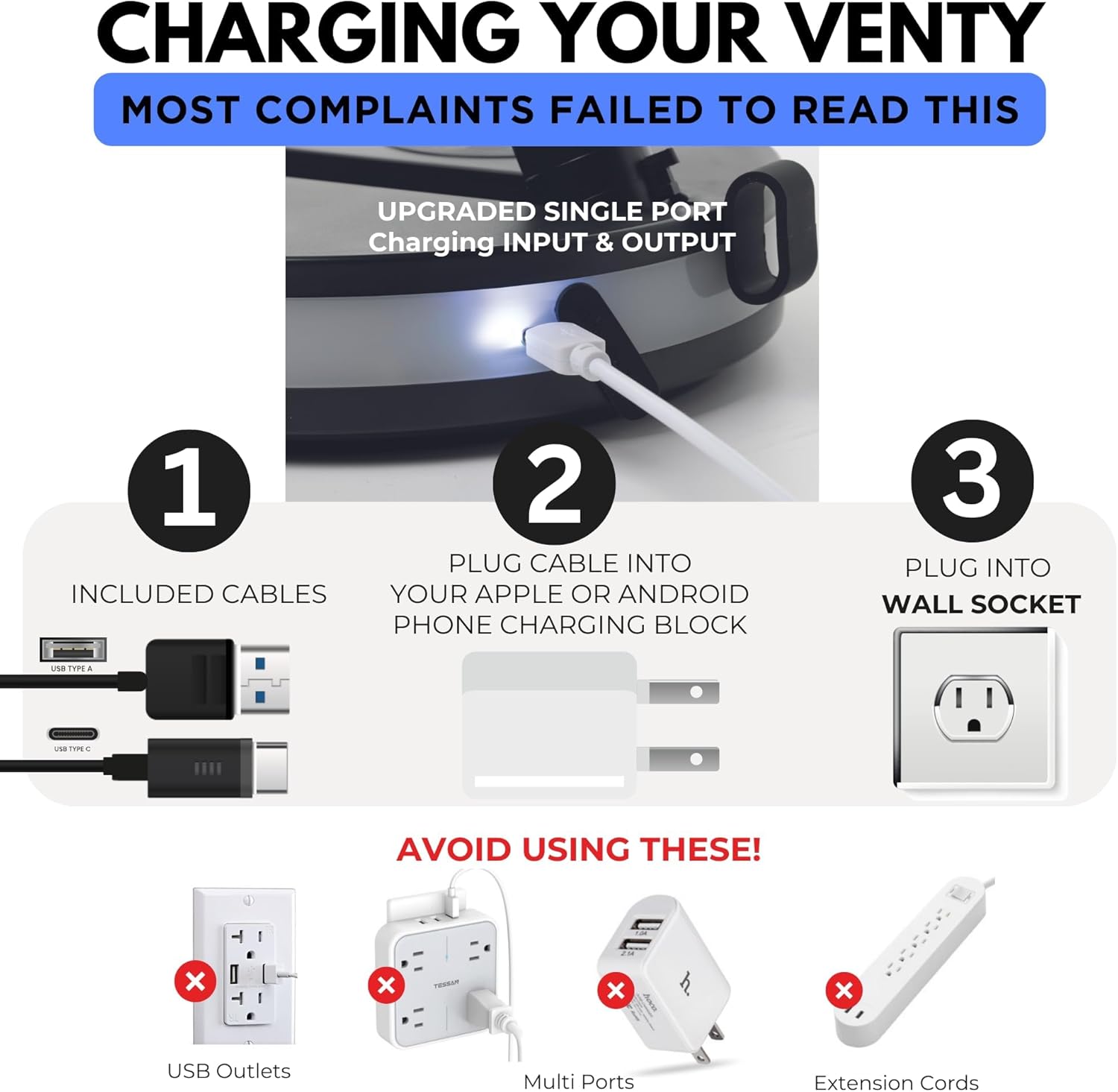
Image: Visual guide for charging the VENTY fan, highlighting the single USB-C port and advising against multi-port chargers or extension cords.
Adjusting Fan Height and Orientation
The VENTY fan is designed to be highly adjustable, extending and folding for various uses.
- Бүктөө/ачуу: The fan folds compactly to 3.5 inches (9 cm) for storage and transport. To unfold, gently extend the telescopic stand.
- Бийиктигин тууралоо: The fan can extend to over 3 feet (91 cm) in height. Pull the telescopic stand upwards to achieve the desired height.
- Бурчту тууралоо: The fan head can be manually tilted to direct airflow as needed.

Image: The fan's extendable and foldable design, demonstrating its compact storage and full height capabilities.
Иштөө нускамалары
Controls Overview
The VENTY fan can be operated using the touch controls on its base or the included wireless remote control.

Image: The fan's control panel and remote, illustrating the various function buttons.
Күйгүзүү/өчүрүү
- On Fan Base: Кубат сөлөкөтүн басыңыз (⏻) желдеткичти күйгүзүү же өчүрүү үчүн.
- On Remote: Press the 'ON' or 'OFF' button.
Күйөрмандар ылдамдыгын тууралоо
The fan has 4 adjustable speed settings.
- On Fan Base: Repeatedly press the fan speed icon (⏻) to cycle through speeds 1 to 4.
- On Remote: Use the '+' and '-' buttons to increase or decrease the fan speed incrementally.

Сүрөт: бүттүview of the fan's four power speeds and other specifications.
Термелүү функциясы
The fan offers a 120° oscillation feature to distribute airflow across a wider area.
- On Fan Base: Press the oscillation icon (⟳) to turn oscillation on or off.
- On Remote: Термелүү баскычын басыңыз (⟳).

Image: Visual representation of the fan's 120° oscillation capability.
LED жарыктандыруу
The fan base features warm 3-level LED ambient lighting.
- On Fan Base: Лампочка сүрөтчөсүн басыңыз (💡) to cycle through the 3 brightness levels or turn the light off.
- On Remote: Лампочка баскычын басыңыз (💡) to cycle through brightness levels.

Image: The fan's LED lighting feature providing ambient illumination in a room.
Power Bank катары колдонуу
The VENTY fan's 16,000 mAh battery can be used to charge other devices.
- Connect your device's charging cable to the USB-C port on the fan's base.
- The fan will begin charging your device.

Image: The fan's power bank functionality, charging a smartphone via its USB-C port.
Техникалык тейлөө
Желдеткичти тазалоо
Regular cleaning ensures optimal performance and extends the life of your fan.
- Ensure the fan is turned off and unplugged from any power source before cleaning.
- To clean the fan blades, twist the front face plate counter-clockwise to remove it. This mechanism is tool-less for easy access.
- Wipe the fan blades and the inside of the grille with a soft, damp кездеме. Абразивдүү тазалагычтарды же эриткичтерди колдонбоңуз.
- Wipe the exterior of the fan with a dry or slightly damp кездеме.
- Once clean and dry, align the face plate and twist clockwise to secure it back in place.
Сактагыч
When not in use, fold the fan into its compact form and store it in the included hard shell carry case. This protects the fan from dust and damage, making it ideal for travel.

Image: The VENTY fan compactly stored within its dedicated travel case.
Проблемаларды чечүү
If you encounter issues with your VENTY Portable Fan, please refer to the following common problems and solutions:
| Көйгөй | Мүмкүн себеп | Чечим |
|---|---|---|
| Желдеткич күйбөйт. | Батарея түгөнүп калды. | Charge the fan fully using a compatible charger and wall socket. |
| Fan does not charge. | Incorrect charger or power source used. | Ensure you are using a single-port wall charger (e.g., 27W PD type) directly into a wall socket. Avoid multi-port adapters or extension cords. |
| Батареянын иштөө мөөнөтү кыска. | Fan is consistently used on high speed settings. | Battery life is reduced at higher fan speeds. Use lower speeds for extended operation. Ensure the fan is fully charged before use. |
| Алыстан башкаруу жооп бербей жатат. | Remote battery depleted or obstruction. | Ensure there is no obstruction between the remote and the fan. The remote is magnetically attached to the fan base; ensure it is properly seated or try using it detached. (Note: The remote does not use replaceable batteries, it charges with the fan). |
| Желдетүүчү адаттан тыш үн чыгарат. | Obstruction in fan blades or dirty blades. | Turn off and unplug the fan. Remove the front grille and clean the blades. Check for any foreign objects. |
Техникалык шарттар
| Өзгөчөлүк | Деталь |
|---|---|
| Бренд | VENTY |
| Модель аты | Ventyfan |
| Модель номери | 2022 |
| Түс | Кызыл |
| Power Source | Батарея менен иштейт |
| Батарея түрү | 1 Литий Полимер (кошулган) |
| Батарея сыйымдуулугу | 16,000 мАч (болжол менен) |
| Күйөрмандардын ылдамдыгы | 4 |
| Термелүү | 120° |
| LED жарык | 3-level warm ambient light |
| Башкаруу ыкмасы | Пульт, сенсордук башкаруу |
| Продукциянын өлчөмдөрү (бүктөлгөн) | 8"D x 8"W x 3.5"H (болжол менен) |
| Продукциянын өлчөмдөрү (кеңейтилген) | 8"D x 8"W x 36"H (болжол менен) |
| Элемент Салмагы | 2.64 фунт (1.2 килограмм) |
| Тtage | 5 вольт |
| Камтылган компоненттер | Fan, Remote, Carry Case, USB-C to A Cable, USB-C to C Cable |
| Ички/тышкы колдонуу | Indoor |
| UPC | 860011698418 |
Кепилдик жана колдоо
For any questions, concerns, or support needs regarding your VENTY Portable Fan, please contact our customer service team. Our team is based in Las Vegas and ready to assist you.
Кепилдик боюнча конкреттүү маалымат алуу үчүн сатып алуу документтерин караңыз. Кепилдик боюнча дооматтар үчүн сатып алууну тастыктаган документти сактап коюңуз.