
ROCAM ROCAM-CR1009Ultra
ROCAM 12000mAh авариялык радио колдонуучунун колдонмосу
Model: ROCAM-CR1009Ultra
Introduction
The ROCAM 12000mAh Emergency Radio is a versatile and essential device designed for emergency preparedness and outdoor activities. It combines multiple critical functions including AM/FM/SW/NOAA weather radio, a powerful flashlight, a reading lamp, an SOS siren, and a portable power bank. With multiple charging options, this radio ensures you stay informed and connected during power outages, severe weather, and other emergencies.

Figure 1: ROCAM 12000mAh Emergency Radio (Army Green)
Коопсуздук маалыматы
- Түзмөктү узак убакыт бою өтө жогорку температурага же түз күн нуруна дуушар кылбаңыз.
- Keep the device away from water and high humidity, except for its IPX6 waterproof rating which protects against strong jets of water. Do not submerge.
- Радиону бөлүктөргө бөлүүгө же өзгөртүүгө аракет кылбаңыз. Бул кепилдикти жокко чыгарып, коопсуздук коркунучтарын жаратышы мүмкүн.
- Use only the provided Type-C cable for charging or a certified equivalent.
- Ашыкча ысып кетүүнүн алдын алуу үчүн заряддоо учурунда жакшы желдетүүнү камсыз кылыңыз.
- Балдар жетпеген жерде сактаңыз.
Пакеттин мазмуну
Сураныч, пакетте төмөнкү нерселерди текшериңиз:
- 1x ROCAM Emergency Radio
- 1x Type-C кабели
- 1x Built-in 12000mAh Rechargeable Battery (pre-installed)
- 1x Portable Hand Strap
- 1x Hang Buckle (Carabiner)
- 1x Колдонуучунун колдонмосу
Продукт бүттүview
The ROCAM Emergency Radio is designed with user-friendly controls and multiple functionalities for various situations.

Figure 2: Key Features of the ROCAM Emergency Radio
Негизги өзгөчөлүктөрү:
- 12000mAh кайра заряддалуучу батарея: Provides extended operation and serves as a power bank for external devices.
- AM/FM/SW/NOAA Radio: Wide band reception for news, entertainment, and critical weather alerts.
- AUTO NOAA Weather Alert: Automatically monitors 7 NOAA weather stations and alerts with a loud siren, red warning light, and flashing WX icon for severe weather.
- 5 Кубаттоо параметрлери:
- USB Type-C заряддоо
- Кол кранынын кубаттуулук өндүрүүсү
- Күн панелин заряддоо
- Камтылган 12000mAh кайра заряддалуучу батарея
- 3x AAA Батарея (киргизилген эмес)

Figure 3: Multiple Charging Options
- Bright Flashlight & Reading Lamp:
- 3W flashlight illuminates up to 230 feet for 50-70 hours.
- 2.5W reading lamp illuminates a 20㎡ area for 50-70 hours.
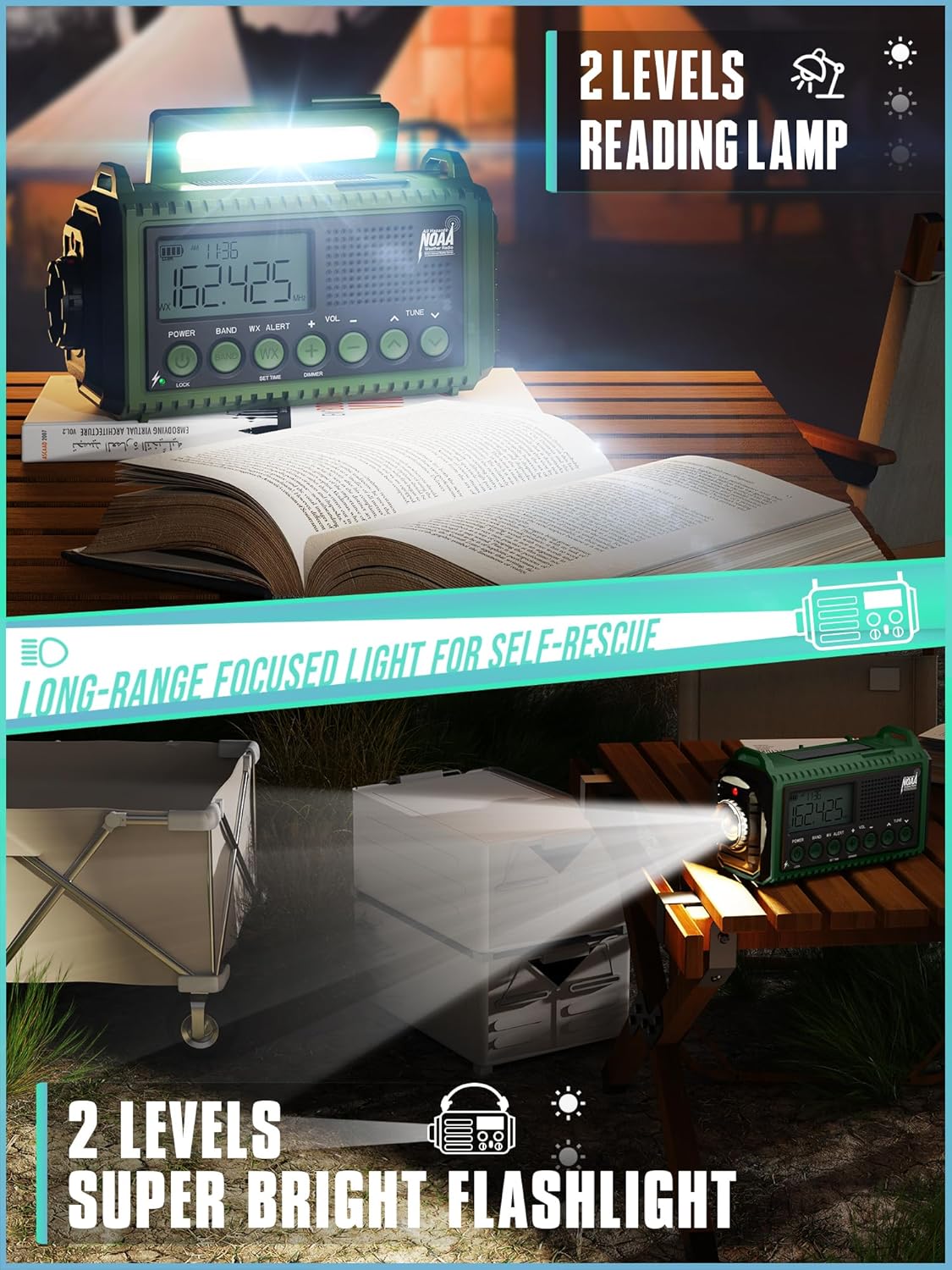
Figure 4: Flashlight and Reading Lamp Функционалдык
- Loud 116dB SOS Alarm: Шашылыш сигнал берүү үчүн.
- Large HD LCD Screen: Displays time, battery level, and alerts with a backlight and power-saving mode.
- IPX6 Суу өткөрбөйт: Protected against strong water jets, suitable for outdoor use.
- Портативдик дизайн: Compact (6.8 × 3.7 × 2.9 inches, 1.3 lbs) with lanyard and carabiner for easy transport.
- 3.5 мм гарнитура уячасы: Жеке угуу үчүн.
Жайгашуу
1. Алгачкы кубаттоо:
Before first use, fully charge the radio's built-in 12000mAh battery using the provided Type-C USB cable. Connect the Type-C end to the radio's charging port and the USB-A end to a compatible USB power adapter (not included) or computer USB port. The battery indicator on the LCD screen will show charging progress.
2. Installing AAA Batteries (Optional Backup Power):
For an additional power source, you can install 3 AAA batteries (not included) in the battery compartment located on the back of the radio. Ensure correct polarity (+/-) when inserting the batteries. Use the "POWER" switch to select between the built-in Li-ion battery and AAA batteries.
3. Antenna Extension:
For optimal radio reception, extend the telescopic antenna fully. Adjust its direction for the clearest signal.
Иштөө нускамалары
1. Күйгүзүү/өчүрүү:
басыңыз КҮЧ радиону күйгүзүү же өчүрүү үчүн баскычты басыңыз. LCD экраны күйөт.
2. Radio Operation (AM/FM/SW/NOAA):
- Топтун тандоосу: басыңыз БАНД button to cycle through AM, FM, SW (Shortwave), and WX (NOAA Weather Band).
- тюнинг: колдонуу КОНУН knob to manually adjust the frequency. The current frequency will be displayed on the LCD screen.
- Үндү көзөмөлдөө: айлантыңыз VOLUME үн деңгээлин жөндөө үчүн баскыч.
- NOAA Auto-Scan: When in WX band, the radio will automatically scan and lock onto the strongest NOAA weather station.
3. NOAA Weather Alert:
To activate the automatic NOAA weather alert function, ensure the radio is in WX band. When a severe weather alert is broadcast, the radio will emit a loud siren, activate a red warning light, and display a flashing WX icon on the screen.

Figure 5: Automatic NOAA Weather Alert Feature
4. Фонарь жана көрсөткүчтөрдү окууamp:
- Кол чырак: Press the flashlight button (usually on the side) to turn on the front flashlight. Press again to cycle through brightness levels (if applicable) or turn off.
- Окуу Лamp: Көрсөткүчтү көрсөтүү үчүн күн панелин көтөрүңүзampl көрсөткүчүн басыңыз.amp button (usually on the top) to turn it on. Press again to cycle through brightness levels or turn off.
5. SOS Alarm:
басып, кармап туруңуз SOS button (usually red) to activate the loud 116dB emergency siren and flashing light. Press again to deactivate.
6. Charging External Devices (Power Bank Function):
Connect your smartphone or other USB-powered device to the USB-A output port on the radio using your device's charging cable. The radio's built-in 12000mAh battery will begin charging your device. This feature is ideal for emergencies when other power sources are unavailable.

Figure 6: Power Bank Functionality
7. Manual Charging (Hand Crank & Solar Panel):
- Кол бурчу: Unfold the hand crank handle on the back of the radio and rotate it clockwise or counter-clockwise at a steady pace (approx. 130-150 RPM) to generate power and charge the internal battery.
- Күн панели: Place the radio with the solar panel facing direct sunlight to slowly charge the internal battery. This method is best for maintaining charge or for trickle charging over long periods.
Техникалык тейлөө
- Тазалоо: Радиону жумшак менен сүртүңүз, гamp кездеме. Катуу химиялык заттарды же абразивдүү тазалагычтарды колдонбоңуз.
- Батареяга кам көрүү: To prolong the life of the built-in rechargeable battery, fully charge it at least once every three months, even if not in use. Remove AAA batteries if the radio will not be used for an extended period to prevent leakage.
- Сактагыч: Радиону салкын, кургак жерде, түз күндүн нурунан жана экстремалдык температурадан алыс сактаңыз.
Проблемаларды чечүү
| Көйгөй | Мүмкүн себеп | Чечим |
|---|---|---|
| Радио күйбөйт. | Батарея түгөнүп калды. | Charge the radio via USB-C, hand crank, or solar panel. Check if AAA batteries are inserted correctly and have charge. |
| Радио кабыл алуу начар. | Антенна узартылган эмес же сигналдын начар аймагы. | Fully extend the telescopic antenna and try adjusting its position. Move to an open area if indoors. |
| Тышкы түзмөктөрдү заряддоо мүмкүн эмес. | Radio battery too low or incorrect cable. | Ensure the radio's internal battery has sufficient charge. Use a compatible USB charging cable for your device. |
| NOAA alert not working. | Not in WX band or no active alert. | Ensure the radio is set to the WX band. The alert only activates when an official NOAA alert is broadcast in your area. |
Техникалык шарттар
| Өзгөчөлүк | Деталь |
|---|---|
| Модель номери | ROCAM-CR1009Ultra |
| Өлчөмдөр | 6.8"L x 2.48"W x 3.7"H |
| Салмагы | 1.16 фунт |
| Батарея сыйымдуулугу | Камтылган 12000mAh кайра заряддалуучу батарея |
| Кубат булагынын параметрлери | USB Type-C, Hand Crank, Solar Panel, 3x AAA Batteries (not included) |
| Radio Bands | AM/FM/SW/NOAA Weather Alert |
| Кол чырактын күчү | 3W LED |
| Окуу Лamp Күч | 2.5 Вт |
| SOS Siren Volume | 116дБ |
| Суу өткөрбөйт рейтинги | IPX6 |
| Байланыш | USB (for charging external devices), 3.5mm Headphone Jack |
Кепилдик жана колдоо
The ROCAM Emergency Radio comes with a one-year warranty from the date of purchase. For any product-related inquiries, technical support, or warranty claims, please contact ROCAM customer support. We offer 24/7 customer support to assist you.
Please refer to the contact information provided on the product packaging or the official ROCAM webакыркы колдоо маалымат үчүн сайт.

Figure 7: 12-Month Replacement Promise and Included Items
Ask a question about this manual
Ask about setup, troubleshooting, compatibility, parts, safety, or missing instructions. Manuals+ will review the question and use this page’s manual context to help answer it.