
Продукт бүттүview
The CREWORKS 180 PPD Commercial Dehumidifier is designed for effective humidity control in large spaces, ranging from 600 to 1600 square feet. This unit features a robust design with upgraded components for efficient moisture removal and durability. Key features include automatic defrost, a user-friendly control panel, and portability for flexible placement.

Сүрөт: алдыңкы view of the CREWORKS 180 PPD Commercial Dehumidifier, highlighting its compact and robust design.
- Натыйжалуу нымсыздандыруу: Capable of removing up to 180 PPD (Pints Per Day) at saturation, suitable for areas up to 1600 sq. ft.
- Автоматтык эритүү: Prevents frost buildup on coils, ensuring continuous operation and efficiency.
- Туруктуу курулуш: Features upgraded copper coils for enhanced heat dissipation and longevity.
- Колдонуучуга ыңгайлуу башкаруулар: An intuitive display panel allows for easy adjustment of humidity levels and timer settings.
- Портативдик дизайн: Equipped with large rear wheels and a convenient handle for easy movement.
Орнотуу нускамалары
Follow these steps to properly set up your CREWORKS 180 PPD Commercial Dehumidifier.
1. Пакеттен чыгаруу жана жайгаштыруу
- Кургаткычты анын таңгагынан кылдаттык менен алып салыңыз. Ар кандай жеткирүү зыянын текшериңиз.
- Place the unit on a level, stable surface in the desired location. Ensure there is at least 12 inches (30 cm) of clear space around all sides for proper airflow.
- Consider the dimensions of the unit for optimal placement.

Image: Diagram showing the dimensions of the dehumidifier (23.11"D x 17.32"W x 34.13"H).

Сүрөт: Мисamples of suitable environments for the dehumidifier, including warehouses, garages, basements, and fitness centers.
2. Дренаждык туташуу
The unit includes a drain hose for continuous drainage. This eliminates the need for manual emptying of a water tank.
- Түзмөктүн үстүндөгү дренаждык түтүктүн чыгышын табыңыз.
- Берилген дренаждык түтүктү дренаждык чыгуучу түтүккө бекем туташтырыңыз.
- Route the other end of the hose to a suitable drain point, such as a floor drain, sink, or large container. Ensure the hose is sloped downwards to allow for gravity drainage and is free from kinks or obstructions.

Image: Illustration of the drain hose connection and the overflow alarm feature, which notifies users if drainage is improper.
3. Power Connection
Электр шнурын жерге туташтырылган электр розеткасына сайыңыз. Voltage бирдиктин талаптарына дал келет.
Иштөө нускамалары
This section details how to operate your dehumidifier using the control panel.
Башкаруу панелиview
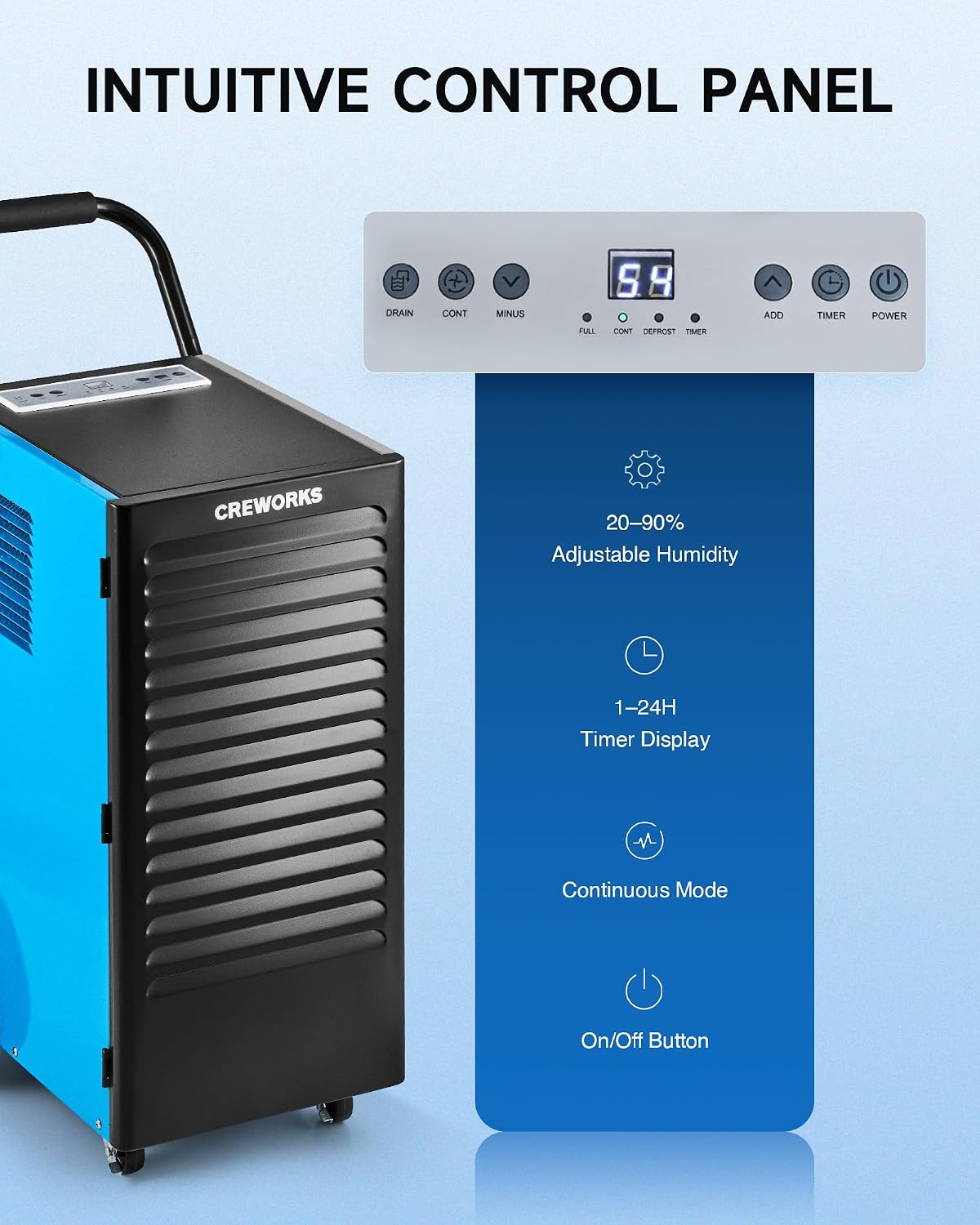
Сүрөт: Жакын план view of the dehumidifier's intuitive control panel with various buttons and a digital display.
The control panel features a digital display and several buttons for managing the dehumidifier's functions:
- Кубат баскычы: Агрегатты КҮЙГҮЗӨТ же ӨЧҮРөт.
- ADD / MINUS Buttons: Adjusts the desired humidity level (20-90%) or timer setting (1-24 hours).
- Таймер баскычы: Sets the operational timer.
- УЛАНТУУ (Үзгүлтүксүз) баскычы: Activates or deactivates continuous dehumidification mode.
- АГЫЗУУ баскычы: Activates or deactivates the drain pump (if applicable to the model).
- Дисплей көрсөткүчтөрү: Shows current humidity, timer, and status indicators for FULL, CONT, DEFROST, and TIMER.
Негизги операция
- Күйгүзүү: басыңыз КҮЧ Нымдандыргычты күйгүзүү үчүн баскычты басыңыз. Дисплейде бөлмөнүн учурдагы нымдуулугу көрсөтүлөт.
- Каалаган нымдуулукту коюу: колдонуу КОШУУ or МИНУС buttons to set your desired humidity level between 20% and 90% Relative Humidity (RH). The unit will operate until the set humidity is reached, then cycle on and off to maintain it.
- Үзгүлтүксүз режим: басыңыз УЛАНДЫ button for continuous operation, where the unit will run constantly regardless of the humidity level. This is useful for very damp conditions or for faster drying.
- Таймер функциясы: басыңыз ТАЙМЕР button to set an auto-on or auto-off time (1-24 hours).
Video: Demonstration of setting the desired humidity level and activating continuous mode on the dehumidifier's control panel.
Автоматтык эритүү
The dehumidifier is equipped with an automatic defrost function. If frost builds up on the evaporator coils, the compressor will temporarily shut off, and the fan will continue to run to melt the frost. The DEFROST indicator light will illuminate during this cycle. Once defrosted, the unit will resume normal dehumidification.

Image: Illustration showing the automatic defrost function, where the dehumidifier temporarily halts the compressor to prevent frosting.
Техникалык тейлөө
Үзгүлтүксүз тейлөө оптималдуу иштешин камсыз кылат жана нымдандыргычыңыздын иштөө мөөнөтүн узартат.
1. Аба чыпкасын тазалоо
The dehumidifier is equipped with a washable air filter. A dirty filter can reduce efficiency and airflow.
- Ным кургаткычты өчүрүп, аны розеткадан сууруп алыңыз.
- Locate and remove the air filter from the unit. Refer to the product diagram for filter location.
- Чыпканы жылуу, самындуу суу менен жууңуз. Кылдаттык менен жууп, кайра салаардан мурун аны толугу менен кургатуу керек. Идиш жуугучту же катуу химиялык заттарды колдонбоңуз.
- Кургак фильтрди блокко кайра салыңыз.
Сунуш: Clean the air filter every 2-4 weeks, or more frequently depending on usage and air quality.

Image: Illustration showing the removable and reusable air filter for easy cleaning.
2. Сырты тазалоо
Агрегаттын сыртын жумшак менен сүртүңүз, гamp кездеме. Абразивдүү тазалагычтарды же эриткичтерди колдонбоңуз.
3. Сактоо
If storing the unit for an extended period, ensure it is clean and dry. Coil the power cord and store the unit in a cool, dry place.
Кыйынчылыктарды табуу боюнча колдонмо
Жалпы маселелер жана аларды чечүү үчүн бул колдонмону караңыз.
| Көйгөй | Мүмкүн себеп | Чечим |
|---|---|---|
| Кургаткыч күйгүзбөйт. | No power, power cord loose, unit not plugged in. | Ensure the unit is properly plugged into a working outlet. Check circuit breaker. |
| Агрегат иштейт, бирок суу чогултпайт. | Humidity setting too high, room temperature too low, air filter clogged, unit in defrost mode. | Lower the desired humidity setting. Ensure room temperature is above 41°F (5°C). Clean the air filter. Wait for defrost cycle to complete. |
| Unit is freezing up (frost on coils). | Low room temperature, refrigerant issue. | The unit has an automatic defrost function. If freezing persists, ensure room temperature is within operating range. If problem continues, contact support. |
| Суу агып жатат. | Drain hose not connected properly, drain hose kinked or blocked, unit not level. | Check drain hose connection and ensure it is secure. Clear any kinks or blockages in the hose. Ensure the unit is on a level surface. |
| Агрегат ызы-чуу. | Бош бөлүктөрү, бирдиги түз эмес, желдеткич тоскоолдук. | Ensure the unit is on a stable, level surface. Check for any loose components. Inspect fan for obstructions. |
Продукт спецификациялары
Detailed technical specifications for the CREWORKS 180 PPD Commercial Dehumidifier.
| Өзгөчөлүк | Деталь |
|---|---|
| Бренд | ЭКИПАЖДАР |
| Модель аты | 180PPD |
| Dehumidification Capacity (Saturation) | Күнүнө 180 Пинт |
| Dehumidification Capacity (AHAM) | Күнүнө 85 Пинт |
| Сунушталган камтуу аймагы | 600-1600 чарчы фут |
| Продукциянын өлчөмдөрү (D x W x Y) | 23.11" x 17.32" x 34.13" |
| Аба агымынын кубаттуулугу | Мүнөтүнө 350 куб сантиметр |
| Иштөө режими | Үзгүлтүксүз |
| Өзгөчөлүктөр | Automatic Defrost, Portable, Timer, Wheels, Drain Hose, Display Panel |
| Материал | Металл |
| Муздаткыч | R32 (Low-Impact) |
Кепилдик жана колдоо
Кепилдик маалымат
CREWORKS products typically come with a manufacturer's warranty. Specific warranty terms, including duration and coverage, may vary. Please refer to the warranty card included with your product or contact CREWORKS customer service for detailed information. Keep your purchase receipt as proof of purchase for warranty claims.
Эскертүү: Some customer reviews indicate a potential for issues after approximately one year of use. Regular maintenance and proper operation as outlined in this manual can help ensure product longevity.
Кардарларды колдоо
For technical assistance, troubleshooting beyond this guide, or warranty inquiries, please contact CREWORKS customer support. Contact information can typically be found on the manufacturer's official webсайтында же продуктунун таңгагында.
When contacting support, please have your product model number (180PPD) and purchase date available.