
1. Киришүү
This manual provides detailed instructions for the QUMOX Z312 External USB 3.0 CD/DVD Drive with an integrated 8-in-1 USB Hub. This device allows you to read and write CDs and DVDs, and expands your computer's connectivity with additional USB ports and card reader slots. It is designed for use with laptops and desktop computers running various operating systems.
2. Продукциянын өзгөчөлүктөрү
- High-Speed USB 3.0 Connectivity: Equipped with USB 3.0 for fast data transfer speeds up to 5 Gigabits/s (625 MB/s). Backward compatible with USB 2.0/1.1.
- External CD/DVD Recording Drive: Supports reading and writing of CD±R/RW, CD-ROM, DVD±R/RW, DVD-RAM, VCD, and SVCD.
- Кеңири шайкештик: Compatible with Macbooks, iMacs, notebooks, desktops, and laptops. Supports Windows 11/10/8/7/XP, Vista 7/8, Linux, and Mac OS 10.6 or later versions.
- 8-in-1 USB Hub Functionality: Includes 1 USB 3.0 port, 3 USB 2.0 ports, 1 TF card slot, 1 SD card slot, and 1 USB-C port. Supports various USB accessories like hard drives, mice, keyboards, and cooling fans.
- Ultra-Slim and Portable Design: Lightweight with a built-in data cable for easy transport and organization. Features an anti-slip rubber base.

Image: The QUMOX Z312 drive with a disc inserted, highlighting its plug-and-play functionality for various media and data tasks.

Сүрөт: деталдуу view of the QUMOX Z312, illustrating its 8-in-1 hub with various ports and card slots.
3. Орнотуу нускамалары
- Компьютерге туташуу: Connect the integrated USB 3.0 cable from the QUMOX Z312 drive directly to a USB port on your laptop or desktop computer. For optimal performance and power supply, avoid connecting through a USB hub or port replicator if possible.
- Электр камсыздоо: Ensure your computer is adequately powered, especially if using a laptop. If the drive requires additional power, use the provided USB-C power port (charging port, not data port) with an external power source (power bank or adapter, not included).
- Драйверди орнотуу: The device is typically plug-and-play for most modern operating systems (Windows 10/11, Mac OS, Linux). Your computer should automatically recognize and install the necessary drivers. If prompted, allow the system to install drivers.
- Software for Media Playback: For playing DVDs and CDs on Windows 10 or above, you may need to install third-party media player software such as VLC Media Player, as native support might be limited.
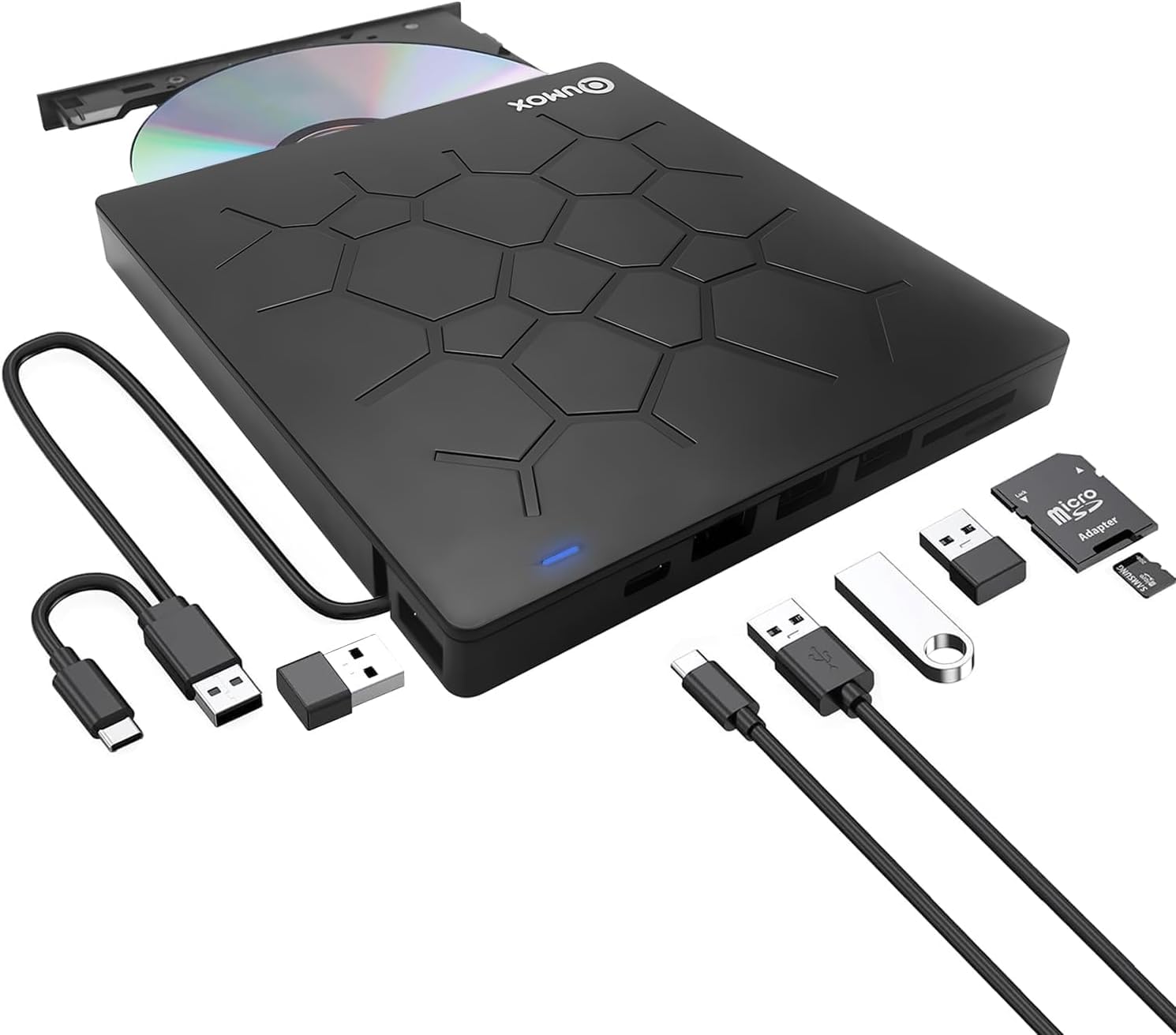
Image: The QUMOX Z312 drive connected to a laptop, demonstrating its plug-and-play functionality for various media and data tasks.
4. Иштөө нускамалары
4.1. Дисктерди киргизүү жана чыгаруу
- To Open the Tray: Press the Pop-up Button located on the front of the drive. The disc tray will eject.
- Дискти киргизүү үчүн: Carefully place the CD or DVD onto the tray with the label side facing up. Gently push the tray back into the drive until it clicks into place.
- Дискти чыгаруу үчүн: Press the Pop-up Button again. Alternatively, you can eject the disc through your computer's operating system (e.g., right-click the drive icon and select 'Eject'). In case of power failure or if the button does not work, use the Forced Ejection pinhole with a thin, pointed object.
4.2. Using the USB Hub and Card Readers
- USB порттору: Connect USB devices such as external hard drives, mice, keyboards, or cooling fans to the available USB 3.0 and USB 2.0 ports.
- SD/TF карта уячалары: Insert your SD or TF (Micro SD) cards into the corresponding slots. Эскертүү: The SD port and TF slot cannot be used simultaneously.

Сүрөт: деталдуу view of the drive's ports, buttons, and a crucial note regarding simultaneous use of SD and TF card slots.
5. Техникалык тейлөө
- Тазалоо: Use a soft, dry cloth to clean the exterior of the drive. Do not use liquid cleaners or abrasive materials. For the optical lens, use a specialized CD/DVD lens cleaning kit if necessary.
- Сактагыч: Дискти салкын, кургак жерде, күндүн түз нурунан жана өтө жогорку температурадан алыс сактаңыз.
- Колдонуу: Handle the drive gently to avoid physical damage. Do not force the disc tray.
6. Кыйынчылыктарды
- Диск таанылган жок:
- Ensure the USB cable is securely connected directly to a USB 3.0 port on your computer.
- Башка USB портуна туташып көрүңүз.
- If using a laptop, ensure it is plugged into a power source to provide sufficient power to the drive.
- Check Device Manager (Windows) or System Information (Mac) to see if the device is listed. If there are driver issues, try uninstalling and reinstalling the device.
- Cannot Read/Write Discs:
- Дисктин таза жана чийиксиз же таксыз экенин текшериңиз.
- Verify the disc type is supported (CD±R/RW, CD-ROM, DVD±R/RW, DVD-RAM, VCD, SVCD). Blu-ray discs are not supported.
- Ensure you have appropriate media playback or burning software installed (e.g., VLC Media Player for playback).
- SD/TF Card Reader Issues:
- Ensure only one card (either SD or TF) is inserted at a time.
- Check if the card is inserted correctly and fully seated.
- Test the card in another device to ensure it is not faulty.
- Computer Enters Sleep Mode: Avoid letting your computer enter sleep mode while using the drive to prevent data loss or corruption.
7. Техникалык шарттар
| Өзгөчөлүк | Деталь |
|---|---|
| Бренд | QUMOX |
| Модель аты | Z312 |
| Байланыш | USB 3.0 (USB 2.0/1.1 менен артка шайкеш келет) |
| Колдоого алынган диск түрлөрү | CD±R/RW, CD-ROM, DVD±R/RW, DVD-RAM, VCD, SVCD |
| USB хаб порттору | 1x USB 3.0, 3x USB 2.0, 1x USB-C (charging only) |
| Card Reader Slots | 1x SD, 1x TF (Micro SD) |
| Операциялык системанын шайкештиги | Windows 11/10/8/7/XP, Vista 7/8, Linux, Mac OS 10.6+ |
| Аппараттык платформа | Ноутбук, компьютер |
| Элемент Салмагы | 12.3 унция (0.35 килограмм) |
| Пакеттин өлчөмдөрү | 6.57 x 6.5 x 1.06 дюйм |
| Өзгөчө өзгөчөлүк | Plug & Play |

Image: The bottom label of the device, indicating power requirements and safety certifications.
8. Шайкештик жана дал келбестик
8.1. Шайкеш түзмөктөр жана системалар
- Laptops and Desktop PCs
- Macbooks, iMacs
- Operating Systems: Windows 11/10/8/7/XP, Vista 7/8, Linux, Mac OS 10.6 or later
8.2. Шайкеш келбейт
- Машиналар
- Проекторлор
- Планшеттер
- iPads
- Уюлдук телефондор
- Chromebook'тар
- Microsoft Surface devices
- Blu-ray discs
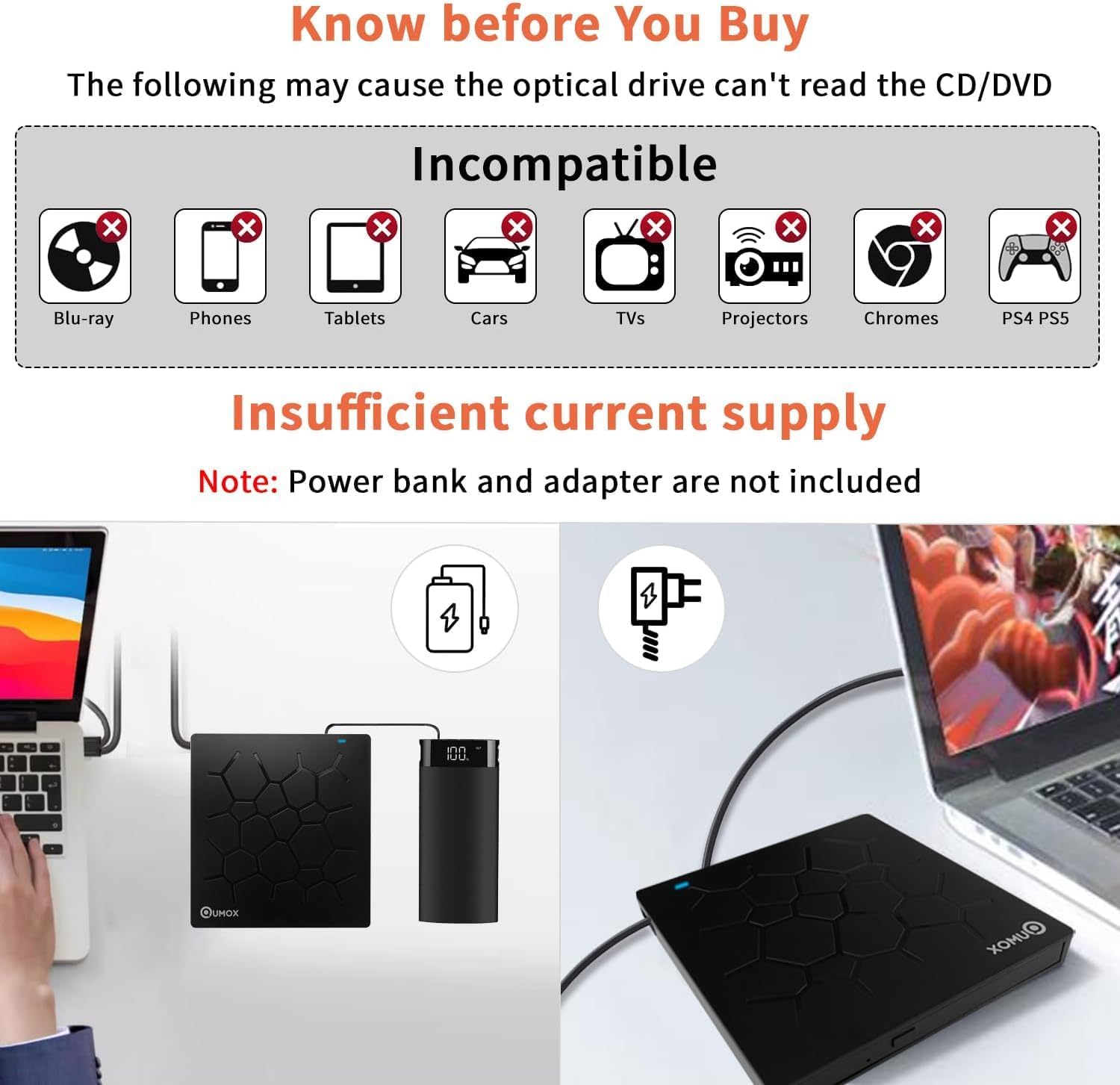
Image: Visual guide to incompatible devices and a warning about insufficient power supply.
Video: This video demonstrates the physical features and basic operation of the QUMOX External DVD CD Writer, including its ports and disc tray mechanism. It also highlights its compatibility with various devices and operating systems.
9. Кутуда эмне бар
- 1x QUMOX USB 3.0 DVD Drive (Model Z312)
10. Кепилдик жана колдоо
For warranty information, technical support, or any inquiries regarding your QUMOX Z312 External USB 3.0 CD/DVD Drive, please refer to the contact information provided with your purchase or visit the official QUMOX webсайт. Кепилдик дооматтары үчүн сатып алганыңыздын далилин сактап коюңуз.