
1. Киришүү
Thank you for choosing the QUMOX External CD/DVD Drive with 8-in-1 USB 3.0 Hub. This versatile device provides high-speed data transfer for reading and writing CDs and DVDs, along with expanded connectivity through its integrated USB hub and card readers. This manual will guide you through the setup, operation, and maintenance of your new device.
2. Коопсуздук маалыматы
- Аппаратты суудан, нымдан жана экстремалдык температурадан алыс кармаңыз.
- Аппаратты түшүрүүдөн же катуу таасирлерден сактаныңыз.
- Аппаратты өз алдынча бөлүүгө же оңдоого аракет кылбаңыз. Тейлөө үчүн квалификациялуу кызматкерлерге кайрылыңыз.
- Use only compatible discs and cables.
- Ашыкча ысып кетүүнүн алдын алуу үчүн туура желдетүүнү камсыз кылыңыз.
3. Пакеттин мазмуну
Сураныч, пакеттин мазмунун текшерип, бардык буюмдар бар экенин текшериңиз:
- QUMOX External CD/DVD Drive with 8-in-1 USB 3.0 Hub
- USB-Aдан USB-Cге маалымат кабелине
- USB-A Data Cable
- Колдонуучунун Колдонмосу (бул документ)
4. Продукт бүтүп калдыview
The QUMOX External CD/DVD Drive combines an optical drive with a multi-functional hub, offering enhanced connectivity and media capabilities.
4.1 Түзмөктүн жайгашуусу
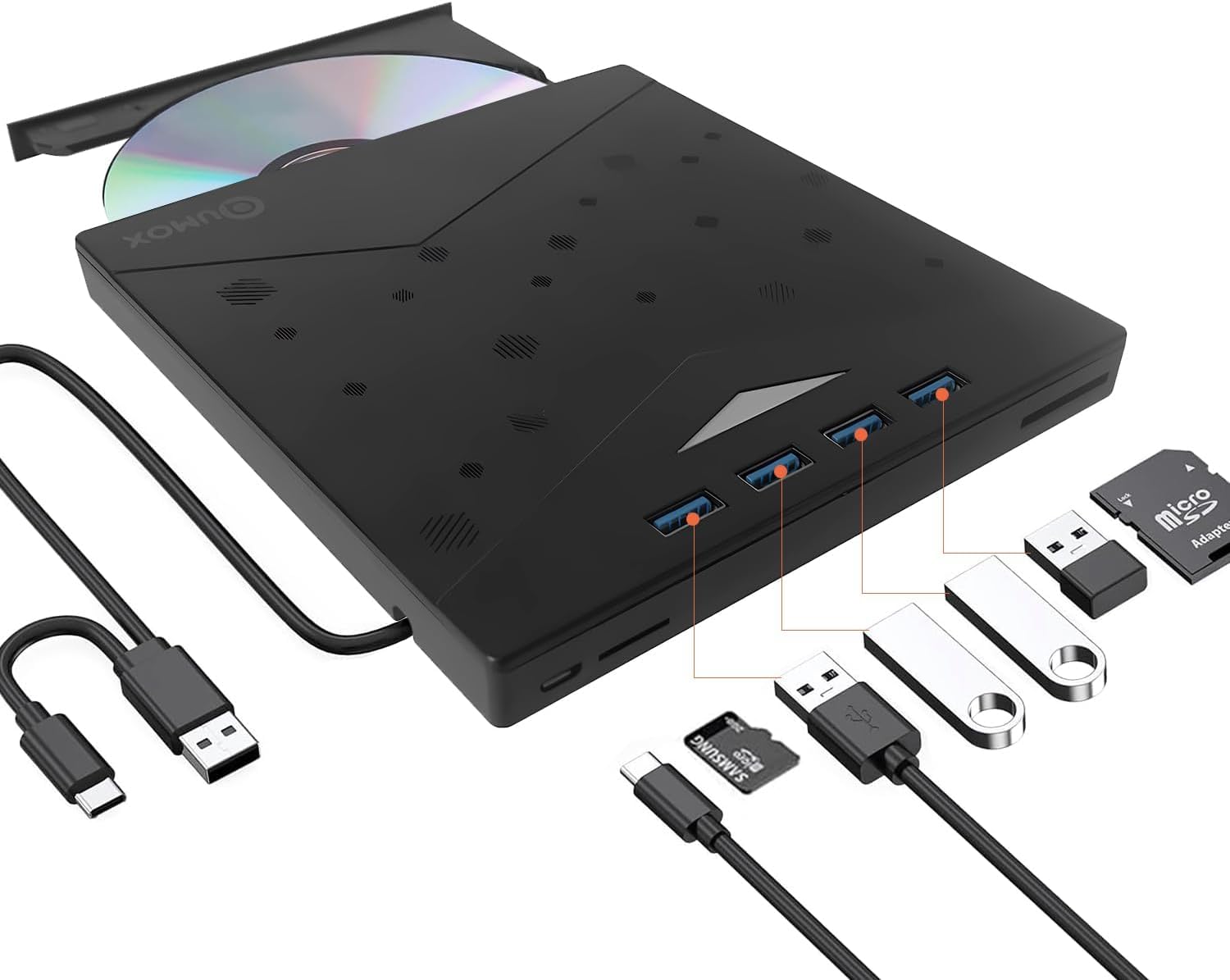
Figure 1: QUMOX External CD/DVD Drive with USB-A and USB-C cables.
The device features a sleek, ultra-slim design with an integrated cable for convenience. It includes multiple ports for various peripherals.
4.2 Порттор жана көрсөткүчтөр

Figure 2: Labeled ports and connections on the QUMOX External CD/DVD Drive.
- USB A 3.0 Ports (x4): For connecting USB devices such as flash drives, keyboards, mice, or external hard drives.
- TF Slot: For Micro SD (TF) memory cards.
- SD оюгу: Стандарттык SD эстутум карталары үчүн.
- USB C порту: For connecting the drive to a host device with a USB-C port.
- USB A Data Cable: Integrated cable for connecting to a host device with a USB-A port.
- Pop-up Button: To open the disc tray.
- Forced Ejection Hole: For manual disc ejection in case of power failure or malfunction.
- Индикатор жарыгы: Shows device status (e.g., power, activity).

Figure 3: Device dimensions and additional features.
5. Орнотуу жана орнотуу
The QUMOX External CD/DVD Drive is designed for plug-and-play functionality, requiring no additional drivers for most operating systems.
5.1 Аппаратты туташтыруу
- Connect the integrated USB-A data cable to an available USB 3.0 port on your computer. If your computer only has USB-C ports, use the provided USB-A to USB-C adapter cable.
- Ensure the connection is secure. The indicator light on the drive will illuminate, indicating it is powered on and ready for use.
- Сиздин иштөө тутумуңуз керектүү драйверлерди автоматтык түрдө таап, орнотууга тийиш. Бул процесс бир нече мүнөткө созулушу мүмкүн.

Figure 4: Plug and Play connection to a laptop.
Эскертүү: For optimal performance, connect the drive directly to a USB 3.0 port on your computer. Avoid using unpowered USB hubs or extension cables, as this may affect performance or power delivery.
6. Иштөө нускамалары
6.1 Using the CD/DVD Drive
- Дискти киргизүү үчүн: Press the pop-up button on the front of the drive. The disc tray will eject. Carefully place a CD or DVD onto the tray, ensuring it is centered on the spindle. Gently push the tray back into the drive until it clicks into place.
- Дискти чыгаруу үчүн: Press the pop-up button. Alternatively, you can eject the disc through your operating system (e.g., right-click the drive icon and select "Eject").
- Окуу дисктери: Диск салынгандан кийин, компьютериңиздин операциялык системасы аны автоматтык түрдө аныкташы керек. Сиз андан кийин дисктин мазмунуна кире аласыз File Explorer (Windows) же Finder (macOS).
- Writing/Burning Discs: To burn data to a CD-R/RW or DVD±R/RW, you will need compatible burning software (not included). Follow the instructions provided with your chosen software.
The drive supports CD-R/RW, DVD±R/RW, DVD-RAM, and SVCD formats. It offers up to 8x DVD read/write speed and 24x CD read/write speed.
6.2 Using the 8-in-1 Hub
- USB 3.0 порттору: Connect up to four USB devices to the available USB 3.0 ports for high-speed data transfer (up to 5 Gbps).
- SD/TF картаны окугучтар: Insert your SD or Micro SD (TF) memory cards into the corresponding slots to access or transfer data. Эскертүү: The SD and TF card slots cannot be used simultaneously.
6.3 Системанын шайкештиги

5-сүрөт: Ар кандай операциялык системалар менен кеңири шайкештик.
This device is widely compatible with operating systems including Windows XP, Windows 7, Windows 8, Windows 10, Windows 11, macOS, and Linux. It is designed for use with PCs and laptops. Маанилүү: This device is not compatible with tablets, smartphones, or Blu-ray discs.
7. Техникалык тейлөө
- Тазалоо: Use a soft, dry cloth to clean the exterior of the drive. Do not use liquid cleaners or abrasive materials. For the disc tray, use a specialized optical drive cleaning kit if necessary.
- Сактагыч: When not in use, store the drive in a cool, dry place, away from direct sunlight and dust.
- Колдонуу: Манжа издерин жана чийиктерди болтурбоо үчүн дисктерди ар дайым четтеринен кармап туруңуз.
8. Кыйынчылыктарды
| Көйгөй | Мүмкүн себеп | Чечим |
|---|---|---|
| Дискти компьютер тааныган жок. | Бошоң байланыш, кубаттуулуктун жетишсиздиги, драйвердеги көйгөй. |
|
| Disc not reading or burning. | Dirty/scratched disc, incorrect disc type, faulty disc. |
|
| USB hub or card readers not working. | Loose connection, power issue, incompatible card. |
|
| Диск салгыч ачылбайт. | Электр энергиясы көйгөйү, механикалык тыгын. |
|
9. Техникалык шарттар
| Өзгөчөлүк | Description |
|---|---|
| Бренд | QUMOX |
| Модель номери | Z311 |
| Интерфейс | USB 3.0 (backward compatible with USB 2.0/1.1), USB 3.0 Type-A, USB 3.0 Type-C |
| Оптикалык сактагычтын окуу ылдамдыгы | Up to 8x for DVD, 24x for CD |
| Оптикалык сактагычтын жазуу ылдамдыгы | Up to 8x for DVD, 24x for CD |
| Колдоого алынган диск түрлөрү | CD-R/RW, DVD±R/RW, DVD-RAM, SVCD |
| USB хабы | 4 x USB 3.0 порттору |
| Card Readers | SD Slot, TF (Micro SD) Slot (not simultaneous) |
| Операциялык системанын шайкештиги | Windows XP/7/8/10/11, macOS, Linux |
| Аппараттык платформа | Ноутбук, компьютер |
| Өлчөмдөрү (L x W x Y) | 19.4 x 16.1 x 2.7 см (болжол менен 7.6 x 6.3 x 1.1 дюйм) |
| Салмагы | 390 грамм (болжол менен 0.86 фунт) |
| Өзгөчөлүктөр | Powered, DVD Burner, Portable, RGB lighting |
10. Кепилдик жана колдоо
QUMOX products are designed and manufactured to the highest quality standards. This product is covered by a standard manufacturer's warranty against defects in materials and workmanship.
For warranty claims, technical support, or any questions regarding your QUMOX External CD/DVD Drive, please contact your retailer or visit the official QUMOX webкардарларды тейлөө маалымат сайты.
Сураныч, кепилдик максаттары үчүн сатып алганыңыздын далилин сактап коюңуз.