
AGCUT KTUS-H0
AGCUT LCD Screen Replacement for Xiaomi Black Shark 5 Pro (Model: KTUS-H0)
Instruction Manual
1. Продукт бүтүп калдыview
This product is a high-quality LCD display touch screen digitizer assembly replacement kit designed for the Xiaomi Black Shark 5 Pro. It is intended to replace defective screens exhibiting issues such as incorrect response, display problems, pixel distortion, cracks, or color inaccuracies.
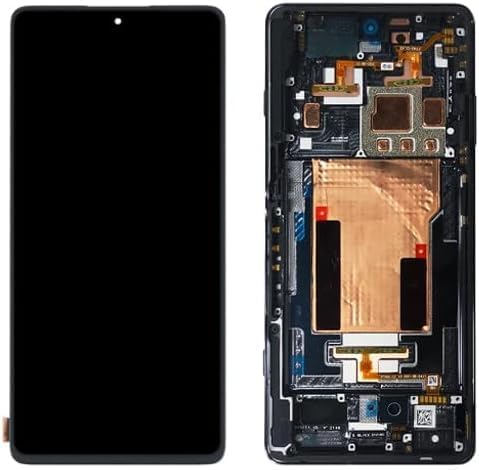
Сүрөт: алдыңкы жана арткы view of the replacement LCD screen assembly, showing the display panel and the internal flex cables and components.
2. Эмнелер камтылган
Пакет төмөнкү нерселерди камтыйт:
- 1x LCD Screen Touch Screen Digitizer Replacement Kit for Xiaomi Black Shark 5 Pro (with frame)
- 1x Anti-falling Omnidirectional Tempered Film for Xiaomi Black Shark 5 Pro LCD screen
- 1x Dust Removal Sticker
- 1x Free Tape (adhesive)
- 1x Set of Special Removal Tools for Xiaomi Black Shark 5 Pro screen (3 screwdrivers, 1x plastic dredger, 2x blue open shell fragments, 1x Card Pin, 1x suction cup)

Image: A visual representation of the complete packing list, showing the screen replacement, tempered glass, dust removal sticker, adhesive tape, and a set of disassembly tools.
3. Орнотуу боюнча колдонмо
3.1 Pre-Installation Checks and Precautions
Before proceeding with the installation, it is crucial to perform the following checks and observe these precautions:
- Продукт абалы: Inspect the new screen for any physical damage. Ensure it is in good condition before attempting installation.
- Сыноо: It is strongly recommended to test the screen functionality before full installation. Do not remove any protective films or labels during this testing phase.
- Статикалык электр: Be mindful of static electricity. Take appropriate anti-static measures to prevent damage to electronic components.
- Морттук: The screen replacement is made of glass and is very fragile. Handle it with extreme care.
- Cable Bending: Do not bend the LCD cable excessively. Bending the cable more than 90 degrees can result in a black screen or other display malfunctions.
3.2 Installation Recommendation
Replacing a phone screen requires specific technical skills and tools. If you are not experienced in repairing electronic equipment, it is highly recommended to:
- Seek assistance from a professional repair shop.
- Refer to relevant installation videos available on platforms like YouTube for detailed visual guidance.
This screen replacement includes a frame, which simplifies the installation process and reduces the risk of damage compared to screen-only replacements.
4. Operating and Testing the Screen
After connecting the new screen but before fully assembling your device, perform a thorough test to ensure proper functionality.
4.1 Сыноо процедурасы
- Connect the new LCD screen assembly to the phone's motherboard.
- Түзмөктү күйгүзүңүз.
- Төмөнкүлөрдү текшериңиз:
- No scratches on the screen surface.
- No dead zones or unresponsive areas on the touch screen.
- No dot pixels or lines visible on the display.
- High color saturation and accurate color reproduction.
- Smooth and responsive touch functionality.
- If all tests pass, proceed with the final assembly. If any issues are detected, recheck connections or contact support.

Image: Visual guide for screen quality assurance, demonstrating checks for dead pixels, pixel lines, touch screen responsiveness, and overall display integrity.
5. Кыйынчылыктарды
5.1 Common Installation Issues
- Black Screen After Installation: If your phone displays a black screen after connecting the new display, simultaneously press and hold the power key and volume key. If the phone vibrates, this often indicates that the main flex cable is not properly installed. Reinstall the product, ensuring all connections are secure.
- Unresponsive Touch or Display Glitches: Recheck all flex cable connections. Ensure no cables are bent beyond 90 degrees, as this can cause display issues.
Эгерде көйгөйдү чечүү кадамдары көйгөйдү чечпесе, анда профессионал оңдоочу адиске кайрылуу сунушталат.
6. Техникалык шарттар
| Бренд | AGCUT |
| Шайкеш модель | Xiaomi Black Shark 5 Pro |
| Модель номери | КТУС-Н0 |
| Экран түрү | LCD Display Touch Screen Digitizer Assembly |
| Материал | Original |
| Screen Size | 6.67 дюйм |
| Резолюция | 1080x2400 пиксел |
| Түс | КАРА |
7. Quality Guarantee and Support
All AGCUT LCD replacements undergo strict Quality Control (QC) testing before shipment to ensure they are 100% intact and free from defects such as scratches, dead zones, or pixel issues. We aim to provide products with high color saturation, high resolution, wide color gamut, and a smooth touch experience.
For further assistance or if you require an installation instruction video, please search for relevant guides on YouTube. Non-professional installation is not recommended.
Ask a question about this manual
Ask about setup, troubleshooting, compatibility, parts, safety, or missing instructions. Manuals+ will review the question and use this page’s manual context to help answer it.