
1. Киришүү
This manual provides instructions for the VINABTY replacement remote control, designed for various United TV models. This remote serves as a direct replacement for your original remote, offering full functionality without the need for complex programming.

Сүрөт 1: Алдыңкы view of the VINABTY replacement remote control.
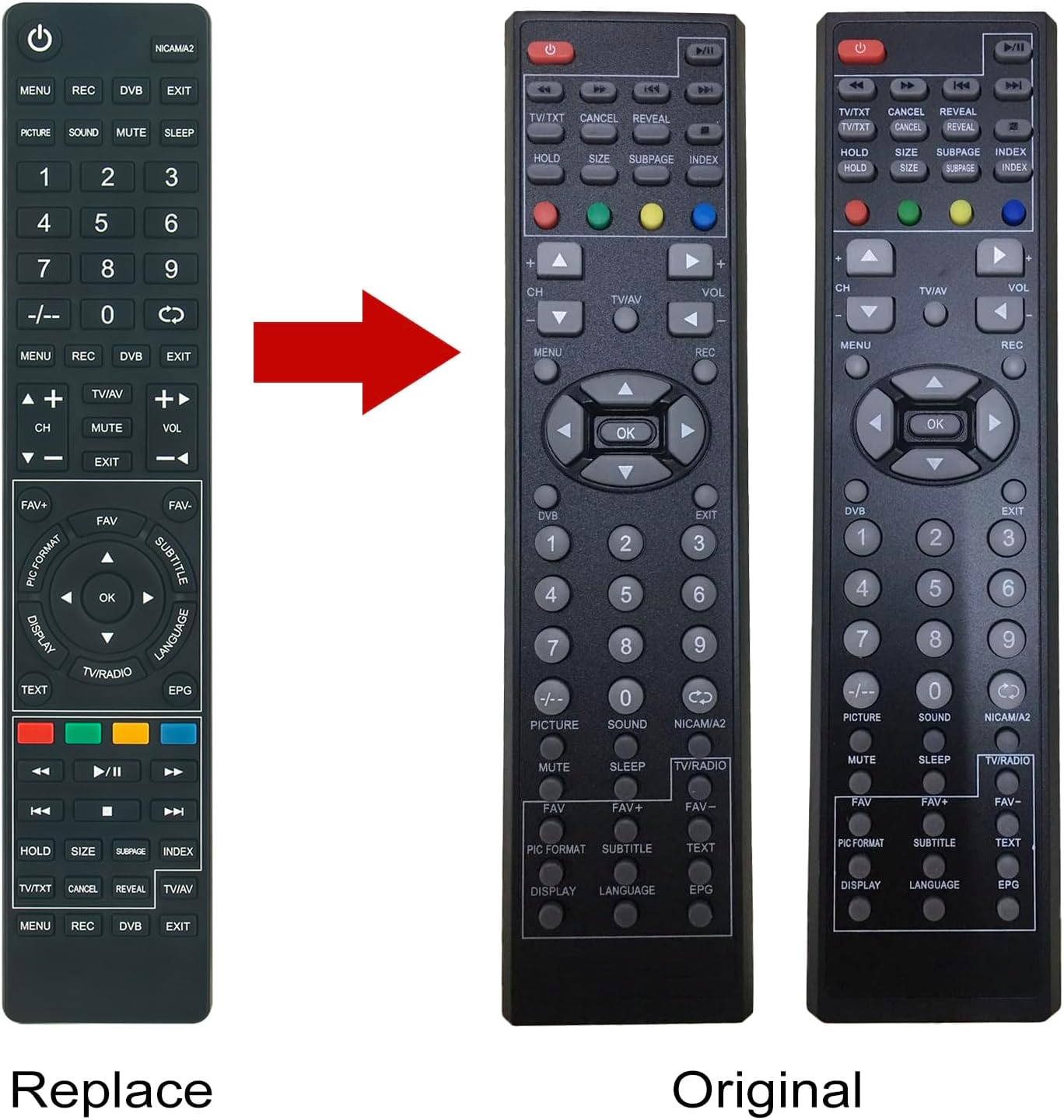
Figure 2: Comparison showing the VINABTY replacement remote (left) and a typical original remote (right).
2. Орнотуу
2.1 Батареяны орнотуу
Алыстан башкаруу пульту эки AAA батарейкасын талап кылат (кошулмага кирбейт). Аларды орнотуу үчүн төмөнкү кадамдарды аткарыңыз:
- Пульттун артындагы батарея бөлүкчөсүнүн капкагын табыңыз.
- Бөлүмдү ачуу үчүн капкакты ылдый жылдырыңыз же кулпуну (эгер бар болсо) басыңыз.
- Оң (+) жана терс (-) терминалдары бөлүмдүн ичиндеги белгилер менен туура дал келишин камсыз кылып, эки AAA батарейкасын салыңыз.
- Батарея бөлүкчөсүнүн капкагын бекем чыккыча ордуна жылдырыңыз.

3-сүрөт: Арткы view батарея бөлүмү ачык турган алыстан башкаруу пультунун AAA батареяларын кайда салуу керектигин көрсөтөт.
2.2 Алгачкы колдонуу
No programming or setup is required. Once batteries are installed, the remote control is ready for immediate use with compatible United TV models.
3. Иштөө нускамалары
Point the remote control directly at your United TV. Ensure there are no obstructions between the remote and the TV's infrared receiver.
3.1 Баскычтын жалпы функциялары
- Кубат баскычы (⏻): Телевизорду күйгүзөт же өчүрөт.
- Сан баскычтары (0-9): Түздөн-түз каналдарды тандоо.
- CH+/CH-: Каналдарды өйдө же ылдый өзгөртөт.
- VOL+/VOL-: Үндү өйдө же ылдый тууралайт.
- Үнсүз: Телевизордун үнүн өчүрөт же өчүрөт.
- МЕНЮ: Сыналгынын негизги менюсуна кирет.
- OK / Навигация жебелери: Менюларды кыдырып, тандоолорду ырастайт.
- ЧЫГУУ: Учурдагы менюдан же функциядан чыгат.
- SOURCE / TV/AV: Selects input sources (e.g., HDMI, AV).
- РЕК: Initiates recording (if supported by TV and external device).
- DVB: Switches to Digital Video Broadcasting mode.
- Picture / Sound: Accesses picture or sound settings.
- MUTE / SLEEP: Mutes sound or sets sleep timer.
- TEXT / EPG: Accesses Teletext or Electronic Program Guide.
- Түстүү баскычтар (кызыл, жашыл, сары, көк): Functionality varies by TV model and context, often used for interactive services or specific menu options.
- Ойнотуу башкаруулары (ойнотуу, тындыруу, токтотуу, артка түрүү, алдыга жылдыруу): Медианы ойнотууну көзөмөлдөйт.
Note: Specific button functions may vary slightly depending on your United TV model.
4. Техникалык тейлөө
4.1 Батареяны алмаштыруу
If the remote control's range decreases or it becomes unresponsive, replace the batteries. Always replace both batteries at the same time with new AAA batteries. Do not mix old and new batteries, or different types of batteries.
4.2 Тазалоо
To clean the remote control, wipe it with a soft, dry cloth. Do not use liquid cleaners, abrasive pads, or chemical solvents, as these can damage the remote's surface or internal components.
4.3 Сактоо
Узак мөөнөткө колдонулбаганда, пульттун агып кетишинин жана мүмкүн болуучу зыяндын алдын алуу үчүн батарейкаларды алып салуу сунушталат.
5. Кыйынчылыктарды
- Пульт жооп бербей жатат:
- Батареялардын туура полярдуулукта жана туура орнотулганын текшериңиз.
- Батареяларды жаңыларына алмаштырыңыз.
- Ensure there is a clear line of sight between the remote control and the TV's infrared sensor.
- Verify that the remote control is compatible with your specific United TV model.
- Чектелген иш диапазону:
- Батареяларды алмаштырыңыз.
- Пульт менен телевизордун ортосундагы тоскоолдуктарды алып салыңыз.
- Ensure you are within the maximum operating range of 10 meters.
6. Техникалык шарттар
| Бренд | VINABTY |
| Модель номери | LED22X10 LED2470DVB |
| Туура келген сыналгы моделдери | UNITED TV LED22X10, LED16X13, LED24X10, LED28W13, LED32X11, LED16X12, LED19X10, LED19X11, LED19X18, LED22X11, LED22X13, LED22X18, LED32X13, LED32X18, LTW22X94DB |
| Байланыш технологиясы | Инфракызыл |
| Максималдуу диапазон | 10 метр |
| баскычтардын саны | 10 (Primary function buttons) |
| Power Source | 2 x AAA Батареялар (киргизилген эмес) |
| Түс | Кара |
| Өзгөчө өзгөчөлүк | Эргономикалык дизайн |

Figure 4: Dimensions of the remote control, showing approximate length of 23.5 cm (9.25 in), width of 4.7 cm (1.85 in), and thickness of 2 cm (0.79 in).
7. Кепилдик маалыматы
Warranty information for this product is not available in the provided documentation. Please refer to the seller or manufacturer's website for details regarding warranty coverage, if any.
8. Колдоо
For further assistance or inquiries, please contact the seller or refer to the VINABTY official support channels. Contact information is not provided in this manual.