
Introduction
This manual provides detailed instructions for the installation, operation, and maintenance of your PGST PG103-2GEU-E-T53A WiFi GSM Home Alarm System. Please read this manual thoroughly before using the product to ensure proper functionality and safety. This system is designed to enhance the security of your home or small business by detecting intrusions and alerting you through various methods.
Пакеттин мазмуну
The PGST PG103-2GEU-E-T53A system typically includes the following components:
- Alarm Host (Main Control Panel)
- 2MP коопсуздук камерасы
- Зымсыз сирена
- Door/Window Sensors (Multiple units)
- Motion Sensors (Multiple units)
- Keypads (Remote controls)
- RFID Tags
- Сигнализация хосту үчүн кубат адаптери
- Монтаждоочу жабдык
- User Manual

Сүрөт: бүттүview of the PGST Home Alarm System components.
Продукт бүттүview
The PGST PG103-2GEU-E-T53A is a comprehensive wireless home security system featuring both WiFi and GSM connectivity. It supports integration with the Smart Life/Tuya application for remote control and monitoring.
Негизги өзгөчөлүктөрү:
- Эки тармактык байланыш: Supports 2.4G WiFi for app control and 2G GSM for SMS and call notifications (SIM card not included).
- 2.4 дюймдук TFT түстүү дисплей: Full capacitive touch screen for intuitive operation.
- Көп тилдүү колдоо: Menu, voice prompts, and SMS notifications available in multiple languages.
- Кеңейтүүчү система: Supports up to 99 wireless defense zones for various sensors.
- Интегралдык камера: Includes a 2MP security camera for visual monitoring.
- Пландаштырылган курал/жараксыздандыруу: Set specific times for the system to arm or disarm automatically.
- Шашылыш SOS функциясы: Dedicated SOS button for immediate alerts.

Image: Alarm host display and smartphone app interaction.

Сүрөт: Мисample placement of security system components in a home.
Орнотуу нускамалары
1. Initial Power-Up and Network Connection:
- Туташуу кубаты: Plug the alarm host into a power outlet using the provided adapter. The internal battery will also begin charging.
- SIM картаны салыңыз (милдеттүү эмес): If you intend to use GSM features (SMS/call notifications), insert a 2G SIM card into the designated slot on the alarm host. Ensure the SIM card's PIN code is disabled before insertion. Refer to your SIM card provider's instructions for disabling the PIN.
- Колдонмону жүктөп алуу: Download the "Smart Life" or "Tuya Smart" app from your smartphone's app store.
- Катталуу/Кирүү: Каттоо эсебин түзүңүз же колдонмого кириңиз.
- Түзмөк кошуу: In the app, follow the instructions to add a new device. Select "Security & Sensor" and then "Alarm (Wi-Fi)". Follow the on-screen prompts to connect the alarm host to your 2.4GHz Wi-Fi network.
2. Sensor Installation and Pairing:
The system components are pre-programmed at the factory. If additional pairing is needed or for new sensors:
- Эшик/терезе сенсорлору: Mount the two parts of the sensor on a door or window frame, ensuring they are aligned and within 1cm of each other when the door/window is closed. Use the adhesive pads or screws provided.
- Кыймыл сенсорлору: Install motion sensors in corners or areas where movement is expected, typically 2-2.2 meters (6.5-7.2 feet) above the floor. Ensure a clear line of sight. These sensors are often pet-immune to reduce false alarms from small animals.
- Коопсуздук камерасы: Follow the camera's specific instructions to connect it to your Wi-Fi network and link it to the Smart Life/Tuya app.
- Жупташтыруу (зарыл болсо): Refer to the alarm host's menu for "Add Sensor" or "Zone Management" options. Activate the sensor (e.g., open a door, trigger motion) when prompted by the host to pair it.

Image: Alarm system components and alert mechanisms.
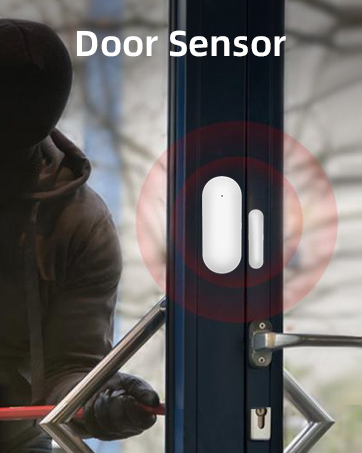

Сүрөт: Мисamples of a door sensor and a motion sensor.
Иштөө нускамалары
Куралдануу жана куралсыздандыруу:
- Кол (Алыскы режим): Activates all sensors. Use the alarm host keypad, remote control, or the Smart Life/Tuya app.
- Куралсыздандыруу: Deactivates all sensors. Use the alarm host keypad (enter password), remote control, or the Smart Life/Tuya app.
- Үйдө калуу режими (Калуу режими): Activates perimeter sensors (e.g., door/window sensors) while allowing free movement within the property.
- Пландаштырылган курал/жараксыздандыруу: Configure specific times in the app or on the alarm host for automatic arming and disarming.

Сүрөт: Мисample of scheduled arming and disarming for daily routines.
Emergency (SOS) Function:
Press the SOS button on the alarm host or remote control to trigger an immediate alarm and send emergency notifications to pre-configured contacts.
Колдонмону башкаруу:
The Smart Life/Tuya app allows you to:
- Arm and disarm the system remotely.
- Receive real-time alarm notifications (push, SMS, calls).
- Monitor sensor status.
- View live feed from the 2MP security camera.
- Manage system settings and user permissions.
Техникалык тейлөө
- Батареяны текшерүү: The alarm host has an internal backup battery (Lithium-ion, 2.5 hours life). Ensure it is regularly charged. Sensors typically use AAA batteries (2 included) and should be replaced when low battery indicators appear.
- Тазалоо: Сигнализациянын хостун жана сенсорлорун жумшак, кургак чүпүрөк менен сүртүңүз. Абразивдүү тазалоочу каражаттарды же эриткичтерди колдонуудан алыс болуңуз.
- Программалык камсыздоонун жаңыртуулары: Periodically check the Smart Life/Tuya app for firmware updates for the alarm host and camera to ensure optimal performance and security.
- Сенсордун жайгашуусу: Ensure sensors remain securely mounted and free from obstructions.
Проблемаларды чечүү
- Система Wi-Fi'га туташпай жатат:
- Ensure your Wi-Fi network is 2.4GHz. Check Wi-Fi password. Move the alarm host closer to the router. Restart the alarm host and router.
- No SMS/Call notifications:
- Verify the 2G SIM card is correctly inserted and has active credit/plan.
- Crucially, ensure the SIM card's PIN code is disabled. Many SIM cards come with a default PIN that must be removed using a mobile phone before inserting into the alarm host.
- Check the signal strength on the alarm host display.
- Confirm emergency contact numbers are correctly configured in the system settings.
- False alarms from motion sensors:
- Adjust sensor sensitivity if available. Ensure sensors are not facing direct sunlight, heat sources, or areas with pets (if not pet-immune). Re-position the sensor if necessary.
- Сенсорлор жооп бербей жатат:
- Check sensor battery levels. Ensure sensors are within range of the alarm host. Re-pair the sensor if necessary.
- Camera not streaming:
- Check camera's power supply and Wi-Fi connection. Ensure the Smart Life/Tuya app is updated. Restart the camera.
Техникалык шарттар
| Бренд | PGST |
| Модель номери | PG103-2GEU-E-T53A |
| Байланыш технологиясы | Wireless (Wi-Fi 2.4GHz, GSM 2G) |
| Power Source | Battery Powered (Alarm Host: Lithium-ion, Sensors: AAA) |
| Alarm Host Battery Life | Approximately 2.5 hours (backup) |
| Шайкеш түзмөктөр | Smart Life App, Tuya App |
| Видео жаздыруу чечими | 1080p (for included camera) |
| Орнотуу түрү | Өзүн чаптама |
| Эскертүү түрү | Аудио жана кыймыл |
| Башкаруу ыкмасы | Application, Keypad, Remote Control |
| Пакеттин өлчөмдөрү | 21.2 x 15.6 x 14.7 см |
| Элемент Салмагы | 1.26 килограмм |
Кепилдик жана колдоо
For warranty information and technical support, please refer to the documentation included with your product or visit the official PGST webсайт. Ошондой эле жардам алуу үчүн сатуучуга түздөн-түз кайрылсаңыз болот.