
Introduction
This manual provides detailed instructions for the GAMFAMI TERIOS Wireless Controller. Please read this manual carefully before using the product to ensure proper operation and to maximize your gaming experience. This controller is designed for use with PlayStation 4, PS4 Pro, and PS4 Slim consoles.
Продукт өзгөчөлүктөрү
- Холл эффектисинин джойстиктери: Equipped with Hall joysticks to prevent drift and ensure a longer lifespan with smooth, precise control.
- Макро программалоо: Two programmable back buttons (M1, M2) allow mapping of various inputs (X, O, Triangle, Square, Up, Down, Left, Right, L3, R3, L1, R1, L2, R2) for enhanced gameplay.
- Зымсыз туташуу: Enjoy a seamless wireless gaming experience with Bluetooth technology.
- Кош шоктук термелүү: Enhanced dual shock motors provide immersive haptic feedback for a realistic gaming experience.
- Турбо функциясы: Activate the Turbo feature for rapid, repeated button presses, offering a competitive advantage.
- Узак мөөнөттүү батарея: Features a 1000mAh rechargeable battery for extended play sessions.
- Эргономикалык дизайн: Lightweight and durable ABS construction with textured grips for comfortable handling.
- Built-in Speaker & 3.5mm Audio Jack: Provides high-quality audio directly from the controller and supports headset connection.
Пакеттин мазмуну
Сураныч, кутудан чыкканда пакеттин мазмунун текшериңиз:
- GAMFAMI TERIOS Wireless Controller
- USB заряддоо кабели
- Instruction Manual
Controller Layout
Familiarize yourself with the buttons and features of your GAMFAMI TERIOS Wireless Controller.
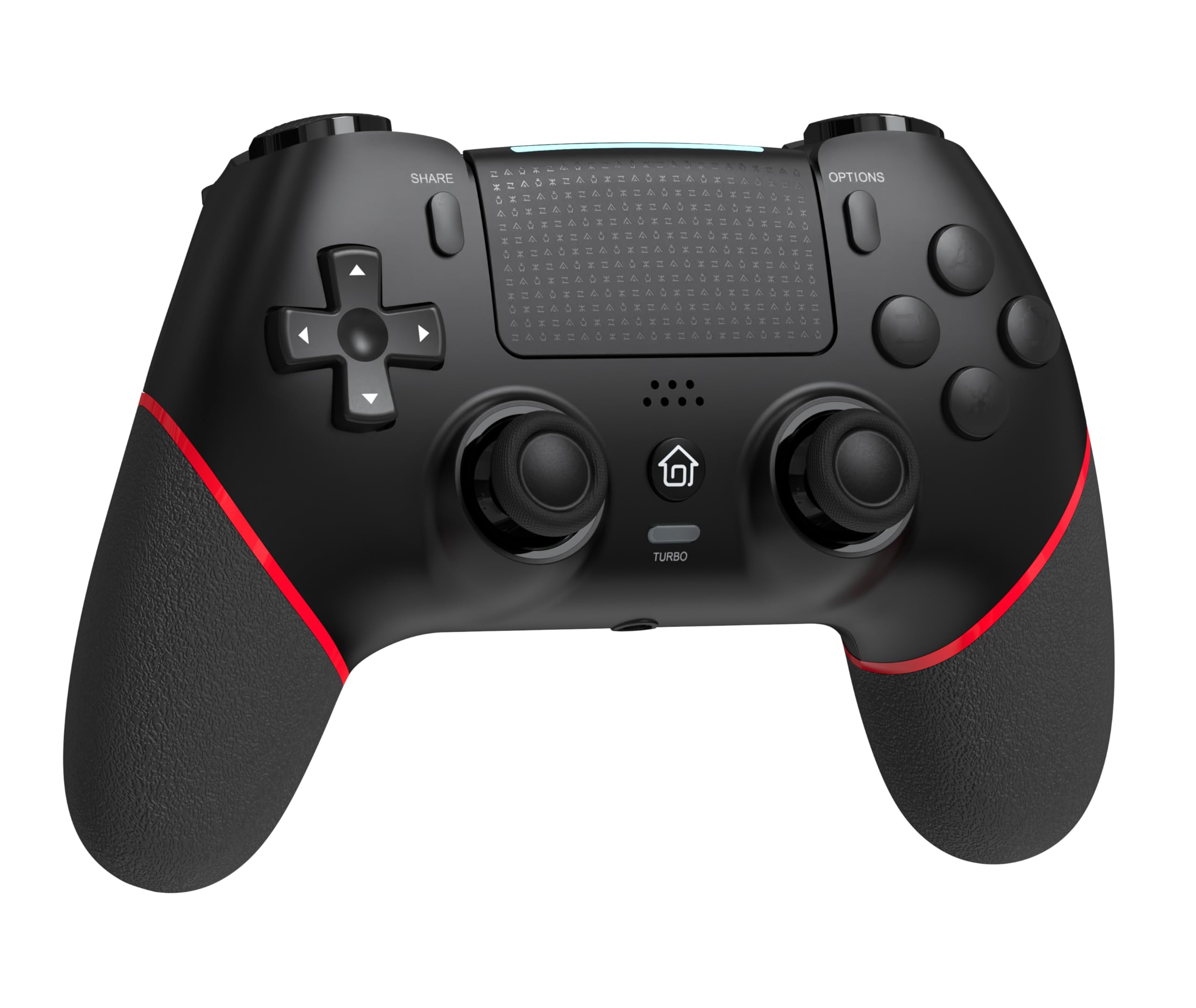
Фронт view of the GAMFAMI TERIOS Wireless Controller, showing the joysticks, D-pad, action buttons, Share, Options, Home, and Turbo buttons, and the touchpad.
- Багыттоочу такта (D-Pad): Багыттуу киргизүү үчүн.
- Аракет баскычтары (Үч бурчтук, Тегерек, Крест, Төрт бурчтук): Standard PlayStation action buttons.
- Сол/оң аналогдук таякчалар: For precise movement and camera control. Features Hall Effect technology.
- БӨЛҮШҮҮ баскычы: For sharing gameplay content.
- ПАРАМЕТРЛЕР баскычы: For in-game menus and options.
- PS баскычы (Башкы бет баскычы): To access the PS4 system menu.
- L1/R1 баскычтары: Ийин баскычтары.
- L2/R2 триггерлери: Аналогдук триггерлер.
- Сенсордук такта: Multi-touch input area.
- M1/M2 баскычтары: Программалануучу арткы баскычтар.
- TURBO баскычы: Турбо функциясын иштетет/өчүрөт.
- 3.5 мм гарнитура уясы: For connecting a compatible headset.
- USB-C порту: Заряддоо жана зымдуу туташуу үчүн.

Артка view of the controller, highlighting the M1 and M2 programmable buttons and product information.
Орнотуу жана туташуу
Pairing with PS4/PS4 Pro/PS4 Slim
- PS4 консолуңуз күйгүзүлгөнүн текшериңиз.
- Connect the controller to your PS4 console using the included USB charging cable.
- Press the PS button on the controller. The light bar will flash, indicating it is pairing.
- Once the light bar turns solid, the controller is successfully paired and ready for use.
- You can now disconnect the USB cable for wireless play.
Reconnecting to PS4
After initial pairing, simply press the PS button on the controller to reconnect wirelessly to your PS4 console.
Иштөө нускамалары
Турбо функциясын колдонуу
- басып, кармап туруңуз TURBO баскычы.
- Кармап жатканда TURBO, press the action button (e.g., Cross, Circle, Square, Triangle, L1, R1, L2, R2) you wish to apply the turbo function to.
- Release both buttons. The selected action button will now rapidly repeat its input when held down.
- To disable turbo for a specific button, repeat the process: hold TURBO and press the turbo-enabled action button.
- To disable turbo for all buttons, press and hold the TURBO баскычын 5 секунда басыңыз.
Macro Programming (M1/M2 Buttons)
The M1 and M2 buttons on the back of the controller can be programmed to replicate other button inputs.
- басып, кармап туруңуз БӨЛҮШҮҮ баскычы жана M1 or M2 button simultaneously for 3 seconds until the light bar flashes rapidly. This indicates macro programming mode.
- Press the button(s) you wish to map to M1 or M2 (e.g., X, O, Triangle, Square, Up, Down, Left, Right, L3, R3, L1, R1, L2, R2). You can map a single button or a sequence of buttons.
- басыңыз M1 or M2 button again to save the macro. The light bar will stop flashing rapidly and return to its normal state.
- To clear a macro, repeat step 1, then press the M1 or M2 button twice without pressing any other buttons.

Illustration of the advanced buttons and their programming capabilities.
Заряддоо жана батареяны башкаруу
The controller is equipped with a 1000mAh rechargeable battery.
Контроллерди заряддоо
- Connect the included USB charging cable to the USB-C port on the controller.
- Connect the other end of the cable to a USB port on your PS4 console (when powered on or in rest mode) or a compatible USB wall adapter (5V/1A recommended).
- The light bar on the controller will slowly pulse orange while charging.
- Once fully charged, the light bar will turn off.
Батарея деңгээлинин көрсөткүчү
The controller's light bar will indicate battery status. A low battery will cause the light bar to flash red. It is recommended to charge the controller when this occurs.
Техникалык тейлөө
- Тазалоо: Контроллерди тазалоо үчүн жумшак, кургак чүпүрөктү колдонуңуз. Катуу химиялык заттарды же абразивдүү материалдарды колдонбоңуз.
- Сактагыч: Контроллерди түз күн нурунан жана экстремалдык температурадан алыс салкын, кургак жерде сактаңыз.
- Тамчылардан качуу: Контроллерди тамчылардан жана таасирлерден коргоңуз, бул ички компоненттерге зыян келтириши мүмкүн.
Проблемаларды чечүү
| Көйгөй | Чечим |
|---|---|
| Controller does not connect/pair. |
|
| Controller experiences input lag or disconnection. |
|
| Joysticks exhibit drift. |

Illustration of Hall Effect joystick technology, designed to prevent drift. |
| Controller does not charge. |
|
Техникалык шарттар
| Модель аты | TERIOS |
| Бренд | GAMFAMI |
| Шайкеш түзмөктөр | PS4, PS4 Pro, PS4 Slim |
| Controller Type | Gamepad |
| Байланыш технологиясы | Bluetooth (зымсыз) |
| Power Source | Батарея менен иштейт |
| Батарея сыйымдуулугу | 1000mAh |
| Элемент Салмагы | 0.37 килограмм |
| Түс | Кара кызыл |
Кепилдик жана колдоо
For warranty information and technical support, please refer to the documentation included with your purchase or visit the official GAMFAMI webсайт. Сатып алуу квитанциясын кепилдик дооматтары үчүн сатып алуунун далили катары сактаңыз.
For further assistance, please contact GAMFAMI customer service through their official channels.