
1. Киришүү
This manual provides detailed instructions for the setup, operation, and maintenance of your SHARE SUNSHINE Wireless Ergonomic Vertical Mouse. Designed for comfort and efficiency, this mouse aims to reduce wrist strain and promote a natural hand position during extended computer use.

Image: A visual comparison illustrating how a vertical ergonomic mouse alleviates wrist pressure compared to a traditional mouse.
2. Продукт бүтүп калдыview
The SHARE SUNSHINE Wireless Ergonomic Vertical Mouse features an adjustable angle design, RGB breathing light, a removable palm rest, and multiple DPI settings for precise control. It connects wirelessly via a USB receiver, offering convenience and a clutter-free workspace.

Image: The SHARE SUNSHINE Wireless Ergonomic Vertical Mouse, showcasing its unique upright design and RGB lighting.
3. Пакеттин мазмуну
- 1 x SHARE SUNSHINE Wireless Ergonomic Vertical Mouse
- 1 x USB Receiver (typically stored in the mouse's battery compartment)
- 1 x Type-C заряддоо кабели
- 1 x Алынма алакан таяныч
- 1 х Колдонуучунун колдонмосу (бул документ)
4. Орнотуу нускамалары
- Чычканды заряддоо: Before first use, connect the mouse to a USB power source using the provided Type-C charging cable. The RGB light may indicate charging status.
- USB кабыл алгычты табыңыз: The USB receiver is typically stored in a compartment on the underside of the mouse. Carefully remove it.
- Кабылдагычты туташтыруу: Insert the USB receiver into an available USB port on your computer (PC, Laptop, MacBook).
- Күйгүзүү: Адатта астыңкы жагында жайгашкан кубат баскычын колдонуп, чычканды күйгүзүңүз.
- Автоматтык туташуу: The mouse should automatically connect to your computer. No additional drivers or software are typically required for basic functionality.
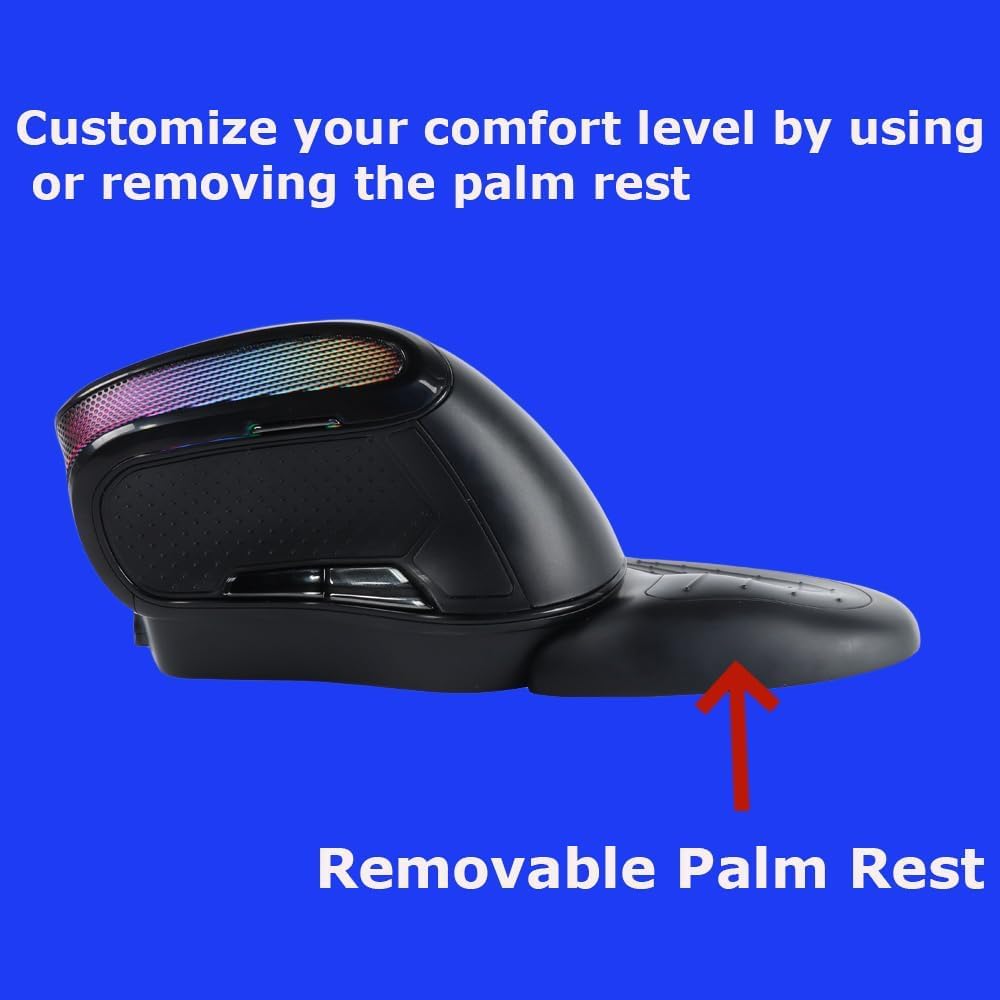
Image: Illustration of the USB receiver, which plugs into your computer for wireless connectivity.
5. Иштөө нускамалары
5.1 Негизги функциялар
- Сол чыкылдатуу: Стандарттык тандоо жана активдештирүү.
- Оң чыкылдатуу: Контексттик менюларга жетет.
- Жылдыруу дөңгөлөгү: Документтерди карап чыгат жана web барактар.
- Алга/Артка баскычтары: Капталында жайгашкан бул баскычтар навигацияны жеңилдетет web браузерлер жана file изилдөөчүлөр.
5.2 DPI жөндөө
The mouse features adjustable DPI (Dots Per Inch) settings, allowing you to change cursor sensitivity. This is useful for different tasks, such as precise graphic design work or faster navigation. The available DPI settings are 1000, 1600, 2000, 2400, and 3600.
- To Adjust DPI: Press the DPI button, usually located near the scroll wheel or on the top-left side of the mouse. Each press cycles through the available DPI settings.
5.3 Adjustable Angle Gradient
The mouse features an adjustable angle gradient, allowing you to customize the tilt for optimal comfort and to find the perfect hand position that suits your wrist.

Image: The ergonomic mouse depicted at different adjustable angles, demonstrating its customizable design.
5.4 RGB жарыктандыруу
The mouse includes an RGB "breathing" light feature that adds a dynamic visual element. This lighting can enhance your workspace aesthetics.
- The RGB lighting automatically cycles through colors. There is no specific button mentioned for changing modes or turning it off, implying it's an automatic feature.

Image: The mouse displaying its vibrant RGB lighting effect.
5.5 Removable Palm Rest
The included palm rest provides additional support and comfort, helping to reduce wrist pain during prolonged use. It is magnetically attached and can be easily removed or reattached based on your preference.
- Тиркөө: Align the palm rest with the base of the mouse and allow the magnets to secure it in place.
- Алып салуу үчүн: Gently pull the palm rest away from the mouse.

Image: The ergonomic mouse with its removable palm rest attached, highlighting the support it provides.
6. Чычканды заряддоо
The mouse is rechargeable via a Type-C port. When the battery is low, the mouse's performance may degrade, or the indicator light may change. Connect the provided Type-C cable to the mouse and a USB power source (e.g., computer USB port, wall adapter).
- Толук заряддоо, адатта, бир нече саатка созулат.
- The mouse can often be used while charging.

Image: Close-up of the Type-C charging interface on the mouse.
7. Техникалык тейлөө
- Тазалоо: Чычканды тазалоо үчүн жумшак, кургак чүпүрөктү колдонуңуз. өжөр кир үчүн, бир аз гampчүпүрөктү суу же жумшак тазалоо эритмеси менен жууп салыңыз. Катуу химиялык заттардан алыс болуңуз.
- Сактагыч: When not in use for extended periods, turn off the mouse to conserve battery life. Store it in a clean, dry place.
- USB кабыл алгыч: Keep the USB receiver in a safe place, preferably in the mouse's storage compartment, to prevent loss.
8. Кыйынчылыктарды
- Чычкан жооп бербей жатат:
- Чычкан күйгүзүлгөнүн текшериңиз.
- USB кабыл алгычтын иштеген USB портуна бекем сайылганын текшериңиз.
- Verify the mouse battery is charged.
- USB ресиверди башка USB портуна сайып көрүңүз.
- Компьютериңизди өчүрүп күйгүзүңүз.
- Үзгүлтүксүз туташуу же артта калуу:
- Ensure the mouse is within the wireless range (up to 33 feet).
- Remove any obstructions between the mouse and the receiver.
- Avoid using the mouse near strong electromagnetic interference sources (e.g., other wireless devices, large metal objects).
- Батарея жетиштүү заряддалганын текшериңиз.
- Курсордун кыймылы туруксуз же так эмес:
- Чычкандын астындагы оптикалык сенсорду тазалаңыз.
- Чычканды башка бетте же чычкан аянтчасында колдонуп көрүңүз.
- Эгерде курсор өтө тез болсо, DPI жөндөөсүн төмөнкү мааниге тууралаңыз.
- RGB light not working:
- Чычкандын кубатталганын жана батареясынын жетиштүү заряддалганын текшериңиз.
- The RGB light is an automatic breathing effect; it does not have manual controls for activation or deactivation.
9. Техникалык шарттар
| Модель номери | ergo mouse wireless |
| Байланыш | 2.4G зымсыз (USB кабыл алуучу) |
| DPI орнотуулары | 1000 / 1600 / 2000 / 2400 / 3600 |
| Кыймылды аныктоо | Оптикалык |
| Өзгөчөлүктөр | Adjustable Angle Gradient, Removable Palm Rest, RGB Breathing Light, Type-C Charging |
| Батарея түрү | Rechargeable (Internal) |
| Элемент Салмагы | 9 унция (болжол менен 255 грамм) |
| Өлчөмдөр | 6.61 x 4.09 x 3.5 дюйм (Пакеттин өлчөмдөрү) |
| Шайкештик | Windows, macOS, Linux |
Note: The product description and included charging cable indicate a rechargeable internal battery. The specification "2 AA batteries required" may be a general placeholder or refer to a different product variant. This manual assumes a rechargeable internal battery.
10. Кепилдик
Your SHARE SUNSHINE Wireless Ergonomic Vertical Mouse comes with a one-year worry-free warranty from the date of purchase. This warranty covers manufacturing defects and ensures product reliability. Please retain your proof of purchase for warranty claims.

Image: A badge indicating a 1-year warranty.
11. Колдоо
For further assistance, technical support, or warranty inquiries, please contact SHARE SUNSHINE customer service through the retailer where the product was purchased or visit the official SHARE SUNSHINE store page.
SHARE SUNSHINE Store: Дүкөнгө кириңиз