
1. Киришүү
This manual provides detailed instructions for the installation, operation, and maintenance of your H-Tech HT-7864CA 7-inch Android Multimedia System. Designed to enhance your driving experience, this multimedia system offers a wide range of features and high-quality entertainment. It combines advanced technology with ease of use, integrating various functions such as Bluetooth for music and phone calls, smartphone mirroring, USB connectivity, and compatibility with popular applications like Spotify. Featuring an Android operating system, you can download applications directly to your multimedia screen. Please read this manual thoroughly before using the product to ensure proper function and safety.
2. Пакеттин мазмуну
Төмөндө тизмеленген нерселердин баары пакетиңизге камтылганын текшериңиз:
- 1x H-Tech HT-7864CA 7-inch Android 2-DIN Multimedia System
- 1x Арткы View Камера
- 1x GPS антеннасы
- 1x Set of Installation Harnesses
- 1x Колдонуучунун колдонмосу (Бул документ)

Image: H-Tech HT-7864CA Multimedia System with its complete set of accessories, including the main unit, rear camera, GPS antenna, and various wiring harnesses for installation.
3. Продукт бүтүп калдыview жана Негизги өзгөчөлүктөрү
The H-Tech HT-7864CA is a 2-DIN full-touch multimedia system designed for in-car entertainment and connectivity. It features a 7-inch glass IPS display and runs on the Android 13 operating system.
Негизги өзгөчөлүктөрү:
- Дисплей: 7-inch Glass IPS Panel with HD 1280x800 resolution.
- Операция системасы: Android 13.
- Процессор: Octa-core for smooth performance.
- Эстутум: 4GB RAM and 64GB Internal Storage.
- Байланыш:
- Bluetooth for hands-free calls and audio streaming.
- Integrated Wi-Fi.
- 2x USB inputs.
- CarPlay and Android Auto compatibility (wired and wireless).
- EasyConnect app for smartphone mirroring.
- Аудио: 4x60W RMS power output, 1 audio output, 1 subwoofer output.
- Видео: 1 audio and video input.
- Камера киргизүүлөрү: 1 rear camera input, 1 front camera input.
- Навигация: Integrated GPS (maps sold separately).
- Башкаруу каражаттары: Full Touchscreen, 7 selectable button colors, 2 SWC wires for steering wheel control (supports up to 10 functions).

Image: Visual representation of the H-Tech HT-7864CA's key features, including USB, touchscreen, Android OS, Bluetooth, FM radio, steering wheel control, Android Auto, Apple CarPlay, wireless connectivity, GPS, and mirroring capabilities.

Image: Explanation of the IPS screen technology used in the multimedia system, highlighting its 1280x800 resolution and superior viewing angles compared to standard displays.
4. Орнотуу жана орнотуу
Professional installation is highly recommended for this product. Incorrect installation can lead to damage to the unit or vehicle and may void the warranty. Refer to the included wiring harnesses and diagrams for proper connections.
4.1 Зымдарды туташтыруу:
- Connect the main power harness to your vehicle's electrical system, ensuring correct positive, negative, and accessory power connections.
- Connect the speaker wires to the corresponding vehicle speakers.
- Attach the GPS antenna to the designated port on the multimedia unit and position it in a location with a clear view оптималдуу сигнал кабыл алуу үчүн асман.
- Арткы жагын туташтырыңыз view camera to its dedicated input. Ensure the camera's power and ground wires are correctly connected, typically to the vehicle's reverse light circuit.
- If installing a front camera, connect it to the front camera input.
- Connect any external audio/video sources to the A/V input.
- For steering wheel controls, connect the two SWC wires to your vehicle's steering wheel control interface. Refer to your vehicle's specific wiring diagram for compatibility and configuration.
- USB cables should be routed to an accessible location for connecting USB devices.
4.2 Физикалык орнотуу:
- Carefully insert the 2-DIN unit into the vehicle's dashboard opening.
- Берилген бекитүүчү кронштейндерди жана бурамаларды колдонуп, түзүлүштү бекитиңиз.
- Ensure all cables are properly routed and not pinched.
- Куралдар тактасын толугу менен монтаждоодон мурун бардык функцияларды текшериңиз.
Note: This unit does NOT have an output for headrest monitors.
5. Иштөө нускамалары
5.1 Негизги операция:
- Күйгүзүү/өчүрүү: Түзмөктү күйгүзүү же өчүрүү үчүн кубат баскычын (көбүнчө алдыңкы панелде жайгашкан) басып, кармап туруңуз.
- Сенсордук экран: Navigate the interface by tapping, swiping, and dragging on the 7-inch touchscreen.
- Үндү көзөмөлдөө: Use the on-screen controls or steering wheel controls (if configured) to adjust the volume.
- Башкы экран: Access various applications and settings from the main home screen.

Image: The multimedia system screen showing the Android operating system logo, confirming its platform.
5.2 Bluetooth байланышы:
- Мультимедиа системасындагы Bluetooth жөндөөлөрүнө өтүңүз.
- Смартфонуңузда Bluetooth'ду иштетиңиз.
- Издөө available devices on your phone or the multimedia system.
- Select "HT-7864CA" (or similar name) from the list and pair the devices.
- Эгер суралса, жупташтыруу кодун ырастаңыз.
- Once connected, you can make/receive calls hands-free and stream audio from your phone.
5.3 CarPlay and Android Auto:
The system supports both wired and wireless CarPlay and Android Auto, allowing you to integrate your smartphone's features directly onto the multimedia screen.
- Зымдуу туташуу: Connect your smartphone to one of the USB ports using a high-quality USB cable. The system should automatically detect and launch CarPlay or Android Auto.
- Зымсыз туташуу: Ensure Bluetooth and Wi-Fi are enabled on your phone and the multimedia system. Follow the on-screen prompts to establish a wireless connection for CarPlay or Android Auto.
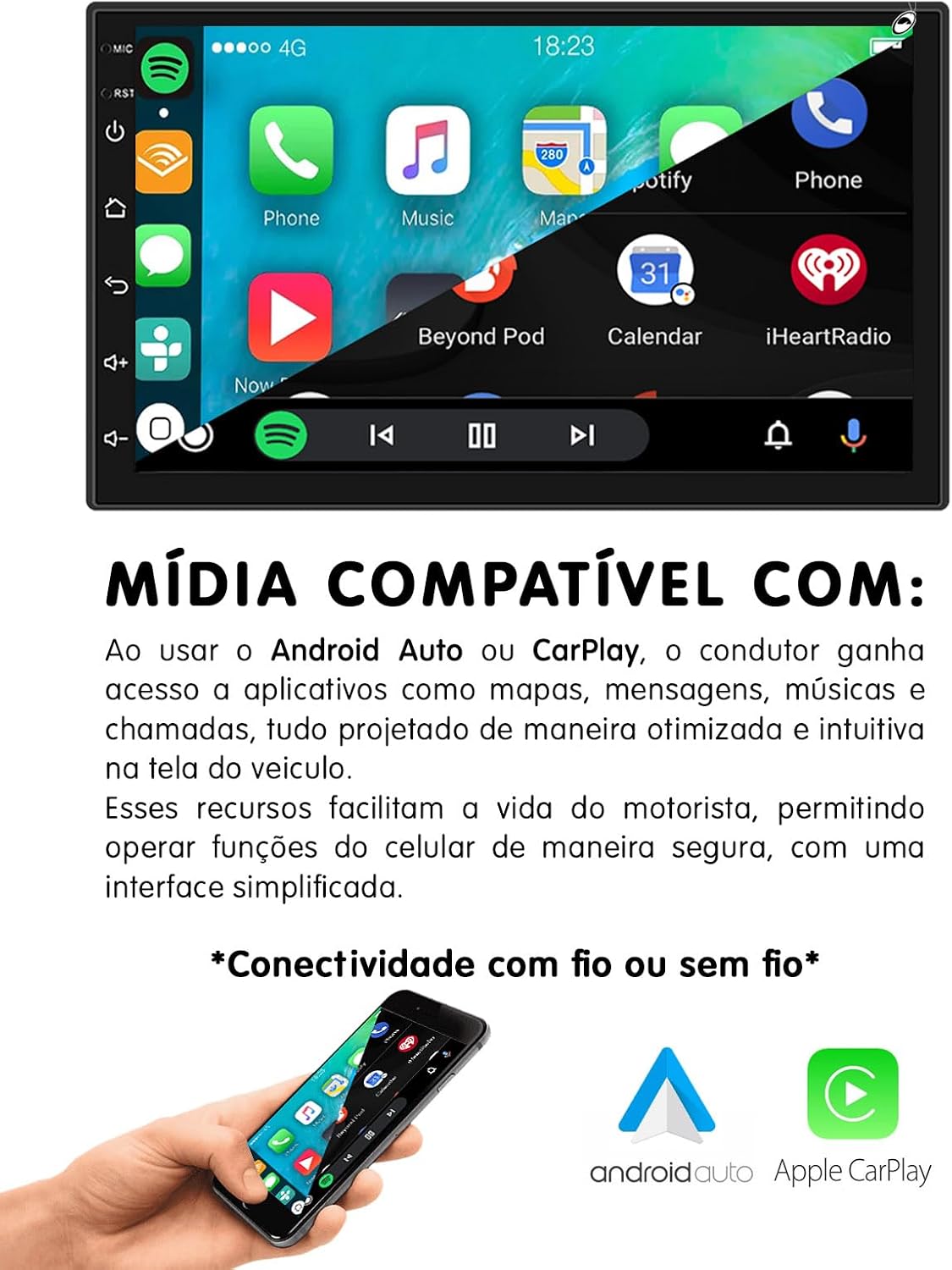
Image: The multimedia system's compatibility with Android Auto and Apple CarPlay, illustrating how a smartphone integrates with the system for optimized in-car use.
5.4 Smartphone Mirroring (EasyConnect):
Use the EasyConnect application to mirror your smartphone's screen onto the multimedia unit. This feature is compatible with both Android and iOS devices. Consult the EasyConnect app for specific compatibility versions and connection instructions.
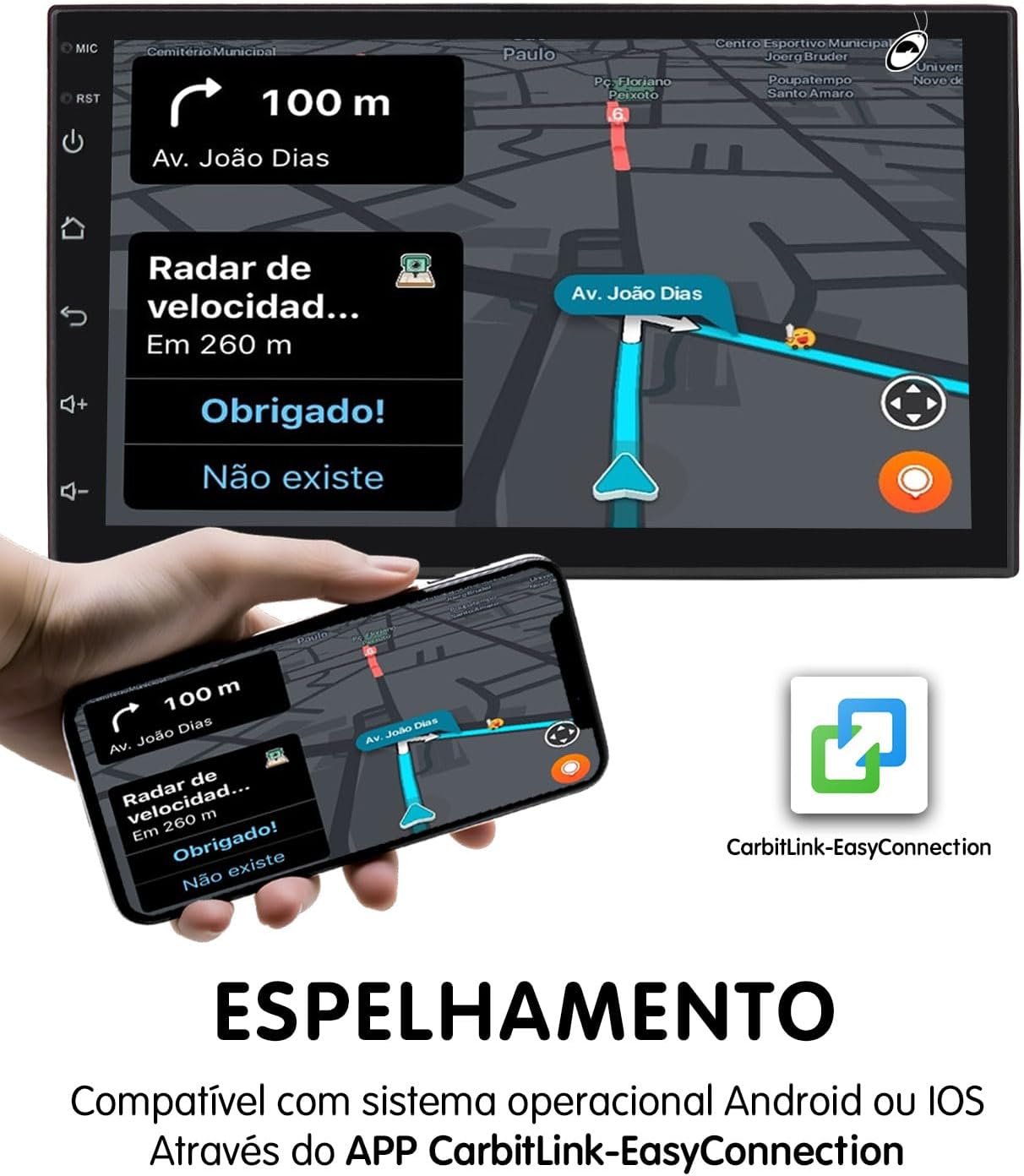
Image: The screen mirroring function of the multimedia system, enabled by the CarbitLink-EasyConnection app, displaying a smartphone's navigation interface on the larger unit screen.
5.5 GPS навигациясы:
The system has integrated GPS hardware. To use navigation, you will need to install a compatible navigation application from the Google Play Store (requires Wi-Fi connection) and download maps. Ensure the GPS antenna is properly installed for accurate positioning.
5.6 Wi-Fi Connectivity:
Connect the multimedia system to a Wi-Fi network (e.g., a mobile hotspot) to access online features, download apps, and browse the internet.
- Орнотуулар > Тармак жана Интернет > Wi-Fi бөлүмүнө өтүңүз.
- Wi-Fi күйгүзүп, каалаган тармакты тандаңыз.
- Керек болсо сырсөздү киргизиңиз.
5.7 Арткы View Камера:
When the vehicle is shifted into reverse gear, the multimedia system will automatically display the feed from the connected rear view camera, aiding in safe parking and maneuvering.

Image: The H-Tech HT-7864CA multimedia system screen showing a navigation map, accompanied by an image of the included rear view camera and a smartphone demonstrating screen mirroring of the map.
6. Техникалык тейлөө
- Тазалоо: Экранды жана аппаратты тазалоо үчүн жумшак, кургак чүпүрөктү колдонуңуз. өжөр белгилери үчүн, бир аз гamp жумшак, абразивдүү эмес тазалоочу каражаты бар чүпүрөктү колдонсо болот, бирок түзмөккө түз чачпаңыз.
- Программалык камсыздоо жаңыртуулары: Periodically check for software updates through the system's settings or the manufacturer's webоптималдуу аткарууну жана жаңы функцияларга жетүүнү камсыз кылуу үчүн сайт.
- Ашыкча температурадан сактаныңыз: Аппаратты өтө ысыкка же суукка тийгизбеңиз, анткени бул анын иштешине жана иштөө мөөнөтүнө таасир этиши мүмкүн.
- Нымдан коргоо: Агрегатты кургак жана суюктуктардан алыс кармаңыз.
7. Кыйынчылыктарды
| Көйгөй | Мүмкүн себеп | Чечим |
|---|---|---|
| Түзмөк күйбөйт. | Туура эмес электр зымдары; Сактагыч күйүп кеткен; Унаанын аккумуляторунда көйгөй бар. | Check power connections and fuses. Ensure vehicle battery is charged. Consult a professional installer. |
| Үн жок. | Үнү өтө төмөн; Үнсүз режим иштетилген; Динамиктин зымдары туура эмес туташтырылган. | Үндү катуулатыңыз. Үнсүз режим иштетилгенин текшериңиз. Динамиктердин туташуусун текшериңиз. |
| Bluetooth туташпай жатат. | Bluetooth off on phone/unit; Pairing issue; Interference. | Bluetooth эки түзмөктө тең иштетилгенин текшериңиз. Мурунку жупташтырууларды жок кылып, кайра жупташтыруу. Бирдикке жакыныраак жылыңыз. |
| GPS сигналы начар же так эмес. | GPS антеннасы туура эмес орнотулган же тыгылып калган. | GPS антеннасынын таза болушун текшериңиз view асмандын жана коопсуз байланышта. |
| Арткы камера көрүнбөйт. | Камеранын зымдарында көйгөй бар; Тескери триггер зымы туташкан эмес. | Check camera power and video connections. Verify the reverse trigger wire is correctly connected to the vehicle's reverse light circuit. |
| Сенсордук экран жооп бербейт. | Убактылуу программалык камсыздоонун катасы; Экранды калибрлөө керек. | Restart the unit. If issue persists, perform a factory reset (refer to settings menu, note this will erase data). |
If you encounter problems not listed here or if the suggested solutions do not resolve the issue, please contact customer support or a qualified technician.
8. Техникалык шарттар

Image: Approximate physical dimensions of the H-Tech HT-7864CA multimedia unit, showing width, height, and depth measurements.
| Өзгөчөлүк | Деталь |
|---|---|
| Бренд | H-TECH |
| Модел | HT-7864CA |
| Дисплей өлчөмү | 7 дюйм |
| Дисплей түрү | IPS Glass Panel |
| Резолюция | 1280x800 (HD) |
| Операция системасы | Android 13 |
| Процессор | Окта ядролуу |
| RAM | 4 ГБ |
| Ички сактагыч | 64 ГБ |
| Power Output | 4x60W RMS |
| Байланыш | Bluetooth, Wi-Fi, USB |
| Compatible Internet Services | Spotify (and others via Android apps) |
| Шайкеш түзмөктөр | Смартфондор (iOS жана Android) |
| Controller Type | Touch screen control, Voice control |
| Түс | Кара |
| Продукт Салмагы | 950 г |
| Пакеттин өлчөмдөрү | 23 x 20 x 9 см |
| Сертификация | 04725-21-11538 |

Image: Details on the multimedia system's internal components, emphasizing the Octa-core processor, 4GB RAM, and 64GB storage for enhanced performance and capacity.
9. Кепилдик жана колдоо
9.1 Өндүрүүчүнүн кепилдиги:
This H-Tech HT-7864CA Multimedia System comes with a 1 жылдык өндүрүүчүнүн кепилдиги сатып алынган күндөн тартып. Бул кепилдик нормалдуу колдонуудагы материалдардагы жана жасалгадагы кемчиликтерди камтыйт.
Important: The warranty does NOT cover damages resulting from incorrect installation, misuse, accidents, unauthorized repairs, or modifications. Professional installation is strongly recommended to ensure proper function and maintain warranty validity.
9.2 Кардарларды колдоо:
For technical assistance, warranty claims, or further inquiries, please contact your retailer or the H-Tech customer support channel. Refer to the product packaging or the official H-Tech webбайланыш маалыматы үчүн сайт.