
1. Киришүү жана коопсуздук маалыматы
This manual provides essential instructions for the installation, operation, and maintenance of your GAMEMAX GX-850 80 Plus Gold Fully Modular Power Supply. Please read this manual thoroughly before installation and retain it for future reference.
1.1 Маанилүү коопсуздук эскертүүлөрү
- Электр шок коркунучу: Power supplies contain high voltage components. Do not open the power supply unit. There are no user-serviceable parts inside. Opening the unit will void the warranty.
- Туура Жерге салуу: Ensure your computer system is properly grounded to prevent electrical hazards.
- Кубатты өчүрүү: Always disconnect the AC power cord from the wall outlet before installing, removing, or servicing the power supply or any other computer components.
- Вентиляция: Электр булагынын айланасында жетиштүү желдетүүнү камсыз кылыңыз. Желдетүү тешиктерин жаппаңыз.
- Moisture and Temperature: Do not operate the power supply in high humidity or high-temperature environments. Keep it away from water and heat sources.
- Кесиптик орнотуу: Эгерде сиз орнотуунун кандайдыр бир кадамдары боюнча күмөн санасаңыз, квалификациялуу техниктен жардам сураңыз.
2. Пакеттин мазмуну
Verify that all items are present in your GAMEMAX GX-850 package:
- GAMEMAX GX-850 80 Plus Gold Fully Modular Power Supply
- Modular Cable Set (including ATX 24-pin, CPU 8-pin, PCIe 6+2-pin, SATA, Peripheral 4-pin cables)
- AC Power Cord
- Монтаждоо бурамалар
- Колдонуучунун Колдонмосу (бул документ)
3. Продукт бүтүп калдыview
The GAMEMAX GX-850 is an 850-watt 80 Plus Gold certified fully modular power supply designed for desktop computers. It features an LLC and DC-DC circuit design for high efficiency and stable power delivery, along with an ultra-quiet FDB (Fluid Dynamic Bearing) fan for optimal cooling and low noise.
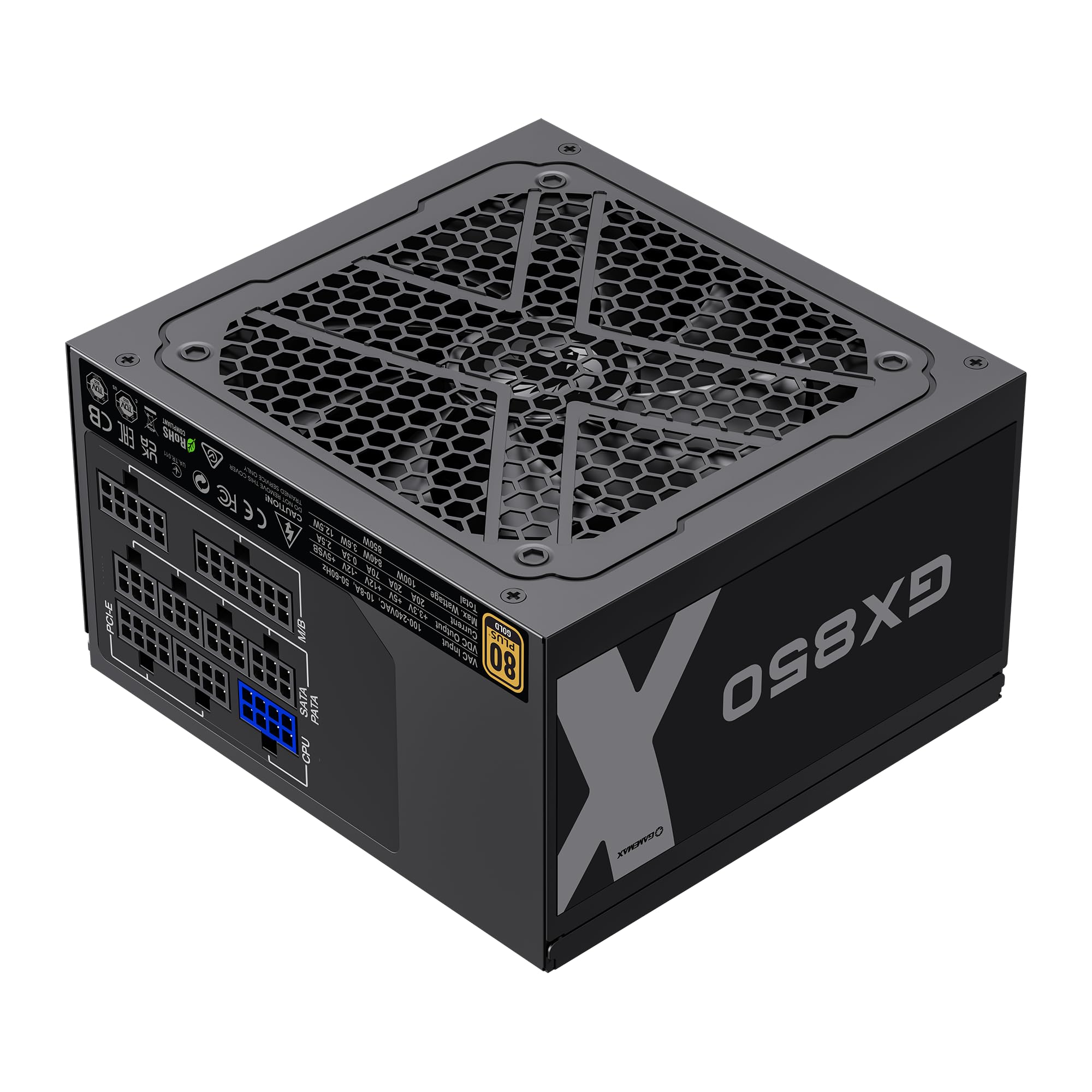
Image: The GAMEMAX GX-850 80 Plus Gold Fully Modular Power Supply, showcasing its black finish and modular design.
3.1 Негизги өзгөчөлүктөрү
- 80 Plus Gold сертификаты: Жылуулук жана эксплуатациялык чыгымдарды азайтып, электр энергиясынын жогорку натыйжалуулугун камсыз кылат.
- LLC+DC-DC Circuit: Advanced circuit design for stable voltage output and improved efficiency.
- Толугу менен модулдук дизайн: Allows for custom cable management, reducing clutter and improving airflow.
- FDB Fan: Ultra-quiet temperature-controlled Fluid Dynamic Bearing fan for silent operation and extended lifespan.
- 105℃ Mainstream Capacitor: High-quality capacitors ensure long life and smooth power output.
- Комплекстүү коргоо: Features SIX levels of protection: Over Temperature Protection (OTP), Over Current Protection (OCP), Short Circuit Protection (SCP), Over Voltage Protection (OVP), Under Voltage Protection (UVP), and Over Power Protection (OPP).
4. Орнотуу жана орнотуу
Follow these steps to properly install your GAMEMAX GX-850 power supply into your computer system.
4.1 Орнотуу кадамдары
- Системаңызды даярдаңыз: Компьютериңиз толугу менен өчүрүлгөнүн жана розеткадан суурулганын текшериңиз. Компьютериңиздин корпусун ачыңыз.
- Эски PSUну алып салуу (эгер бар болсо): Бардык кабелдерди эски кубат булагыңыздан ажыратып, аны корпустан чыгарыңыз.
- Жаңы PSUну орнотуу: Carefully place the GAMEMAX GX-850 into the power supply bay of your computer case. Secure it with the provided mounting screws. Ensure the fan is facing the correct direction for optimal airflow (typically facing down if your case has a bottom vent, or up if it's a top-mounted PSU).
- Модулдук кабелдерди туташтыруу: Identify the necessary cables for your components. Connect the modular cables to the corresponding ports on the power supply first, then route them to your components.
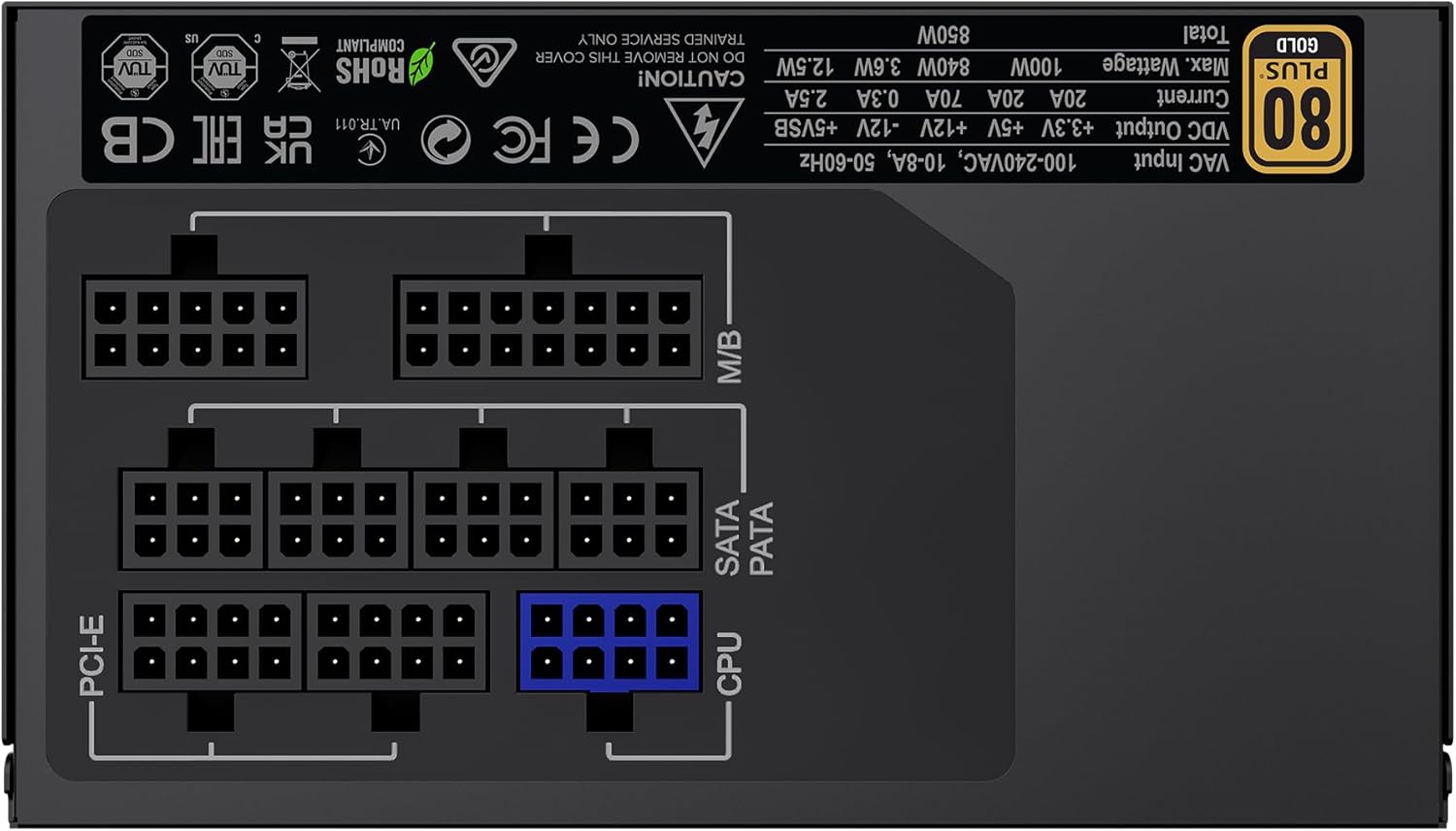
Сүрөт: Арткы view of the GAMEMAX GX-850 showing the fully modular cable connection ports for PCI-e, M/B (Motherboard), SATA/PATA, and CPU cables.
- Motherboard (M/B): 24-пин ATX кабелин энелик платага туташтырыңыз.
- CPU: Connect the 8-pin (or 4+4-pin) CPU power cable to the CPU power connector on your motherboard.
- Graphics Cards (PCI-e): Connect the 6+2-pin PCIe power cables to your graphics card(s). Use separate cables for each connector if your GPU requires multiple.
- Storage Devices (SATA): SATA электр кабелдерин SSD, HDD жана оптикалык дисктериңизге туташтырыңыз.
- Peripherals (PATA/Molex): Connect peripheral power cables to any other devices requiring them (e.g., fan controllers, older drives).
- Кабелдик башкаруу: Аба агымын жана эстетиканы жакшыртуу үчүн кабелдерди тыкан өткөрүңүз.
- Корпусту жаап, AC кубатын туташтырыңыз: Компьютериңиздин корпусун жабыңыз. AC кубат шнурун кубат булагына, андан кийин жерге туташтырылган розеткага туташтырыңыз.
5. Иштөө нускамалары
After successful installation, follow these steps to operate your system.
- Кубат которгучу: Кубат булагынын арткы жагындагы кубат которгучу 'ON' (I) абалында экенин текшериңиз.
- Система күйүк: Press the power button on your computer case to turn on the system.
- System Power Off: To turn off your system, use the operating system's shutdown procedure. For a hard shutdown, hold the case power button for several seconds. For complete power disconnection, switch the PSU's power switch to 'OFF' (O) and unplug the AC cord.
6. Техникалык тейлөө
Үзгүлтүксүз техникалык тейлөө электр менен камсыздооңуздун узак мөөнөттүү жана оптималдуу иштешин камсыз кылууга жардам берет.
- Чаңды тазалоо: Periodically clean the power supply's fan and ventilation grilles using compressed air to prevent dust buildup, which can impede cooling. Ensure the system is powered off and unplugged before cleaning.
- Кабель текшерүү: Occasionally check all modular cable connections to ensure they are securely seated.
- Экологиялык шарттар: Maintain a clean, dry, and well-ventilated environment for your computer.
7. Кыйынчылыктарды
Эгер сиз кубат менен камсыз кылууда көйгөйлөргө туш болсоңуз, төмөнкү жалпы көйгөйлөрдү чечүү кадамдарын караңыз:
- Кубат жок:
- AC кубат шнурунун розеткага да, кубат булагына да бекем сайылганын текшериңиз.
- Кубат булагынын арткы жагындагы кубат которгучу "ON" (I) абалында экенин текшериңиз.
- Verify that the 24-pin ATX and 8-pin CPU power cables are correctly and firmly connected to the motherboard.
- Дубалдагы розеткада кубат бар экенин ырастоо үчүн башка аспап менен сынап көрүңүз.
- Системанын туруксуздугу/Кокус өчүрүүлөр:
- Бардык модулдук кабельдер PSU жана тетиктердин учтарына толугу менен орнотулганын текшериңиз.
- Туура желдетүүнү текшериңиз жана PSU желдеткичинин айланып жатканын текшериңиз. Ашыкча ысып кетүү өчүрүүлөргө алып келиши мүмкүн.
- If you have recently added new components, ensure your 850W power supply is sufficient for the total system wattage.
- желдеткич айланбай жатат:
- The GX-850 features a temperature-controlled fan. It may not spin at low loads or temperatures. This is normal operation.
- If the fan does not spin under load and the PSU feels hot, ensure there are no obstructions and consider contacting support.
If problems persist after performing these steps, contact GAMEMAX customer support or your retailer for further assistance.
8. Техникалык шарттар
Detailed technical specifications for the GAMEMAX GX-850 80 Plus Gold Power Supply:
| Өзгөчөлүк | Спецификация |
|---|---|
| Модель аты | GX-850 Modular |
| Бренд | GAMEMAX |
| Чыгуу Wattage | 850 Ватт |
| Форма фактору | ATX |
| Натыйжалуулуктун сертификациясы | 80 Plus Алтын |
| Энергия менен жабдуунун дизайны | Толук модулдук |
| Муздатуу ыкмасы | Air (FDB Fan) |
| Күйөрмандардын саны | 1 |
| Минималдуу киргизүү көлөмүtage | 115 вольт |
| Максималдуу киргизүү көлөмүtage | 240 вольт (AC) |
| Жогорку температура рейтинги | 105 Degrees Celsius (Capacitors) |
| Шайкеш түзмөктөр | Иш столунун компьютери |
| Туташтыргычтын түрлөрү | ATX, PCI-e, SATA |
9. Кепилдик жана колдоо
GAMEMAX products are manufactured to high-quality standards. For warranty information, please refer to the warranty card included with your product or visit the official GAMEMAX webсайт. Кепилдиктин шарттары аймакка жана сатуучуга жараша өзгөрүшү мүмкүн.
For technical support or further inquiries, please contact GAMEMAX customer service through their official webсайт же сатуучуңуз берген байланыш маалыматы.