
1. Киришүү
This manual provides detailed instructions for the H-TECH HT-9700CA 9.7-inch Vertical Tesla Multimedia System. Designed to enhance your driving experience, this multimedia unit integrates advanced technology with intuitive features. Please read this manual thoroughly before installation and operation to ensure proper use and to maximize the system's capabilities.
The H-TECH HT-9700CA offers Bluetooth connectivity for music and calls, smartphone mirroring (CarPlay and Android Auto), USB input, and a full Android operating system, allowing you to download applications directly to the unit. This system aims to make your journeys safer and more enjoyable.

Image 1.1: H-TECH HT-9700CA Multimedia System with included rear camera.
2. Негизги өзгөчөлүктөрү
- 9.7-inch Vertical Tesla-style Display: Offers an immersive and intuitive viewing experience, seamlessly integrated into your vehicle for a modern and personalized feel.
- Android операциялык системасы: Allows direct download and use of applications, enhancing entertainment and navigation options.
- CarPlay and Android Auto Integration: Supports both wireless and wired connections for seamless smartphone integration (iOS and Android devices). Access apps, make calls, send messages, and control music safely while driving.
- Ыңгайлаштырылуучу каптал баскычтар: Features 7 color options for side buttons, allowing personalization to match your vehicle's interior or personal preference. Provides quick and easy access to essential multimedia functions.
- Өркүндөтүлгөн байланыш: Includes Bluetooth 4.1, Wi-Fi, 1 USB input, 1 rear camera input, 1 front camera input, 1 audio/video input, and 1 audio/video output (for simultaneous rear screen display).
- Жогорку өндүрүмдүү аппаратура: Equipped with 2GB RAM, 32GB internal memory, and a Quad-Core processor for smooth operation.
- Интегралдык GPS: Built-in GPS functionality (maps sold separately).
- High-Resolution IPS Screen: 1024x768p resolution with an IPS panel for clear and sharp visuals.
- Руль башкаруусу (SWC): Two SWC wires support up to 10 programmable functions.
- EasyConnect Application: For smartphone mirroring.

Image 2.1: Visual representation of the H-TECH HT-9700CA's main features.
3. Пакеттин мазмуну
The following items are included in your H-TECH HT-9700CA Multimedia System package:
- 1x 9.7-inch Android Multimedia Unit
- 1x Арткы камера
- 1x GPS антеннасы
- Installation Wiring Harnesses
- Көрсөтмө (бул документ)
4. Орнотуу жана орнотуу
Маанилүү эскертүү: For installation, a 2-DIN panel frame is required. This multimedia unit is compatible with all vehicles that use a 2-DIN panel frame. Professional installation is recommended to ensure correct wiring and functionality.
4.1. Физикалык орнотуу
The multimedia unit is designed to fit into a standard 2-DIN opening. The side panels are removable, allowing for easier integration with various vehicle dashboards.

Image 4.1: Multimedia unit with removable side panels for adaptable installation.
4.2. Зымдарды туташтыруу
Connect the provided wiring harnesses to the corresponding ports on the rear of the multimedia unit and to your vehicle's electrical system. Ensure all connections are secure to prevent malfunctions.
- Электр жабдыктары: Connects to your vehicle's power supply (constant 12V, accessory 12V, ground).
- Динамик аппараты: Connects to your vehicle's speakers.
- GPS антеннасы: Connect the GPS antenna to the dedicated port and mount it in a location with a clear view асмандын.
- Арткы камера киргизүү: Connect the included rear camera to its dedicated input.
- Алдыңкы камеранын киргизүүсү: If using an optional front camera, connect it here.
- USB киргизүү: Connect the USB extension cable for external storage or device charging.
- Аудио/Видео Киргизүүлөр/Чыгуулар: Use these for connecting external audio/video sources or for outputting video to rear monitors.
- SWC (Steering Wheel Control) Wires: Connect these to your vehicle's steering wheel control wires to enable button functionality.
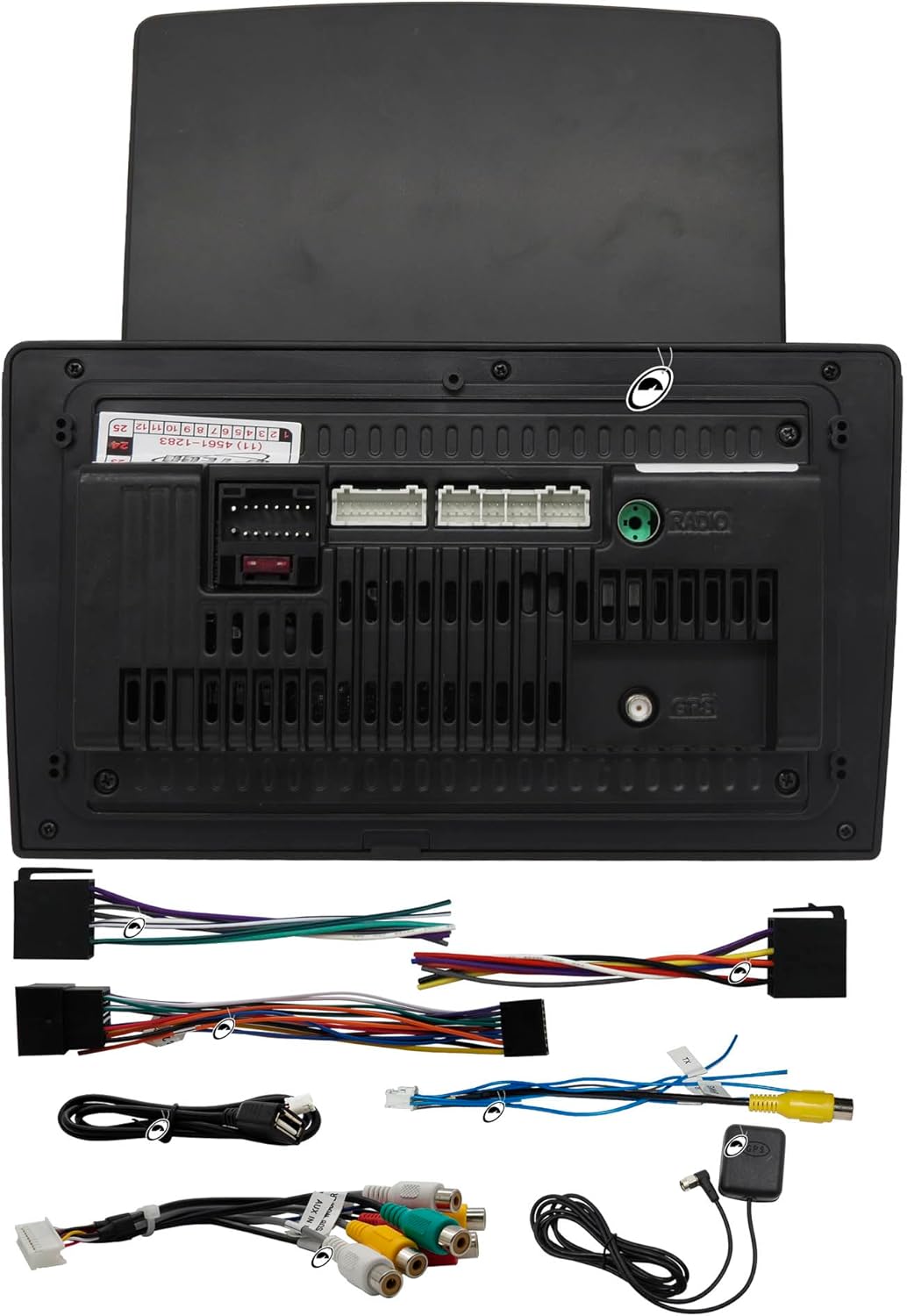
Image 4.2: Rear panel connections and included wiring harnesses.
5. Иштөө нускамалары
5.1. Күйгүзүү/өчүрүү жана негизги навигация
Press the power button (usually integrated with the volume knob) to turn the unit on or off. The touchscreen interface allows for intuitive navigation through menus and applications. Swipe, tap, and drag gestures are used similar to a smartphone.

Image 5.1: Android operating system interface.
5.2. Android System and Applications
The unit runs on an Android operating system. You can connect to Wi-Fi to access the internet and download applications directly from the app store, similar to a tablet or smartphone. Popular apps like Spotify, YouTube, and navigation tools can be installed.
5.3. CarPlay жана Android Auto
The system supports both wireless and wired CarPlay and Android Auto. Connect your compatible iOS or Android smartphone to access navigation, music, messages, and calls through the multimedia screen. Follow the on-screen prompts for initial setup.
5.4. Каптал баскычтар
The physical buttons on the side of the unit provide quick access to essential functions such as volume control, menu navigation, and mode selection. These buttons can be customized with 7 different color options to match your preference.

Image 5.2: Side buttons for quick function access.
5.5. Аудио жана видео ойнотуу
- Радио: Access FM radio stations.
- Bluetooth: Колсуз чалуу жана аудио агымы үчүн смартфонуңузду Bluetooth 4.1 аркылуу жупташтырыңыз.
- USB: Медиа ойнотуу files from a USB drive connected to the USB input.
- Арткы камера: The system automatically displays the rear camera feed when the vehicle is in reverse.
- Видео чыгаруу: The unit features a video output that allows for simultaneous display on rear headrest monitors, providing entertainment for passengers.
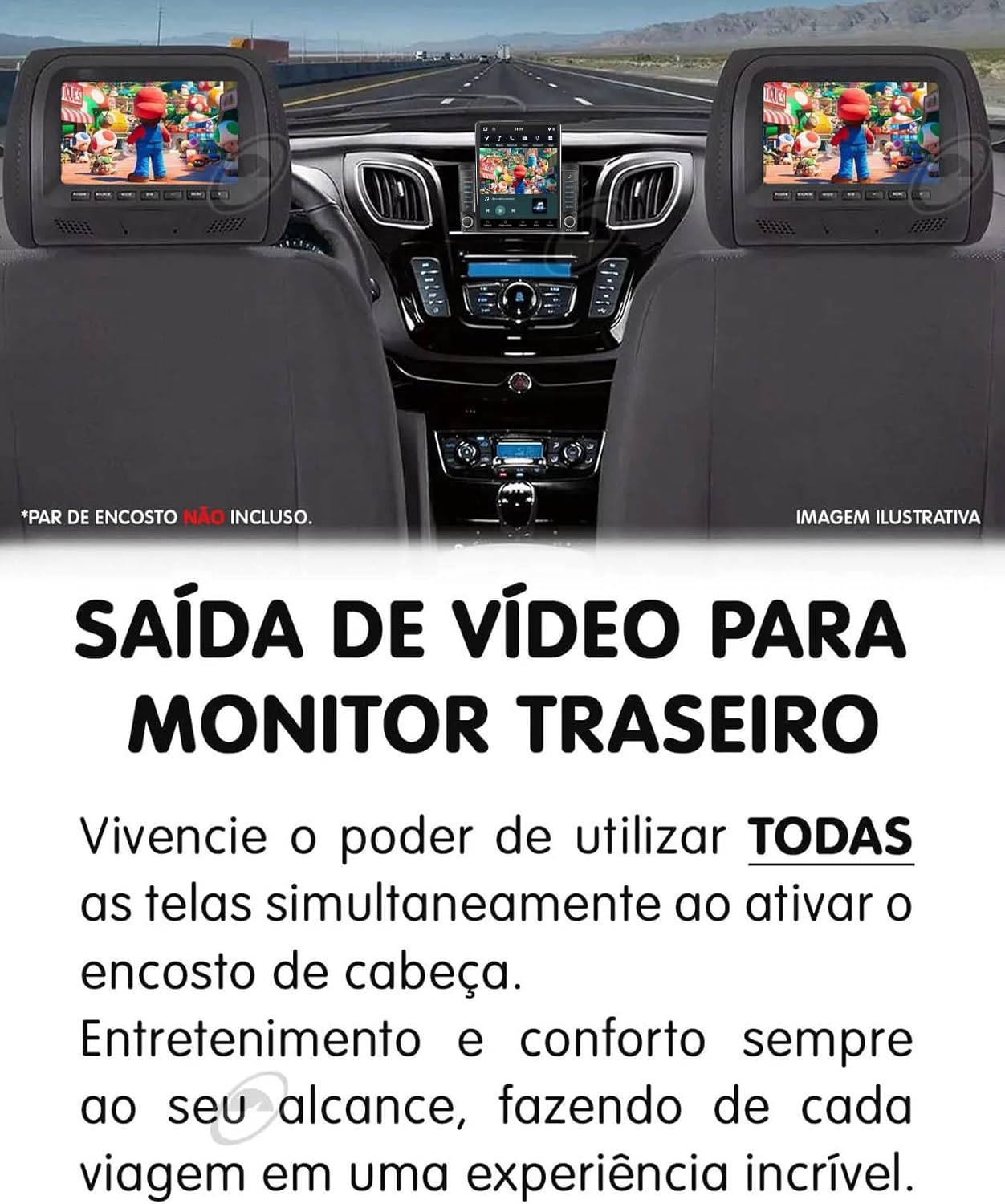
Image 5.3: Video output to rear monitors for passenger entertainment.
5.6. GPS навигациясы
The unit has an integrated GPS module. While the hardware is present, navigation maps need to be acquired and installed separately. Once installed, you can use the GPS functionality for turn-by-turn directions.
6. Техникалык тейлөө
To ensure the longevity and optimal performance of your H-TECH HT-9700CA multimedia system, follow these maintenance guidelines:
- Экранды тазалоо: Экранды акырын сүртүү үчүн жумшак, түксүз чүпүрөктү колдонуңуз. өжөр тактар үчүн, бир аз гampчүпүрөккө суу же экранды тазалоочу каражат. Катуу химиялык заттардан же абразивдүү материалдардан алыс болуңуз.
- Программалык камсыздоо жаңыртуулары: Periodically check for software updates through the system settings. Keeping the software updated can improve performance, add new features, and fix bugs.
- Экологиялык шарттар: Аппаратты экстремалдык температурага, түз күн нуруна узак убакытка же ашыкча нымдуулукка дуушар кылуудан алыс болуңуз.
- Кабелдик байланыштар: Бардык зымдардын туташууларынын бекем жана бузулбагандыгын текшерүү үчүн мезгил-мезгили менен текшерип туруңуз.
7. Кыйынчылыктарды
If you encounter issues with your multimedia system, refer to the following common troubleshooting steps:
- Кубат жок: Ensure all power connections are correctly installed and secure. Check the vehicle's fuse box for any blown fuses related to the stereo system.
- Үн жок: Verify that the volume is not muted or set to minimum. Check speaker connections. Ensure the correct audio source is selected.
- Сенсордук экран жооп бербейт: Бирдикти өчүрүп күйгүзүп көрүңүз. Эгер маселе чечилбесе, баштапкы абалга кайтаруу зарыл болушу мүмкүн (эскертүү: бул колдонуучунун бардык дайындарын жана жөндөөлөрүн өчүрөт).
- Bluetooth туташуу маселелери: Ensure Bluetooth is enabled on both the multimedia unit and your smartphone. Delete previous pairings and try pairing again. Move the devices closer to each other.
- GPS иштебейт: GPS антеннасы туура туташтырылганын жана тунук жерге орнотулганын текшериңиз view of the sky. Verify that navigation maps are correctly installed.
- CarPlay/Android Auto туташпай жатат: Ensure your smartphone is compatible and that the USB cable (if wired) is functional. Check app permissions on your phone. Try restarting both the unit and your phone.
- Арткы камера көрүнбөйт: Камеранын кубат жана видео сигнал туташууларын текшериңиз. Унаанын артка жүрүү ылдамдыгында экенин текшериңиз.
If these steps do not resolve the issue, please contact H-TECH customer support or a qualified technician.
8. Техникалык шарттар
| Өзгөчөлүк | Спецификация |
|---|---|
| Бренд | H-TECH |
| Модел | HT-9700CA |
| Screen Size | 9.7 дюйм |
| Экран түрү | Vertical IPS Glass Panel |
| Резолюция | 1024x768p |
| Операция системасы | Android |
| RAM | 2 ГБ |
| Ички эс тутум | 32 ГБ |
| Процессор | Quad-Core |
| Bluetooth версиясы | 4.1 |
| Байланыш | Wi-Fi, HDMI, USB |
| Шайкеш түзмөктөр | Смартфон (Android, iOS) |
| Аудио чыгаруу режими | Стерео |
| Чыгуу күчү | 4x60W RMS (240 Watts total) |
| Киргизүүлөр | 1x USB, 1x Rear Camera, 1x Front Camera, 1x Audio/Video |
| Чыгуулар | 1x Audio/Video (simultaneous rear screen), 1x Subwoofer |
| Руль башкаруу | 2 SWC wires (up to 10 functions) |
| Сертификаттар | Анател: 14755-22-14701 |
| Продукт Салмагы | 950 г |
| Өлчөмдөрү (болжол менен) | 27 x 25 x 10 см (Пакет) |

Image 8.1: Approximate dimensions of the multimedia unit.
9. Кепилдик жана колдоо
9.1. Өндүрүүчүнүн Кепилдиги
The H-TECH HT-9700CA Multimedia System comes with a 1 жылдык өндүрүүчүнүн кепилдиги сатып алынган күндөн тартып.
Маанилүү: Кепилдик ЖОК cover installation errors or misuse of the product. Any damage resulting from improper installation, unauthorized modifications, or neglect will void the warranty.
9.2. Кардарларды колдоо кызматы
For technical assistance, warranty claims, or any questions regarding your H-TECH multimedia system, please contact your retailer or the H-TECH customer support channel provided at the point of purchase.