
1. Киришүү
The FosPower 5-in-1 Bug Zapper is a versatile device designed for both indoor and outdoor use, offering multiple functionalities to enhance your environment. It combines a powerful bug zapper with various lighting options, a power bank, and an SOS signal for emergencies. Its rugged and water-resistant design ensures reliable performance in diverse conditions.
Негизги өзгөчөлүктөрү:
- Bug Zapper: 3,300V grid with 0.3-inch spaced guards for effective and safe insect elimination.
- Кол чырак: Integrated side flashlight with multiple brightness settings.
- Окуу жарыгы: Adjustable top-mounted light for ambient or focused illumination.
- Power Bank: High-capacity 29600mWh internal power bank with USB-A output for charging mobile devices.
- SOS сигналы: Emergency flashing mode for signaling.
- Кайра заряддалуучу: Supports both USB and solar charging for extended battery life.
- Туруктуу дизайн: Rugged build with IPX3 water resistance.

Figure 1: ашыкview of the FosPower 5-in-1 Bug Zapper's functionalities.
2. Орнотуу
2.1 Алгачкы заряддоо
Before first use, fully charge your FosPower 5-in-1 Bug Zapper. The device can be charged via USB-C or its integrated solar panel.
- USB-C заряддоо: Connect the provided USB-C cable to the USB-C input port on the device and to a compatible USB power source (e.g., wall adapter, computer USB port). The power indicator lights will illuminate to show charging progress.
- Күн кубаты: Place the device with the solar panel facing direct sunlight. The solar panel is located on the top of the device and can be rotated for optimal sun exposure. The power indicator lights will show charging activity.

Figure 2: Charging ports and solar panel location.
2.2 Батарея көрсөткүчү
The device features LED indicator lights to display the battery level:
- 4 blue lights: Battery level above 75%.
- 3 blue lights: Battery level between 50% and 75%.
- 2 blue lights: Battery level between 25% and 50%.
- 1 blue light: Battery level between 3% and 25%.
- 1 flashing blue light: Battery level below 3%.
3. Операция
The FosPower 5-in-1 Bug Zapper features three main control buttons for its various functions.
3.1 Bug Zapper Function
- Locate the button marked with a spider icon.
- Press this button once to activate the bug zapper. The blue UV light grid will illuminate.
- Press the button again to turn off the bug zapper.
Video 1: Demonstrating the bug zapper function and other features of the FosPower 5-in-1 Bug Zapper.
3.2 Flashlight and SOS Signal
- Locate the button marked with a sun icon.
- Press once for low brightness flashlight.
- Press twice for medium brightness flashlight.
- Press three times for high brightness flashlight.
- Press four times to activate the SOS flashing signal.
- Press five times to turn off the flashlight/SOS signal.
3.3 Окуу жарыгы
- Locate the button marked with a light bulb icon.
- Press once to activate the reading light at low brightness.
- Press twice for high brightness reading light.
- Press three times to turn off the reading light.
- The reading light panel can be rotated and adjusted to direct illumination as needed.
3.4 Power Bank функциясы
- Connect your mobile device or other electronics to the USB-A output port using a compatible charging cable.
- The internal 29600mWh power bank will begin charging your device.
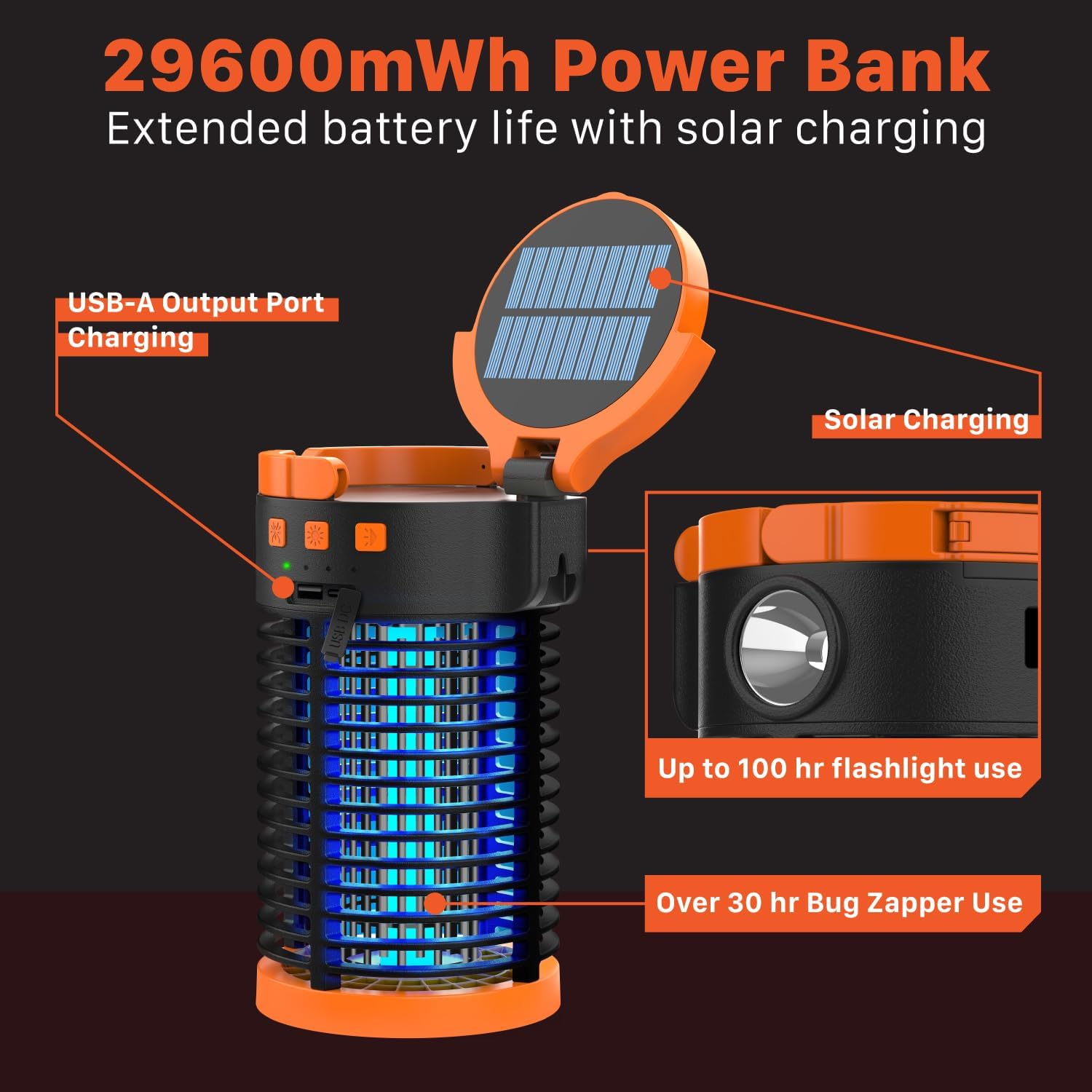
Figure 3: Versatile use of the bug zapper in different environments.
4. Техникалык тейлөө
4.1 Cleaning the Bug Collection Tray
Regular cleaning ensures optimal performance of the bug zapper. Always ensure the device is turned off before cleaning.
- Twist the bottom cover of the device counter-clockwise to unlock and remove the bug collection tray.
- Empty any collected insects from the tray.
- Use the provided cleaning brush to gently remove any debris from the bug zapper grid. Do not use water or liquids directly on the grid.
- Reattach the collection tray by aligning it and twisting clockwise until securely locked.

Figure 4: Safety features and grid spacing of the bug zapper.
5. Кыйынчылыктарды
5.1 Bug Zapper Not Activating or Ineffective
- Батарея деңгээлин текшерүү: Ensure the device is sufficiently charged. Refer to section 2.2 for battery indicator details.
- Clean Grid: A dirty bug zapper grid can reduce effectiveness. Follow the cleaning instructions in section 4.1.
- Туура жайгаштыруу: For outdoor use, place the zapper away from competing light sources and in areas with high insect activity.
5.2 Жарыктар иштебей жатат
- Батарея деңгээлин текшерүү: Ensure the device has enough charge.
- Cycle Power: Turn the device off and on again, and cycle through the light modes to ensure proper function.
5.3 Түзмөк кубатталбай жатат
- USB-C заряддоо: Verify the USB-C cable is securely connected to both the device and the power source. Try a different cable or power adapter.
- Күн кубаты: Ensure the solar panel is clean and exposed to direct sunlight. Cloudy conditions or indirect light will significantly reduce charging efficiency.
6. Техникалык шарттар
| Өзгөчөлүк | Деталь |
|---|---|
| Бренд | FosPower |
| Модель номери | FOSPWB-2444PX |
| Элемент Салмагы | 902 грамм |
| Power Source | Battery (Rechargeable USB/Solar) |
| Батареянын ички сыйымдуулугу | 29600 мВт саат |
| Bug Zapper Voltage | 3,300V |
| Bug Zapper Coverage Area | 1,200 чарчы фут |
| Суу өткөрбөйт деңгээл | IPX3 |
| Сунушталган колдонуу | Ички/тышкы |
| Максаттуу түрлөр | Чиркей |
7. Кепилдик жана колдоо
FosPower offers a Чектелген Өмүр бою Кепилдик on this product. For warranty claims, technical support, or any inquiries, please contact FosPower customer service.
You can register your product and find more information about the warranty at: fospower.com/warranty
Join millions of satisfied customers with our limited lifetime warranty, backed by our experienced and dedicated USA based customer service.