
Продукт бүттүview
The PPLEE Alarm Clock (Model: CR1001EPRO) is an upgraded digital clock designed for bedrooms, featuring a large, bold number display for easy readability. It includes dual alarms, weekend/weekday modes, adjustable brightness and volume, and convenient Type-C and USB charging ports. This clock is designed to provide reliable timekeeping and alarm functions with power-off memory for uninterrupted use.

Figure 1: PPLEE Alarm Clock with large white LED display and charging phone.
Негизги өзгөчөлүктөрү
- Large Bold LED Display: 2.2-inch digits for clear visibility day and night, with an upgraded week display.
- Жөнгө салынуучу жарыктык жана үн көлөмү: 5 levels of brightness and volume to suit individual preferences and light sensitivity.
- Кош ойготкучтар: Set two independent alarms with daily, weekday (MON-FRI), and weekend (SAT-SUN) modes for flexible scheduling.
- USB + Type-C Charging Ports: Conveniently charge mobile devices directly from the clock.
- DST & 12/24H Format: Easy Daylight Saving Time (DST) adjustment and switch between 12-hour and 24-hour time formats.
- Big Snooze Button: Allows for an extra 9 minutes of sleep.
- Эстутумду өчүрүү: Электр энергиясы өчүрүлгөн учурда убакытты жана ойготкуч жөндөөлөрүн сактайтtages (requires backup batteries, not included).

Figure 2: Adjustable brightness levels of the alarm clock display.
Жайгашуу
1. Power Connection
Connect the provided AC adapter to the DC 5V IN port on the back of the alarm clock and plug it into a standard wall outlet. The display will light up.

3-сүрөт: Арткы view of the alarm clock with power and charging ports.
2. Батареянын камдык көчүрмөсү (милдеттүү эмес)
For power-off memory function, insert 2 AAA batteries (not included) into the battery compartment on the back of the clock. This will preserve time and alarm settings during power interruptions.

Figure 4: Illustration of the battery backup feature for power outagэлектрондук эс тутум.
Иштөө нускамалары
1. Убакытты белгилөө
- басыңыз УБАКЫТ КОЙГУЛА баскычын бир жолу. Саат цифралары жарк этет.
- колдонуу HOUR саатты жөндөө үчүн баскыч.
- басыңыз MIN мүнөттөрдү жөндөө үчүн баскычты басыңыз.
- Басыңыз УБАКЫТ КОЙГУЛА again or wait a few seconds for the setting to save automatically.
2. Ойготкучтарды орнотуу (Кош ойготкучтар)
The clock supports two independent alarms (ALARM1 and ALARM2).
- басыңыз ALARM1 or ALARM2 ойготкучтун убактысы күйүп-өчүп турат.
- колдонуу HOUR жана MIN каалаган ойготкуч убактысын коюу үчүн баскычтарды басыңыз.
- басыңыз ALARM1 or ALARM2 button again to confirm and activate the alarm. An alarm icon will appear on the display.
- To select alarm mode (Daily, Weekday, Weekend), press the corresponding ALARM button repeatedly until the desired mode icon appears.

Figure 5: Dual alarm settings with weekday and weekend options.
3. Тындырма функциясы
Ойготкуч чыкканда чоң баскычты басыңыз КАЙРЫЛУУ/ОК button on top to temporarily silence the alarm for 9 minutes.
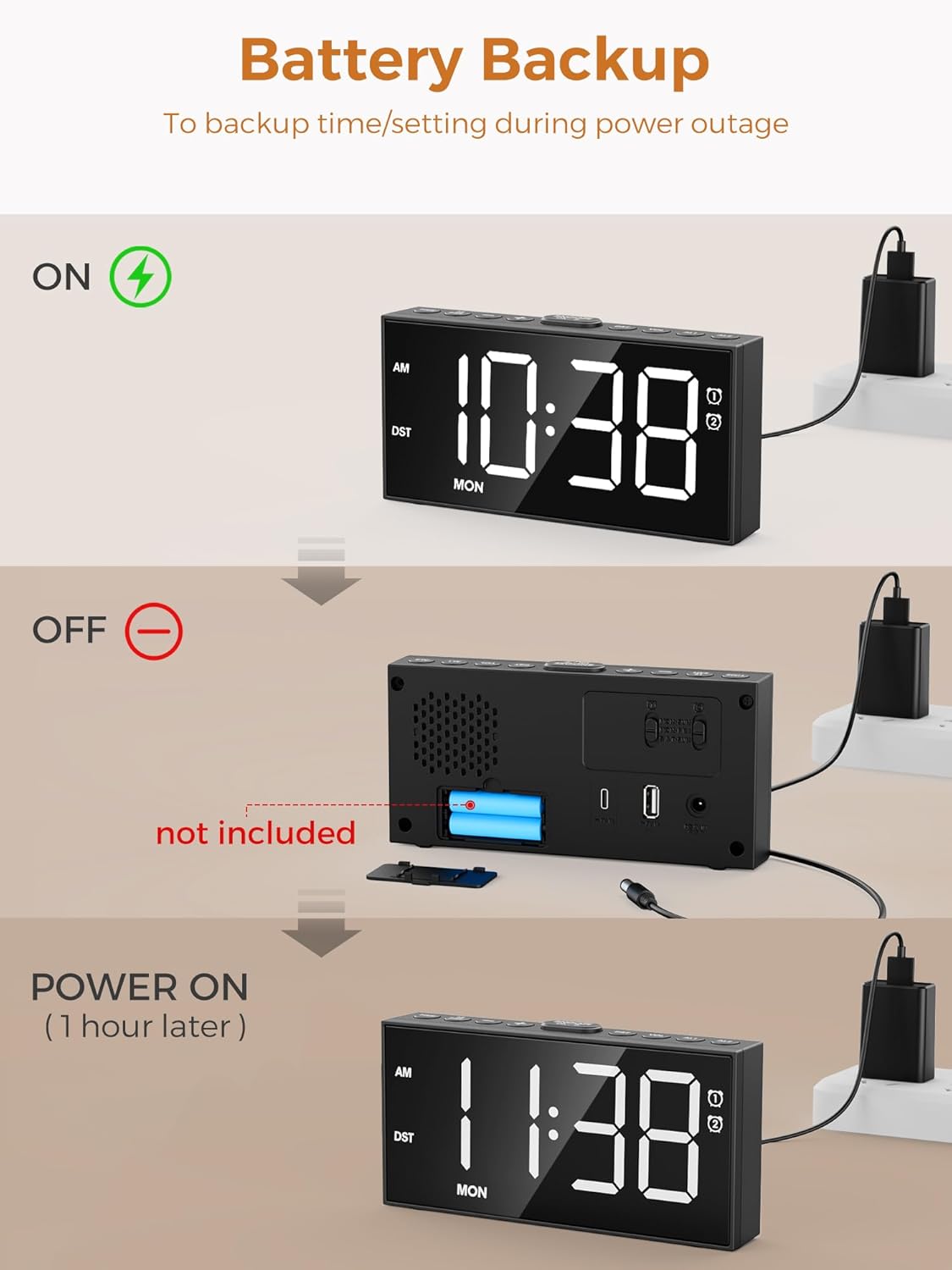
Figure 6: The large snooze button for temporary alarm silencing.
4. Жарыктыкты жөндөө
басыңыз DIMMER Дисплейдин жарыктыгынын 5 деңгээлин айландыруу үчүн баскычын кайра-кайра басыңыз.
5. Үндү тууралоо
колдонуу VOL+ жана VOL- buttons on the side to adjust the alarm volume (5 levels).
6. 12/24 Hour Format & DST
басыңыз 12/24H button to switch between 12-hour (with AM/PM indicator) and 24-hour formats. Hold the DST button for 3 seconds to activate/deactivate Daylight Saving Time, which will adjust the time by one hour.

Figure 7: Time format and DST adjustment options.
Техникалык тейлөө
- Keep the clock clean by wiping it with a soft, dry cloth. Avoid abrasive cleaners.
- Күнү-түнү туура желдетүүнү камсыз кылыңыз.
- Саатты өтө жогорку температурага, түз күн нуруна же жогорку нымдуулукка дуушар кылбаңыз.
- If using battery backup, replace batteries annually or when the display shows signs of dimming during power outages.
Проблемаларды чечүү
| Көйгөй | Мүмкүн себеп | Чечим |
|---|---|---|
| Сааттын дисплейи өчүк же күңүрт. | No power or low brightness setting. | Check AC adapter connection. Press DIMMER жарыктыгын жогорулатуу үчүн баскыч. |
| Ойготкуч угулбайт. | Ойготкуч иштетилген эмес, үнү өтө төмөн, же туура эмес ойготкуч режими. | Ensure alarm icon is displayed. Increase volume using VOL+. Verify correct alarm mode (Daily/Weekday/Weekend). |
| Убакыт/жөндөөлөр өчүрүлгөндөн кийин жоголдуtage. | No backup batteries or batteries are dead. | 2 AAA резервдик батарейкасын орнотуңуз же алмаштырыңыз. |
| Cannot charge devices via USB/Type-C. | Кабель маселеси же түзмөктүн шайкеш келбегендиги. | Ensure charging cable is functional. Check device compatibility with 5V 1A output. |
Техникалык шарттар
- Модел: CR1001EPRO
- Бренд: PPLEE
- Дисплей түрү: LED
- Кубат булагы: Зымдуу электр (AC адаптери камтылган)
- Батареянын камдык көчүрмөсү: 2 x AAA батарейкалар (киргизилген эмес)
- Заряддоо порттору: 1 x USB (5V 1A), 1 x Type-C (5V 1A)
- Продукциянын өлчөмдөрү: 6.8"W x 3.4"H
- Элемент Салмагы: 9.9 унция
- Материал: Acrylonitrile бутадиен Styrene
Кепилдик жана колдоо
This PPLEE Alarm Clock comes with an extended warranty. For any product inquiries, technical support, or warranty claims, please contact PPLEE Customer Service at Support@ppleee.net.
Please refer to the official PPLEE webэң акыркы кепилдик маалыматы жана колдоо ресурстары үчүн сайт.