
1. Киришүү
Welcome to the LongPlus X83 2K Wireless Outdoor Security Camera System. This manual provides detailed instructions for setting up, operating, and maintaining your new security cameras. Please read this manual thoroughly before use to ensure proper functionality and safety.

Image 1.1: LongPlus X83 2K Wireless Outdoor Security Camera System
This image shows three LongPlus X83 cameras, sleek and black, positioned in the foreground. In the background, a hand holds a smartphone displaying a live feed from one of the cameras, showing a clear view of a house and its driveway.
2. Кутуда эмне бар
Пакетиңиздин мазмунун текшериңиз. Эгерде кандайдыр бир нерселер жок болсо же бузулса, кардарларды колдоо менен байланышыңыз.
- Security Camera(s) with Bracket
- Бурамалар пакети
- Ийени кайра коюу
- USB кабели
- Quick Start Guide
3. Орнотуу
3.1 Камераны заряддоо
Before initial use, fully charge the camera using the provided USB cable. The charging indicator light will show the charging status.
3.2 Колдонмону орнотуу жана аккаунт түзүү
Your LongPlus X83 camera operates with the VicoHome app. Download the VicoHome app from the App Store (for iOS devices) or Google Play Store (for Android devices).
- Издөө "VicoHome" in your device's app store.
- Колдонмону жүктөп алып, орнотуңуз.
- Каттоо эсебин түзүү жана кирүү үчүн колдонмону ачып, экрандагы нускамаларды аткарыңыз.
3.3 Камераны жупташтыруу
Follow these steps to pair your camera with the VicoHome app:
- Ensure your camera is fully charged and powered on.
- VicoHome колдонмосун ачып, жаңы түзмөк кошуу үчүн "+" сүрөтчөсүн таптаңыз.
- Тизмеден камераңыздын моделин тандаңыз.
- Follow the in-app instructions, which typically involve scanning a QR code displayed on your phone with the camera lens, or connecting to the camera's temporary Wi-Fi hotspot.
- Камераны үйүңүздөгү 2.4 ГГц Wi-Fi тармагына туташтырыңыз.
3.4 Монтаждоо боюнча нускамалар
The LongPlus X83 cameras are designed for versatile installation, including ceiling mount, wall mount, or freestanding placement. Choose a location that provides optimal viewing coverage and a strong Wi-Fi signal.

Image 3.1: Flexible Mounting Options
This image illustrates the flexible mounting options for the LongPlus X83 camera. It shows the camera securely mounted to a wall, inverted from a ceiling, and placed freestanding on a flat surface, demonstrating its adaptability for different installation needs.
Дубалга/шыпка орнотуу:
- Mark the desired drilling spots using the camera bracket as a template.
- Тешиктерди бургула жана зарыл болсо, дубал анкерлерин салгыла.
- Secure the bracket to the wall or ceiling using the provided screws.
- Камераны кашаага бекитип, тууралап коюңуз viewзарыл болгон бурч.
Өз алдынча:
- Камераны туруктуу, жалпак бетке коюңуз.
- Ensure the camera is not easily knocked over and has a clear line of sight.
4. Иштөө нускамалары
4.1 Live View жана Ойнотуу
Access real-time footage жана review recorded events through the VicoHome app.

Сүрөт 4.1: Жандуу View and Playback Interface
This image shows a smartphone held against a scenic beach background, displaying the VicoHome app interface. The screen illustrates both live video streaming and a timeline for reviewing recorded events, emphasizing the ability to monitor from anywhere.
- Live View: Open the VicoHome app and select the desired camera to view анын жандуу тоюту.
- Ойнотуу: Кайра көрүү үчүн колдонмонун ичиндеги ойнотуу бөлүмүнө өтүңүзview recorded events stored on the Micro SD card or cloud storage.
4.2 Жасалма интеллект менен кыймылды аныктоо жана эскертүүлөр
The camera utilizes advanced AI algorithms to distinguish between people, pets, vehicles, and packages, reducing false alarms.

Image 4.2: AI Detection Analysis
This image visually explains the AI detection analysis feature. It shows various objects such as a person, a package, a dog, and a car being identified and categorized by the camera's AI, with corresponding event notifications displayed on a smartphone screen.
- реалдуу убакыт эскертүүлөр: Кыймыл аныкталганда смартфонуңузга заматта эскертмелерди алыңыз.
- Сирена жана стробоскоп жарыгы: The camera can automatically trigger an audible siren and strobe light to deter intruders upon detecting humanoid motion.
- Иш зоналары: Customize specific areas within the camera's field of view for motion detection, ignoring irrelevant areas.
- Жөнгө салынуучу сезгичтик: Modify the detection sensitivity (High, Medium, Low) to suit your environment and reduce unwanted alerts.
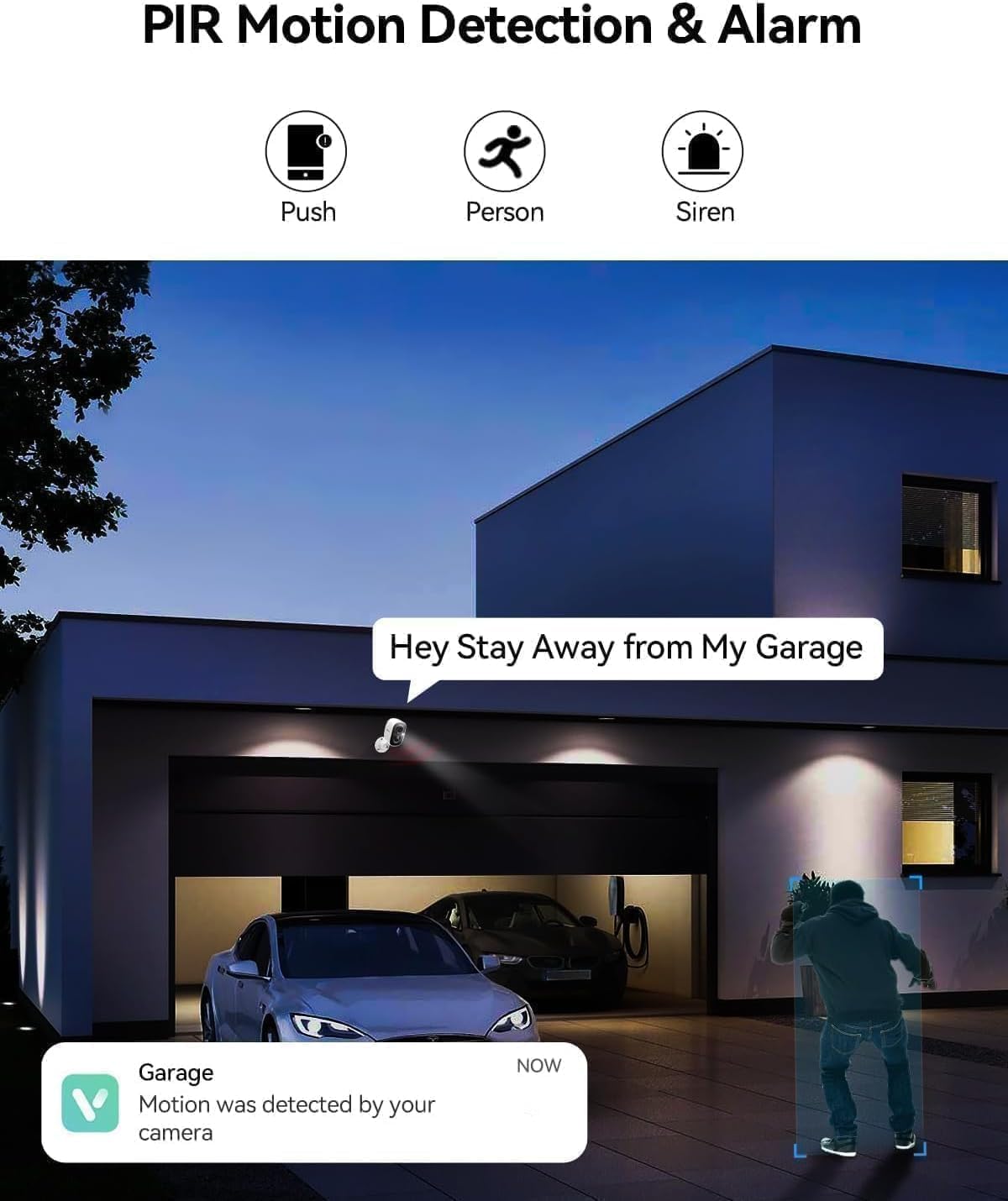
Image 4.3: PIR Motion Detection and Siren Alarm
This image depicts a LongPlus camera mounted above a garage, detecting a person. An on-screen notification reads "Hey Stay Away from My Garage," indicating the camera's ability to trigger an alarm and send alerts upon detecting suspicious activity.
4.3 Эки тараптуу аудио
Орнотулган микрофонду жана динамикти колдонуп, коноктор менен байланышыңыз же каалабаган конокторду токтотуңуз.
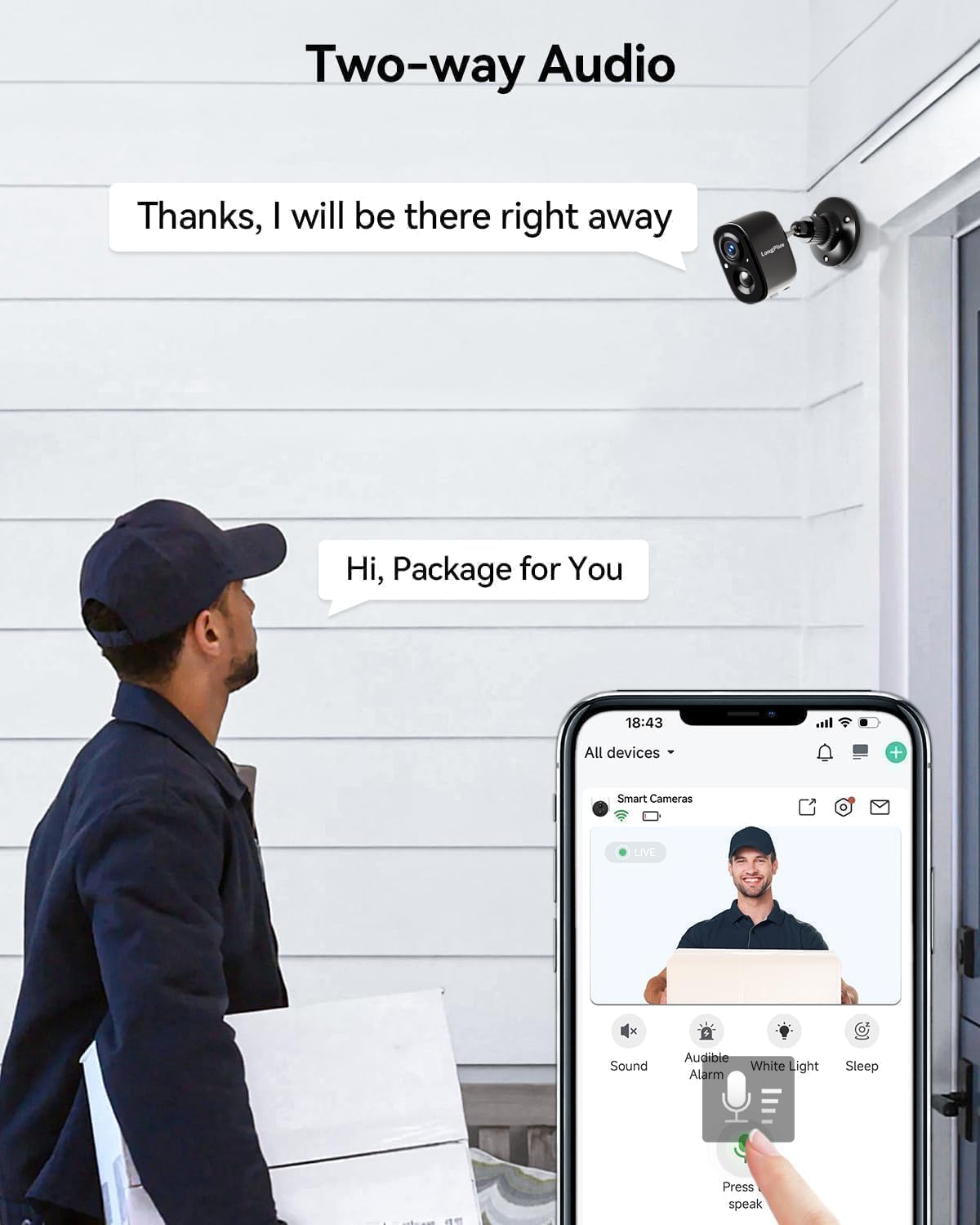
Image 4.4: Two-Way Audio Communication
This image shows a delivery person at a front door, holding a package. A LongPlus camera is mounted above the door. A speech bubble from the camera says, "Hi, Package for You," and another from the app interface says, "Thanks, I will be there right away," illustrating the two-way audio feature.
- Tap the microphone icon in the VicoHome app to speak through the camera.
- Listen to audio from the camera's location through the app.
4.4 Түстүү түнкү көрүү
The camera provides clear, vivid color images even in low-light conditions, extending up to 33 feet.
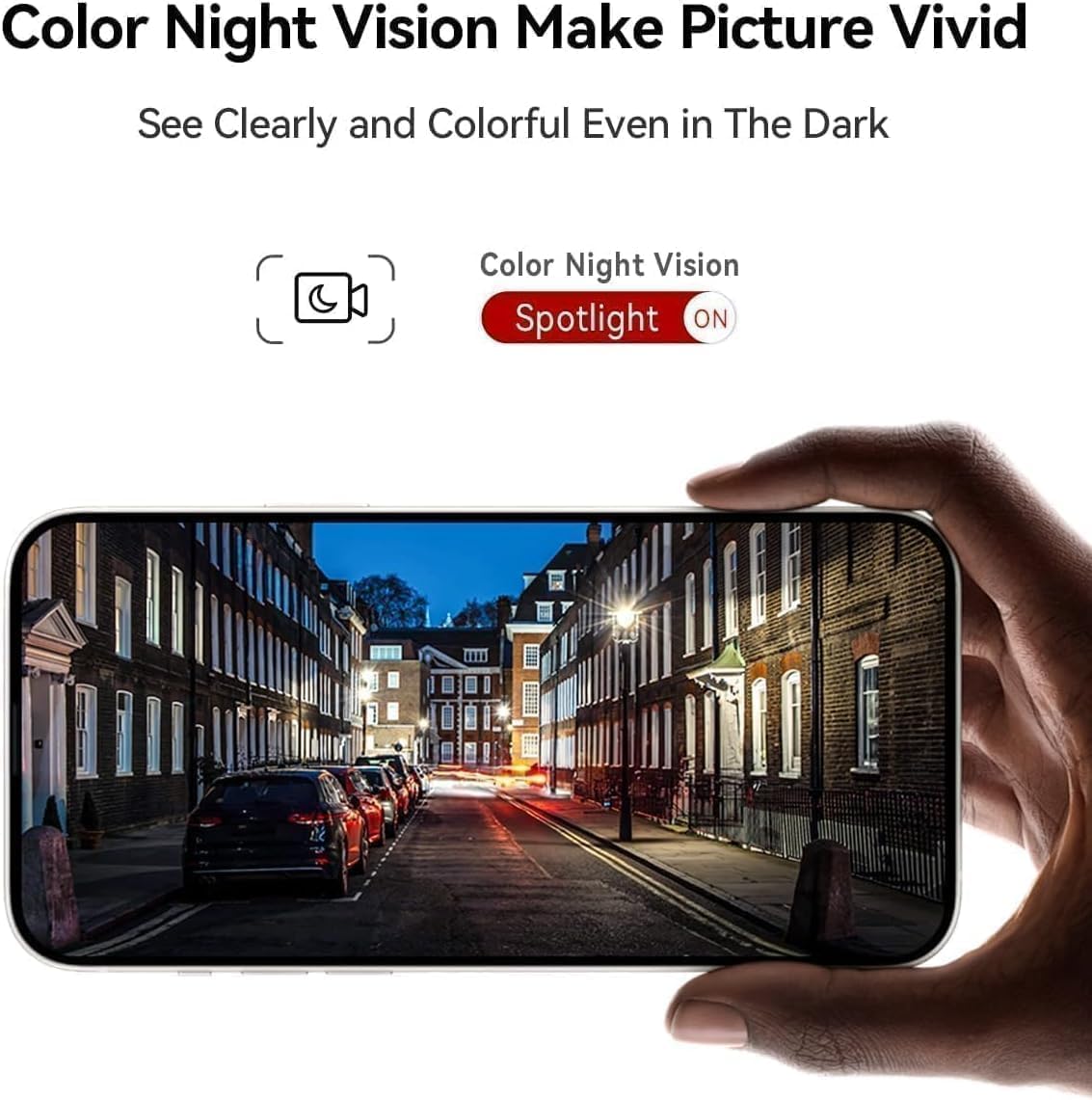
Image 4.5: Color Night Vision in Action
This image shows a smartphone held up, displaying a clear and vivid color night vision view of a street scene at night. The image highlights the camera's ability to capture detailed and colorful footage even in dark environments, with a 'Spotlight ON' indicator for color night vision.
- The camera automatically switches to color night vision mode when ambient light is low.
- Ensure the spotlight feature is enabled in the app for optimal color night vision performance.
4.5 Alexa интеграциясы
Integrate your LongPlus X83 camera with Amazon Alexa for convenient voice control.

Image 4.6: Alexa Compatibility
This image shows a LongPlus camera positioned next to an Amazon Echo Show device. The Echo Show displays live footage of a person at a front door, illustrating how users can command Alexa, "Alexa, show me in front of the door," to view камеранын берүүлөрүндө.
- Enable the VicoHome skill in the Alexa app.
- Link your VicoHome account with Alexa.
- Use voice commands such as "Alexa, show me the [camera name]" to view шайкеш келген Alexa түзмөктөрүндө түз эфирдеги берүүлөрдү.
4.6 Түзмөктү бөлүшүү
Камераңызды үй-бүлө мүчөлөрү же ишенимдүү адамдар менен бөлүшүңүз.

Image 4.7: Family Sharing Feature
This image illustrates the device sharing capability, showing multiple family members (an elderly couple, a woman on a laptop, a man on a tablet) connected to the camera feed, which is displayed on a smartphone held by another person, watching a child playing in a pool. This highlights multi-user access for shared security.
- In the VicoHome app, navigate to the camera settings and find the "Share Device" option.
- Invite other users by entering their VicoHome account details.
- Shared users will have access to live view жана жаздырылган тамак-ашtage.
5. Техникалык тейлөө
5.1 Батареяны заряддоо
The LongPlus X83 camera is battery-powered. Monitor the battery level in the VicoHome app and recharge as needed using the provided USB cable.

Image 5.1: Sleep Setting for Battery Optimization
This image shows a man working on a laptop, with a graphic overlay illustrating a customizable sleep schedule for the camera. This feature allows users to set specific activation dates and times (e.g., 09:00 to 18:00 on weekdays) to conserve battery life.
- To prolong battery life, utilize the "Sleep Setting" feature in the app to customize the camera's activation schedule.
5.2 Сактагычты башкаруу
Your camera supports both Micro SD card storage (up to 128GB, not included) and optional cloud storage.
- Micro SD картасы: Insert a Micro SD card into the designated slot on the camera. The camera will automatically begin recording events to the card.
- Булуттагы сактагыч: Explore the VicoHome app for cloud storage options. A 30-day free trial is typically available.
5.3 Тазалоо
Оптималдуу иштешин камсыз кылуу үчүн камеранын линзасын жана корпусун дайыма тазалап туруңуз.
- жумшак колдонуу, damp cloth to wipe the camera body.
- Линза үчүн, чийилип калбашы үчүн линзаны тазалоочу чүпүрөктү жана эритмени колдонуңуз.
- Катуу химиялык заттарды же абразивдүү материалдарды колдонбоңуз.
6. Кыйынчылыктарды
If you encounter issues with your LongPlus X83 camera, refer to the following common problems and solutions:
| Көйгөй | Мүмкүн чечим |
|---|---|
| Камера күйбөйт | Ensure the battery is fully charged. Check the USB cable and power adapter. |
| Wi-Fi'га туташуу мүмкүн эмес | Verify your Wi-Fi network is 2.4GHz. Check Wi-Fi password. Move camera closer to router. Reset camera and try pairing again. |
| Кыймылды аныктоо эскертүүлөрү жок | Check app notification settings. Adjust motion detection sensitivity. Ensure Activity Zones are correctly configured. |
| Сүрөттүн сапаты начар | Clean the camera lens. Ensure there is sufficient lighting. Check Wi-Fi signal strength. |
| Эки тараптуу аудио иштебейт | Check microphone and speaker permissions in your phone's app settings. Ensure camera's microphone/speaker are not obstructed. |
If these solutions do not resolve the issue, please contact LongPlus customer support.
7. Техникалык шарттар
| Өзгөчөлүк | Спецификация |
|---|---|
| Модель аты | X83 |
| Видео тартуунун резолюциясы | 2K |
| Натыйжалуу дагы эле чечим | 3 депутат |
| Байланыш технологиясы | Зымсыз (Wi-Fi) |
| Power Source | Батарея менен иштейт (2 литий-полимердик батарейка камтылган) |
| Ички/тышкы колдонуу | Ички, сырткы |
| Сууга туруктуулук деңгээли | Суу өткөрбөйт (IP65) |
| Түнкү көрүү диапазону | 33 Фут |
| Viewбурч | 130 градус |
| Сактагыч параметрлери | Micro SD (128 ГБ чейин), Булуттагы сактагыч |
| Өзгөчөлүктөр | 2-Way Audio, AI Motion Detection, Color Night Vision, Siren Alarm, Alexa Compatible |
| Өлчөмдөрү (L x W x Y) | 8.3 x 2.45 x 6.2 дюйм |
| Элемент Салмагы | 2.4 фунт |
8. Коопсуздук маалыматы
- Камераны иштөө диапазонунан тышкары өтө жогорку температурага (-20°Cден +60°Cге чейин) дуушар кылбаңыз.
- Камераны күчтүү магниттик талаалардын же тоскоолдук булактарынын жанына койбоңуз.
- Өндүрүүчү сунуштаган кубаттоочу аксессуарларды гана колдонуңуз.
- Камераны жана анын компоненттерин балдар жетпеген жерде сактаңыз.
- Ensure proper installation to prevent the camera from falling.

Image 8.1: Outdoor Design and IP65 Rating
This image highlights the LongPlus camera's robust design for outdoor use, featuring an IP65 waterproof rating. It also displays the operational temperature range from -20°C to +60°C, indicating its resilience to various weather conditions.

Image 8.2: Privacy Protection
This image features a prominent shield icon with the 'LongPlus' logo, positioned in front of a house. It visually represents the commitment to privacy protection, indicating that AES-256 data encryption is used to secure footage during transmission and storage.
9. Кепилдик жана колдоо
LongPlus products are designed for reliability and performance. For warranty information, please refer to the documentation included with your purchase or visit the official LongPlus webсайт.
For technical support, troubleshooting assistance, or any questions regarding your LongPlus X83 camera, please contact LongPlus customer service through the VicoHome app or the official LongPlus support channels.