1. Киришүү
Сатып алганыңыз үчүн рахматasing the GOOJODOQ GFS001 Portable High-Speed Fan. This device is designed to provide powerful and adjustable airflow for personal cooling. Featuring a high-speed motor, a large-capacity battery, and precise wind speed control, it offers a convenient solution for various environments. Please read this manual thoroughly before use to ensure proper operation and maintenance.
2. Коопсуздук маалыматы
- Вентилятор торчосуна манжаларды же бөтөн нерселерди киргизбеңиз.
- Электр тогуна урунбоо үчүн желдеткичти суудан же башка суюктуктардан алыс кармаңыз.
- Do not disassemble, repair, or modify the fan yourself. Contact customer support if service is required.
- Балдар жетпеген жерде сактаңыз.
- Avoid exposing the fan to extreme temperatures or direct sunlight for extended periods.
- Берилген Type-C кубаттоо кабелин же тастыкталган эквивалентти гана колдонуңуз.
3. Продукт бүтүп калдыview
Familiarize yourself with the components of your GOOJODOQ GFS001 fan.

Сүрөт 3.1: Алдыңкы view of the GOOJODOQ GFS001 Portable High-Speed Fan, showing the main body, air outlet, and control panel.
Бөлүктөрдү аныктоо:
- Аба чыгаруу: Where the airflow is directed.
- LED санарип дисплей: Shows wind speed level and battery status.
- Кубат баскычы: Желдеткичти күйгүзөт/өчүрөт.
- Wind Speed Adjustment Buttons (+/-): Increases or decreases wind speed.
- Аба кирүүчү торчо: Located at the rear, designed for safe air intake.
- Type-C заряддоо порту: Ички батареяны заряддоо үчүн.
- Боо тешиги: For attaching the anti-loss strap.

3.2-сүрөт: Детальдуу view of the fan's features, including the power switch, Type-C charging port, strap hole, and ergonomic body design.
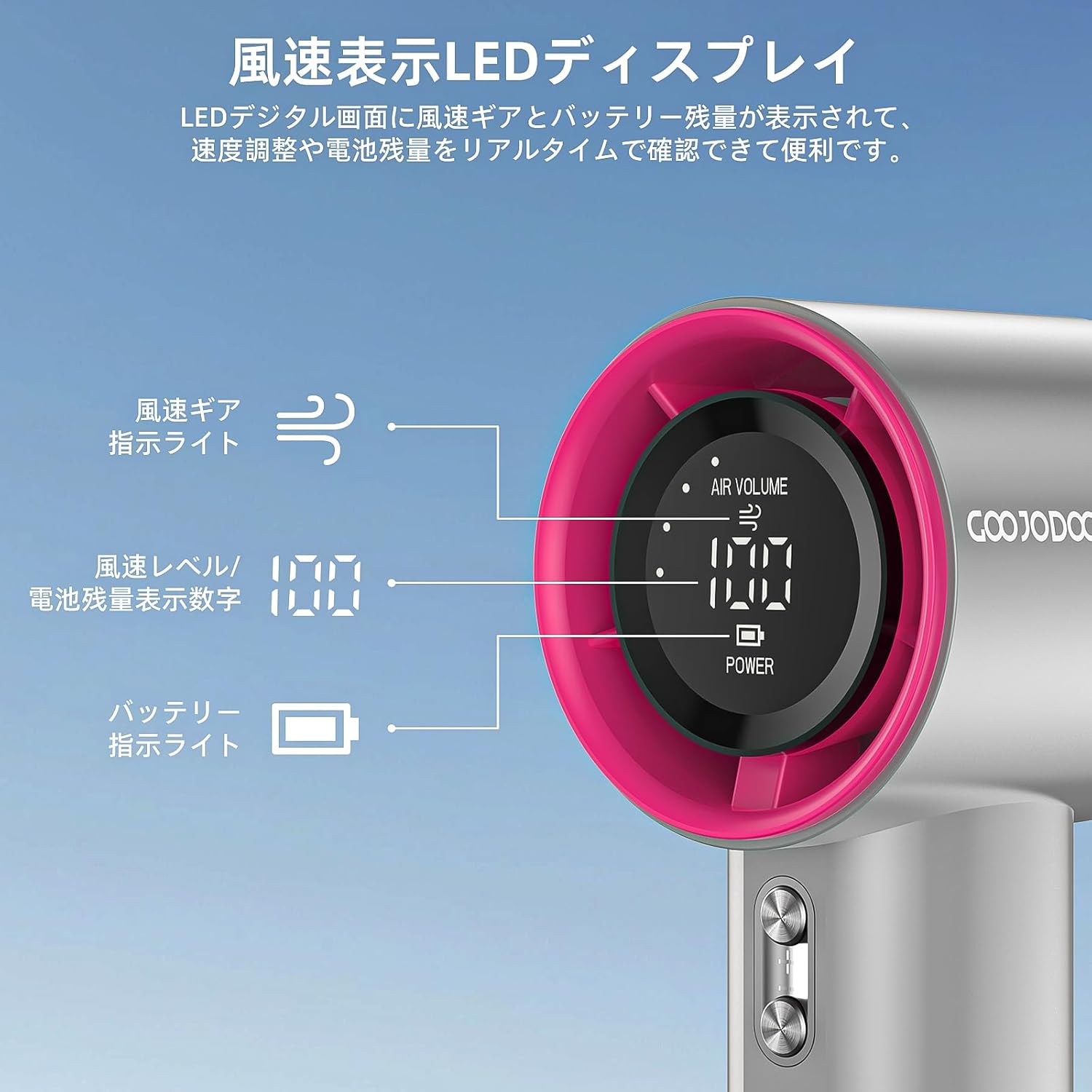
Figure 3.3: Close-up of the LED digital display, indicating current air volume level and battery charge status.
4. Орнотуу
4.1 кутудан чыгаруу
Бардык компоненттерди таңгактан кылдаттык менен алып салыңыз. Төмөнкү нерселердин бар экенин текшериңиз:
- GOOJODOQ GFS001 Portable High-Speed Fan
- USB Type-C кубаттоочу кабель
- Anti-loss Strap
- Колдонуучунун Колдонмосу (бул документ)
4.2 Алгачкы заряддоо
Before first use, fully charge the fan's internal battery.
- Connect the Type-C end of the charging cable to the fan's charging port.
- Connect the USB-A end of the charging cable to a compatible USB power adapter (e.g., wall charger, computer USB port, power bank).
- The LED display will indicate charging status. A full charge typically takes 2-3 hours.
- Толук заряддалгандан кийин, заряддоо кабелин ажыратыңыз.

Figure 4.1: Illustration of the fan's 4000mAh battery and Type-C charging connection.
5. Иштөө нускамалары
5.1 Күйгүзүү/өчүрүү
- To turn on: Press and hold the Power Button for approximately 2 seconds. The LED display will light up.
- To turn off: Press and hold the Power Button for approximately 2 seconds. The LED display will turn off.
5.2 Шамалдын ылдамдыгын тууралоо
The fan offers 100 levels of wind speed adjustment.
- Ыкчам тууралоо: Short press the '+' or '-' button to adjust the wind speed by 20 levels at a time.
- Жакшы жөндөө: Long press the '+' or '-' button for stepless adjustment, changing the wind speed by 1 level at a time.
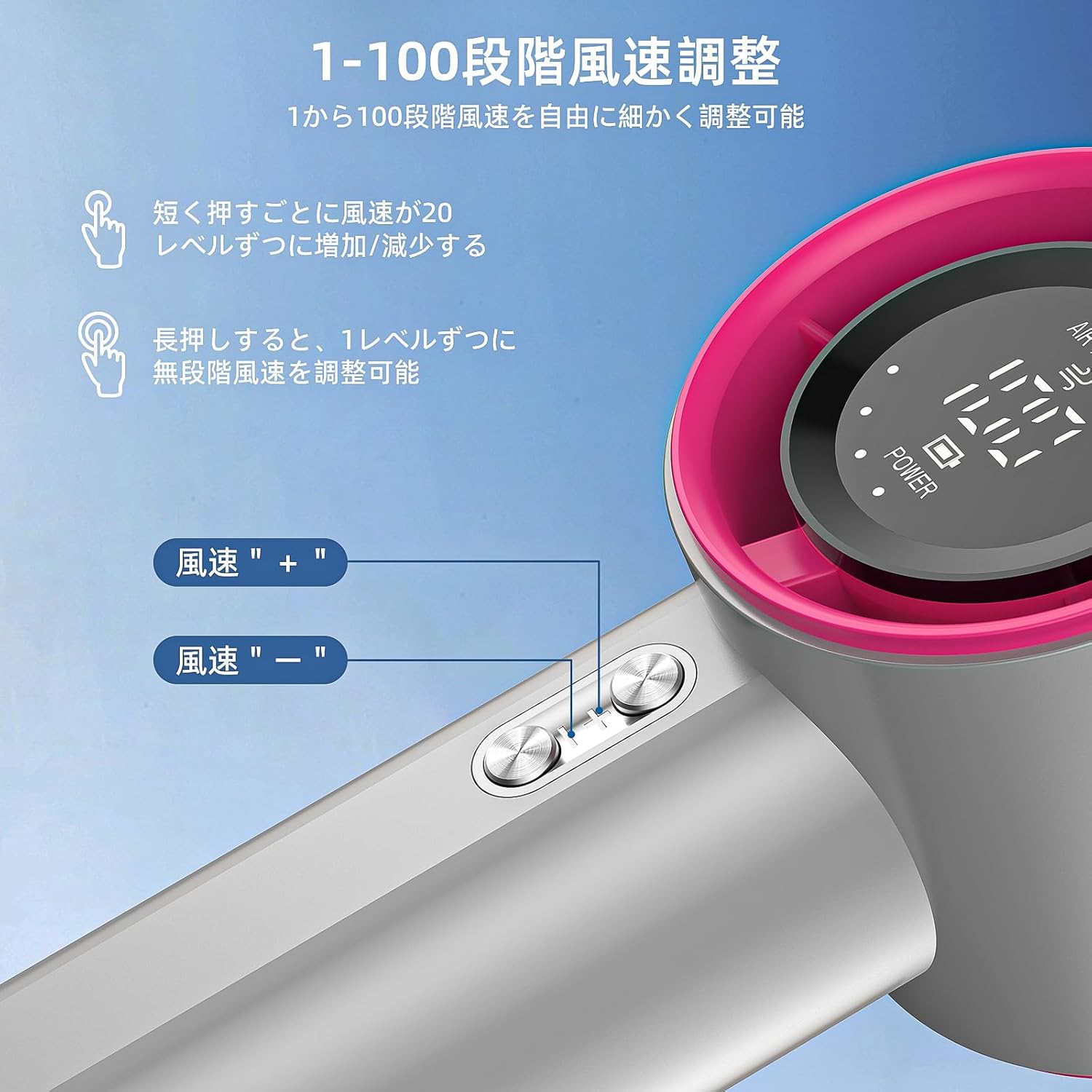
Figure 5.1: Location of the wind speed adjustment buttons (+ and -) on the fan body.
5.3 LED санарип дисплей
LED дисплей реалдуу убакыт режиминде маалымат берет:
- Wind Speed Level: Indicates the current airflow intensity from 1 to 100.
- Батарея деңгээли: Калган батарея зарядын көрсөтөт.
6. Техникалык тейлөө
6.1 Тазалоо
- Тазалоодон мурун желдеткичтин өчүрүлгөнүн жана ар кандай кубат булагынан ажыратылганын текшериңиз.
- Вентилятордун сыртын жумшак, кургак чүпүрөк менен сүртүңүз.
- Use a soft brush or cotton swab to gently clean any dust from the air intake grille and air outlet. Do not use water or abrasive cleaners.
6.2 Сактоо
When not in use for an extended period, store the fan in a cool, dry place, away from direct sunlight and extreme temperatures. It is recommended to charge the battery to about 50% before storage to prolong battery life.
7. Кыйынчылыктарды
| Көйгөй | Мүмкүн себеп | Чечим |
|---|---|---|
| Желдеткич күйбөйт. | Батарея түгөнүп калды. | Charge the fan using the provided Type-C cable. |
| Алсыз же аба агымы жок. | Air intake or outlet is blocked; low battery. | Check for obstructions and clean grilles. Charge the fan. |
| Желдеткич заряддалбай жатат. | Cable or adapter issue; charging port dirty. | Ensure cable and adapter are working. Clean the charging port gently. |
| LED дисплей иштебейт. | Fan is off; internal malfunction. | Turn on the fan. If issue persists, contact customer support. |
If the problem persists after attempting these solutions, please contact GOOJODOQ customer support.
8. Техникалык шарттар
| Өзгөчөлүк | Деталь |
|---|---|
| Бренд | GOOJODOQ |
| Модель номери | GFS001 |
| Мотор ылдамдыгы | 15000 RPM чейин |
| Батарея сыйымдуулугу | 4000 мАч |
| Заряддоо порту | USB Type-C |
| Заряддоо убактысы | Болжол менен 2-3 саат |
| Үзгүлтүксүз колдонуу убактысы | Up to 12 hours (at lowest speed) |
| Wind Speed Levels | 1-100 (жөнгө салынуучу) |
| Дисплей | LED Digital Display (wind speed, battery) |
| Продукциянын өлчөмдөрү | 16 см (тереңдик) x 6.1 см (туурасы) x 5.9 см (бийиктик) |
| Салмагы | Болжол менен 200г |
| Түс | Боз |
9. Кепилдик жана колдоо
9.1 Сапат кепилдиги
Бул продукт менен келет 6 айлык сапат кепилдиги сатып алынган күндөн тартып. Бул кепилдик өндүрүш кемчиликтерин жана нормалдуу колдонуудан келип чыккан маселелерди камтыйт.
9.2 Кардарларды колдоо
If you encounter any problems with your GOOJODOQ GFS001 fan or have questions not covered in this manual, please do not hesitate to contact our customer support team. Please have your purchase details and model number (GFS001) ready when contacting support.
Байланыш маалыматы:
- Электрондук почта: support@goojodoq.com (Чыгamp(эгер бар болсо, чыныгы менен алмаштырыңыз)
- Webсайт: www.goojodoq.com (Чыгamp(эгер бар болсо, чыныгы менен алмаштырыңыз)