
Introduction
This manual provides comprehensive instructions for the setup, operation, and maintenance of your iKF-R1 Retro Bluetooth Headphones. Please read this manual thoroughly before using the product to ensure optimal performance and longevity.
Пакеттин мазмуну
The iKF-R1 Retro Bluetooth Headphones package includes the following items:
- iKF-R1 Retro Bluetooth Headphones
- USB заряддоо кабели
- User Manual
- Exquisite Packaging Box
Продукт бүттүview
Familiarize yourself with the headphone components and controls for efficient operation.

Image: Headphone Controls Diagram
This diagram illustrates the location and function of the power and volume buttons on the iKF-R1 headphones. The power button controls power on/off, play/pause, call management, and mode switching (transparent, low latency). The volume buttons control volume adjustment and track navigation.
Жайгашуу
1. Күйгүзүү жана Bluetooth туташуусу
To power on the headphones, long press the power button for approximately 3 seconds until you hear an audible prompt indicating the device is turned on. Once powered on, the headphones will enter pairing mode. Open the Bluetooth settings on your mobile phone or device, search for "iKF-R1" in the list of available devices, and tap to connect. A successful connection will be indicated by an audible prompt.
Video: Power On and Bluetooth Connection
This video demonstrates how to power on the iKF-R1 headphones by long-pressing the power button for 3 seconds. It also shows the process of connecting the headphones via Bluetooth to a mobile phone by searching for "iKF-R1" in the Bluetooth settings.
The iKF-R1 headphones support multipoint connection, allowing you to connect to two Bluetooth devices simultaneously. This enables seamless switching between devices, for example, from a laptop to a smartphone for incoming calls.
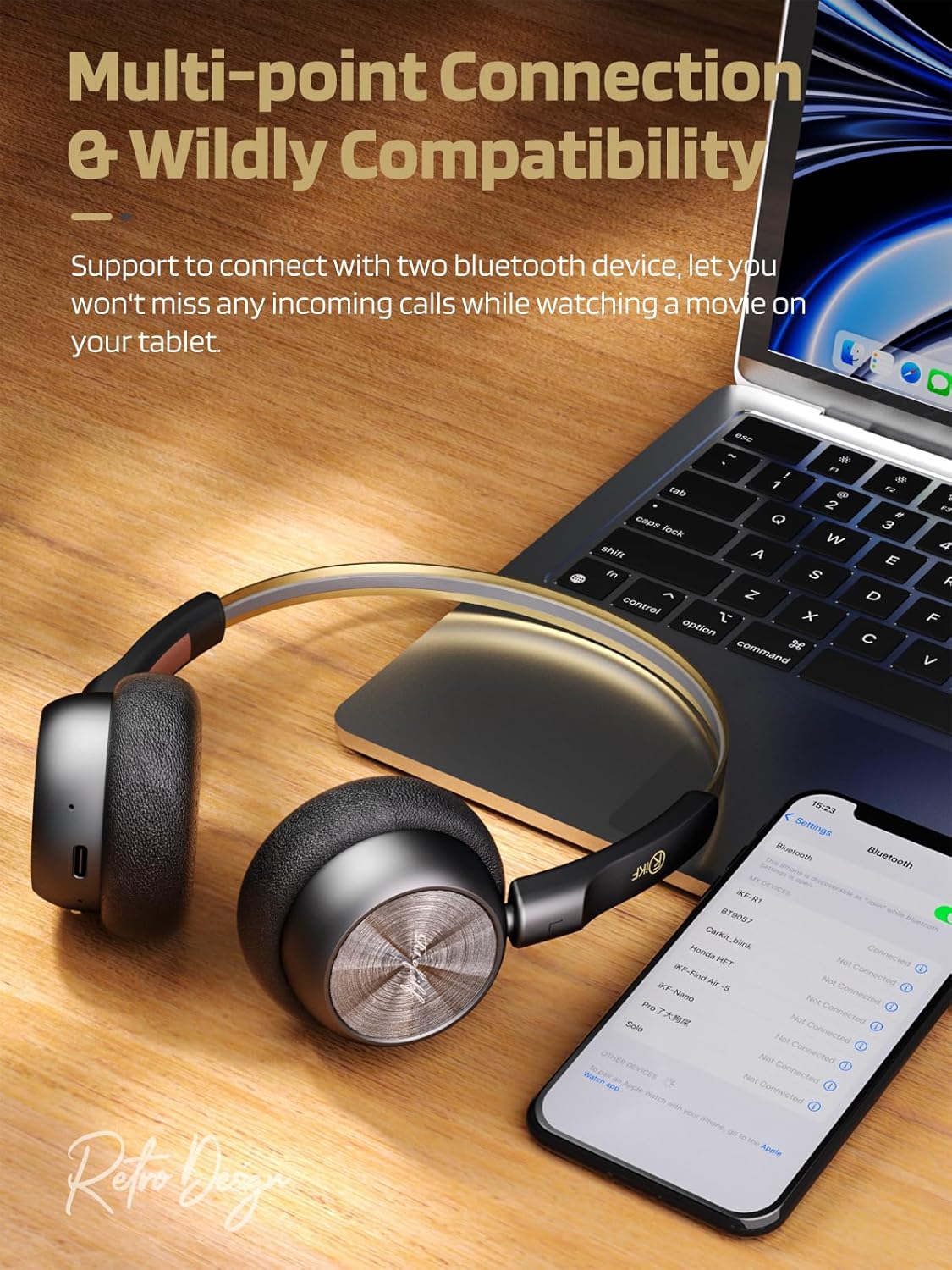
Сүрөт: Көп чекиттүү туташуу
This image shows the iKF-R1 headphones connected to both a laptop and a smartphone, illustrating the multipoint connection feature that allows seamless switching between devices.
Иштөө нускамалары
1. Media Functions
- Ойнотуу/тындыруу: Кубат баскычын бир жолу таптаңыз.
- Көлөмү: "+" баскычын басыңыз.
- Үнүн азайтуу: "-" баскычын басыңыз.
- Кийинки трек: "+" баскычын көпкө басыңыз.
- Мурунку трек: "-" баскычын көпкө басыңыз.
2. Чакыруу функциялары
- Чалууга жооп берүү/түп коюу: Кубат баскычын бир жолу таптаңыз.
- Кирүүчү чалууну четке кагуу: Кубат баскычын көпкө басып туруңуз.
3. Transparency Mode
Transparency Mode allows you to hear your surroundings while listening to audio, enhancing situational awareness.
- Жандыруу/өчүрүү: Double-tap the power button. You will hear a beep twice when activated and once when deactivated.

Image: Transparency Mode in Use
This image depicts a user wearing the iKF-R1 headphones, highlighting the transparency mode feature that enables awareness of ambient sounds.
4. Оюн режими (төмөнкү кечигүү)
Game Mode reduces audio latency to 38ms, providing a more synchronized audio-visual experience for gaming or video playback.
- Жандыруу/өчүрүү: Triple-tap the power button. You will hear three beeps when activated and one beep when deactivated.
5. iKF Exclusive App Features
Enhance your listening experience with the iKF exclusive app. The app allows for custom equalization, white noise selection, and mode switching.

Image: iKF App Interface
This image displays various features of the iKF exclusive app, including custom equalizer adjustments, white noise sound options, and different mode selections for the headphones.
Техникалык тейлөө
Proper maintenance ensures the longevity and optimal performance of your iKF-R1 headphones.
- Тазалоо: Кулакчындарды тазалоо үчүн жумшак, кургак чүпүрөктү колдонуңуз. Абразивдүү материалдарды же катуу химиялык заттарды колдонуудан алыс болуңуз.
- Сактагыч: Наушниктерди салкын, кургак жерде күндүн тике тийген нурунан жана экстремалдык температурадан алыс сактаңыз.
- Заряддоо: Use the provided USB charging cable. Do not use damaged cables or chargers.
- Суу каршылык: The headphones are waterproof. However, avoid prolonged submersion in water. Ensure the charging port is completely dry before charging to prevent damage.
Проблемаларды чечүү
If you encounter any issues with your iKF-R1 headphones, refer to the following troubleshooting guide:
| Көйгөй | Чечим |
|---|---|
| Кулакчындар күйбөйт. | Ensure the headphones are sufficiently charged. Long press the power button for 3 seconds. |
| Bluetooth аркылуу туташуу мүмкүн эмес. | Ensure Bluetooth is enabled on your device. Make sure the headphones are in pairing mode (indicated by a flashing light). Forget the device on your phone and try pairing again. Ensure headphones are charged. |
| Үн жок же үнү төмөн. | Check headphone and connected device volume levels. Ensure headphones are properly connected. Try restarting both devices. |
| үзгүлтүктүү байланыш. | Ensure no physical obstacles are between the headphones and the connected device. Move closer to the device. Avoid strong electromagnetic interference. |
Техникалык шарттар
Detailed technical specifications for the iKF-R1 Retro Bluetooth Headphones:
| Өзгөчөлүк | Деталь |
|---|---|
| Модель аты | iKF-R1 |
| Байланыш технологиясы | Зымсыз (Bluetooth 5.4) |
| Bluetooth диапазону | 15 метр |
| Аудио драйвер түрү | Динамикалык драйвер |
| Аудио драйверинин өлчөмү | 30 миллиметр |
| Батареянын иштөө мөөнөтү | 60 саатка чейин |
| Заряддоо убактысы | Болжол менен 1.99 саат |
| Салмагы | 93 грамм (3.28 унция) |
| Сууга туруктуулук деңгээли | Суу өткөрбөйт |
| Башкаруу түрү | APP, Button, Touch |
| Өзгөчөлүктөр | Lightweight, Retro Design, Hi-Fi Sound, Custom EQ via App, Multipoint Connection, Transparency Mode, Low Latency Game Mode |
Кепилдик жана колдоо
For detailed warranty information and customer support, please refer to the product packaging or visit the official iKF webсайт. Кепилдик боюнча дооматтар үчүн сатып алуу дүмүрчөгүңүздү сактап коюу сунушталат.
For further assistance, you may contact iKF customer service through their official channels.