
FLASHFORGE Camera Kit for Adventurer 5M/Pro/AD5X
FLASHFORGE Camera Kit User Manual
For Adventurer 5M, Adventurer 5M Pro, and AD5X 3D Printers
1. Киришүү
This user manual provides detailed instructions for the installation, operation, and maintenance of your FLASHFORGE Camera Kit. Designed for seamless integration with FLASHFORGE Adventurer 5M, Adventurer 5M Pro, and AD5X 3D printers, this camera enables real-time and remote monitoring of your printing process, enhancing convenience and control.
2. Пакеттин мазмуну
Сиздин пакетте бардык компоненттер бар экенин текшериңиз:
- Камера модулу
- Камера кабели
- M3.5 * 8 бурагы
- 2.5мм Аллен ачкычы
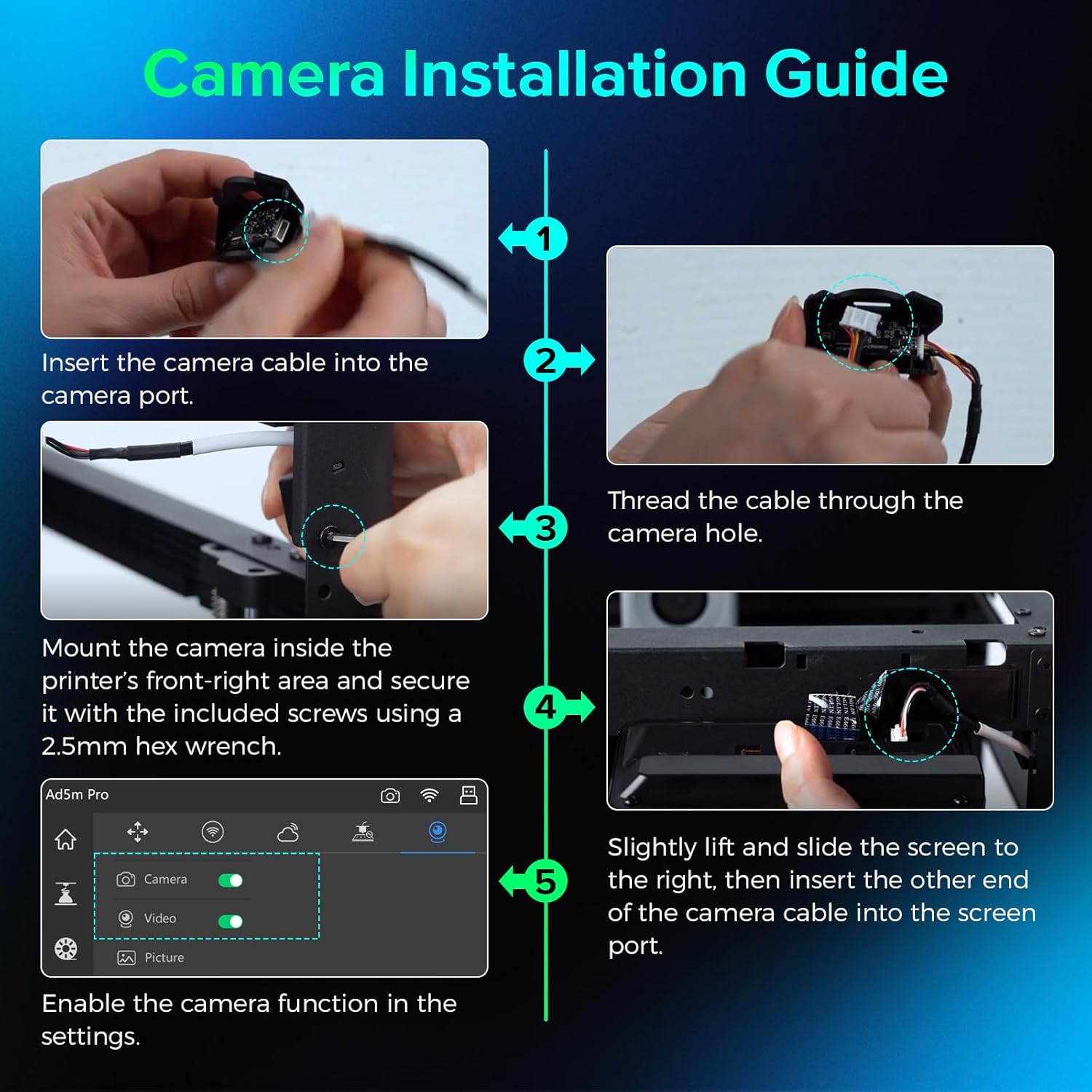
Image: Components of the FLASHFORGE Camera Kit.
3. Орнотуу жана орнотуу
Follow these steps to install the camera module on your 3D printer.
3.1 Аппараттык камсыздоону орнотуу
- Камера модулун даярдоо: Insert the smaller end of the camera cable into the camera port. Thread the camera cable out through the hole of the camera module.

Image: Detailed steps for camera cable insertion and threading.
- Камераны орнотуу: Install the camera on the inner side of the printer's front-right area. Ensure the protrusions on both sides of the camera fit into the locating holes.
- Камераны коргоо: Use the provided 2.5mm Allen wrench to tighten the M3.5*8 screw into the hole, securing the camera in place.
- Connect to Screen: Gently lift and slide the printer's screen to the right to detach it. Remove the upper port cover on the screen. Insert the other end of the camera cable into the designated port on the screen.
- Reattach Screen: Carefully reattach the screen to the printer, ensuring all connections are secure.
Video: Official guide on how to install the camera module on your Adventurer 5M 3D printer.
3.2 Software Activation
- Кирүү Орнотуулары: On the printer's touchscreen, navigate to the settings menu (gear icon).
- Камераны иштетүү: Within the settings, locate the camera icon. Turn on both the "Camera" and "Video" functions to enable the camera.
4. Иштөө нускамалары
4.1 Real-time and Remote Monitoring
The FLASHFORGE Camera Kit allows you to monitor your 3D prints in real-time from anywhere using the compatible Flash Maker App or Orca-Flashforge slicing software.
- Flash Maker App: Download and install the Flash Maker App on your mobile device. Connect the app to your 3D printer to view a live stream of your print progress and control basic printer functions remotely.
- Orca-Flashforge Slicing Software: For desktop monitoring, use the Orca-Flashforge slicing software. After sending a print job to your printer, you can access a live camera feed within the software interface.

Image: Remote monitoring of a 3D print via a mobile application.

Image: Print monitoring setup with desktop software and mobile app.
4.2 Time-Lapse Video Recording
The camera module supports time-lapse video recording of your entire printing process. These videos are stored on the printer's internal memory and can be downloaded after the print job is complete.
- Access Time-Lapse: After a print job finishes, navigate to the "Device Status" section in the Flash Maker App or Orca-Flashforge software.
- Download Video: Select the completed print job and choose the option to download the time-lapse video.

Image: Camera capturing a time-lapse video of the 3D printing process.
5. Техникалык тейлөө
5.1 Микропрограмма жаңыртуулары
Regular firmware updates are provided to maintain a reliable and seamless connection for your camera kit. Ensure your printer's firmware is always up-to-date for optimal performance.
- Жаңыртууларды текшерүү: Periodically check for new firmware versions through your printer's settings menu or the Flash Maker App.
- Жаңыртууларды орнотуу: Follow the on-screen prompts to download and install any available firmware updates.

Image: Firmware update notification on the 3D printer's display.
5.2 Тазалоо
To ensure clear image quality, regularly clean the camera lens with a soft, dry, lint-free cloth. Avoid using abrasive cleaners or solvents.
6. Кыйынчылыктарды
- No Camera Feed:
- Ensure the camera module is correctly installed and securely connected to the screen.
- Verify that the "Camera" and "Video" functions are enabled in the printer's settings.
- Check your network connection for both the printer and your monitoring device.
- Update the printer's firmware to the latest version.
- Сүрөттүн сапаты начар:
- Камера линзасын жумшак, кургак чүпүрөк менен тазалаңыз.
- Ensure adequate lighting within the printer's build chamber.
- Time-Lapse Not Recording:
- Confirm that the "Video" function is enabled in the printer's settings.
- Ensure there is sufficient internal storage on the printer for time-lapse videos.
7. Техникалык шарттар
| Пакеттин өлчөмдөрү | 3.54 x 2.8 x 2.09 дюйм |
| Элемент Салмагы | 1.44 унция |
| Өндүрүүчү | Zhejiang Flashforge 3D Technology Co., Ltd. |
| ASIN | B0D2VSLKTX |
| Дата биринчи жеткиликтүү | 28-апрель, 2024-жыл |
| Шайкештик | FLASHFORGE Adventurer 5M, Adventurer 5M Pro, AD5X 3D Printers |
8. Кепилдик жана колдоо
For warranty information and technical support, please refer to the warranty card included with your product or visit the official FLASHFORGE website. You can also contact FLASHFORGE customer service directly for assistance.
FLASHFORGE Official Store: Дүкөнгө кириңиз
Тектеш документтер - Camera Kit for Adventurer 5M/Pro/AD5X
 |
Flashforge AD5X 3D принтеринин колдонуучу колдонмосу жана колдонмосу Flashforge AD5X 3D принтери үчүн толук колдонуучу колдонмосу, анда орнотуу, программалык камсыздоону орнотуу жана колдонуу, жипчелерди жүктөө жана башкаруу, Wi-Fi жана USB аркылуу басып чыгаруу процедуралары, техникалык тейлөө, мүчүлүштүктөрдү оңдоо жана колдоо жөнүндө маалымат камтылган. |
 |
FlashForge AD5X колдонуучусунун колдонмосу FlashForge AD5X 3D принтеринин колдонуучу колдонмосу, анда орнотуу, программалык камсыздоо, басып чыгаруу, техникалык тейлөө жана мүчүлүштүктөрдү оңдоо камтылган. Оптималдуу натыйжаларга жетүү үчүн AD5Xти кантип иштетүүнү үйрөнүңүз. |
 |
FlashForge AD5X 3D принтеринин тез баштоо боюнча колдонмосу - Орнотуу жана иштетүү FlashForge AD5X 3D принтерин кутудан чыгаруу, орнотуу, компоненттерди идентификациялоо, биринчи басып чыгаруу, программалык камсыздоону колдонуу жана техникалык мүнөздөмөлөрдү камтыган кеңири жана тез ишке киргизүү боюнча колдонмо. |
 |
Flashforge Adventurer 5M/5M Pro/5X Build Plate Specifications and Usage Guide Detailed specifications, compatible filaments, temperature resistance, and usage instructions for the Flashforge Adventurer 5M, 5M Pro, and 5X 3D printer build plates. |
 |
Flashforge Adventurer 4 сериясын тез баштоо боюнча колдонмо Flashforge Adventurer 4 сериясындагы 3D принтерлер үчүн компоненттерди тааныштыруу, таңгактоо мүнөздөмөлөрү, программалык камсыздоону орнотуу жана басып чыгаруу процедураларын камтыган кыскача колдонмо. |
 |
FlashForge Adventurer 4 сериясынын колдонуучу колдонмосу Comprehensive user guide for the FlashForge Adventurer 4 Series 3D printer. Learn about setup, operation, interface navigation, filament management, printing methods (Wi-Fi, USB, Cloud), maintenance, and troubleshooting. Includes specifications for Adventurer 4 and Adventurer 4 Lite. |
Ask a question about this manual
Ask about setup, troubleshooting, compatibility, parts, safety, or missing instructions. Manuals+ will review the question and use this page’s manual context to help answer it.