
One Car Stereo Ai Box Lite
OneCarStereo Ai Box Lite User Manual
Model: Ai Box Lite
1. Киришүү
The OneCarStereo Ai Box Lite is an advanced wireless adapter designed to enhance your in-car entertainment and connectivity. It converts your original car's wired CarPlay system into a wireless one, and also supports wireless Android Auto. Additionally, it features built-in YouTube and Netflix applications, allowing you to stream video content directly on your car's display. This manual provides detailed instructions for setup, operation, and troubleshooting to ensure optimal use of your device.

Figure 1: OneCarStereo Ai Box Lite device.
2. Кутуда эмне бар
Upon opening your OneCarStereo Ai Box Lite package, you should find the following items:
- Ai Box * 1
- Instructions * 1 (This manual)
- USB A female to USB C male adapter * 1
- USB A to USB C cable * 1

Figure 2: Package contents including the Ai Box, instructions, and necessary cables/adapters.
3. Шайкештик
3.1 Car Stereo Compatibility
The OneCarStereo Ai Box Lite is compatible with original car stereos that have a built-in wired Apple CarPlay function. It also supports aftermarket car stereos with wired CarPlay functionality. Please note that it is туура келбейт with vehicles that only have wireless CarPlay.
To check if your car has original wired CarPlay:
- Plug an iPhone (running iOS 10 or newer) into the car's USB ports using a genuine factory lightning cable. If a notification pops up on your iPhone indicating CarPlay, your car has built-in Apple CarPlay.
- Look for a CarPlay icon in your car stereo's menu.
- Ишенбесеңиз, жардам үчүн унаа дилериңизге кайрылыңыз.

Figure 3: Flowchart illustrating car stereo compatibility requirements.
3.2 Телефондун шайкештиги
The Ai Box Lite supports both Apple CarPlay and Android Auto. Ensure your smartphone meets the following requirements:
Apple CarPlay:
Compatible with iPhones running iOS 10 and later, including models such as:
- iPhone 13 Pro Max, iPhone 13 Pro, iPhone 13, iPhone 13 mini
- iPhone 12 Pro Max, iPhone 12 Pro, iPhone 12, iPhone 12 mini
- iPhone 11 Pro Max, iPhone 11 Pro, iPhone 11
- iPhone XS Max, iPhone XS, iPhone XR, iPhone X
- iPhone 8 Plus, iPhone 8, iPhone 7 Plus, iPhone 7
- iPhone 6s Plus, iPhone 6s, iPhone 6 Plus, iPhone 6
- iPhone SE (1st gen), iPhone SE (2nd gen)
- iPhone 5s, iPhone 5c, iPhone 5

Figure 4: List of compatible iPhone models for Wireless Apple CarPlay.
Android Auto:
Wireless Android Auto is supported on smartphones running Android 11 or newer with 5GHz Wi-Fi built-in. Specific compatible models include:
- Google Phones: Pixel /XL, Pixel 2/2 XL, Pixel 3/3 XL/3a/3a XL, Pixel 4/4 XL/4a, Pixel 5, Pixel 6/6 Pro, Nexus 5X, Nexus 6P.
- Samsung Galaxy телефондору: Galaxy S8/S8+, S9/S9+, S10/S10+, S20/S20+/S20 Ultra, S21/S21+/S21 Ultra, Galaxy Note 8, Note 9, Note 10/10+, Note 20/20 Ultra.
- Башкалар: Phones running Android 11 and later.

Figure 5: List of compatible Android phone models for Wireless Android Auto.
4. Орнотуу
Follow these steps to set up your OneCarStereo Ai Box Lite:
- Connect the Ai Box Lite: Simply connect the Ai Box Lite dongle to the USB port in your car that is designated for wired Apple CarPlay/Android Auto connection. If your car has multiple USB ports, ensure you use the correct one.
- Wait for Interface Update: After connecting, wait approximately 15-20 seconds for the car stereo interface to update and display the Ai Box Lite menu.
- Enable Wi-Fi and Bluetooth on your Smartphone: Turn on both Wi-Fi and Bluetooth on your iPhone or Android phone.
- Pair with the Ai Box Lite: On your phone's Bluetooth settings, search for available devices and select the Ai Box Lite (e.g., "AUTO-B050" or similar). Confirm the pairing on both your phone and the car's display if prompted.
- CarPlay/Android Auto баштоо: Once paired, your phone will prompt you to use CarPlay or Android Auto. Confirm to launch the wireless connection.

Figure 6: Visual guide for connecting the Ai Box Lite and initiating wireless CarPlay/Android Auto.

Figure 7: Detailed steps for inserting the device, Bluetooth pairing, and activating CarPlay.
Video 1: Demonstrates the connection process for the OneCarStereo Ai Box Lite, including initial setup, launching Netflix and YouTube, and connecting to Wireless Apple CarPlay and Android Auto.
5. Операция
5.1 Wireless CarPlay жана Android Auto
Once connected, the Ai Box Lite provides seamless wireless access to Apple CarPlay and Android Auto. This allows you to use navigation, make hands-free calls, send messages, and control music directly from your car's display without needing to plug in your phone.
- Навигация: Utilize Google Maps, Apple Maps, or Waze for real-time directions.
- Байланыш: Make calls, send and receive messages using voice commands or the car's touchscreen.
- Музыка жана медиа: Access your favorite music streaming apps like Spotify, Apple Music, or YouTube Music.
- Үн менен башкаруу: Use Siri or Google Assistant for hands-free operation.

Figure 8: ашыкview of the Android System, Apple CarPlay, and Android Auto interfaces on a car's display.
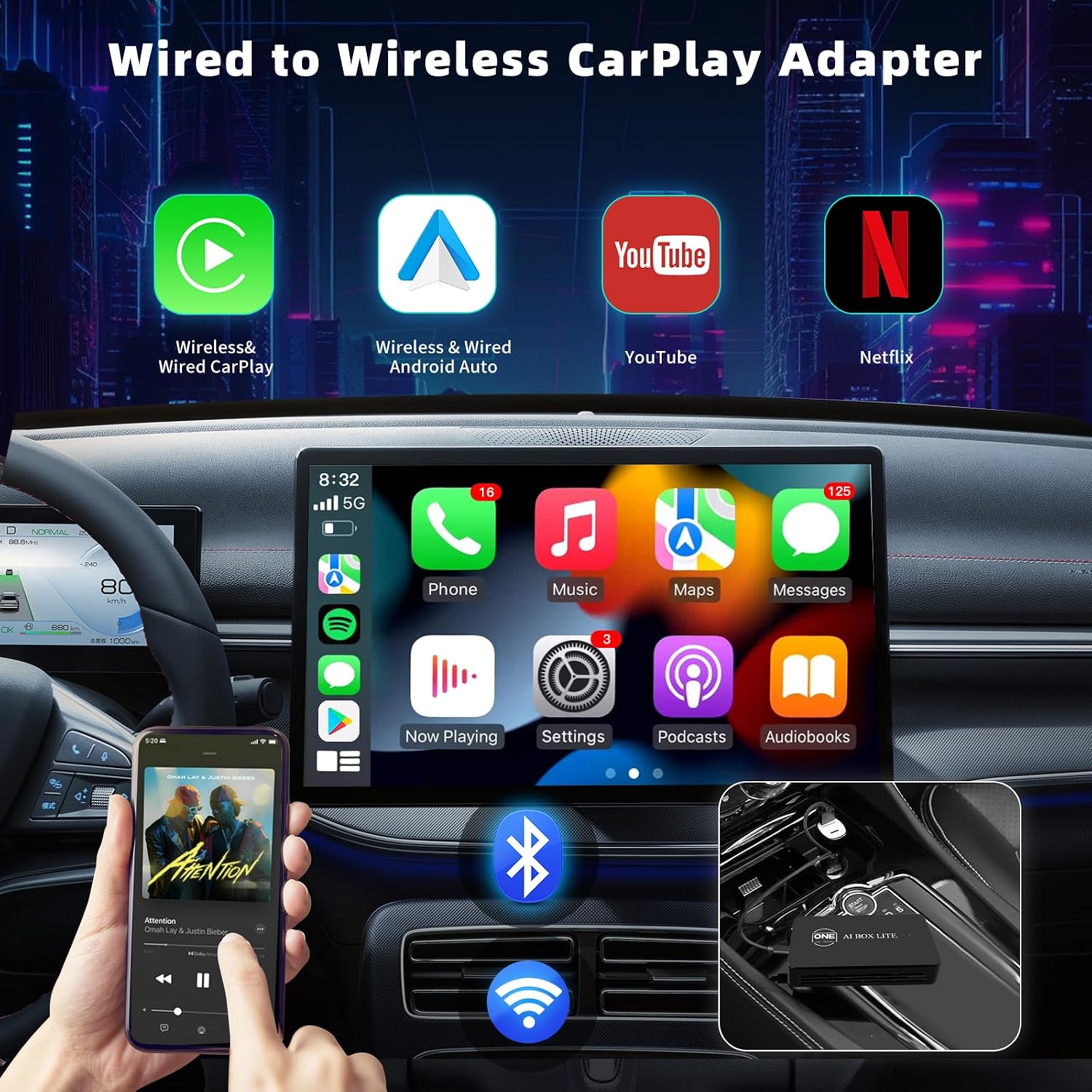
Figure 9: The car's display showing the CarPlay interface with icons for Wireless CarPlay, Wireless Android Auto, YouTube, and Netflix.
5.2 Built-in YouTube and Netflix
The Ai Box Lite comes with pre-installed YouTube and Netflix applications, allowing you to watch videos directly on your car's screen. This feature is ideal for passengers during long trips or while parked.
Маанилүү эскертүү: If you want to watch YouTube or Netflix videos after connecting the box to the Internet, first you need to turn off Bluetooth and Wi-Fi of your smartphone (this will disconnect CarPlay or Android Auto). Then, open your mobile hotspot and click "Setting" in the Ai Box interface to connect to the mobile hotspot to access the Internet.

Figure 10: Car's display showing YouTube and Netflix content, highlighting the entertainment capabilities.
5.3 USB медиа ойнотуу
The device supports reading audio and video files directly from a U disk (USB flash drive) via its USB interface. This allows you to play your own media collection on the car's display.

Figure 11: Illustration of the Ai Box Lite's USB functions supporting audio and video playback.
5.4 Контролдоо ыкмалары
The Ai Box Lite maintains compatibility with your car's original control methods, ensuring a familiar and intuitive user experience. You can control the system using:
- Сенсордук экран: Машинанын дисплейи менен түздөн-түз өз ара аракеттениңиз.
- Үн менен башкаруу: Utilize voice assistants like Siri for hands-free commands.
- Original Car Buttons: Use your car's existing steering wheel controls and console buttons.
- Сенсордук такта: If your car has a touchpad controller, it will also be supported.

Figure 12: Depiction of multiple control methods supported by the Ai Box Lite, including touch, voice, and physical buttons.
6. Кыйынчылыктарды
Бул жерде сиз кабылышы мүмкүн болгон жалпы маселелерди чечүү жолдору бар:
- Product Not Working / Not Compatible:
- Ensure your car stereo has a built-in wired Apple CarPlay function. The device is not compatible with cars that only have wireless CarPlay or aftermarket stereos without wired CarPlay.
- This product may not work with vehicles that have Uconnect 5 system or Tesla style screens.
- Verify your phone's compatibility (iOS 10+ for Apple CarPlay, Android 11+ with 5GHz Wi-Fi for Wireless Android Auto).
- Бир нече USB порттору:
- Always plug the Ai Box Lite into the USB port that is specifically used for wired Apple CarPlay/Android Auto connection.
- Connecting a New Phone:
- Before pairing a new iPhone/Android phone, please disconnect the currently connected phone from Wi-Fi and Bluetooth.
- No Internet Connection for YouTube/Netflix:
- To watch YouTube or Netflix, you need to connect the Ai Box Lite to the internet via a mobile hotspot.
- First, turn off Bluetooth and Wi-Fi on your smartphone (this will disconnect CarPlay or Android Auto).
- Then, open your mobile hotspot on your phone and go to "Setting" in the Ai Box interface to connect to the mobile hotspot.
- General Connectivity Issues:
- Бардык кабелдер коопсуз туташтырылганын текшериңиз.
- Restart both the Ai Box Lite (by unplugging and replugging) and your smartphone.
- Check for any software updates for the Ai Box Lite (refer to the support section for update procedures).
7. Техникалык шарттар
| Модель аты | Ai Box Lite |
| Пакеттин өлчөмдөрү | 4.8 x 3.5 x 1.8 дюйм |
| Элемент Салмагы | 3.52 унция |
| Түс | Кара |
| Байланыш технологиясы | Bluetooth, Wi-Fi, USB |
| Өзгөчө өзгөчөлүк | Bluetooth, Wired to Wireless |
| Резолюция | 1080p |
| Колдоого алынган Интернет кызматтары | Netflix, YouTube |
| Controller Type | Колдонмо башкаруу |
| Шайкеш түзмөктөр | iPhone, Smartphone |
| Келип чыккан өлкө | Кытай |
8. Кепилдик жана колдоо
8.1 Кепилдик маалыматы
The OneCarStereo Ai Box Lite comes with a one-year worldwide warranty. Our technical support team is available to assist you with any questions, setup guidance, or product updates during this period.
8.2 Кардарларды колдоо
If you encounter any problems while using the product, or if you have questions regarding its functionality or compatibility, please do not hesitate to contact our customer service team. We aim to reply within 24 hours.
Электрондук почта: support@onecarstereo.com
You can also contact us via Amazon message at any time.
Ask a question about this manual
Ask about setup, troubleshooting, compatibility, parts, safety, or missing instructions. Manuals+ will review the question and use this page’s manual context to help answer it.