
1. Киришүү
This manual provides detailed instructions for the assembly, installation, operation, and maintenance of your 5Rcom Universal TV Stand. This stand is designed to support most 37-86 inch flat and curved televisions, offering height adjustment and integrated cable management. Please read this manual thoroughly before beginning assembly to ensure correct installation and safe operation.

Image 1.1: The 5Rcom Universal TV Stand installed, supporting a large television.
2. Коопсуздук маалыматы
ЭСКЕРТҮҮ: Failure to read and follow all instructions may result in personal injury or damage to property. Keep this manual for future reference.
- 150 lbs (68 кг) максималдуу салмак сыйымдуулугунан ашпаңыз.
- Ensure your TV's VESA mounting pattern is within the supported range (200x100mm to 800x600mm).
- Always use two people to lift and position the television onto the stand.
- Verify that all screws are securely tightened before use. Do not overtighten.
- Балдарды жана үй жаныбарларын чогултуу аянтынан алыс кармаңыз.
- Place the TV stand on a stable, level surface.
3. Пакеттин мазмуну
Please check that all components are present and undamaged before assembly. If any parts are missing or damaged, contact customer support.
- TV Stand Base (2 pieces)
- Vertical Support Brackets (2 pieces)
- TV Mounting Arms (2 pieces)
- Soundbar Isolation Pads (2 pieces)
- Кабелдик башкаруу клиптери
- Телевизорду орнотуу үчүн ар кандай бурамалар, шайбалар жана аралыктар
- Assembly Hardware (bolts, nuts, Allen wrench, screwdriver)
4. Техникалык шарттар
| Өзгөчөлүк | Спецификация |
|---|---|
| Туура келген сыналгы өлчөмдөрү | 37 - 86 дюйм |
| Максималдуу Салмак сыйымдуулугу | 150 фунт (68 кг) |
| VESA Compatibility (Min) | 200x100мм |
| VESA шайкештиги (максималдуу) | 800x600мм |
| Бийиктигин тууралоо деңгээли | 6 levels (1.8 inches per level) |
| Материал | Эритме болот |
| Продукциянын өлчөмдөрү (болжол менен) | 17.3 x 14.4 x 37.9 дюйм (L x W x H) |
| Элемент Салмагы | 6.6 фунт |
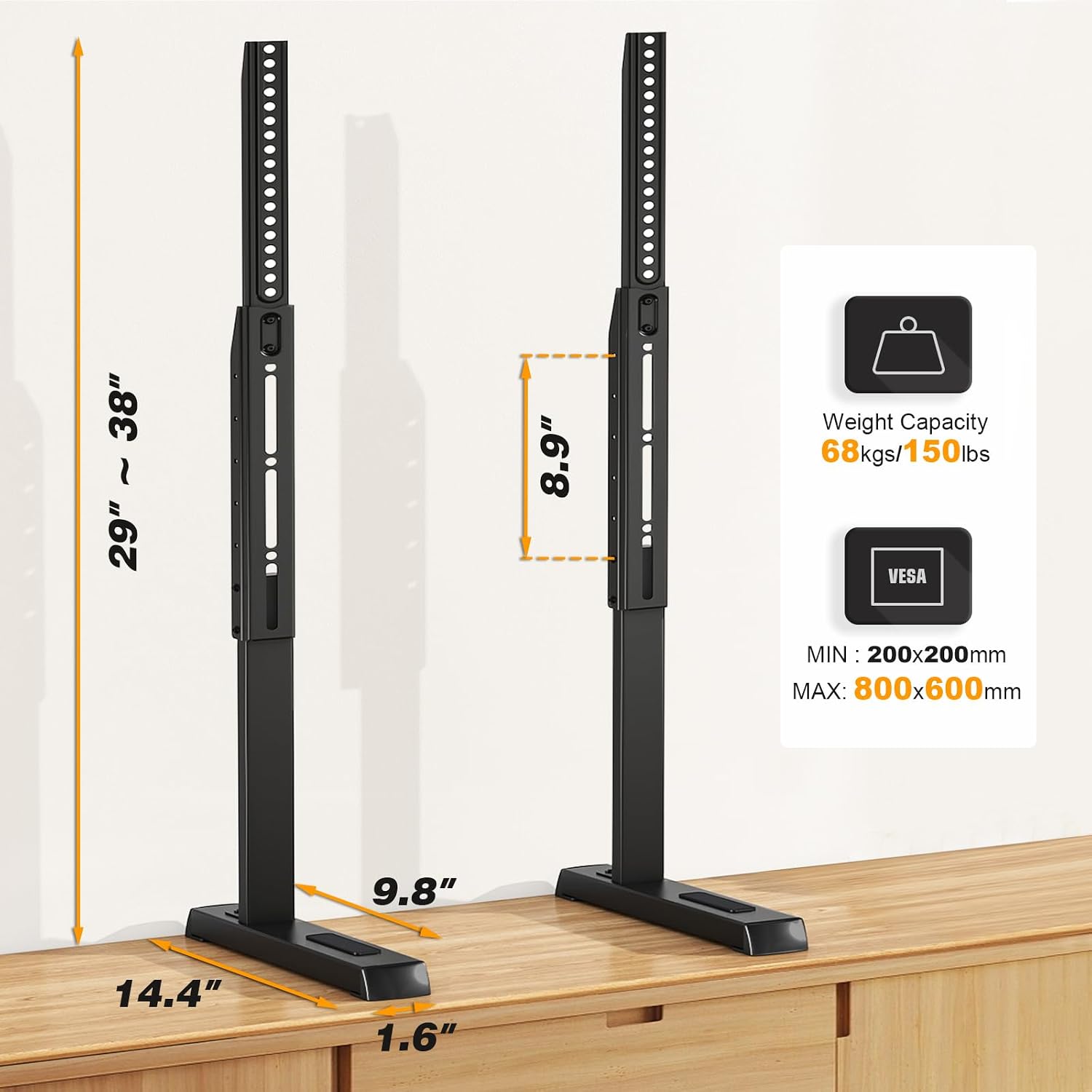
Image 4.1: Key dimensions, weight capacity, and VESA range for the TV stand.
5. Монтаждоо боюнча нускамалар
Follow these steps carefully to assemble your 5Rcom Universal TV Stand. It is recommended to have a second person assist with TV mounting.

Image 5.1: Visual guide for the assembly process.
- Assemble Brackets: Attach the vertical support brackets to the TV mounting arms using the provided screws. Ensure they are securely fastened.
- Attach to TV: Carefully lay your TV face down on a soft, clean surface. Identify the VESA mounting holes on the back of your TV. Select the appropriate screws, washers, and spacers from the provided hardware kit that fit your TV's specific mounting holes. Attach the assembled brackets to the back of your TV.
- Буттарды бекитүү: Connect the TV stand bases (feet) to the bottom of the vertical support brackets. Secure them with the designated screws. Ensure the non-slip stickers are applied to the bottom of the feet to prevent scratching and improve stability.
- Position TV: With assistance, carefully lift the TV and place the stand feet onto your desired surface. Ensure the TV is stable and level.
6. Иштөө нускамалары
6.1 Бийиктигин тууралоо
The 5Rcom Universal TV Stand offers 6 levels of height adjustment, with each adjustment changing the TV height by approximately 1.8 inches. To adjust the height:
- With assistance, carefully lift the TV slightly to relieve pressure on the mounting arms.
- Locate the adjustment pins or screws on the vertical support brackets.
- Adjust the mounting arms to the desired height level, ensuring both sides are set equally.
- Secure the adjustment pins or tighten the screws to lock the TV at the new height.
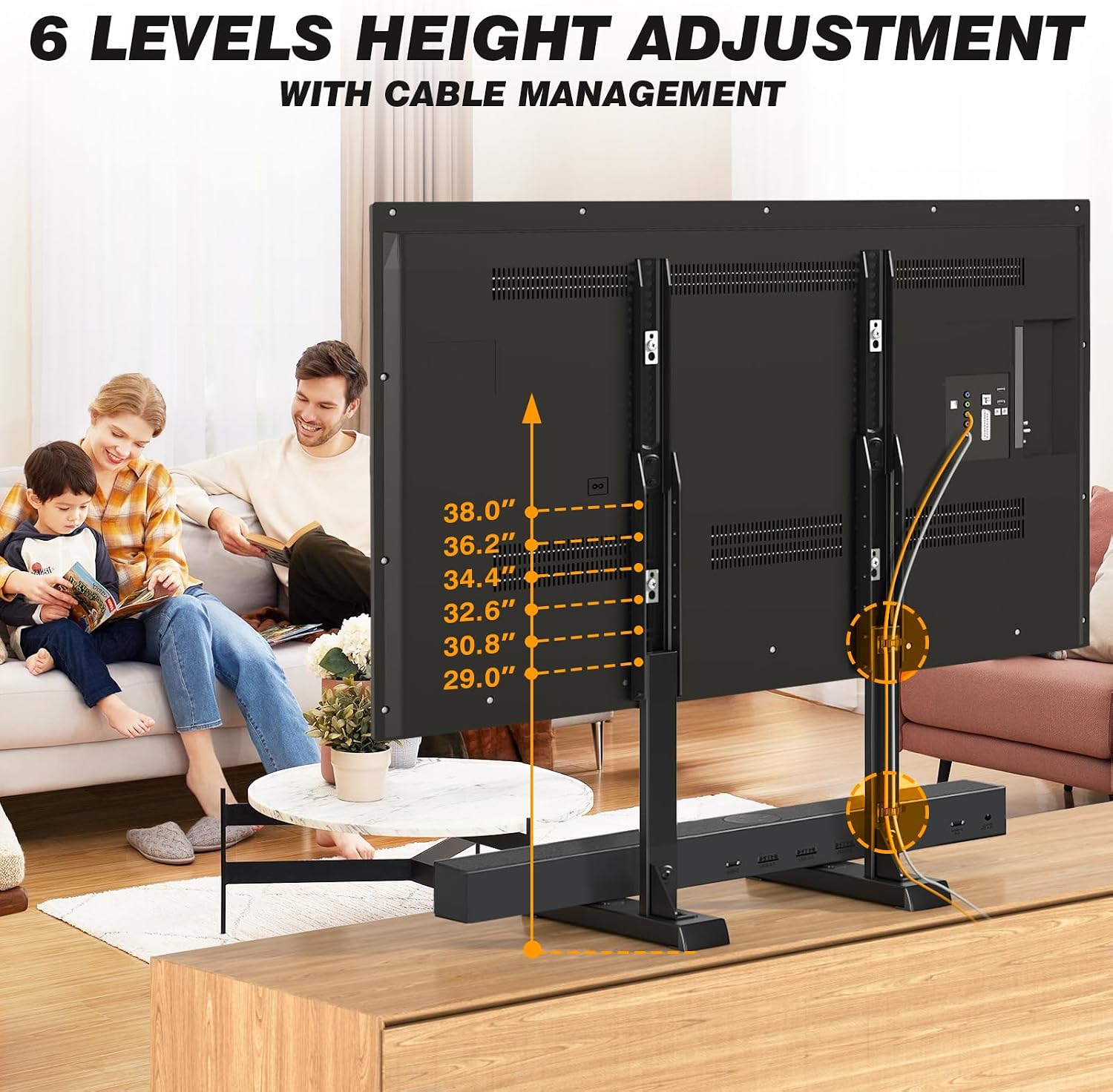
Image 6.1: Illustration of the 6 available height adjustment levels.
6.2 Кабелди башкаруу
Utilize the integrated cable management clips on the vertical support brackets to organize and conceal TV cables. This helps maintain a tidy appearance and prevents cable tangles.

Сүрөт 6.2: Мисample of cables routed through the integrated cable management clips.
6.3 Soundbar жайгаштыруу
The stand bases include special non-slip isolation pads designed for soundbars. Place your soundbar on these pads for increased stability and to prevent sliding.

Image 6.3: A soundbar resting securely on the dedicated isolation pads.
7. Техникалык тейлөө
- Regularly check all screws and bolts to ensure they remain tight.
- Стендди жумшак, кургак чүпүрөк менен тазалаңыз. Абразивдүү тазалагычтардан же эриткичтерден качыңыз.
- Inspect the stand periodically for any signs of wear or damage. If damage is found, discontinue use and contact customer support.
8. Кыйынчылыктарды
8.1 TV is not stable / wobbles
- Бардык монтаж бурамалары толугу менен бекемделгенин текшериңиз.
- Verify the TV stand is placed on a flat, level, and stable surface.
- Check that the non-slip stickers are properly applied to the bottom of the stand feet.
- Confirm the TV's weight does not exceed the stand's maximum capacity of 150 lbs.
8.2 Difficulty attaching TV to brackets
- Ensure you are using the correct size and length of screws, washers, and spacers for your specific TV model's VESA mounting holes. Refer to your TV's manual for VESA specifications.
- Verify that your TV's VESA pattern is within the supported range of 200x100mm to 800x600mm.
9. Кепилдик жана колдоо
For warranty information or technical support, please refer to the product packaging or contact 5Rcom customer service directly. Keep your purchase receipt as proof of purchase.