
1. Киришүү
Thank you for choosing the llano NP-W235 Battery Charger Set. This manual provides essential information for the safe and efficient use of your new battery charger and batteries. This set is designed to provide reliable power for your Fujifilm cameras, including models such as the X-T5, X-T4, X-H2, X-H2S, GFX100 II, GFX100S, and GFX50S II.
Продукцияны колдонуудан мурун бул колдонмону кылдат окуп чыгыңыз жана келечекте колдонуу үчүн сактап коюңуз.
2. Продукт бүтүп калдыview
Пакеттин мазмуну
- 1 x llano Dual Slot NP-W235 Battery Charger
- 2 x llano 2400mAh NP-W235 Batteries
- 1 х USB-C кубаттоо кабели
- 1 x сактоо баштык
- 1 x Lanyard
- 1 x User Manual
Негизги өзгөчөлүктөрү
- Dual Slot Charging: Simultaneously charge two NP-W235 batteries.
- Жогорку кубаттуулуктагы батареялар: Two 2400mAh batteries provide extended shooting time.
- Тез кубаттоо: Supports QC3.0 & PD3.0 for rapid charging (up to 18W PD output).
- Санариптик дисплей: Real-time battery level and charging status indication.
- Интегралдык сактагыч: Doubles as a storage box for two batteries and one SD card.
- Көптөгөн коргоо системасы: 10-layer safety protection against overcharge, overheating, short circuits, and more.
- Көп функциялуу кубаттуулук киргизүү: Charge via wall outlet, car adapter, power bank, or laptop.

Image 2.1: The llano NP-W235 Dual Battery Charger Set, including the charger and two batteries.
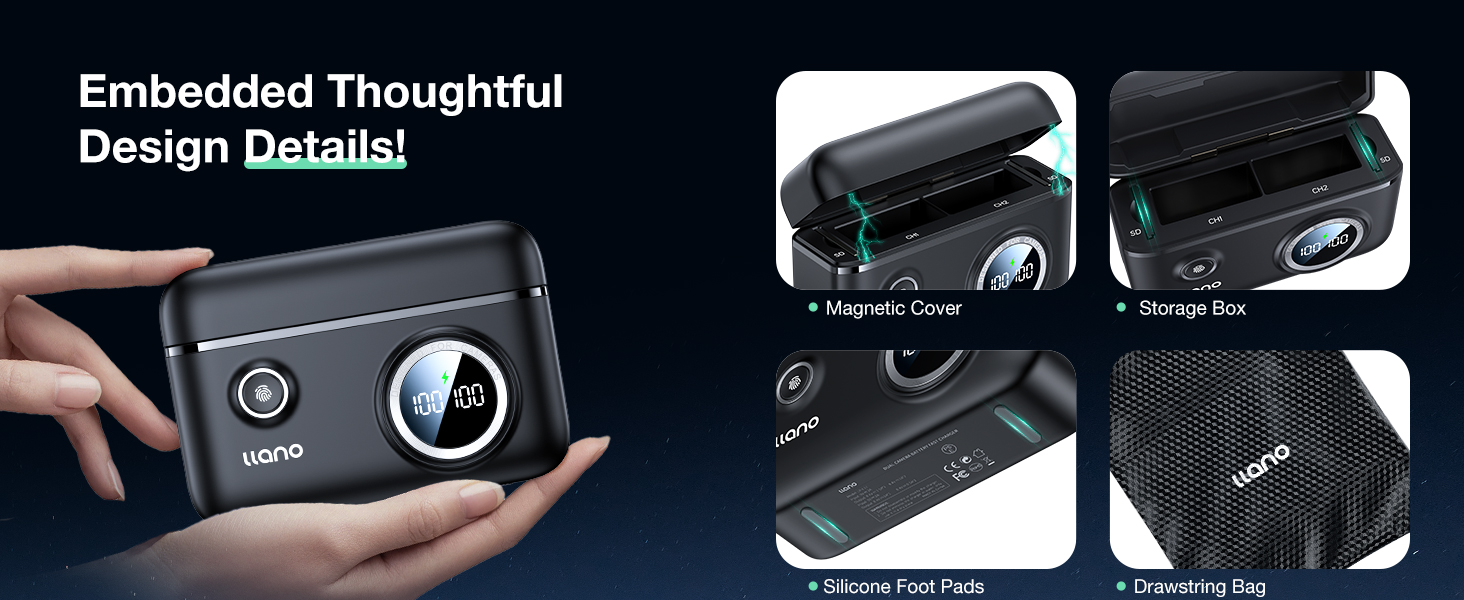
Image 2.2: The compact and portable design of the llano NP-W235 charger.

Image 2.3: Compatibility of the llano NP-W235 charger with Fujifilm cameras.
3. Орнотуу
Батареяларды салуу
- Open the magnetic cover of the llano charger.
- Align the metal contacts of the NP-W235 battery with the contacts inside the charging slot (CH1 or CH2).
- Gently push the battery into the slot until it is securely seated. You can insert one or two batteries.
- Close the magnetic cover to protect the batteries and contacts.
Заряддагычты туташтыруу
- Connect the provided USB-C charging cable to the USB-C port on the side of the llano charger.
- Connect the other end of the USB-C cable to a compatible power source (e.g., a USB wall adapter, power bank, or laptop). For optimal fast charging, use an 18W or higher PD (Power Delivery) or QC (Quick Charge) compatible adapter.

Image 3.1: Connecting the llano charger for fast charging.
4. Иштөө нускамалары
Заряддоо процесси
- Once connected to a power source, the digital display on the charger will activate, showing the current charge level of each inserted battery.
- A lightning bolt icon will appear on the display to indicate that fast charging mode is active.
- The display will show '100 100' when both batteries are fully charged.
- Charging time for two 2400mAh batteries is approximately 2.8 hours with an 18W PD charger.
Батарея деңгээлин текшерүү
Even when not connected to a power source, you can check the battery levels. Simply press the small button located next to the 'llano' logo on the charger. The digital display will briefly show the charge percentage of each inserted battery.

Image 4.1: Digital display for instant battery level recognition and charging status.
Бир нече заряддоо параметрлери
The charger offers flexibility in power sources:
- Дубал заряддагыч: Use with a compatible USB wall adapter.
- Унаа заряддагыч: Connect to a USB car adapter for on-the-go charging.
- Power Bank: Ideal for outdoor or remote charging.
- Ноутбук: Connect to your laptop's USB port.

Image 4.2: Various power sources for the llano NP-W235 charger.
Видео 4.1: Бүттүview of the llano 2-Pack NP-W235 Batteries & Charger for Fujifilm XT5 XT4, demonstrating its features and use.
5. Техникалык тейлөө
Кам көрүү жана тазалоо
- Keep the charger and batteries dry. Do not expose them to moisture or extreme temperatures.
- Clean the charger and battery contacts with a soft, dry cloth. Avoid using harsh chemicals or abrasive materials.
- Ensure the magnetic cover is closed when not in use to protect the charging slots and any stored SD cards.
Сактагыч
- Store the charger and batteries in a cool, dry place away from direct sunlight.
- For long-term storage, it is recommended to charge the batteries to about 50-70% capacity.
- The charger's integrated storage box helps keep batteries and an SD card organized and protected.

Image 5.1: Thoughtful design details including magnetic cover and storage.
Коопсуздук өзгөчөлүктөрү
The llano NP-W235 charger incorporates a 10-layer safety protection system to ensure safe operation and prolong battery life:
- Ашыкча ысып кетүүдөн коргоо
- Overvoltage Коргоо
- Ашыкча заряддан коргоо
- Ашыкча ток коргоо
- Кыска туташуулардан коргоо
- Battery PTC Protection
- Ашыкча разряддан коргоо
- Калыбына келтирүүдөн коргоо
- Overpower Protection
- Trickle Charging Protection

Image 5.2: The 10-layer safety protection system of the llano charger.
6. Кыйынчылыктарды
If you encounter issues with your llano NP-W235 Battery Charger Set, please refer to the following common solutions:
- Заряддагыч күйбөй жатат: Ensure the USB-C cable is securely connected to both the charger and a functional power source. Try a different USB-C cable or power adapter.
- Батареялар заряддалбай жатат: Verify that the batteries are correctly inserted into the charging slots with contacts aligned. Check if the digital display shows a charging indicator. If not, try re-inserting the batteries or using a different slot.
- Жай кубаттоо: Ensure your power adapter supports PD3.0 or QC3.0 and provides at least 18W output for optimal fast charging. Lower wattage adapters will result in slower charging times.
- Inaccurate battery level display: This can sometimes occur due to minor fluctuations. Remove and re-insert the battery, then press the check button. If the issue persists, fully charge and discharge the battery once to recalibrate.
- Заряддоо учурунда ысып кетүү: The charger has built-in overheating protection. If it feels excessively hot, disconnect it from the power source and allow it to cool down in a well-ventilated area. Ensure there is no obstruction around the charger.
If the problem persists after trying these steps, please contact llano customer support for further assistance.
Video 6.1: A brief demonstration of the llano NP-W235 charger, showing its functionality and components.
7. Техникалык шарттар
| Өзгөчөлүк | Спецификация |
|---|---|
| Модель номери | NP-W235 |
| Батарея сыйымдуулугу | 2400 мАч (ар бир батарейка) |
| Output Voltage | 8.4 вольт |
| Заряддоо киргизүү | USB-C (PD3.0 & QC3.0 compatible, up to 18W) |
| Продукциянын өлчөмдөрү | 4.25 x 1.73 x 3.27 дюйм (кубаттагыч) |
| Элемент Салмагы | 14.4 унция (жалпы пакет) |
| Шайкештик | Fujifilm X-T5, X-T4, X-H2, X-H2S, GFX100 II, GFX100S, GFX50S II |
| Коопсуздукту коргоо | Overcharge, Overheating, Short Circuit, Overvoltage, Overcurrent, Overdischarge, Battery PTC, Recovery, Overpower, Trickle Charging |
8. Кепилдик жана колдоо
Кепилдик маалымат
llano products are manufactured to high-quality standards and come with a limited warranty. Please refer to the product packaging or the official llano webАймагыңызга тиешелүү кепилдик шарттары жана шарттары үчүн сайт.
Кардарларды колдоо
For any questions, technical assistance, or warranty claims, please contact llano customer support through the following channels:
- Электрондук почта: support@llano.com (exampле)
- Webсайт: www.llano.com (мисampле)
- Телефон: +1-800-XXX-XXXX (exampле)
Please have your product model number (NP-W235) and purchase details ready when contacting support.