
1. Коопсуздук боюнча маанилүү маалымат
Please read these instructions carefully before using your VonHaus Pedestal Fan. Keep this manual for future reference.
- Вентилятор туруктуу, тегиз бетке коюлганын текшериңиз.
- Вентилятор торчосуна манжаларды же бөтөн нерселерди киргизбеңиз.
- Вентиляторду суудан же башка суюктуктардан алыс кармаңыз.
- Тазалоодон же техникалык тейлөөдөн мурун желдеткичти электр розеткасынан сууруп алыңыз.
- Бул шайман физикалык, сезүү же акыл-эс жөндөмү начар же тажрыйбасы жана билими жок адамдар (анын ичинде балдар) үчүн, эгерде алардын коопсуздугуна жооптуу адам тарабынан көзөмөлсүз же шайманды колдонуу боюнча көрсөтмө болбосо, колдонууга арналбайт.
- Балдар шайман менен ойнобошу үчүн аларды көзөмөлгө алуу керек.
2. Пакеттин мазмуну
Чогултуудан мурун бардык компоненттердин бар экендигин текшериңиз.
- Fan Head Assembly (with 5 blades)
- Алдыңкы жана арткы торчолор
- Pedestal Pole (Adjustable Height)
- База
- Алыстан башкаруу (батарея менен)
- User Manual
3. Орнотуу жана чогултуу
Follow these steps to assemble your VonHaus Pedestal Fan.
- Базаны тиркөө: Securely attach the pedestal pole to the base using the provided screws.
- Вентилятор башын чогултуңуз:
- Place the rear grille onto the motor housing, aligning the notches.
- Attach the fan blades to the motor shaft, ensuring they are firmly in place.
- Secure the front grille to the rear grille using the clips or screws provided, ensuring it is tightly closed.
- Mount Fan Head to Pedestal: Attach the assembled fan head to the top of the pedestal pole. Ensure it clicks into place or is secured with the locking mechanism.
- Бийиктигин тууралоо: Loosen the height adjustment knob on the pedestal pole, extend or retract the pole to your desired height (up to 128 cm), and then tighten the knob securely.

Image: This diagram illustrates the adjustable features of the fan, including its height range of 110-128 cm, a tilting range of +7 to -15 degrees, and an 80-degree left/right oscillation capability. The fan base is 42 cm wide.
4. Иштөө нускамалары
Your VonHaus Pedestal Fan offers multiple settings for personalized comfort.
Башкаруу панели жана алыстан башкаруу
The fan can be operated using the touch-sensitive LED display on the unit or the included remote control.

Image: This image displays the fan's LED touch panel, which includes controls for power, speed, mode, timer, and oscillation. It also shows the remote control, which allows for convenient adjustment of all fan functions from a distance.
Күйгүзүү/өчүрүү
басыңыз Күч button on the control panel or remote to turn the fan on or off.
Ылдамдык орнотуулары
The fan features 24 жөнгө салынуучу ылдамдык. колдонуу + жана - buttons on the control panel or remote to increase or decrease the airflow intensity.

Image: This image highlights the fan's powerful DC motor and its capability to provide 24 different airflow speeds, allowing users to select their desired cooling level. It also references a 15-hour timer function.
Иштөө режимдери
ичинен тандаңыз 3 programmed modes to suit your preference:
- Комфорт режими: Provides a steady, consistent airflow.
- Табигый режим: Күйөрмандардын ылдамдыгын өзгөртүү менен табигый желди окшоштурат.
- Түнкү режим: Operates at a lower speed with reduced noise (minimum 35 dB) and dims the LED display for undisturbed sleep.

Image: This image depicts the fan in a bedroom, illustrating its three programmed modes: Comfort, Natural, and Night. It emphasizes that the digital display dims in Night mode and the fan operates at a minimum noise level of 35 dB.
Термелүү
басыңыз Термелүү button to activate or deactivate the 80° left-to-right oscillation feature, distributing air across a wider area.
Таймер функциясы
The fan includes a 15 сааттык таймер. басыңыз Таймер button repeatedly to set the desired operating duration in 1-hour increments. The fan will automatically turn off after the set time.
Жөнгө салынуучу кыйшаюу
Manually adjust the fan head's vertical tilt within a range of +7° to -15° to direct airflow precisely where needed.
5. Техникалык тейлөө
Үзгүлтүксүз тазалоо жана тейлөө желдеткичиңиздин оптималдуу иштешин жана узак иштөөсүн камсыз кылат.
Тазалоо
- Тазалоодон мурун ар дайым желдеткичти сууруп алыңыз.
- жумшак колдонуу, damp Сырткы беттерди сүртүү үчүн чүпүрөк колдонуңуз. Абразивдүү тазалоочу каражаттарды же эриткичтерди колдонбоңуз.
- To clean the fan blades, carefully remove the front grille (refer to assembly instructions for reverse steps). Wipe the blades with a damp cloth. Ensure blades are dry before reattaching the grille.
- Желдеткичти сууга батырбаңыз же мотор корпусуна суу тамчылап жибербеңиз.
Сактагыч
Вентилятор көпкө чейин колдонулбаган учурда, аны чаңдан жана бузулуудан коргоо үчүн салкын, кургак жерде, мүмкүн болсо, баштапкы таңгагында сактаңыз.
6. Кыйынчылыктарды
If you encounter any issues with your fan, refer to the following common problems and solutions.
- Желдеткич күйбөйт:
- Электр шнурунун иштеген электр розеткасына бекем сайылганын текшериңиз.
- Ensure the power button has been pressed.
- Алыстан башкаруу пультунун батареясы түгөнүп калбаганын текшериңиз.
- Алсыз аба агымы:
- Ылдамдык жөндөөсүн жогорулатыңыз.
- Ensure the fan grilles and blades are clean and free from dust buildup.
- Check for any obstructions blocking the airflow.
- желдеткич ызы-чуу болуп жатат:
- Вентилятор туруктуу, тегиз жерде турганын текшериңиз.
- Check if any parts are loose or vibrating. Tighten if necessary.
- Clean the fan blades and grilles to remove any debris that might cause imbalance.
- Пульт иштебей жатат:
- Пульттун батареясын алмаштырыңыз.
- Алыстан башкаруу пульту менен желдеткичтин кабыл алгычынын ортосунда эч кандай тоскоолдуктар жок экенин текшериңиз.
- Алыстан башкаруу пультун түз эле желдеткичтин башкаруу панелине багыттаңыз.
If the problem persists after trying these solutions, please contact VonHaus customer support.
7. Техникалык шарттар
| Өзгөчөлүк | Деталь |
|---|---|
| Модель номери | 8100085 |
| Бренд | VonHaus |
| Өлчөмдөрү (L x W x Y) | 42 x 42 x 128 см |
| Салмагы | 6.22 кг |
| Күч | 50 Ватт |
| Ылдамдыктын саны | 24 |
| Иштөө режимдери | 3 (Comfort, Natural, Night) |
| Термелүү | 80° (Left/Right) |
| Тилтти тууралоо | +7° / -15° |
| Таймер | 15 саатка чейин |
| Башкаруу ыкмасы | Алыстан башкаруу, сенсордук панель |
| Blades саны | 5 |
| Материал | Металл |
| Түс | Ак |
| Ички/тышкы колдонуу | Indoor |
| Камтылган компоненттер | Алыстан башкаруу |
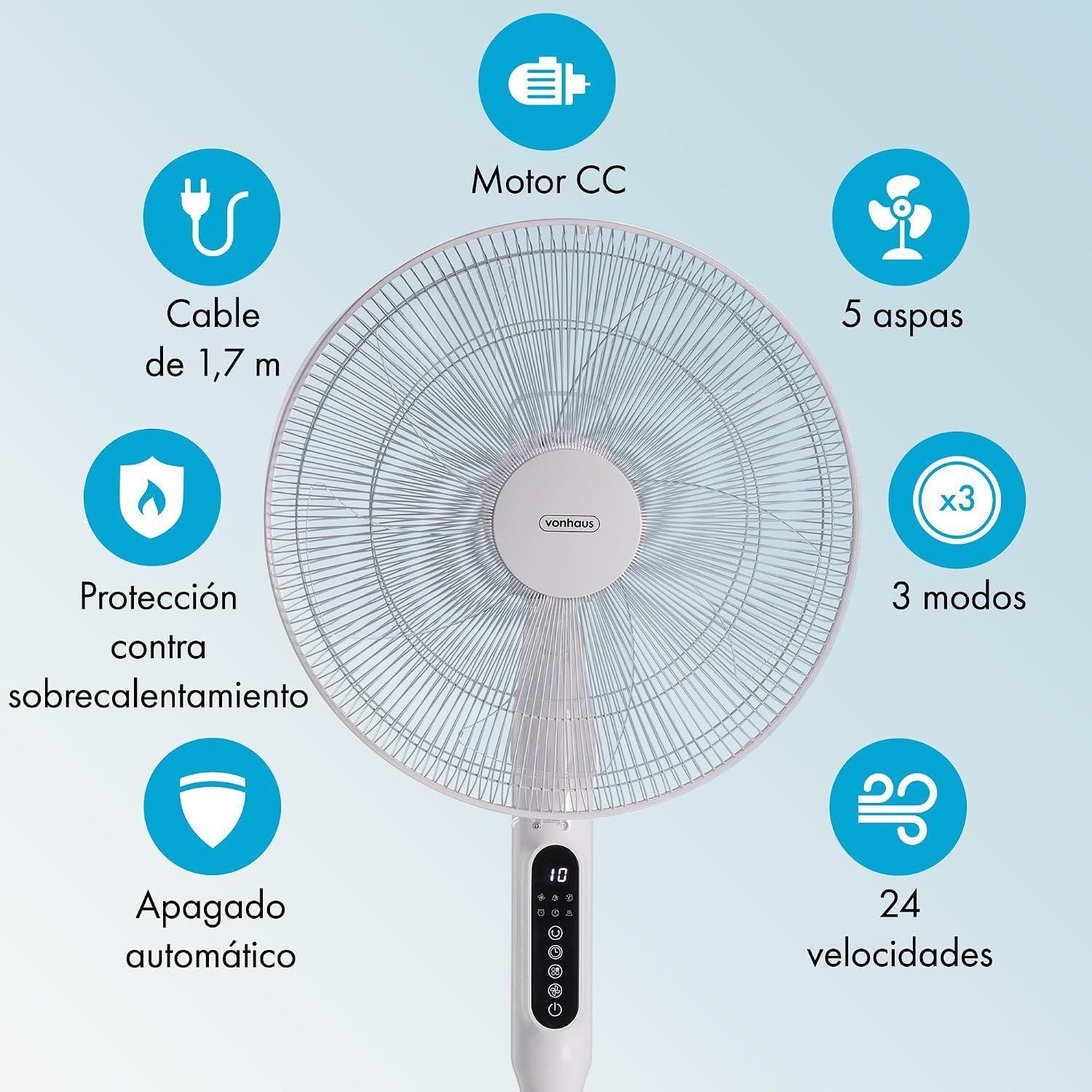
Image: This graphic summarizes the fan's main features, including a DC motor, 5 blades, 3 operating modes, 24 speeds, 1.7m cable, overheat protection, and automatic shut-off.
8. Кепилдик жана колдоо
All VonHaus products come with a minimum 2 жылдык кепилдик. This warranty covers manufacturing defects and ensures that we are available to assist you if any issues arise with your product.
For technical support, troubleshooting assistance, or warranty claims, please contact VonHaus customer service through the retailer where you purchased the product or visit the official VonHaus webбайланыш маалыматы үчүн сайт.
Сураныч, кепилдик максаттары үчүн сатып алганыңыздын далилин сактап коюңуз.