
1. Киришүү
This manual provides essential instructions for the proper use, maintenance, and care of your SPI 18-010-9 Digital Caliper. This precision measuring instrument is designed for accurate internal, external, depth, and step measurements. Please read this manual thoroughly before operating the device to ensure optimal performance and longevity.
The SPI 18-010-9 Digital Caliper features IP54 protection, making it resistant to dust and water splashes, suitable for various industrial and scientific applications. It offers measurements in inches, millimeters, and fractions, with a clear digital display for easy reading.
2. Коопсуздук маалыматы
- Handle the caliper with care to avoid dropping or impacting it, which can affect its accuracy.
- Keep the caliper clean and free from debris, especially the measuring surfaces and the digital scale.
- Avoid exposing the caliper to extreme temperatures, direct sunlight, or high humidity.
- Do not attempt to disassemble the caliper, as this will void any warranty and may damage the instrument.
- When replacing the battery, ensure correct polarity and dispose of old batteries responsibly.
3. Продукт бүтүп калдыview
The SPI 18-010-9 Digital Caliper consists of several key components:
- Outside Jaws: Used for external measurements.
- Inside Jaws: Used for internal measurements.
- Тереңдик таякчасы: Used for depth measurements.
- Step Measuring Faces: Used for step measurements.
- Main Beam: The main body of the caliper with the measurement scale.
- Санариптик дисплей: Shows the measurement reading.
- Roller Wheel: For fine adjustment of the slider.
- Бекитүү бурагы: To fix the slider in position.
- Башкаруу баскычтары: Power ON/OFF, Zero, Inch/mm/Fraction conversion.

Сүрөт 3.1: Алдыңкы view of the SPI Digital Caliper, showing the digital display and measurement scale.
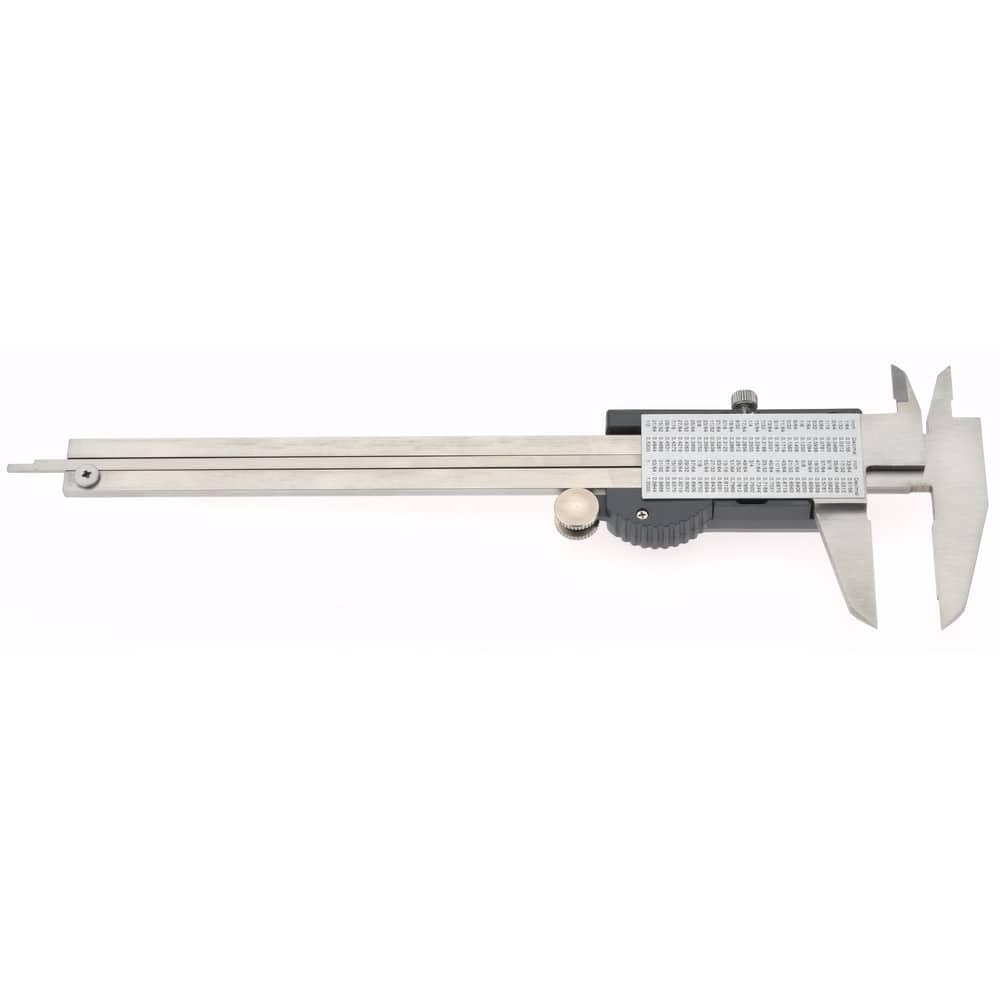
3.2-сүрөт: Каптал view of the SPI Digital Caliper, highlighting the depth rod and main beam.

Figure 3.3: Close-up of the inch/decimal/fraction conversion chart located on the caliper body.
4. Орнотуу
4.1 Батареяны орнотуу
- Locate the battery compartment cover on the digital display unit.
- Slide the cover open or unscrew it, depending on the design.
- Insert a new CR2032 3V lithium battery, ensuring the positive (+) side faces upwards.
- Батарея отсегин бекем жабыңыз.
4.2 Initial Zeroing
- басыңыз КҮЙГҮЗҮҮ/ӨЧҮРҮҮ button to power on the caliper.
- Gently close the outside measuring jaws completely.
- басыңыз НӨЛ button. The display should now read "0.00" (or "0.000" depending on the unit setting).
- The caliper is now ready for accurate measurements.
5. Иштөө нускамалары
5.1 Күйгүзүү/өчүрүү
- басыңыз КҮЙГҮЗҮҮ/ӨЧҮРҮҮ button to turn the caliper on.
- The caliper features an automatic off function to conserve battery life after a period of inactivity.
- Кол менен өчүрүү үчүн, баскычын басып кармап туруңуз КҮЙГҮЗҮҮ/ӨЧҮРҮҮ баскычы.
5.2 Бирдикти конверсиялоо
басыңыз IN/MM/F button to cycle through measurement units: inches, millimeters, and fractions (if available on your model). The selected unit will be indicated on the digital display.
5.3 Өлчөөлөрдү алуу
Ensure the caliper is zeroed before taking any measurements.
- Тышкы өлчөө: Open the outside jaws and place the object between them. Close the jaws firmly but gently until they contact the object. Read the measurement on the display.
- Ички өлчөө: Close the inside jaws and insert them into the opening to be measured. Open the jaws until they contact the inner surfaces. Read the measurement on the display.
- Тереңдикти өлчөө: Place the end of the main beam on the top surface of the object. Extend the depth rod into the hole or recess until it touches the bottom. Read the measurement on the display.
- Кадамды өлчөө: Place the step measuring face of the fixed jaw on the higher surface. Extend the slider until the step measuring face of the moving jaw rests on the lower surface. Read the measurement on the display.
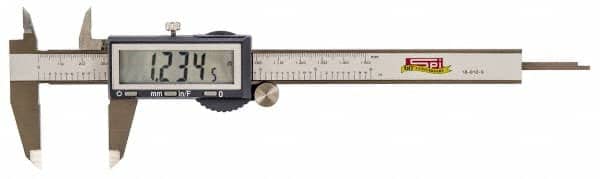
Figure 5.1: The digital display showing a measurement of 1.2345 inches.
6. Техникалык тейлөө
6.1 Тазалоо
- Wipe the caliper clean with a soft, dry cloth after each use.
- Кежир кир үчүн, чүпүрөктү жеңил колдонуңуз dampened with isopropyl alcohol. Avoid harsh chemicals or abrasive cleaners.
- Ensure the measuring surfaces and the digital scale are free from dust, oil, and moisture.
6.2 Сактоо
- Store the caliper in its protective case when not in use.
- Keep the caliper in a dry environment, away from direct sunlight and extreme temperatures.
- Узак мөөнөткө сактоо үчүн, агып кетүүнүн алдын алуу үчүн батарейканы алып салыңыз.
7. Кыйынчылыктарды
| Көйгөй | Мүмкүн себеп | Чечим |
|---|---|---|
| Дисплей бош же бүлбүлдөп турат | Low or dead battery; poor battery contact | Replace the battery; ensure battery is correctly seated. |
| Так эмес окуулар | Caliper not zeroed; dirt on measuring surfaces; damaged scale | Re-zero the caliper; clean measuring surfaces; inspect for damage. |
| Slider movement is stiff | Dirt or debris on the main beam | Clean the main beam thoroughly. |
| Баскычтар жооп бербейт | Battery issue; internal malfunction | Replace battery; if problem persists, contact support. |
8. Техникалык шарттар
- Модел: SPI 18-010-9
- Өлчөө диапазону: 0-6 дюйм (0-150 мм)
- Чечим: 0.0005 дюйм (0.01 мм)
- Тактыгы: ±0.0015 дюйм (±0.03 мм)
- Коргоо деңгээли: IP54 (Dust and water splash resistant)
- Дисплей: 1/2-inch LC Digital Display
- Өлчөө түрлөрү: 4-way (Outside, Inside, Depth, Step)
- Материал: Hardened Stainless Steel
- Жаак узундугу: 1.56 дюйм
- Жаактын калыңдыгы: 0.136 дюйм
- Күч: CR2032 3V Lithium Battery (Automatic off function)
9. Кепилдик жана колдоо
For warranty information or technical support regarding your SPI 18-010-9 Digital Caliper, please refer to the documentation provided with your purchase or contact the manufacturer, MSC Industrial, directly. Keep your purchase receipt as proof of purchase.
Manufacturer: MSC Industrial