
Introduction
The JBL Soundgear Frames are innovative Bluetooth audio glasses designed to provide an immersive audio experience while allowing you to remain aware of your surroundings. Equipped with ultra-slim speakers, an integrated microphone, and touch controls, these frames offer seamless connectivity for music, calls, and video conferences. This manual provides essential information for setting up, operating, and maintaining your Soundgear Frames.
Кутуда эмне бар
Carefully unpack your JBL Soundgear Frames and ensure all items are present:
- JBL Soundgear Frames (Onyx)
- Заряддоо кабели
- Тазалоочу кездеме
- Ташуу кутусу
Эскертүү: Кошумча аксессуарлар өзүнчө сатылышы мүмкүн.
Жайгашуу
1. Аппаратты заряддоо
Before first use, fully charge your JBL Soundgear Frames. Connect the provided charging cable to the charging port on the frames and to a USB power source. The LED indicator will show charging status.

Сүрөт: каптал view of the JBL Soundgear Frames, highlighting the charging port and internal electronics within the temple arms.
- Заряддоо убактысы: Толук кубаттоо үчүн болжол менен 2 саат.
- Батареянын иштөө мөөнөтү: Up to 8 hours of audio playback on a full charge.
2. Bluetooth Жупташтыруу
To connect your Soundgear Frames to a Bluetooth-enabled device:
- Ensure the Soundgear Frames are charged and powered off.
- Press and hold the power button (usually located on one of the temple arms) until the LED indicator flashes blue, indicating pairing mode.
- Түзмөгүңүздө (смартфон, планшет, компьютер) Bluetooth жөндөөлөрүнө өтүп, Bluetooth'ду иштетиңиз.
- Select "JBL Soundgear Frames" from the list of available devices.
- Туташкандан кийин LED индикатору көк түскө айланат.
The frames support Bluetooth 5.2 for stable and efficient wireless connectivity.
Иштөө нускамалары
Күйгүзүү/өчүрүү
- Күйгүзүү: Press and hold the power button for 2 seconds. The LED will light up.
- Өчүрүү: Кубат баскычын 3 секунд басып туруңуз. LED өчөт.
Музыканы ойнотуу
Use the touch controls located on the temple arms to manage your audio:
- Ойнотуу/тындыруу: Single tap on either temple arm.
- Кийинки трек: Double tap on the right temple arm.
- Мурунку трек: Double tap on the left temple arm.
- Көлөмү: Swipe forward on the right temple arm.
- Үнүн азайтуу: Swipe backward on the right temple arm.
Чалууларды башкаруу
The integrated microphone allows for clear hands-free calls:
- Чалууга жооп берүү/аяктоо: Single tap on either temple arm.
- Чакырууну четке кагуу: Press and hold either temple arm for 2 seconds.
Үн жардамчысы
Activate your device's voice assistant (e.g., Siri, Google Assistant) by triple-tapping on either temple arm.

Image: A person wearing the JBL Soundgear Frames outdoors, demonstrating their use in a real-world setting.
Техникалык тейлөө
Тазалоо
To maintain the clarity of your lenses and the integrity of the frames:
- Use the provided cleaning cloth to gently wipe the lenses and frame.
- For stubborn smudges, use a lens cleaning spray specifically designed for eyewear.
- Avoid using abrasive materials or harsh chemicals, as these can damage the lenses and frame finish.
Сактагыч
When not in use, store your Soundgear Frames in the provided carrying case to protect them from scratches and impacts.
Батареяга кам көрүү
To prolong battery life, avoid exposing the frames to extreme temperatures. If storing for an extended period, charge the battery to approximately 50% before storage.
Проблемаларды чечүү
| Көйгөй | Чечим |
|---|---|
| Frames do not power on. | Батарея заряддалганын текшериңиз. Кубат булагына туташып, кайра аракет кылыңыз. |
| Bluetooth аркылуу туташуу мүмкүн эмес. | Make sure the frames are in pairing mode (flashing blue LED). Check your device's Bluetooth settings and forget previous connections if necessary. Restart both devices. |
| Үн жок же үнү төмөн. | Check the volume level on both the frames and your connected device. Ensure the frames are properly paired. |
| Сенсордук башкаруу элементтери жооп бербейт. | Ensure the touch surface is clean and dry. Restart the frames. |
Техникалык шарттар
| Өзгөчөлүк | Деталь |
|---|---|
| Модель номери | JBLSNDGEARFMSRONX |
| UPC | 050036399845 |
| Түс | Оникс |
| Элементтин формасы | Тегерек |
| Линзанын түсү | Кара |
| Линзанын түрү | Поляризацияланбаган |
| Frame Material | Термопластикалык |
| Frame Coverage | Толук кадр |
| Байланыш | Bluetooth 5.2 |
| Баяндамачылар | Ultra-slim 25mm x 9mm |
| Микрофон | Интеграцияланган |
| Controls | тийүү |
| Батареянын иштөө мөөнөтү | 8 саатка чейин |
| Заряддоо убактысы | Болжол менен 2 саат |
| Суу каршылык | IP54 (Splash and dust resistant) |
| Сунушталган колдонуу | Музыка угуу |
| Жаш аралыгы | бойго жеткен |
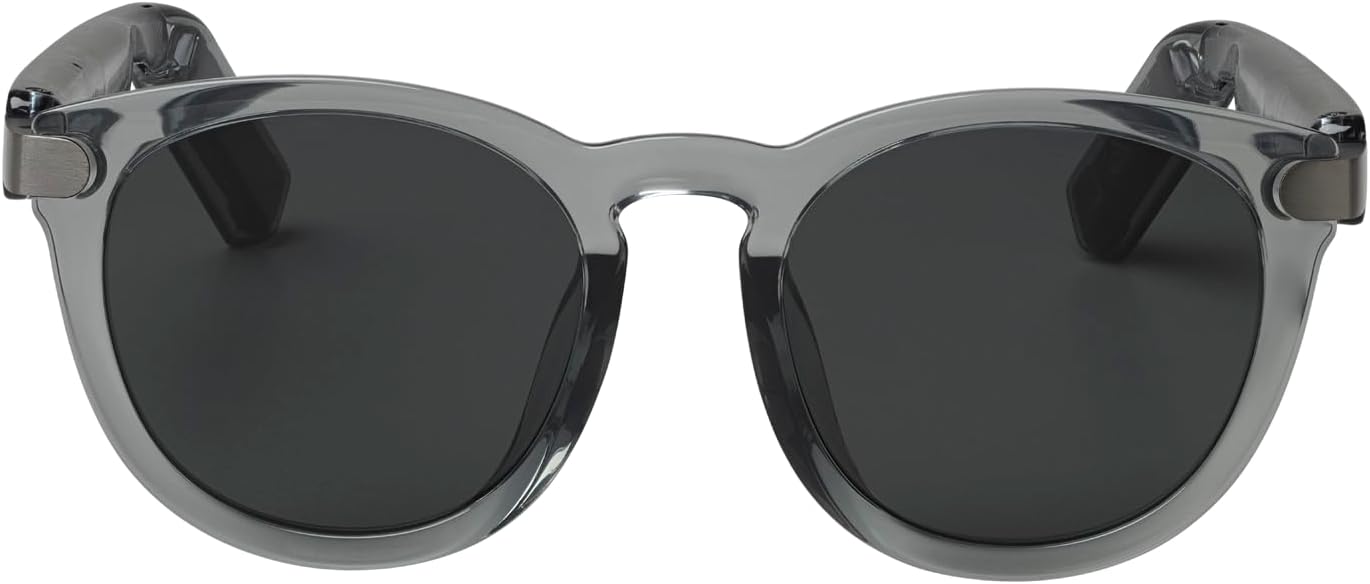
Сүрөт: алдыңкы view of the JBL Soundgear Frames, showcasing the round, full-frame design and black non-polarized lenses.

Сүрөт: Артка view of the JBL Soundgear Frames, showing the overall structure from the rear.
Кепилдик жана колдоо
JBL products are designed for reliability and performance. For warranty information and customer support, please refer to the warranty card included with your product or visit the official JBL webсайты. Ошондой эле, сиз онлайн режиминде Көп берилүүчү суроолорду жана кошумча колдоо ресурстарын таба аласыз.
Онлайн колдоо: www.jbl.com/support