
1. Продукт бүтүп калдыview
The ULTRAK 495 Professional 100-Lap Digital Stopwatch is designed for precise timekeeping in various sports and training activities. It features a large, easy-to-read display and multiple functions to support athletes, coaches, and referees.
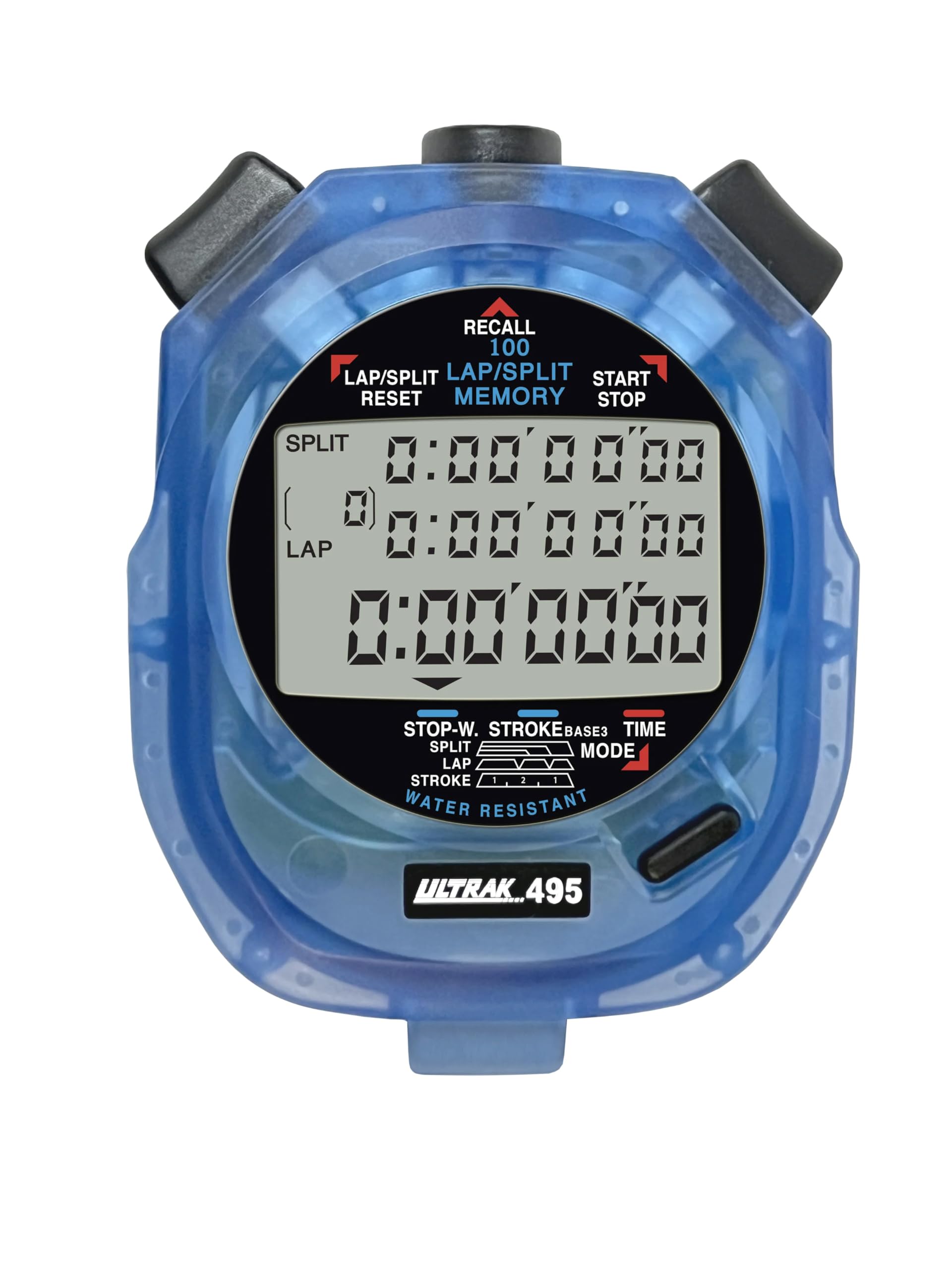
Figure 1: ULTRAK 495 Stopwatch in blue.
Негизги өзгөчөлүктөрү:
- 100 Dual Split Recallable Memory: Enhances accuracy for track and field events, ideal for athletes and coaches requiring precise timekeeping.
- Ар тараптуу функциялар: Includes stroke/frequency, time, and calendar functions, suitable for diverse sports activities.
- Сууга туруктуу дизайн: Allows for outdoor use in various weather conditions.
- Чоң 3 катарлуу дисплей: Facilitates easy viewing of multiple lap times simultaneously.
- Durable Lithium Battery: Ensures reliability for extended use.
2. Орнотуу
2.1. Батареяны орнотуу
The ULTRAK 495 Stopwatch comes with one Lithium Metal battery pre-installed. If battery replacement is needed, refer to the Maintenance section.
2.2. Баштапкы убакытты жана күндү коюу
Убакытты жана күндү белгилөө үчүн:
- басыңыз РЕЖИМ button repeatedly until the time/calendar display mode is active.
- басып, кармап туруңуз SET button (usually located on the top right) until the digits begin to flash.
- колдонуу LAP/SPLIT/RESET button (top left) to adjust the flashing digit.
- басыңыз SET button to move to the next digit or setting (e.g., hours, minutes, seconds, month, day, year).
- Бардык орнотуулар туура болгондон кийин, басыңыз РЕЖИМ орнотуу режиминен чыгуу үчүн баскыч.

Figure 2: Stopwatch displaying various modes, including Time/Calendar.
3. Операция
3.1. Stopwatch Mode (Standard Timing)
This mode is used for basic timing of events.
- Ensure the stopwatch is in the standard stopwatch mode (usually indicated by "STOPWATCH" on the display). If not, press РЕЖИМ пайда болгонго чейин.
- Басыңыз START/STOP (top right button) to begin timing.
- Басыңыз START/STOP кайра таймерди тындыруу үчүн.
- Басыңыз START/STOP убакытты кайра эсептөө үчүн.
- To reset the timer to zero, ensure it is stopped, then press LAP/SPLIT/RESET (top left button).
3.2. Lap/Split Timing with Memory Recall
The ULTRAK 495 can record up to 100 lap and split times.
- In stopwatch mode, press START/STOP убакытты баштоо үчүн.
- Басыңыз LAP/SPLIT/RESET to record a split time. The display will momentarily show the split time while the main timer continues running in the background. The bottom row displays the running event or lap time.
- Repeat step 2 for each lap or split you wish to record.
- Басыңыз START/STOP to end the timing session.
- To recall recorded times, press the ЧАКЫРУУ button (top center). Use the LAP/SPLIT/RESET жана START/STOP buttons to navigate through the stored lap and split times.
- To exit recall mode, press РЕЖИМ. To clear memory, ensure the stopwatch is stopped and not in recall mode, then press and hold LAP/SPLIT/RESET.

Figure 3: Display showing simultaneous split, lap, and total times.
3.3. Артка таймер режими
The stopwatch includes a countdown timer function.
- Басыңыз РЕЖИМ until the countdown timer display appears.
- Басып кармап туруңуз SET орнотуу режимине кирүү үчүн.
- Колдонуу LAP/SPLIT/RESET to adjust the time and SET сааттар, мүнөттөр жана секундалар арасында жылдыруу.
- Каалаган артка саноо убактысы коюлгандан кийин, баскычын басыңыз РЕЖИМ орнотуу режиминен чыгуу үчүн.
- Басыңыз START/STOP артка санаууну баштоо үчүн. Таймер нөлгө жеткенде сигнал чыгат.
3.4. Stroke/Frequency Measuring Mode
This mode is useful for measuring stroke rates in swimming or other repetitive actions.
- Басыңыз РЕЖИМ until the stroke/frequency mode is displayed.
- Басыңыз START/STOP to begin measuring.
- Басыңыз LAP/SPLIT/RESET at the start of each stroke or cycle. The stopwatch will calculate and display the frequency.
- Басыңыз START/STOP өлчөөнү токтотуу.
4. Техникалык тейлөө
4.1. Тазалоо
Wipe the stopwatch with a soft, dry cloth. For stubborn dirt, use a slightly damp кездеме жана жумшак самын менен сүртүп, андан кийин жакшылап кургатыңыз. Катуу химиялык заттардан же абразивдүү тазалоочу каражаттардан алыс болуңуз.
4.2. Сууга туруктуулук
The ULTRAK 495 is water-resistant, making it suitable for use in various weather conditions. However, it is not designed for submersion. Avoid pressing buttons while the stopwatch is wet to prevent water ingress.
4.3. Батареяны алмаштыруу
The stopwatch uses one Lithium Metal battery. When the display becomes dim or functions become erratic, it's time to replace the battery. Carefully open the battery compartment (usually on the back, secured by small screws) and replace with a new battery of the same type. Ensure proper polarity and securely close the compartment.
5. Кыйынчылыктарды
- Дисплей бош же күңүрт: Батареяны текшериңиз. Керек болсо алмаштырыңыз.
- Stopwatch resets unexpectedly during timing: This can sometimes occur due to low battery or a temporary electrical glitch. Try replacing the battery. If the issue persists, ensure buttons are not being pressed inadvertently.
- Баскычтар жооп бербейт: Ensure the stopwatch is not in a locked mode (if applicable, check manual for specific lock features). If wet, ensure it is completely dry. If still unresponsive, try replacing the battery.
- Туура эмес убакыт же дата: Refer to section 2.2 to re-set the time and date.
6. Техникалык шарттар
| Өзгөчөлүк | Деталь |
|---|---|
| Модель номери | 495 |
| Эс | 100 Dual Split Recallable Laps |
| Дисплей | Large 3-Row Display |
| Функциялар | Stopwatch, Lap/Split, Countdown Timer, Stroke/Frequency, Time, Calendar |
| Суу каршылык | Ооба (Сууга туруктуу) |
| Батарея түрү | 1 литий металл батарейка (кошулган) |
| Материал | Пластик |
| Продукциянын өлчөмдөрү | 0.2"D x 2.5"W x 3.5"H |
| Элемент Салмагы | 3.2 унция |
7. Кепилдик жана колдоо
For specific warranty information and customer support, please refer to the documentation included with your product or visit the official Ultrak webсайт. Сатып алуу квитанциясын кепилдик дооматтары үчүн сатып алуунун далили катары сактаңыз.