
1. Продукт бүтүп калдыview
The NEWSKILL Chiron Pro is an ambidextrous wireless gaming mouse designed for precision and comfort. It features a high-performance optical sensor, programmable buttons, and customizable RGB lighting.

Сүрөт: бурчтуу view of the NEWSKILL Chiron Pro Wireless Gaming Mouse, showcasing its ergonomic shape and design.
2. Пакеттин мазмуну
- NEWSKILL Chiron Pro Wireless Gaming Mouse
- USB 2.4 ГГц зымсыз кабыл алгыч
- USB-C - USB-A заряддоо/дата кабели
- Колдонуучунун Колдонмосу (бул документ)
3. Орнотуу нускамалары
3.1 Алгачкы заряддоо
Before first use, it is recommended to fully charge the mouse. Connect the provided USB-C cable to the mouse's front port and the USB-A end to a powered USB port on your computer or a USB wall adapter. A full charge takes approximately 2 hours and provides up to 80 hours of usage.

Сүрөт: алдыңкы view чычкандын, USB-C заряддоо портун бөлүп көрсөтүү.
3.2 Зымсыз байланыш (2.4 ГГц)
- Locate the USB 2.4GHz wireless receiver. It is typically stored in a compartment on the underside of the mouse.
- USB ресиверди компьютериңиздеги жеткиликтүү USB портуна сайыңыз.
- Чычкандын ылдый жагында жайгашкан ON/OFF которгучу аркылуу чычканды күйгүзүңүз.
- Your computer should automatically detect and install the necessary drivers. The mouse is ready for use once the RGB lighting activates.
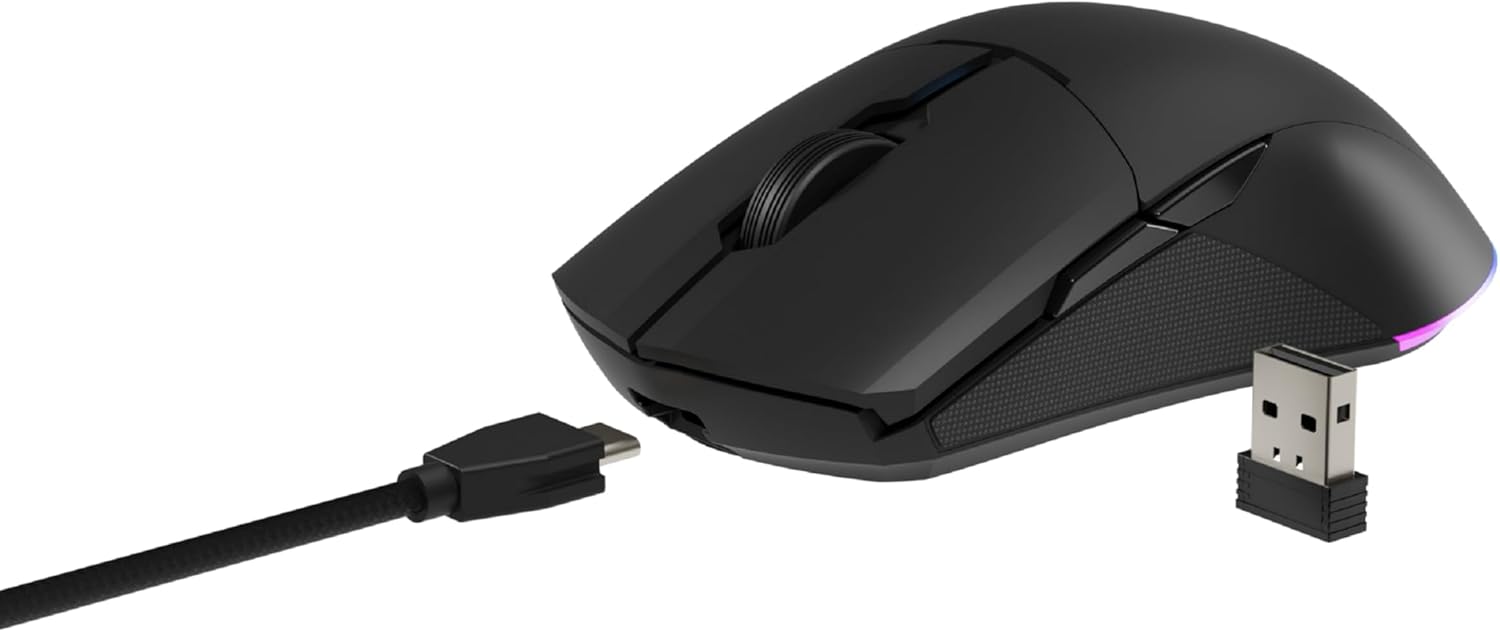
Image: The NEWSKILL Chiron Pro mouse shown with its USB-C cable and the 2.4GHz wireless receiver.
3.3 Зымдуу туташуу
The mouse can also be used in wired mode. Simply connect the USB-C cable to the mouse and the USB-A end to your computer. The mouse will function as a wired device and charge simultaneously.
4. Иштөө нускамалары
4.1 Негизги функциялар
- Сол чыкылдатуу баскычы: Негизги аракет.
- Оң баскычты чыкылдатуу: Кошумча аракет/контексттик меню.
- Жылдыруу дөңгөлөгү: Өйдө/төмөн сыдырыңыз, ортоңку чыкылдатыңыз.
- Side Buttons (8 programmable): Default functions may vary, but are customizable via software.

Сүрөт: каптал view of the mouse, showing the textured grip and two side buttons.
4.2 DPI жөндөө
The mouse features a Pixart PMW3335 optical sensor with up to 16000 configurable DPI. The DPI button on the underside of the mouse allows you to cycle through preset DPI levels. For fine-tuning and custom DPI settings, use the advanced software.

Image: Underside of the mouse, showing the DPI button, optical sensor, and ON/OFF switch.
4.3 RGB Lighting Настройка
The Chiron Pro features customizable RGB lighting. To personalize lighting effects, colors, and brightness, download and install the dedicated NEWSKILL software from the official website. The software also allows for button remapping and macro creation.

Image: The NEWSKILL Chiron Pro mouse displaying its customizable RGB lighting.
5. Техникалык тейлөө
5.1 Тазалоо
Оптималдуу иштеши үчүн чычканыңызды дайыма тазалаңыз. Бетти сүртүү үчүн жумшак, кургак чүпүрөктү колдонуңуз. өжөр кир үчүн, бир аз гamp жумшак самын менен кездеме колдонсо болот, чычканга суюктук кирбесин. Абразивдүү тазалагычтардан же эриткичтерден качыңыз.
5.2 Батареяга кам көрүү
Батареянын иштөө мөөнөтүн узартуу үчүн чычканды бат-баттан толук кубаттап турбаңыз. Батарея индикатору аз кубаттуулукту көрсөтүп жатканда чычканды заряддаңыз. Чычканды узак убакытка колдонбогондо салкын, кургак жерде сактаңыз.
6. Кыйынчылыктарды
- Чычкан жооп бербей жатат:
Ensure the mouse is turned ON. Check if the USB receiver is securely plugged into a working USB port. If using wired mode, ensure the USB-C cable is properly connected. Try a different USB port. - Зымсыз байланыш көйгөйлөрү:
Ensure the mouse is within range of the USB receiver (typically up to 10 meters). Avoid placing the receiver near other wireless devices that might cause interference. Re-pair the mouse if necessary (refer to software instructions). - DPI or button issues:
Ensure the NEWSKILL software is installed and up-to-date. Check your settings within the software. Reset to default settings if custom configurations are causing issues. - Заряддоо көйгөйлөрү:
Verify the USB-C cable is not damaged and is properly connected. Try a different USB port or charging adapter. Ensure the mouse is not in an extremely hot or cold environment during charging. - Missing USB Receiver:
The USB receiver is typically stored in a compartment on the underside of the mouse for safekeeping. Please check this compartment thoroughly. If it is genuinely missing, contact customer support.
7. Техникалык шарттар
| Өзгөчөлүк | Спецификация |
|---|---|
| Бренд | NEWSKILL |
| Модель аты | CHIRON PRO |
| Модель номери | 10831240 |
| Түс | Кара |
| Байланыш технологиясы | Wireless (2.4GHz), USB (Wired) |
| Сенсор түрү | Optical (Pixart PMW3335) |
| DPI | 16000 XNUMX DPI чейин |
| баскычтардын саны | 8 (Программалануучу) |
| Жашоо мөөнөтүн которуу | Huano switches (up to 20 million clicks) |
| Колдун багыты | Эки тараптуу |
| Батареянын иштөө мөөнөтү | 80 саатка чейин |
| Заряддоо убактысы | Болжол менен 2 саат |
| Продукциянын өлчөмдөрү | 12.4 x 6.75 x 0.1 см |
| Продукт Салмагы | 500 г |
| Шайкеш операциялык системалар | Windows 10, Windows 7, Windows Vista, Windows XP, Linux |
8. Кепилдик жана колдоо
8.1 Кепилдик маалыматы
NEWSKILL products are covered by a manufacturer's warranty. For specific warranty terms and conditions, please refer to the warranty card included with your product or visit the official NEWSKILL webсайт. Кепилдик дооматтар үчүн сатып алганыңыздын далилин сактаңыз.
8.2 Кардарларды колдоо
If you encounter any issues or have questions regarding your NEWSKILL Chiron Pro Wireless Gaming Mouse, please visit the official NEWSKILL support website or contact their customer service team. You can find contact information on the NEWSKILL webсайт: www.newskillgaming.com