
1. Киришүү
Thank you for choosing the JIGUUN PRO2000W-12 Pure Sine Wave Power Inverter. This manual provides essential information for the safe and efficient operation of your inverter. Please read it thoroughly before use and retain it for future reference.
This inverter converts 12V DC power from your battery into 120V AC power, suitable for powering various household appliances, electronics, and tools. Its pure sine wave output ensures compatibility with sensitive electronics, providing stable and clean power.

Image 1.1: JIGUUN 2000 Watt Pure Sine Wave Power Inverter with included battery cables.
2. Коопсуздук маалыматы
WARNING: Failure to follow these safety instructions may result in injury, damage to the inverter, or damage to connected devices.
- Вентиляция: Инвертордун айланасында жетиштүү желдетүүнү камсыз кылыңыз. Муздатуучу желдеткичтерди жаппаңыз.
- Курчап турган чөйрө: Operate the inverter in a dry, well-ventilventilated area, away from direct sunlight, heat sources, flammable materials, and moisture.
- Байланыштары: Always connect the inverter to a 12V DC battery. Ensure all connections are tight and secure to prevent arcing and overheating.
- Негиздөө: The inverter must be properly grounded. Connect the grounding terminal to a suitable ground point.
- Жүктөө жөндөмдүүлүгү: Do not exceed the inverter's continuous power rating (2000W) or peak surge rating (4000W). Overloading can cause damage and trigger safety protections.
- Коргоо өзгөчөлүктөрү: The inverter includes protection against undervoltagд, ашыкчаtage, overheating, overload, and short circuit. If a protection mode is activated, disconnect the load and troubleshoot the issue.
- Балдар: Инверторду балдар жетпеген жерде сактаңыз.
- Тейлөө: Инверторду ачууга же өзгөртүүгө аракет кылбаңыз. Бардык тейлөө иштерин квалификациялуу адистерге тапшырыңыз.
3. Продукт бүтүп калдыview жана компоненттер
Familiarize yourself with the various parts of your JIGUUN Power Inverter.

Image 3.1: Front and rear panel components of the JIGUUN Power Inverter.
Алдыңкы панели:
- LCD дисплей: Shows battery level, DC input voltage, AC чыгыш томtage, output frequency, and load power.
- Күч көрсөткүчү: Illuminates when the inverter is operational.
- ON/OFF которуу: Инвертордун негизги кубаттуулугун башкарат.
- USB Ports (2.1A): USB менен иштеген түзмөктөрдү кубаттоо үчүн.
- AC Receptacles (x4): Шаймандарды туташтыруу үчүн стандарттуу 120V AC розеткалары.
- AC Ground Terminal: Инверторду туура жерге туташтыруу үчүн.
Арткы Panel:
- Negative DC Terminal (Black): 12V батареянын терс терминалына туташат.
- Positive DC Terminal (Red): 12V батарейканын оң терминалына туташат.
- Муздатуучу желдеткичтер (x2): Automatically activate to dissipate heat and maintain optimal operating temperature.
4. Кутуда эмне бар
Пакетиңизде бардык буюмдар бар экенин текшериңиз:
- 1x JIGUUN 2000W Pure Sine Wave Inverter
- 1x Алыстан башкаруу
- 1x Set of Battery Cables (1x Red, 1x Black)
- 4x Spare Fuses (30A)
- 1x Alligator Clip Safety Ground
- 1x Колдонуучунун колдонмосу

Image 4.1: All items included in the JIGUUN Power Inverter package.
5. Орнотуу
5.1 Батареяны туташтыруу
- Ensure the inverter's ON/OFF switch is in the 'OFF' position.
- туташтыруу КЫЗЫЛ батареянын кабелин Оң (+) 12 вольттук батарейкаңыздын терминалы.
- Башка учуна туташтырыңыз КЫЗЫЛ үчүн кабель Оң (+) DC input terminal on the inverter.
- туташтыруу КАРА батареянын кабелин Терс (-) 12 вольттук батарейкаңыздын терминалы.
- Башка учуна туташтырыңыз КАРА үчүн кабель Терс (-) DC input terminal on the inverter.
- Бардык туташуулардын бекем жана коопсуз экенин текшериңиз. Бошоң туташуулар ысып кетүүгө жана зыян келтирүүгө алып келиши мүмкүн.

Image 5.1: DC input terminals for battery connection.

Image 5.2: Included battery cables for connection.
5.2 Инверторду жерге туташтыруу
For safety, the inverter must be properly grounded. Connect the alligator clip safety ground cable from the inverter's ground terminal to a suitable ground point, such as the chassis of a vehicle or a dedicated earth ground.
5.3 Алыстан башкарууну жөндөө
The remote control allows for convenient power management from a distance. No wire connection is required for the remote control to function.
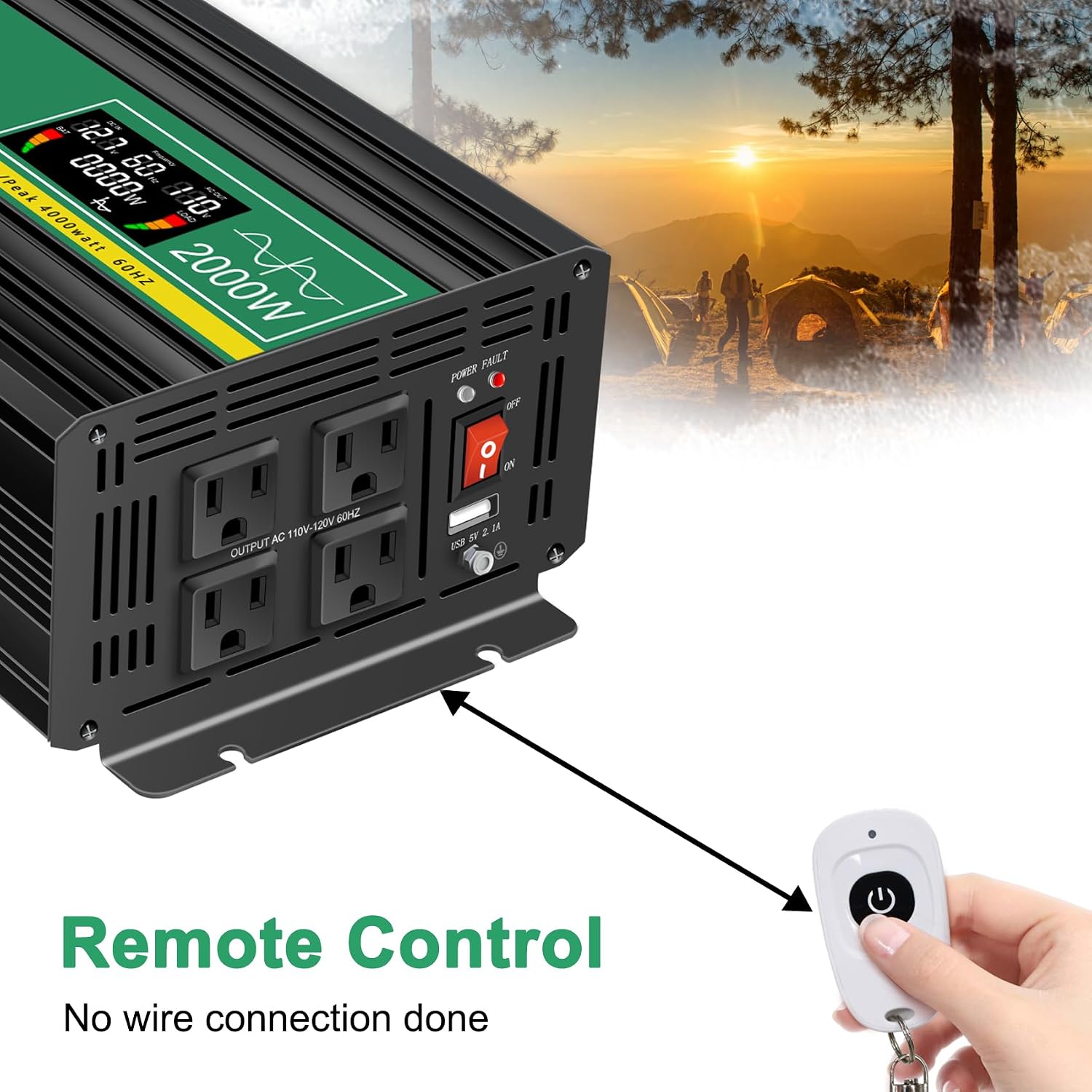
Image 5.3: Remote control for the JIGUUN Power Inverter.
6. Иштөө нускамалары
6.1 Күйгүзүү/өчүрүү
- After ensuring all connections are secure, flip the ON/OFF switch on the inverter to the 'ON' position. The LCD display will illuminate, and the power indicator will light up.
- Өчүрүү үчүн, КҮЙГҮЗҮҮ/ӨЧҮРҮҮ которгучун "ӨЧҮРҮҮ" абалына буруңуз.
- Alternatively, use the remote control to power the inverter on or off.
6.2 ЖК дисплейди колдонуу
Акылдуу LCD дисплей инвертордун абалы жөнүндө реалдуу убакытта маалымат берет:
- Батарея деңгээл тилкеси: Туташкан батареянын заряд деңгээлин көрсөтөт.
- Loads Level Bar: Shows the current power draw from connected AC devices.
- DC Input Voltage: Томду көрсөтөтtage 12V батареядан.
- AC Output Voltage: Shows the 120V AC output voltage.
- Чыгуу жыштыгы: Displays the AC output frequency (60Hz).
- Жүктөө күчү: Indicates the total wattage туташкан түзмөктөр тарабынан тартылууда.
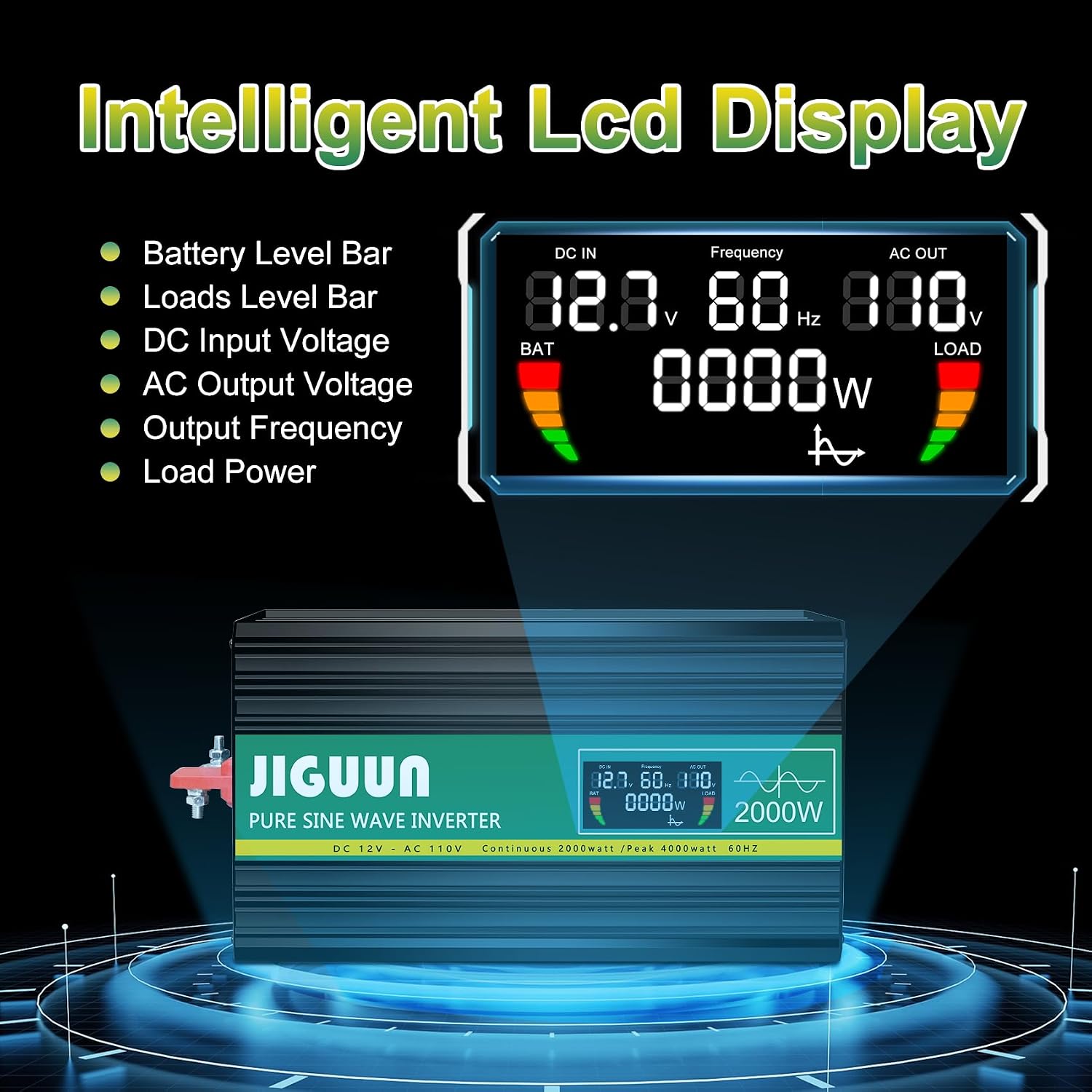
Сүрөт 6.1: Детальдуу view of the LCD display information.
6.3 Connecting AC and USB Devices
- With the inverter powered on, plug your 120V AC appliances into the four AC receptacles.
- USB аркылуу иштеген түзмөктөрүңүздү кубаттоо үчүн USB портторуна сайыңыз.
- жалпы ват камсыз кылууtage of all connected AC devices does not exceed 2000W continuously.

Сүрөт 6.2: Мисampинвертор менен иштеген тиричилик техникаларынын саны аз.
7. Техникалык тейлөө
7.1 Тазалоо
Regularly clean the exterior of the inverter with a dry, soft cloth. Do not use liquid cleaners or solvents. Ensure cooling vents are free from dust and debris to maintain optimal airflow.
7.2 Муздатуу системасы
The inverter features temperature-sensitive control fans that activate automatically when the internal temperature exceeds 45°C. These fans ensure rapid cooling and quiet operation. Ensure the fan vents are not obstructed.

Image 7.1: Inverter cooling fans and intelligent temperature control.
7.3 Сактагычты алмаштыруу
The inverter has built-in fuses for protection. If a fuse needs replacement, it is recommended to contact customer service or a qualified technician. Spare 30A fuses are included in the package for emergency situations, but professional assistance is advised for replacement.

Image 7.2: Spare 30A fuses.
8. Кыйынчылыктарды
Эгерде инвертор туура иштебей жатса, төмөнкү кеңири таралган көйгөйлөрдү жана чечимдерди караңыз:
| Көйгөй | Мүмкүн себеп | Чечим |
|---|---|---|
| Энергиянын чыгышы жок / Инвертор күйбөйт | Батарея байланыштары бош Батареянын көлөмү азtage Инвертор өчүргүч OFF Күйгүзүүчү | Батарея кабелдерин текшерип, бекемдеңиз. Батареяны заряддаңыз же алмаштырыңыз. Өчүргүчтүн КҮЙҮК экенин текшериңиз. Contact customer service for fuse inspection/replacement. |
| Inverter shuts down / Error warning | Ашыкча жүктөө Ашыкча ысып кетүү Төмөн/Жогорку киргизүү көлөмүtage Кыска туташуу | Байланыштагы жүктөмдү азайтыңыз. Ensure proper ventilation, clear fan vents. Батареянын көлөмүн текшериңизtage. Disconnect all loads, check for faulty wiring/appliances. |
| Connected appliance not working | Appliance power exceeds inverter capacity Шаймандын катасы Inverter in protection mode | Verify appliance wattage. Test appliance with another power source. Check inverter display for error codes. |
8.1 Protection System
The JIGUUN inverter is equipped with a comprehensive safety and security system (BMS) to protect itself and your devices:
- Батарея азtage Коргоо
- Батарея Voltage Коргоо
- Полярдуулукту кайтаруу
- Кыска туташуулардан коргоо
- Inverter Over Voltage Коргоо
- Inverter Low Voltage Коргоо
- Temperature Control (Overheating Protection)
- Ground Fault Circuit Interrupter (GFCI) Protection
- Ашыкча жүктөн коргоо

Image 8.1: Comprehensive safety and security system icons.
9. Техникалык шарттар
| Өзгөчөлүк | Спецификация |
|---|---|
| Модель аты | PRO2000W-12 |
| Үзгүлтүксүз күч | 2000 Ватт |
| Чокудагы толкундун күчү | 4000 Ватт |
| DC Input Voltage | 12V |
| AC Output Voltage | 120V |
| Чыгуу жыштыгы | 60Hz |
| Output Waveform | Таза синус толкуну |
| Конверсиянын эффективдүүлүгү | >90% |
| AC розеткалары | 4 |
| USB чыгышы | 2.1A |
| Элемент Салмагы | 11.11 фунт |
| Өлчөмдөрү (L x W x Y) | 19.29 x 9.65 x 6.85 дюйм |
| Сунушталган Колдонуулар | Home, Office, Vehicle (RV, Camping, Emergency) |
| Power Source | Күн жана батарея менен иштейт |
10. Кепилдик жана колдоо
10.1 Кепилдик маалыматы
The JIGUUN PRO2000W-12 Power Inverter comes with a 1 жылдык кепилдик, which includes free replacement for manufacturing defects. Please retain your proof of purchase for warranty claims.
10.2 Кардарларды колдоо
For technical assistance, troubleshooting, warranty claims, or any other inquiries, please contact JIGUUN customer service. Refer to the contact information provided with your product packaging or visit the official JIGUUN webколдоо чоо-жайы үчүн сайт.