
1. Киришүү
This manual provides instructions for the VOLT PLUS TECH Dual USB-C + MicroUSB Switch Cable, Model VPT-2074. This versatile cable is designed to provide efficient charging and data transfer for a wide range of devices, featuring both Micro USB and USB-C connectors. Please read this manual carefully to ensure proper use and maintenance of your cable.
2. Пакеттин мазмуну
- 2 x VOLT PLUS TECH Dual USB-C + MicroUSB Switch Cables
3. Продукциянын өзгөчөлүктөрү
The VOLT PLUS TECH Dual USB-C + MicroUSB Switch Cable offers advanced functionality and durability:
- Кош шайкештик: Features both Micro USB and USB-C connectors, allowing compatibility with a vast majority of modern devices. The switch tip design ensures seamless transition between connector types.
- Тез кубаттоо колдоо: Engineered to support fast charging technologies, including Quick Charge 3.0 (QC3.0/QC2.0/QC1.0), when used with compatible chargers and devices.
- Жогорку ылдамдыктагы маалыматтарды өткөрүп берүү: Supports USB 3.1 for ultra-fast data syncing between your device and computer, enabling quick transfer of large files such as pictures and videos.
- Туруктуу курулуш: Built with premium materials and advanced engineering for enhanced durability, designed to withstand daily use, twists, tugs, and tangles.
- Safety Support: The cable's design supports safe charging by working in conjunction with intelligent circuit systems in compatible chargers and devices to help prevent issues like overcharging, over-currents, and overheating.

Сүрөт 3.1: Бүттүview of the Dual USB-C + MicroUSB Switch Cable. This image displays the USB-A connector on one end and the innovative dual Micro USB and USB-C switch tip on the other end, highlighting its versatile design.

Сүрөт 3.2: Детальдуу view of the cable's connectors. This image illustrates the craftsmanship of the USB-A, USB-C, and Micro USB interfaces, emphasizing their clean outlines and robust construction.

Image 3.3: Close-up of the cable's switch tip mechanism. This image shows how the USB-C connector slides over the Micro USB connector, demonstrating the dual compatibility feature.

Image 3.4: Illustration of the cable's durability. This image highlights the cable's robust design, indicating a bend lifespan of more than 3000 cycles, ensuring long-term performance.

Сүрөт 3.5: кесилиши view of the cable's internal structure. This image details the high-purity copper core, TPE jacket, metal mesh layer, aluminum foil layer, anti-interference rubber layer, and tinned ground wire, all contributing to better conductivity and durability.
4. Орнотуу
To set up your VOLT PLUS TECH Dual USB-C + MicroUSB Switch Cable:
- Identify the charging port on your device. It will either be a Micro USB port or a USB-C port.
- Connect the appropriate end of the cable to your device. If your device has a Micro USB port, use the smaller connector. If it has a USB-C port, slide the USB-C adapter over the Micro USB connector and then insert it into your device.
- Connect the standard USB-A end of the cable to a compatible power source (e.g., wall charger, power bank, computer USB port) for charging, or to a computer's USB port for data transfer.
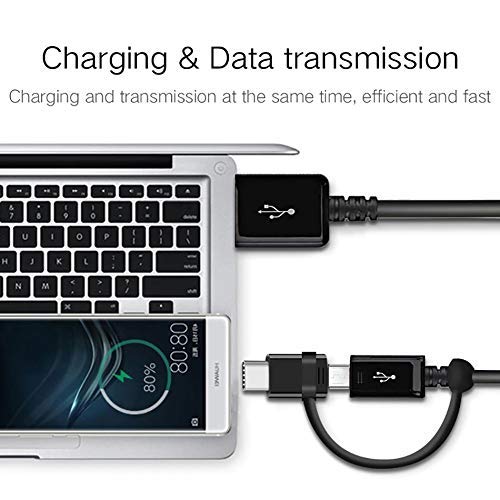
Image 4.1: Cable connected for charging and data transmission. This image demonstrates the cable simultaneously charging a smartphone and connecting it to a laptop for data transfer, illustrating its dual functionality.
5. Иштөө нускамалары
5.1 Аппаратыңызды заряддоо
Connect the cable as described in the Setup section. Ensure your power source is active. Your device should indicate that it is charging. For fast charging, ensure both your device and power adapter support Quick Charge technology.
5.2 Маалыматтарды өткөрүү
Connect the cable between your device and a computer. Once connected, your computer should recognize the device. You may need to select a data transfer mode (e.g., "File Transfer" or "MTP") on your device's screen. You can then access your device's storage to transfer files.
5.3 Switching Connectors
The cable features a Micro USB connector with an attached USB-C adapter. To use Micro USB, simply plug the Micro USB end into your device. To use USB-C, slide the USB-C adapter over the Micro USB connector until it clicks into place, then insert the combined connector into your USB-C device.
6. Техникалык тейлөө
To ensure the longevity and optimal performance of your cable:
- Сактагыч: Store the cable in a clean, dry place away from extreme temperatures. Avoid tightly coiling or bending the cable at sharp angles, especially near the connectors.
- Тазалоо: Зарыл болсо, кабелди жана туташтыргычтарды жумшак, кургак чүпүрөк менен акырын сүртүңүз. Катуу химиялык заттарды же абразивдүү материалдарды колдонбоңуз.
- Колдонуу: Ички зымдарга зыян келтирбөө үчүн, кабелди сайганда же сууруп алганда, кабелдин өзүн тартпастан, ар дайым туташтыргычтын башын кармаңыз.
7. Кыйынчылыктарды
- Түзмөк кубатталбай жатат:
- Кабелдин эки учу тең бекем туташтырылганын текшериңиз.
- Кубат булагынын (дубал адаптери, компьютер порту) иштеп турганын текшериңиз.
- Test the cable with a different device or charger to isolate the issue.
- Check if the correct connector (Micro USB or USB-C) is being used for your device.
- Жай кубаттоо:
- Ensure your charger supports fast charging and is adequately powered.
- Some devices may limit charging speed if used while charging or if the battery is very low/full.
- Data transfer not working:
- Кабелдин компьютердин маалымат иштетилген USB портуна туташтырылганын ырастаңыз.
- On your device, check for a notification to select "File Transfer" or "MTP" mode.
- Компьютериңиздин драйверлери жаңыртылганын текшериңиз.
8. Техникалык шарттар
| Бренд | VOLT PLUS TECH |
| Модель номери | VPT-2074 |
| Туташтыргыч түрү | Микро USB, USB Type A, USB Type C |
| Кабель түрү | USB Type-C / MicroUSB to USB-A |
| Шайкеш түзмөктөр | Android, iOS, Mac, Windows, ZTE Grand X 4, and other USB-powered devices |
| Өзгөчөлүктөр | Digital IC Chip (supports intelligent charging), Heavy Duty, Lightweight, Multi-Functional, Tangle Free Cord |
| Пакеттин өлчөмдөрү | 2 x 0.3 x 0.3 дюйм |
| Элемент Салмагы | 1.4 унция |
9. Кепилдик жана колдоо
For warranty information and customer support, please refer to the official VOLT PLUS TECH webсайтка же сатуучуга кайрылыңыз. Сатып алганыңыздын далили катары сатып алуу дүмүрчөгүңүздү сактаңыз.