
1. Киришүү
Thank you for choosing the VOLT PLUS TECH Dual USB-C + MicroUSB Switch Cable. This versatile cable is designed to provide efficient charging and high-speed data transfer for a wide range of devices, featuring both Micro USB and USB-C connectors. This manual provides essential information for setup, operation, maintenance, and troubleshooting to ensure optimal performance of your cable.
2. Негизги өзгөчөлүктөрү
- Жалпы шайкештик: Equipped with both Micro USB and USB-C connectors, ensuring compatibility with a vast majority of modern devices.
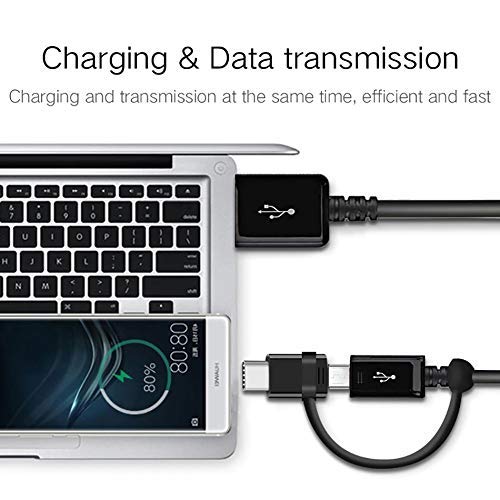
- Кош функционалдык: Supports both power delivery for charging and high-speed data transmission simultaneously.
- Тез кубаттоо колдоо: Engineered to support various fast charging technologies, including Quick Charge (QC 3.0/2.0/1.0) and Power Delivery (PD) up to 25W, for compatible devices.
- Жогорку ылдамдыктагы маалыматтарды өткөрүп берүү: Utilizes USB 3.1 technology for rapid data synchronization between your device and computer.
- Туруктуу курулуш: Built with premium materials and advanced engineering for enhanced durability and a long lifespan, designed to withstand daily use.
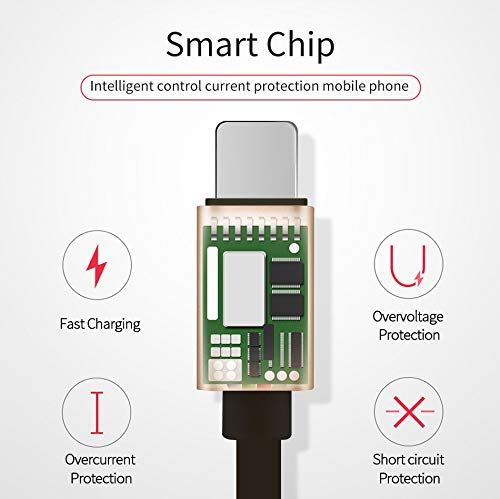
- Integrated Smart Chip: Features an intelligent circuit system for automatic device recognition and protection against overcharging, overcurrent, overvoltage, жана кыска туташуулар.

3. Орнотуу нускамалары
Follow these steps to connect your VOLT PLUS TECH Dual USB-C + MicroUSB Switch Cable:
- Түзмөк туташтыргычын аныктоо: Determine whether your device requires a Micro USB or a USB-C connection. The cable features a switch tip design where the USB-C connector attaches over the Micro USB connector.
- Түзмөккө туташуу: Gently insert the appropriate connector (Micro USB or USB-C) into your device's charging/data port. Ensure a secure fit.
- Кубат булагына же компьютерге туташыңыз: Insert the standard USB-A end of the cable into a compatible USB power adapter for charging, or into a USB port on your computer for both charging and data transfer.

4. Кабелди иштетүү
4.1 Аппаратыңызды заряддоо
Once connected as described in the Setup section, your device will begin charging. The cable supports fast charging when paired with a compatible fast charger and a device that supports fast charging protocols.
4.2 Маалыматтарды өткөрүү
To transfer data between your device and a computer:
- Кабелдин USB-A учун компьютериңиздин USB портуна туташтырыңыз.
- Connect the appropriate Micro USB or USB-C end to your mobile device.
- Your computer should recognize the connected device. You may need to select a 'File Transfer' or 'MTP' mode on your mobile device if prompted.
- You can now access your device's storage to copy files, photos, or videos. The cable's USB 3.1 support ensures efficient transfer speeds.
5. Кароо жана тейлөө
To ensure the longevity and optimal performance of your cable, please observe the following guidelines:
- Сактагыч: Кабелди таза, кургак жерде, күндүн түз нурунан жана өтө жогорку температурадан алыс сактаңыз.
- Колдонуу: Avoid excessive bending, twisting, or pulling on the cable, especially near the connectors, to prevent internal damage.
- Тазалоо: If necessary, gently wipe the cable and connectors with a soft, dry cloth. Do not use liquid cleaners or abrasive materials.
- Коргоо: Do not expose the cable to water or other liquids.

6. Кыйынчылыктарды
If you encounter issues with your cable, please refer to the following common problems and solutions:
- Түзмөк кубатталбай жатат:
- Ensure both ends of the cable are securely plugged into the device and the power source.
- Verify that the power adapter or USB port is functional by testing with another cable or device.
- Түзмөгүңүздүн кубаттоо портун кандайдыр бир таштанды же бузулууларды текшериңиз.
- Жай кубаттоо:
- Confirm that your power adapter supports fast charging (e.g., QC 3.0, PD) and provides sufficient wattage.
- Ensure your device itself is compatible with fast charging technology.
- Маалыматтарды өткөрүү маселелери:
- Make sure the cable is firmly connected to both your device and computer.
- On your mobile device, check if you have selected the correct USB connection mode (e.g., 'File Transfer' or 'MTP') when prompted.
- Кабелди компьютериңиздеги башка USB портуна туташтырып көрүңүз.
7. Техникалык шарттар
| Бренд | VOLT PLUS TECH |
| Модель номери | VPT-2074 |
| Туташтыргыч түрү | Микро USB, USB Type A, USB Type C |
| Кабель түрү | USB Type-C / MicroUSB to USB-A |
| Шайкеш түзмөктөр | Android, iOS, Mac, Vivo Xplay5 Elite, Windows devices |
| Өзгөчөлүктөр | Digital IC Chip, Heavy Duty, Lightweight, Multi-Functional, Tangle Free Cord |
| Пакеттин өлчөмдөрү | 2 x 0.3 x 0.3 дюйм |
| Элемент Салмагы | 1.4 унция |

8. Кепилдик маалыматы
For detailed warranty information regarding your VOLT PLUS TECH Dual USB-C + MicroUSB Switch Cable, please refer to the documentation included with your purchase or visit the official VOLT PLUS TECH webсайт. Кепилдиктин шарттары жана шарттары ар кандай болушу мүмкүн.
9. Кардарларды колдоо кызматы
If you require further assistance or have questions not covered in this manual, please contact VOLT PLUS TECH customer support through their official website or the retailer from whom you purchased the product. Please have your model number (VPT-2074) and purchase details ready when contacting support.