
1. Киришүү
The NIIMBOT D11H is a compact, portable, and inkless thermal label printer designed for various labeling needs. It connects wirelessly via Bluetooth to your smartphone, allowing for easy creation and printing of high-resolution labels. This manual provides essential information for setting up, operating, and maintaining your device.
2. Пакеттин мазмуну
Төмөндө тизмеленген нерселердин баары пакетиңизге камтылганын текшериңиз:
- 1x NIIMBOT D11H Label Printer
- 1x Label Roll (pre-installed or included)
- 1x USB Type-C заряддоо кабели
- 1x User Manual (Japanese)

3. Орнотуу
3.1. Этикетка кагазын жүктөө
- Slide the cover button on the side of the printer to open the paper compartment.
- Insert the label roll into the compartment with the labels facing upwards, ensuring it is correctly aligned.
- Pull a small portion of the label paper out through the printer's exit slot.
- Капкагын бекем жабыңыз.

3.2. Күйгүзүү
Press and hold the power button located on the front of the printer for 3 seconds until the indicator light turns green, indicating the device is powered on.
3.3. Колдонмону жүктөп алуу жана Bluetooth туташуу
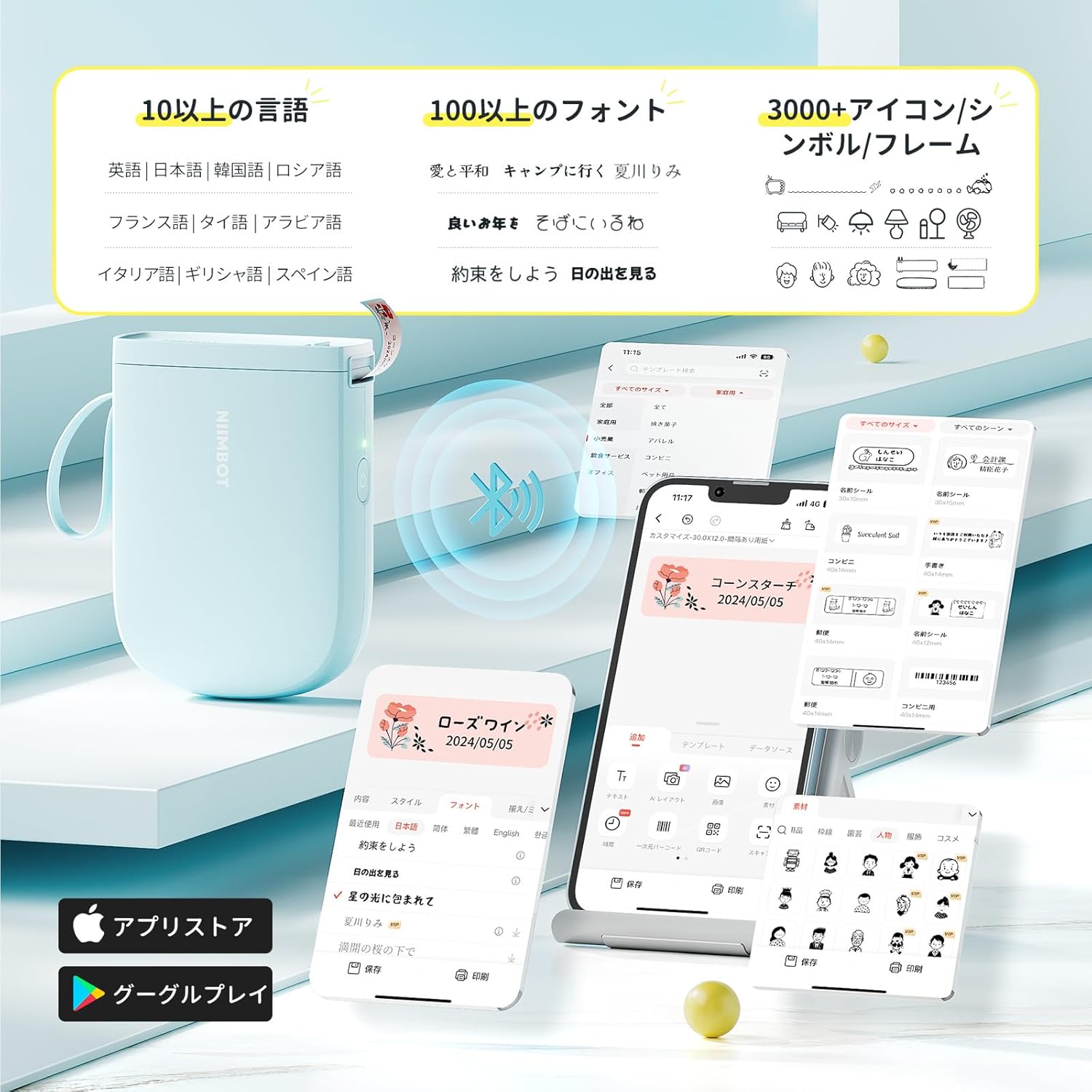
- Download the "NIIMBOT" app from the App Store (iOS) or Google Play Store (Android).
- Смартфонуңузда Bluetooth'ду иштетиңиз.
- Open the NIIMBOT app and tap on the "Connect" or "Printer Connection" option. The app will automatically scan for nearby devices.
- Select your NIIMBOT D11H printer from the list of available devices to establish a Bluetooth connection.

4. Иштөө нускамалары
4.1. Энбелгилерди түзүү
The NIIMBOT app offers a wide range of features for label creation:
- Текст киргизүү: Easily type and customize text with over 20 fonts and various styles.
- Калыптар: Utilize automatic template matching and thousands of image elements for quick design.
- Сүрөттү таануу: Import images for printing.
- Штрих-код/QR коду: Штрих-коддорду жана QR коддорун түзүү жана басып чыгаруу.
- Пакеттик басып чыгаруу: Print multiple labels efficiently.

4.2. Этикеткаларды басып чыгаруу
Once your label design is complete in the app, tap the "Print" button. You can adjust the number of copies and print density before confirming. The printer will automatically feed and cut the labels.
4.3. Ар тараптуу колдонмолор
The NIIMBOT D11H is suitable for a wide range of uses, including organizing documents, creating name tags, price tags, date reminders for food, and labeling items in the kitchen, office, or warehouse.


5. Техникалык тейлөө
To ensure optimal performance and longevity of your NIIMBOT D11H label printer, follow these maintenance guidelines:
- Тазалоо: Regularly clean the print head with a soft, lint-free cloth moistened with alcohol. Ensure the printer is off before cleaning.
- Сактагыч: Принтерди салкын, кургак жерде, тике күндүн нурунан жана экстремалдык температурадан алыс сактаңыз.
- Батарея: Батареянын иштөө мөөнөтүн сактоо үчүн, көп колдонулбаса да, принтерди үзгүлтүксүз кубаттап туруңуз.
6. Кыйынчылыктарды
If you encounter issues with your NIIMBOT D11H, refer to the following common troubleshooting steps:
- Принтер туташпай жатат: Ensure Bluetooth is enabled on your smartphone and the printer is powered on. Try restarting both devices and reconnecting through the app.
- Начар басып чыгаруу сапаты: Check if the label paper is loaded correctly and is a genuine NIIMBOT thermal label. Clean the print head if necessary. Adjust print density in the app settings.
- Кагаз тыгылышы: Open the paper compartment, carefully remove any jammed paper, and reload the label roll correctly.
- Принтер жооп бербей жатат: Ensure the battery is charged. If the device is unresponsive, try resetting it by holding the power button for an extended period (e.g., 10-15 seconds).
7. Техникалык шарттар
| Өзгөчөлүк | Спецификация |
|---|---|
| Бренд | NIIMBOT |
| Модель аты | D11H |
| Байланыш технологиясы | Bluetooth |
| Басма технологиясы | Термикалык |
| Максималдуу басып чыгаруу чечилиши (монохромдуу) | 300 DPI |
| Макс басып чыгаруу ылдамдыгы (монохромдуу) | 40.0 мм/с |
| Макс. Медиа (кагаз) өлчөмү | 15 мм (туурасы) |
| Продукциянын өлчөмдөрү | 11 x 3 x 7 см |
| Элемент Салмагы | 360 г |
| Шайкеш түзмөктөр | Смартфондор (Android жана iOS) |
| Түс | Көк |
8. Кепилдик жана колдоо
For warranty information or technical support, please refer to the official NIIMBOT webсайтка же сатуучуга кайрылыңыз. Сатып алганыңыздын далили катары сатып алуу дүмүрчөгүңүздү сактаңыз.